A $100/mo wall between you and a runaway drip sequence.
Drip sequences and bulk blasts are powerful — and one mis-configured trigger can fire thousands of sends in an afternoon. The Messaging Spend Cap is the per-shop ceiling that stops that from becoming a surprise bill.
The quick version
Texting spend cap: A monthly limit so extra texting never surprises you.
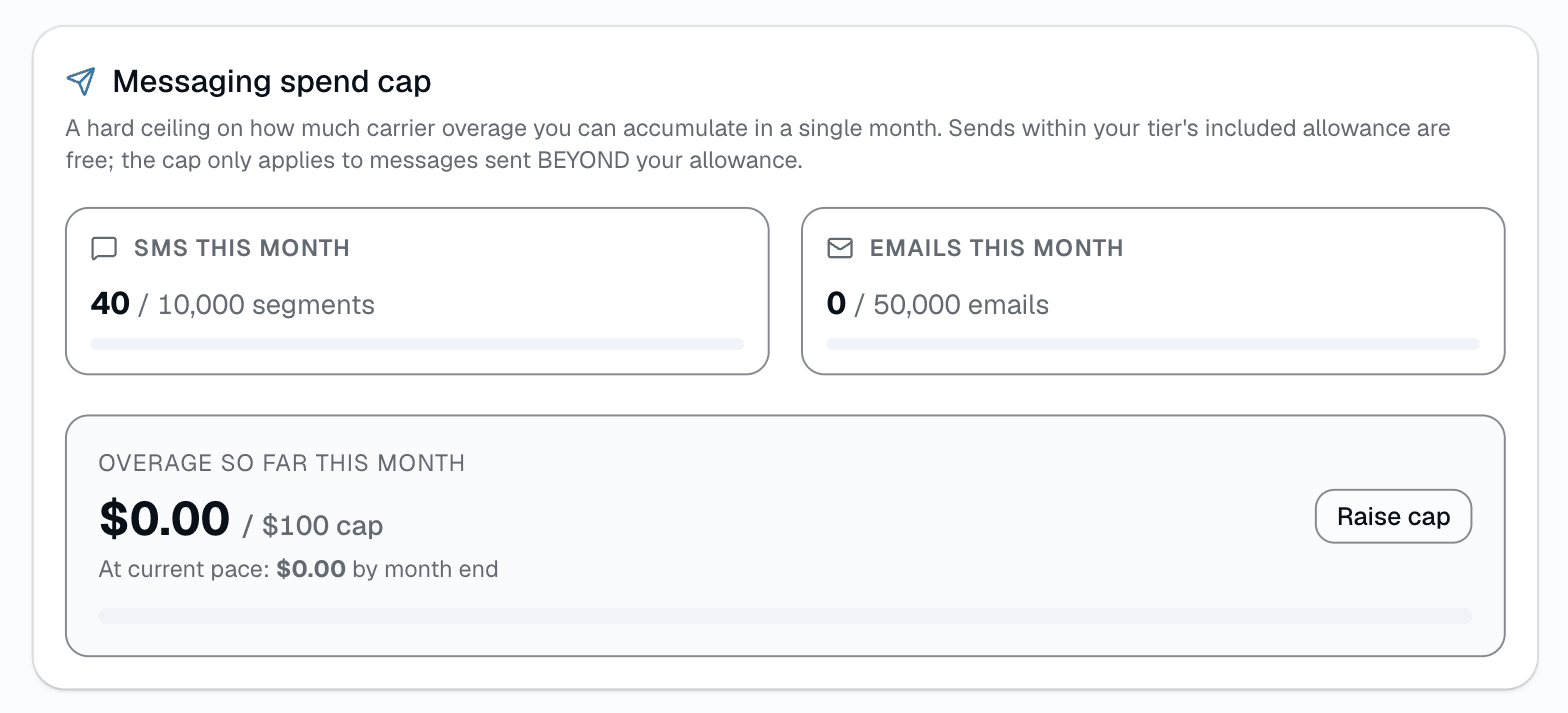
- $100/mo per-shop default cap on OVERAGE dollars, once you're past your tier's included SMS/email allowance
- Live usage bars + overage status in Settings → Payments
- In-page color warning at 75% of the cap, red at 100% — no push/email/Slack alert today, you see it when you open the page
Sends within your plan tier's included SMS/email allowance are free and don't touch the cap at all; once a shop goes over that allowance, every additional send — including automated reminders, not just drips and blasts — draws against a single monthly overage bucket, confirmed in code ("Every send path — drips, reminders, review requests, blasts, automation ticks, etc. — passes through this central gate"). Default cap is $100/mo of overage per shop. Hit it, new sends pause until you raise the cap in Settings → Payments or the month resets. For shops sending genuinely high volume, BYOC mode lets you bring your own Twilio + Resend credentials and skip the cap entirely — pay your carrier directly.
Everything it does
The complete list. The plan tag above shows which plans include it.
- $100/mo per-shop default cap on OVERAGE dollars, once you're past your tier's included SMS/email allowance
- Live usage bars + overage status in Settings → Payments
- In-page color warning at 75% of the cap, red at 100% — no push/email/Slack alert today, you see it when you open the page
- Applies to every send once you're over allowance, including automated reminders — not just drips and blasts
- Self-service raise up to $1,000/mo overage; above that needs a manual admin override
- BYOC escape hatch — bring your own Twilio + Resend, skip the cap, pay carriers direct
- Audit log entry every time the cap is raised or lowered
Who it's for
Built specifically for…
- Every shop running drips or bulk blasts (default-on insurance)
- Multi-location owners who can't personally audit each shop's messaging config weekly
- High-volume shops who want to opt into BYOC and skip the cap entirely
What it replaces
The old way…
- The 4am Twilio bill that shows $480 because someone enrolled the entire customer base in a 7-step drip
- Manual nightly spend audits the owner kept forgetting to do
- 'I'll just turn off the campaign if it gets too expensive' — too late, you already paid
Setting it up
- 1
1. Default cap is on
Every new shop ships with a $100/mo overage cap pre-set. Sends inside your tier's included SMS/email allowance are free; once you're over that allowance, every additional send — automated reminders included — draws against the overage bucket.
- 2
2. Status shows in Settings → Payments
Usage bars turn amber near 75% of the cap and red at 100%. There's no push, email, or Slack alert today — you see the status when you open the page.
- 3
3. Cap hits, new sends pause
Once overage hits the cap, further sends — including automated reminders — pause until you raise the cap or the calendar month rolls over. Volume Packs (extra SMS/email allowance on top of your plan) are coming soon; until then, raising the cap is how you keep sending.
What this looks like in a shop
Illustrative scenario: a new tech at Sample Shop LLC accidentally wired a welcome drip to fire on every customer record instead of just new ones, well past the shop's included SMS allowance for the month. At roughly 1.5¢/segment overage, the queued batch would have added real cost on top of an already-elevated running spend. The cap stopped new sends once the overage total hit $100 for the month. Mike opened Settings → Payments, saw the cap maxed out with a red status, raised it to $200 for the rest of the month, and fixed the drip's trigger.
Good to know
- Does the cap block transactional comms too?
- Yes, once you're over your included allowance — appointment reminders, review requests, and other automated sends go through the same gate as drips and blasts. There's no separate transactional bypass; the code's own comment on the gate says "every send path... passes through this central gate."
- Can I raise or lower the cap?
- Yes — Settings → Payments. Every change is audit-logged. You can self-raise up to $1,000/mo of overage; above that needs a manual admin override.
- What's BYOC and how does it skip the cap?
- Bring-Your-Own-Carrier. Plug in your own Twilio + Resend credentials in Settings → Integrations and SalesThumb routes your shop's sends through your account. SalesThumb's cap doesn't apply because we're not the one billing you.
- What if I have multiple shops?
- Each shop has its own cap and its own Settings → Payments page. There isn't an HQ-facing rollup page showing every shop's cap utilization in one place today.
Works with your stack
Twilio
Per-segment overage cost computed at read time against the cap
Resend
Only if you connect your own Resend account (BYOC), which skips the cap; platform email is metered at a flat per-email rate against the cap
Pairs well with
Drip Campaigns
Included with Starter, Growth, and Pro (Basic has no outbound SMS or email). 7 starter templates (welcome, win-back, post-service review, quote follow-up, more), auto-enrollment on NO_VISIT_DAYS, STATUS_CHANGE, and SEGMENT_ADD triggers, exit-on-reply, per-campaign analytics. No extra fee — sends draw from your shop's existing SMS + email quota, capped at $100/mo by default so a runaway sequence can't bankrupt you.
Bulk blast
Built-in segments (everyone, new in 30 days, top spenders, inactive 90+ days, or a list handed over from an AI tool), a full recipient preview before you send, and replies that land in your normal inbox — not a separate tool to babysit.
Two-way SMS
However a customer reaches you — a text, an email, a Facebook or Instagram message, or WhatsApp — it lands in the same inbox, on the same customer, and you answer from there.
Automations
On Growth and up, pick a preset drip sequence — win back lapsed customers, follow up cold leads, or ask for a review after a completed job. It goes live the moment you choose a pace, so edit the messages right away or pause it until you have.