Loading
Inline AI writing help
The blank box, already filled in. You edit. You approve.
Writing isn't the job — installing film is. But the job comes with words: a caption under the after-shot, a customer-facing line for a service you never described, a reply to the 5-star review sitting unanswered for a week.
No credit card
Cancel anytime
app.salesthumb.com/app/photos
Photo · After
Sample Shop LLC After
AfterSuggest caption
Caption · editable draft
Ceramic window tint finished on this CX-5 — clean, even shade across every window, no bubbling at the edges. Ready for pickup.
Save captionSuggest again
Vision-grounded — the model sees the photo.
Category-aware tone · your save commits it.
The quick version
Writing help: Drafts photo captions, service descriptions and review replies for you to approve.
- Photo caption suggestions — one tap under any job photo in the lightbox (AI vision captions on Pro; other plans get a plain template caption)
- Captions are grounded in the actual photo (Claude vision) + the category (before / after / damage)
- One-click draft for an empty service description, written in your shop's tone
Which plan includes this? See pricingTry it in the Test Drive
AI write tools draft those for you, right where you already are. A caption button under each job photo, a 'draft description' button on an empty catalog item, a suggested reply on each review. Nothing is invented and nothing auto-sends — the AI proposes, you tweak the wording, and you're the one who hits save or reply.
A closer look
01
Caption the photo, don't describe it from memory
In the photo lightbox, a 'suggest caption' button sends the actual image to Claude vision along with the photo's category — before, after, damage, or reference. It comes back with one short, customer-facing caption grounded in what's literally in frame, not a generic 'looking great!'. It drops into the caption field as a draft. You read it, fix a word if you want, and it saves through the same updateCaption path you'd use typing by hand. If a tech already wrote a caption, the suggestion factors it in instead of clobbering it.
- Vision-grounded — the model sees the photo, so the caption matches the shot
- Category-aware: the model is told whether it's a before, after, damage, or reference shot
- Lands as editable draft text — your save commits it, nothing posts on its own
- Respects an existing caption rather than overwriting it
/app/photos
Photo · After
Sample Shop LLCAfterSuggest caption
Caption · editable draft
Ceramic window tint finished on this CX-5 — clean, even shade across every window, no bubbling at the edges. Ready for pickup.
Save captionSuggest again
Vision-grounded — the model sees the photo.
Category-aware tone · your save commits it.
02
Fill the empty service description in your voice
Catalog items often ship with a name and a price but a blank customer-facing description — the thing your booking page and quotes actually show. On an empty description, one click drafts 2-3 confident, warm sentences from the service's name and your shop context. It shows as a preview with Apply, Discard, and Regenerate — Apply saves it to the service, and you can edit the description afterward. The prompt tells it not to invent prices, exact times, or guarantees, but it is also asked to mention a warranty when relevant, and the no-AI-key fallback is a generic per-category template that names warranty terms — so check any warranty or spec line against what you actually offer before you apply it.
- Drafts a 2-3 sentence customer-facing description for an empty field
- Tone is confident-but-warm, never salesy — check any warranty or spec line before applying
- Shows as a preview; Apply saves it to the service, and you can edit it afterward
- Best for the long tail of services you never got around to describing
/app/catalog
Catalog item
Sample Shop LLCPaint Correction · Stage 2
Detailing · listed price set
Customer-facing description
Draft descriptionA multi-step machine polish that removes swirl marks, light scratches, and oxidation to bring back deep, even gloss. We refine the finish by hand on edges and trim, then leave the paint primed and ready for coating or wax.
Save itemEdit draft
Editable text · you approve it by saving · no invented prices or guarantees.
03
Reply to the review without staring at it
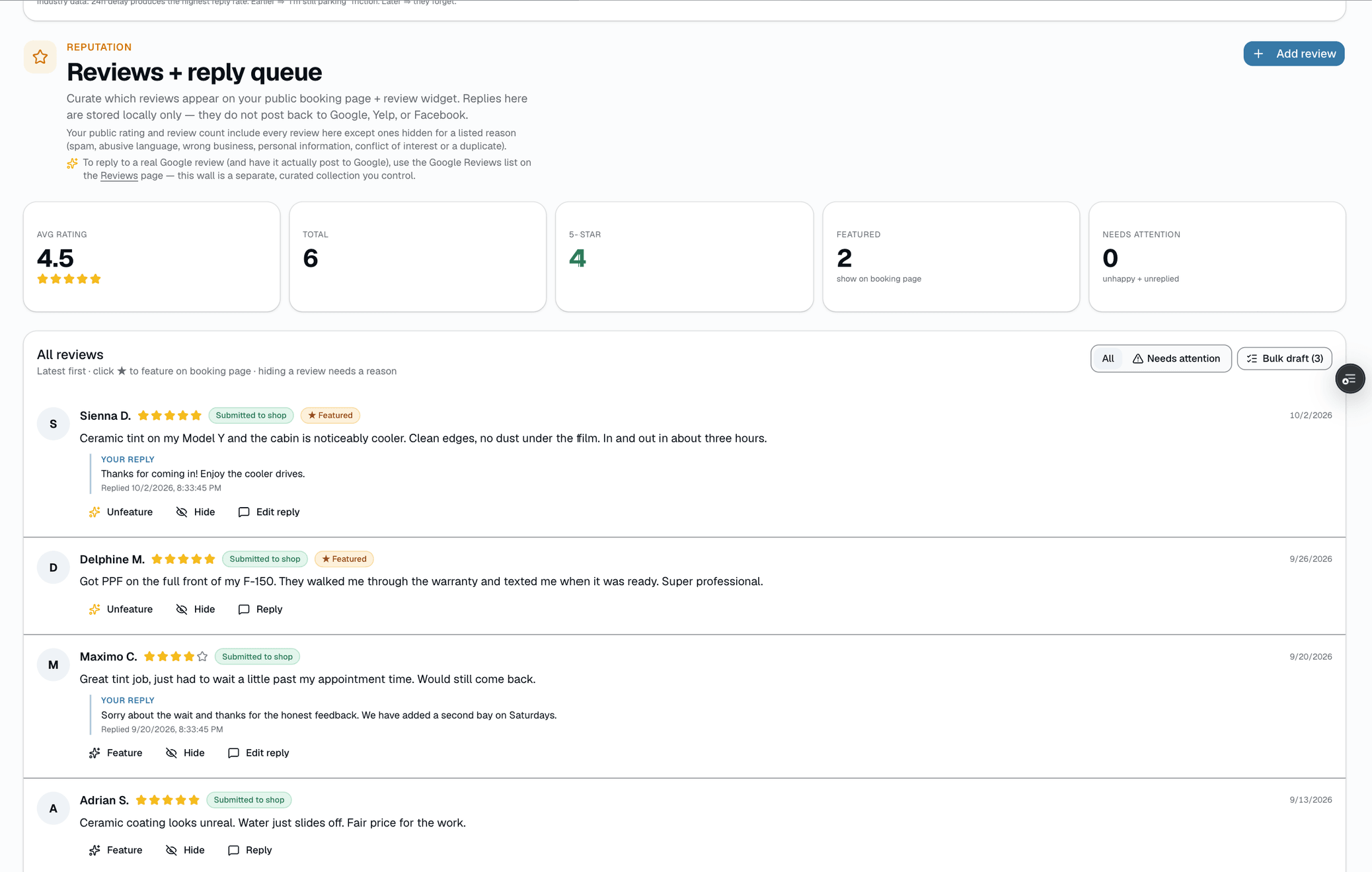
Each review gets a suggested on-brand reply, drafted on demand. The tone adapts to the rating — a warm thank-you for a 5-star, a measured, take-it-offline tone for a 1- or 2-star. The model is explicitly told to keep it generic and gracious when the review gives no specifics rather than fabricating details. Critically, the draft is draft-only: it never writes to the review on its own and never auto-posts anywhere. It sits in an editable box until you read it, adjust it, and click reply yourself.
- One suggested reply per review, tone-matched to the star rating
- No fabricated details — stays warm and generic when the review is vague
- Draft-only: nothing is recorded until you click reply
- Edit freely before sending — the AI proposes, you're the one who replies
/app/reputation
Everything it does
The complete list. The plan tag above shows which plans include it.
- Photo caption suggestions — one tap under any job photo in the lightbox (AI vision captions on Pro; other plans get a plain template caption)
- Captions are grounded in the actual photo (Claude vision) + the category (before / after / damage)
- One-click draft for an empty service description, written in your shop's tone
- On-brand review-reply draft — tone adapts to the star rating, no fabricated details (Growth and Pro)
- Every output is a draft you approve — nothing is saved or posted until you apply or save it
- You edit, then apply — captions save via your normal save, replies are recorded when you click reply
- No invented facts — prompts forbid making up specifics the review or photo didn't give
A tour of the screens
Every meaningful view, the path through it, and the moments that matter — so you know exactly what you're buying.
Draft an empty service description
A service with no description gets an 'AI · Write description' button in Settings → Services.
AI drafts 2-3 sentences; Apply saves it, and you can edit it afterward. Check any warranty line before you apply it.
app.salesthumb.com/app/catalog
Catalog item
Sample Shop LLCPaint Correction · Stage 2
Detailing · listed price set
Customer-facing description
Draft descriptionA multi-step machine polish that removes swirl marks, light scratches, and oxidation to bring back deep, even gloss. We refine the finish by hand on edges and trim, then leave the paint primed and ready for coating or wax.
Save itemEdit draft
Editable text · you approve it by saving · no invented prices or guarantees.
Suggested review reply — draft only
Each review shows a tone-matched reply draft.
Nothing is recorded until you read it, edit it, and click reply yourself. Sample Shop LLC, dark mode.
app.salesthumb.com/app/reputation
Who it's for
Built specifically for…
- Owners and techs who do great work but hate writing the words around it
- Shops with a half-empty service catalog where most items have no customer-facing copy
- Anyone with a backlog of unanswered reviews they keep meaning to reply to
What it replaces
The old way…
- The blank caption box that makes you skip captioning photos entirely
- Generic copy-pasted review replies that read like a form letter
- Service descriptions left empty because writing them never makes the to-do list
Setting it up
- 1
1. You're already on the screen
The tools live where the work is — the photo lightbox, the catalog item editor, the review queue. There's no separate 'AI' tab to go hunt for. When a field would otherwise be blank, a suggest/draft button is right there.
- 2
2. AI drafts into an editable field
One click sends the photo (for captions) or the item/review context to Claude and returns a draft into the field — never a popup you have to copy out of. The draft is yours to keep, change, or discard.
- 3
3. You edit, then you approve
Change a word, rewrite a sentence, or accept it as-is. The suggestion only becomes real when you take the action you always take — saving the caption, saving the catalog item, or clicking reply on the review. The AI never posts for you.
What this looks like in a shop
Illustrative scenario: an installer at a mid-size ceramic-coating shop wraps a job and snaps eight after-shots in the app. Instead of leaving them blank, he taps 'suggest caption' on each, glances at the line, fixes one to name the actual coating, and saves — the customer's gallery now reads like the shop cared. That evening the owner clears three unanswered reviews: she opens each, reads the suggested reply, softens one sentence on the 2-star, and clicks reply herself. The next morning she adds a 'paint correction' item to her catalog, clicks 'AI · Write description' on the service, applies the draft, then trims it to two sentences. None of it auto-posted; she approved every word, but the staring-at-a-blank-box part was gone.
Good to know
- Does the AI post or send anything on its own?
- No. Every output is a draft that lands in an editable field. Captions save when you save the photo, descriptions save when you click Apply, and a review reply is recorded only when you click reply yourself. If you've connected Google Business Profile, that's where a posted reply goes — and only after you approve it. The AI proposes; a human approves and sends.
- Will it make up details about my services or reviews?
- The prompts are written to forbid it. Photo captions are grounded in the actual image, descriptions are built from the service name, category, price, and your shop context, but can mention a warranty you'll need to check, and review replies stay warm and generic when the review gives no specifics rather than inventing facts. You're still the editor, so anything off you'd catch and fix before saving.
- Where does a review reply go after I approve it?
- It's saved as your reply to that review. If you've connected your Google Business Profile, an approved reply can be posted back to Google. The AI itself never publishes — you click reply, and nothing leaves your dashboard until you do.
- Can I just write it myself?
- Always. These are optional helpers on fields you can type into by hand any time. The AI exists to kill the blank-box hesitation, not to take the keyboard away — ignore the button and type your own whenever you'd rather.
Works with your stack
An
Anthropic Claude
Drafts captions (vision), descriptions, and review replies
Cl
Cloudflare R2
Stores the job photos the caption tool reads
Pairs well with
Job Photos
Every appointment gets a photo gallery. Techs capture on mobile (Growth and Pro; the app is view-only on Starter). Customers see a polished post-install gallery. You protect yourself from 'it was like that when you got it' claims.
Learn more
Sales playbook
On Growth and Pro: up to six scheduled nudges per paid invoice over a year — review, warranty (film services only), cross-sell, maintenance, win-back, anniversary — with reply intent AI-classified and acted on automatically. Only the cross-sell step's pitch line is AI-written per customer; the other five are editable template copy.
Learn more
My Day brief
AI reads today's schedule, urgent inbox threads, AR aged 30+ days, and a count of film products with a reorder threshold set — writes a one-paragraph summary you can scan in 10 seconds. Click 'Brief me' whenever you want the latest read. It does not read reviews or playbook activity today.
Learn more