Multi-Location & Franchise HQ
Run 1 shop or 500+ from one dashboard.
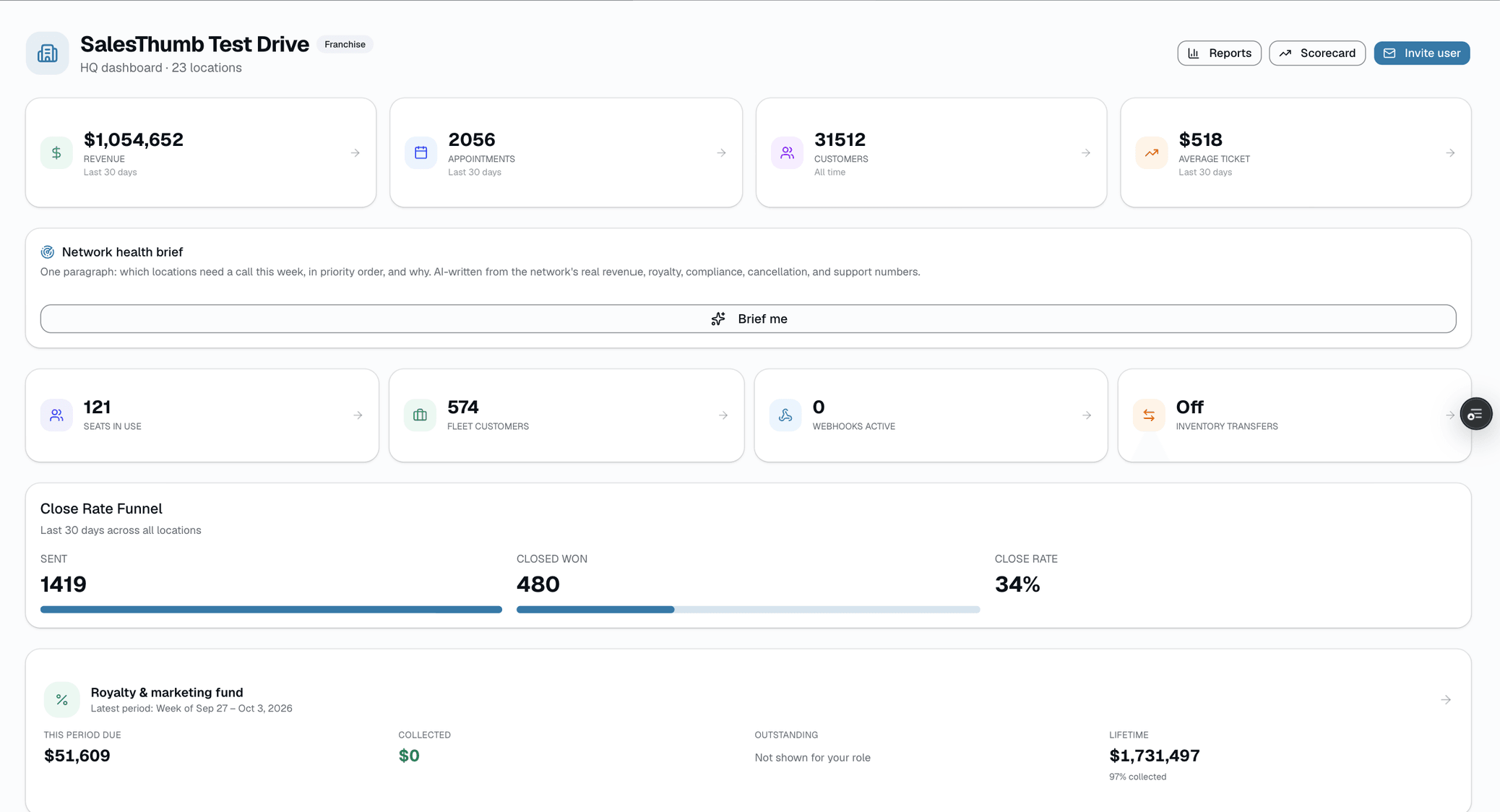
The day you open your second shop, the cracks show. Two spreadsheets. Two price books. Two texts with managers about invoices. SalesThumb HQ is the rollup that makes multi-location feel like one business again: consolidated revenue, appointments, and customers across every shop, a service catalog you add once and push to whichever locations don't have it yet, royalty and marketing-fund statements you generate on demand, with collection handled as a manual step after (a Chase NACHA CSV batch if you bank with Chase, or recorded by hand), and org-wide pricing floors so franchisees can't quietly discount below your margin. Open it Monday morning and you know — in under a minute — which shop needs help this week and which one is already winning.
- Consolidated KPI strip: revenue, appointments, customers, avg ticket across every shop (30 days)
- Location leaderboard ranked by 30-day revenue
- Shop scorecard: every location, every core metric, one table ranked by trailing-twelve-month revenue
- Interactive map view with pins color-coded by vertical + a link into each shop
- Top customers across the whole network, ranked by lifetime spend
What this looks like in a shop
Illustrative scenario: You own 4 shops across Texas. From HQ you see: Houston is crushing it at $28k/month, Austin is at $12k (investigate), San Antonio is on track, Dallas has an installer shortage. You add a new ceramic-coating service once and push it to the shops that don't have it yet. You click Generate on the April royalty period — every shop's statement lands in their inbox with the royalty and marketing-fund amounts owed calculated automatically; collecting the payment is still a manual step (originate an ACH batch or record payments by hand).
Org dashboard
Live activity ticker
The pulse of the shop, on a screen in the lobby.
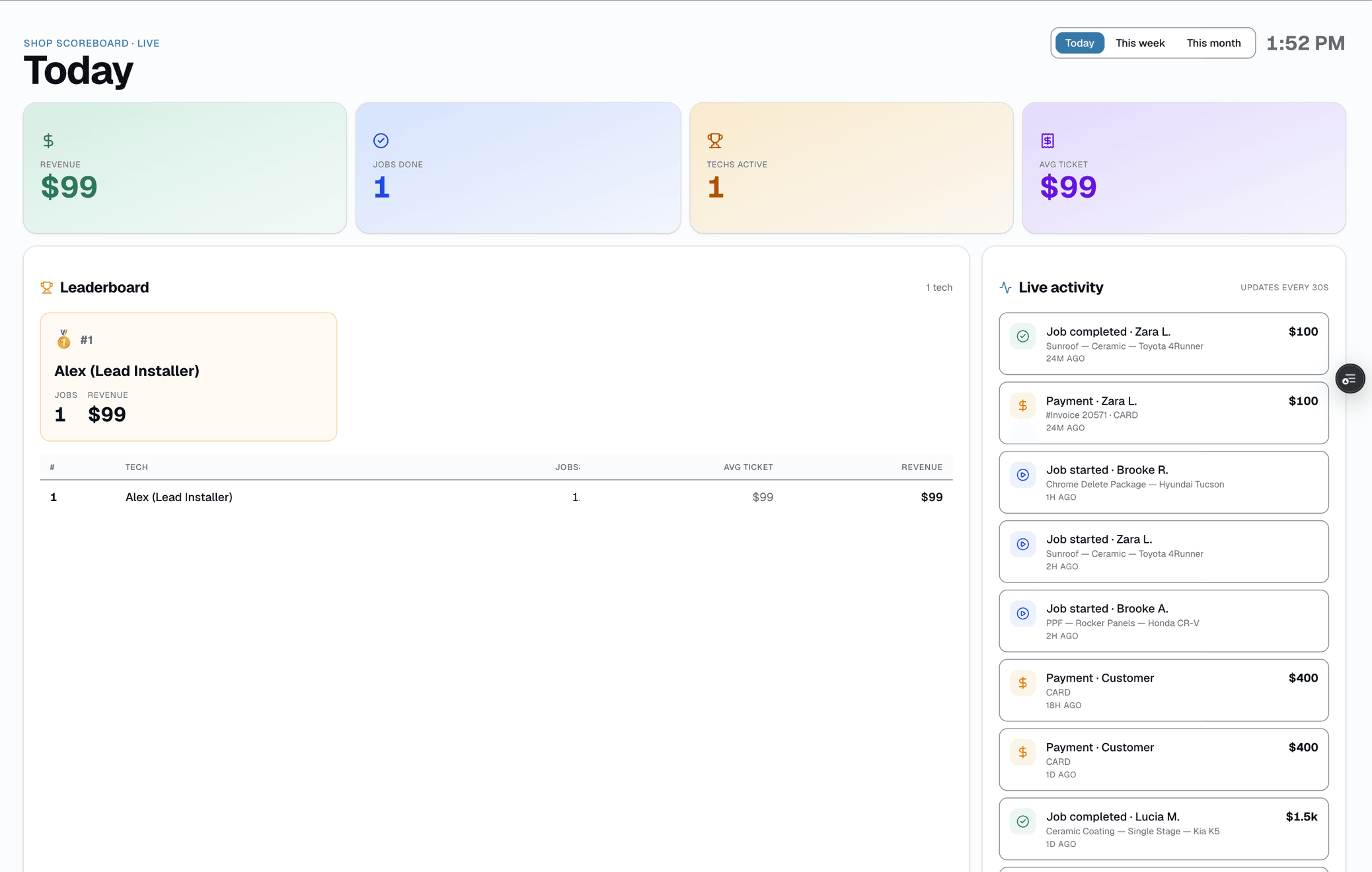
Every meaningful event in your shop — a job starting, a job finishing, a quote going out, a payment landing — surfaces on /app/scoreboard, a leaderboard-style ticker built to run on a TV in the lobby. It polls every 30 seconds and covers four event kinds. There's no click-through and no filters — it's built to be glanced at from across the room, not interacted with. When you need to look further back or investigate something specific, /app/settings/audit's Activity tab (Owner/Admin/Manager only) is a real filterable, searchable log with pagination and CSV export.
- Live-activity ticker on /app/scoreboard, built for a lobby TV
- Covers 4 event kinds: job started, job completed, quote sent, payment
- Auto-refresh every 30s via polling
- No click-through and no filters — built to glance at, not interact with
- Settings → Audit's Activity tab: filterable, searchable, paginated log
- CSV export of every row matching your filters, not just the visible page
What this looks like in a shop
Illustrative scenario: Mike walks past the lobby TV between customers and catches the last few events scroll by — a job starting, a quote going out, a payment landing. Later, when he wants to check exactly who did what earlier in the day, he opens Settings → Audit's Activity tab, filters to Invoices, and searches for the customer's name.
Lobby-TV scoreboard
Royalty Billing
The monthly royalty close computes itself. Collection is still on you.
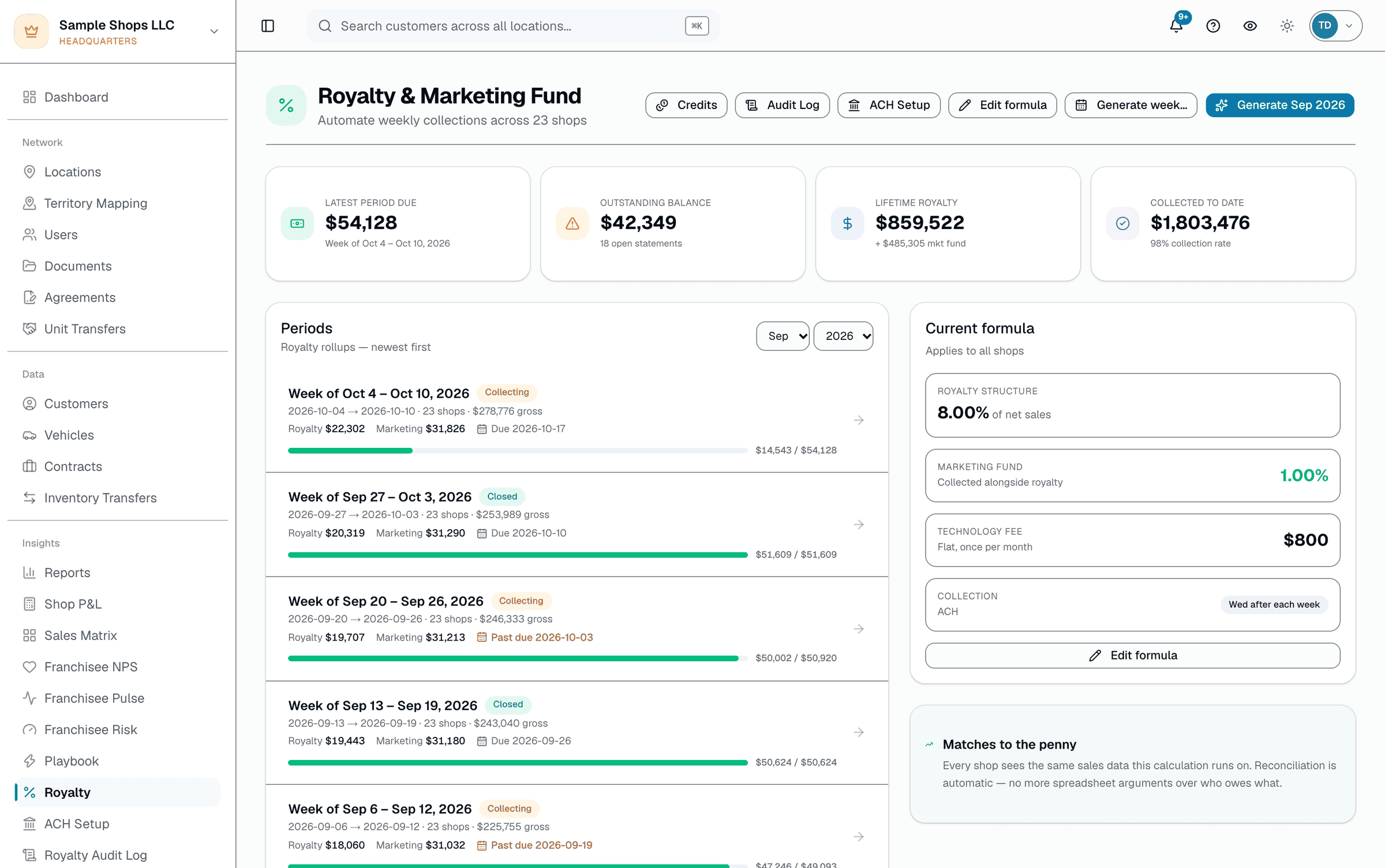
Royalty collection at most franchises is a spreadsheet, a chase-list, and an awkward call on the 15th of every month. SalesThumb automates the math: on the 1st of the month, a cron walks every shop in the chain, sums its invoiced sales for the month (any invoice that's been sent, partially paid, or paid in full — not only fully collected invoices), applies that shop's rate rule (tiered brackets, marketing fund %, tech fee), and generates an itemized statement — no one has to kick it off. What it doesn't do is move money. There's no automatic ACH debit: HQ either generates a Chase NACHA CSV file and originates it through Chase Business Online (Chase accounts only), or records payments by hand as they come in. Disputes are a franchisee typing a reason on one statement, reviewed and resolved by a human — not an automated retry queue.
- Close cron — monthly rules close on the 1st; weekly rules close the day after each billing week ends
- Per-shop rate rules: tiered brackets, marketing fund %, tech fee, other fees
- Idempotent — re-running a closed period skips shops that already have a statement
- Itemized statements (gross → tier splits → royalty → marketing → tech fee → credits)
- Franchisee-side dispute button with a free-text reason
- Chase NACHA CSV file generation for origination through Chase Business Online (Chase accounts only)
What this looks like in a shop
Illustrative scenario: a 14-location PPF franchise used to spend the first week of every month reconstructing what each shop owed from raw POS exports. With the close cron doing that math automatically on the 1st, the owner's remaining work each month is generating a Chase NACHA CSV file for the shops paying by ACH through Chase and following up on the couple that don't — down from a week of spreadsheet work to about an hour.
Royalty close dashboard
Brand Compliance & Audits
Brand-color locks, network pricing floors, and a real audit trail.
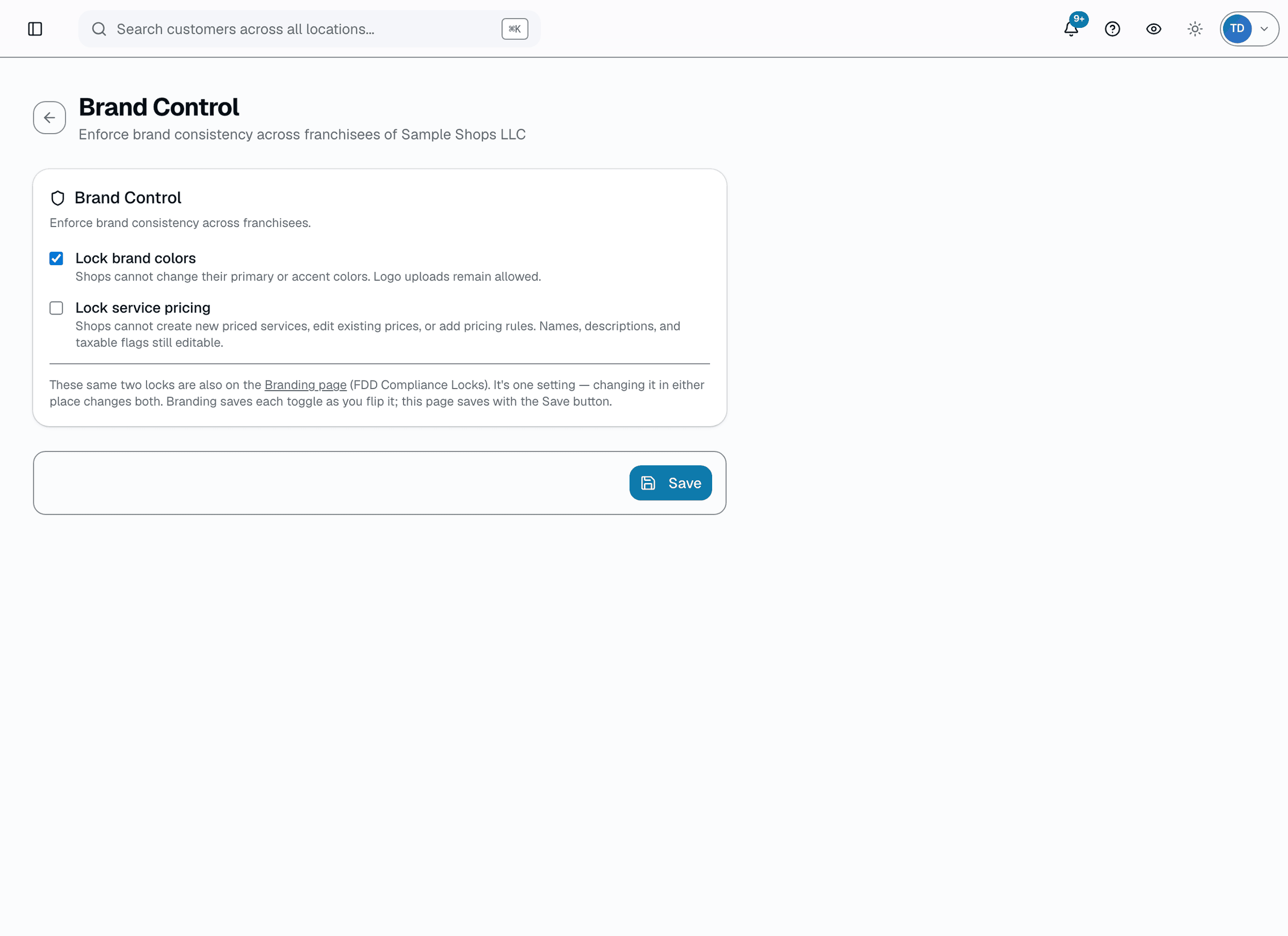
Most franchisors write brand controls into the FDD and then hope. SalesThumb enforces these at the server (plus an optional full service-pricing lock): lock a franchisee's brand color and the picker is disabled — and the same save is rejected server-side no matter which client sends it; set a network minimum price and a franchisee's quote can never net less than that floor after discounts (the system quietly re-caps the discount rather than rejecting the sale). On top of that, an auditor from either side — HQ or the shop's own staff — runs a structured PASS/FAIL/N-A checklist during a visit, attaches evidence photos, and every FAIL becomes a tracked corrective action with an assignee and due date; once every item has a result, the shop and HQ each sign off independently instead of a single auditor's word closing it out.
- Brand-color lock — franchisees can't change primary/accent colors; enforced on every save attempt, not just the UI
- Network-wide minimum price + maximum-discount cap per service category or name pattern
- Pricing floor auto-caps the effective discount so net price never drops below the floor (never blocks the sale outright)
- Compliance checklist runner — PASS / FAIL / N/A per item during a visit, with an optional evidence photo
- Independent shop-side + HQ-side sign-off on a completed checklist — two attestations, not one
- Every FAIL becomes a tracked corrective action (assignee + due date)
What this looks like in a shop
Illustrative scenario: An HQ auditor visits a location, works through the standard 12-item checklist on her phone, and two items fail — a missing required signage element and a walkaround-photo step the tech skipped. Both automatically become corrective actions assigned to the shop manager with a due date. Meanwhile, on the pricing side, a franchisee tries to discount a ceramic-coating line below the network floor; the system silently caps the discount at the floor instead of letting the sale go through underpriced.
Brand-color lock
Marketing Fund & Co-op
One marketing fund, tracked in the open
Marketing fund is where most franchisors lose trust. Franchisees pay in, then can't see where it went. SalesThumb tracks one org-level fund: each shop's contribution (a configurable % of gross revenue) is calculated automatically once a month when royalties close — the collection itself is a manual step, not a bank-level auto-debit — HQ logs its own national campaigns (channel, budget, spend, leads, awarded franchisees) by hand, and franchisees submit reimbursement claims for their own local spend — a flyer run, a sponsorship, a local ad buy — that HQ approves, rejects, or marks paid. Every step is visible on one balance: contributions in, minus campaign spend, minus paid claims.
- Auto-calculated contribution per shop (configurable % of gross revenue, computed monthly at royalty close — collection itself is manual)
- HQ campaign log — channel, budget, spend, impressions, leads, awarded franchisees (entered by HQ, not auto-synced from ad platforms)
- Franchisee claim submission — amount, category, description, optional receipt photo/PDF
- HQ review queue — Approve / Reject / Mark paid, with a required note on reject and a reference note on mark-paid
- AI suggestion chip on submitted claims (reads the claim + receipt, suggests a verdict + reason) — never auto-approves, the reviewer always clicks the real button
- Real-money fund balance: contributions received minus campaign spend minus paid claims
What this looks like in a shop
Illustrative scenario: Sample Franchise Group runs one national marketing fund across 5 shops at a 2% contribution rate. HQ logs its Q2 paid-social campaign in the Campaigns tab by hand as spend comes in. Austin submits a $400 claim for two weeks of local radio spots with a receipt attached; it shows up in HQ's queue, the AI-suggestion chip flags it as a likely approve since the receipt matches the claimed amount, and HQ approves it — then marks it paid once the check goes out.
Sample Franchise Group · Marketing Fund
National marketing fund (NMF). Where every franchisee's 2.0% goes, and what it's buying.
$42,180
Fund balance
Available to deploy
$8,940
Contributions (MTD)
5 shops
$6,200
Spend (MTD)
2 active campaigns
312
Leads generated
18 awarded · $20 CPL
National Spring Sale — Paid Social
ACTIVESpend
$4,100
of $8,000
Channel
Meta
Leads
212
Brand Search — Ceramic + PPF terms
ACTIVESpend
$2,100
of $5,000
Channel
Leads
100
Campaign spend + leads are entered by HQ staff — there's no live sync from Meta/Google, so numbers are only as fresh as the last manual update.
Marketing-fund dashboard
Catalog & Pricing Control
See every shop's services in one place. Push new ones. Set a price floor.
Every franchise wrestles with menu drift — corporate wants a new service everywhere and three months later only 60% of shops have it. SalesThumb's Service Sync shows every service across the org with a coverage bar and a one-click "push to N shops" button that creates it (name, category, price, duration) in whichever shops don't already have it — each shop can change the price or duration afterward (HQ's optional service-pricing lock blocks price changes only) — it's a seed. A separate, related tool — Pricing Rules — lets HQ set a network-wide minimum price floor or a maximum discount % by service category or name pattern; shops can charge more than the floor, never less.
- Service Sync — every service across the org, one screen, coverage bar per service
- One-click push of a service to every shop that doesn't already have it
- Pushed services seed name/category/price/duration — shops can edit afterward; HQ's optional service-pricing lock blocks price changes only
- Pricing Rules — minimum price floor and/or max-discount % by category or service-name pattern
- Pricing rules can be time-boxed (effective-from / effective-until) and enabled/disabled
What this looks like in a shop
Illustrative scenario: an auto-detailing franchise with 5 locations rolls out 'interior ceramic protection' as a new service. From Service Sync, HQ sees 0 of 5 shops carry it, sets the name/category/price/duration once, and pushes — it appears in all 5 shops' service lists immediately. Separately, HQ sets a $349 minimum price floor on the DETAIL category so no shop discounts it below cost.
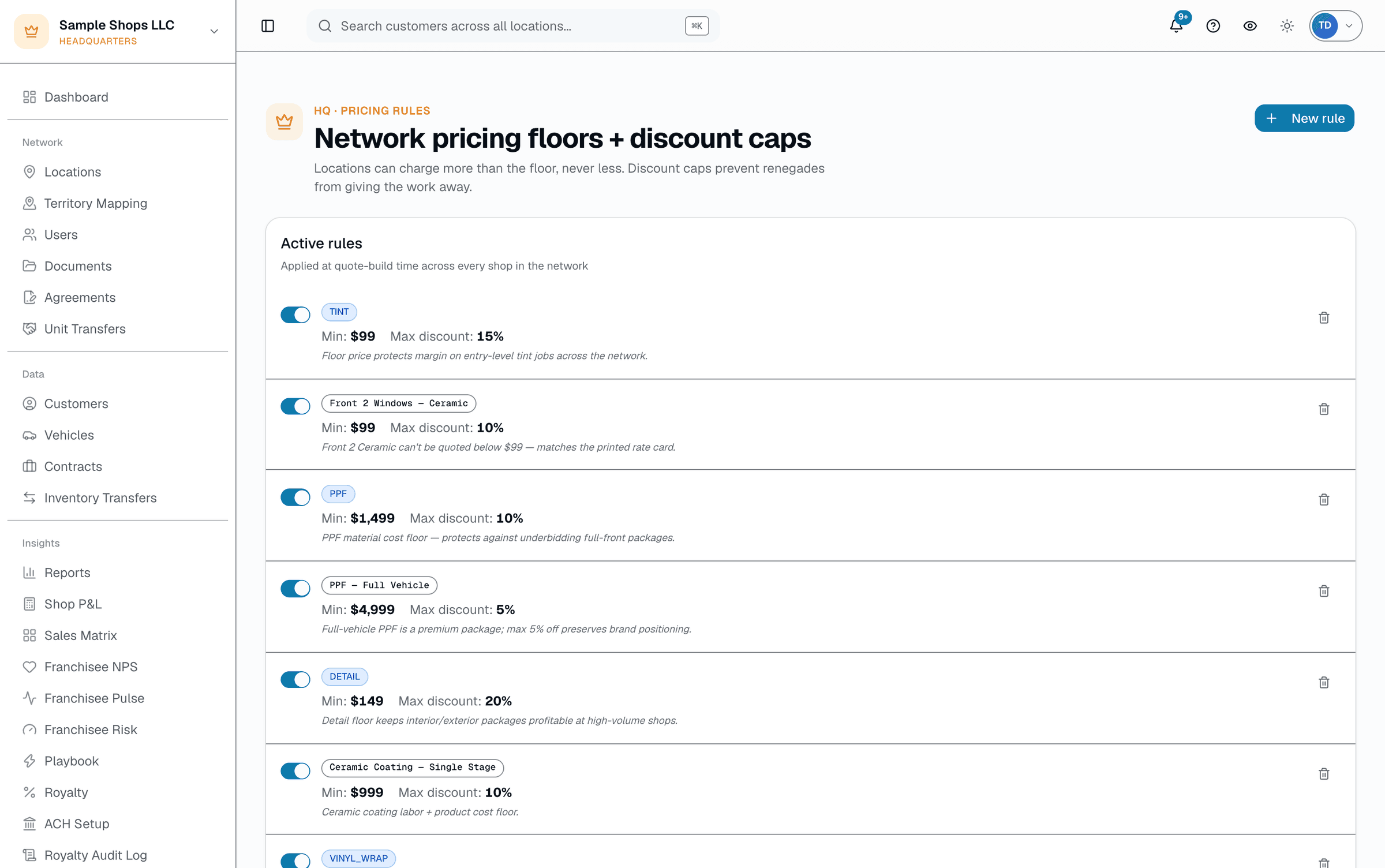
Pricing rules
+Territory Mapping add-on
Franchise territory mapping, built into your HQ
+Territory Mapping is a $199/mo add-on for franchisors on SalesThumb's +HQ add-on that puts your franchise territories on a live map. You pick or draw each territory by ZIP, county, Census block group, radius or shape, see its Census population and demographics, and turn it into a location report.
It works on the same territory records +HQ already keeps (reserve, award, release, block, deposits and conflict flags), so the map is never a second copy to keep in sync. It's priced per HQ organization, not per shop, and it's set up through sales; there's no self-serve checkout.
- Live map of every territory, colored by who owns it: shops, prospects, holds, open and blocked
- Pick ZIP areas, counties or Census block groups, set a radius, or draw a shape by hand
- Drive-time shapes from an address or the middle of the map, on the Draw tab (60 per organization every rolling 30 days)
- Suggest a territory sized to a target population, or start from a business address
- A live overlap warning while you draw, across ZIP, county, block-group, radius and drawn territories
What this looks like in a shop
Illustrative scenario: a window tint franchisor keeps its territories as ZIP lists on +HQ. After adding +Territory Mapping, HQ opens Find uncovered areas for one metro area, sees which populated areas no territory covers, and saves three proposed territories as open to sell. When a prospect asks about one, and after the HQ owner turns on prospect reports, the development team emails the prospect copy of its location report, then reserves the territory for that prospect once they're ready.
Territory map
More in multi-location & franchise
Supporting tools that round out the pillar.
Franchise tools (royalty + ACH export + contracts)
Royalty calculation per shop, NACHA ACH file export, broadcast messages, contract management. Franchise sales CRM with Kanban + sequences + workflows.
Morning standup digest
A one-page morning snapshot the team can turn on — today's bookings, AR balance, overdue items, plays firing today — emailed automatically once scheduled.
WhatsNewCoachmark in-app tour
Dismissible bottom-right coachmark that highlights new features as they ship — your team discovers what's new without a release-notes email blast.
Outbound webhooks
Signed outbound webhooks fire the moment an appointment, invoice, payment, or warranty event happens — pipe SalesThumb into your BI stack or custom tooling. Included on every plan.
White-label & custom domain
Run the customer-facing booking page + portal on your own domain with your branding, send comms from your own name, and sign your team in with Google. Built for chains that need to look like one brand.
Other pillars
The full feature taxonomy.