The pulse of the shop, on a screen in the lobby.
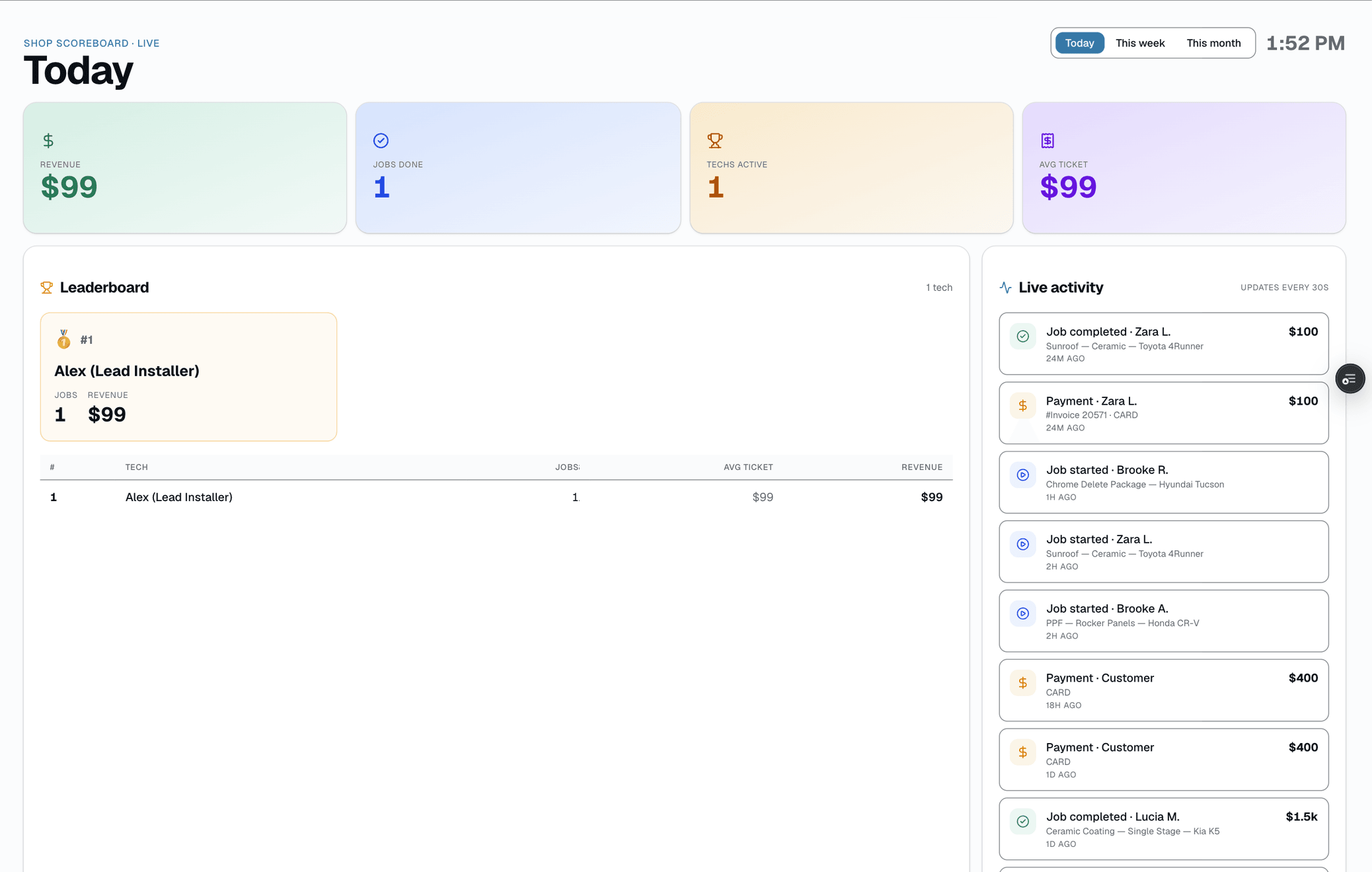
Every meaningful event in your shop — a job starting, a job finishing, a quote going out, a payment landing — surfaces on /app/scoreboard, a leaderboard-style ticker built to run on a TV in the lobby. It polls every 30 seconds and covers four event kinds.
The quick version
Live activity feed: New bookings, payments and photos, live on a screen.
- Live-activity ticker on /app/scoreboard, built for a lobby TV
- Covers 4 event kinds: job started, job completed, quote sent, payment
- Auto-refresh every 30s via polling
There's no click-through and no filters — it's built to be glanced at from across the room, not interacted with. When you need to look further back or investigate something specific, /app/settings/audit's Activity tab (Owner/Admin/Manager only) is a real filterable, searchable log with pagination and CSV export.
A closer look
01
A lobby-TV ticker, not a notification system
Job starts, job completions, quotes sent, and payments scroll across /app/scoreboard — a leaderboard-style ticker meant to run on an unattended screen in the lobby or shop floor, not to be clicked through. It polls the feed every 30 seconds and covers four event kinds. That's the whole surface: no filters, no drill-down, no notifications riding on top of it.
- Covers 4 event kinds: job started, job completed, quote sent, payment
- 30-second polling — no WebSocket, no push
- No click-through to the source record
- No filters — the same ticker for everyone watching
02
Need the full history? Settings → Audit has it
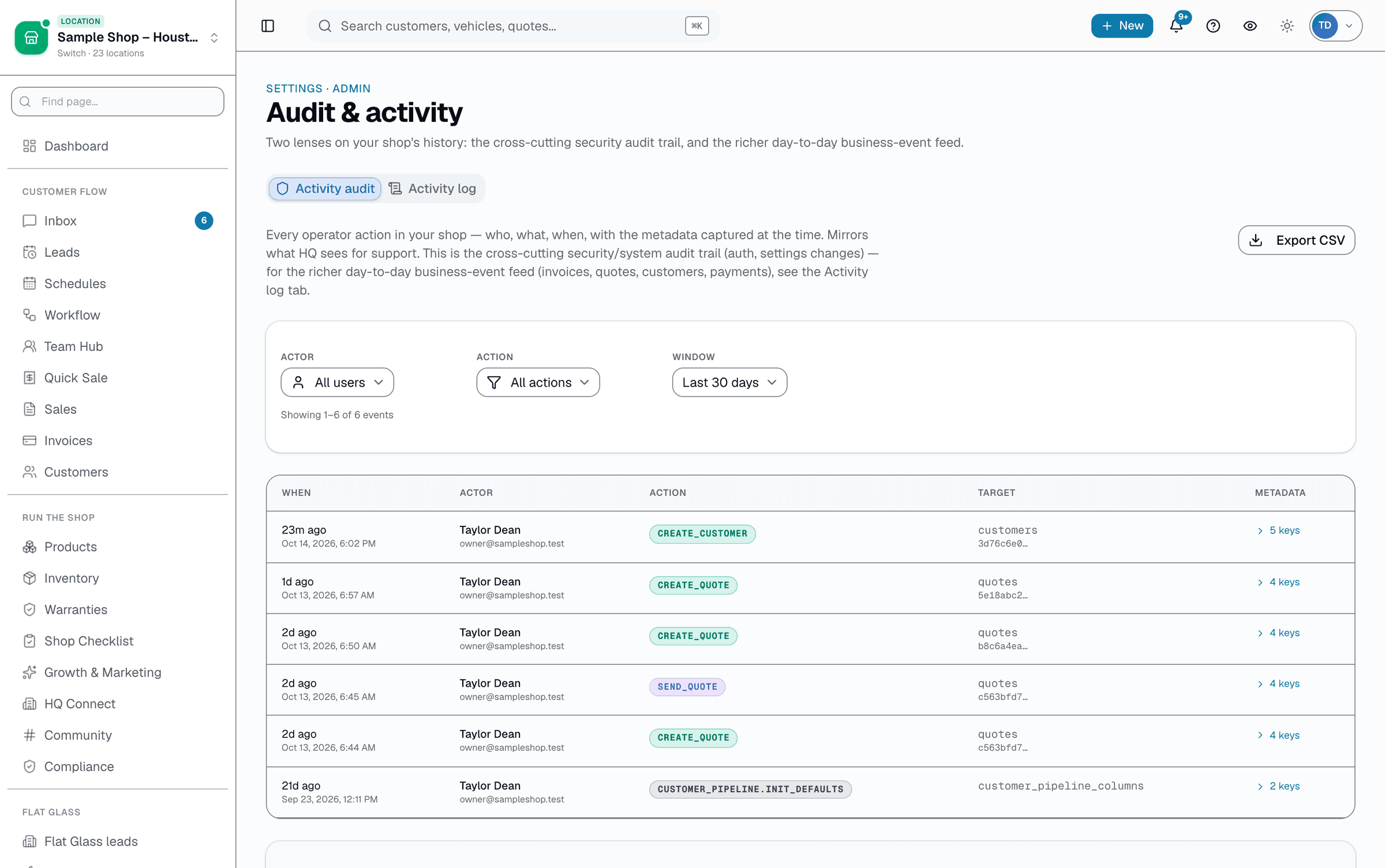
The scoreboard only shows what's scrolling by right now — it isn't a searchable log. /app/settings/audit's Activity tab (Owner/Admin/Manager only) is a real business-event log covering invoices, quotes, customers, appointments, and payments — filterable by entity type, actor, and date range, with a free-text search box and full CSV export of everything matching your filters, not just the visible page.
- Permission-gated — Owner/Admin/Manager only
- Filter by entity type, actor, action, or date range
- Free-text search plus real pagination
- Export all matching rows to CSV, not just the current page
Everything it does
The complete list. The plan tag above shows which plans include it.
- Live-activity ticker on /app/scoreboard, built for a lobby TV
- Covers 4 event kinds: job started, job completed, quote sent, payment
- Auto-refresh every 30s via polling
- No click-through and no filters — built to glance at, not interact with
- Settings → Audit's Activity tab: filterable, searchable, paginated log
- CSV export of every row matching your filters, not just the visible page
A tour of the screens
Every meaningful view, the path through it, and the moments that matter — so you know exactly what you're buying.
Full activity log
Permission-gated, filterable, searchable business-event log with CSV export — Owner/Admin/Manager only..
Setting it up
- 1
1. Events emit from every source
Every meaningful action in /app — a job starting, a job completing, a quote going out, a payment landing — emits into the unified activity feed.
- 2
2. The scoreboard polls every 30s
/app/scoreboard polls the feed every 30 seconds and scrolls the latest events across the ticker. No click-through, no filters — it's built for a screen you glance at, not a screen you work from.
- 3
3. Full history lives in Settings → Audit
For anything further back than what's currently on the ticker, /app/settings/audit's Activity tab (Owner/Admin/Manager only) covers invoices, quotes, customers, appointments, and payments — filterable by entity type, actor, and date range, searchable, paginated, and exportable to CSV.
What this looks like in a shop
Illustrative scenario: Mike walks past the lobby TV between customers and catches the last few events scroll by — a job starting, a quote going out, a payment landing. Later, when he wants to check exactly who did what earlier in the day, he opens Settings → Audit's Activity tab, filters to Invoices, and searches for the customer's name.
Good to know
- Which plan includes live activity feed?
- Growth and Pro include it. See the Pricing page for everything in each plan.
- Does the scoreboard need a dedicated device?
- It runs in any browser at /app/scoreboard, so a spare tablet, monitor, or lobby TV pointed at that URL works fine. No app install required.
- Can I filter the feed?
- Not on the scoreboard — it's the same unfiltered ticker for anyone watching. Settings → Audit's Activity tab is the filterable, searchable version — Owner/Admin/Manager only — with entity type, actor, and date-range filters plus free-text search.
- How far back does the history go?
- The scoreboard itself only shows the live stream, not history. Settings → Audit's Activity tab is a real paginated log with date-range filtering, so you can go back as far as your data does — not capped at a fixed recent count.
Pairs well with
Two-way SMS
However a customer reaches you — a text, an email, a Facebook or Instagram message, or WhatsApp — it lands in the same inbox, on the same customer, and you answer from there.
Automations
On Growth and up, pick a preset drip sequence — win back lapsed customers, follow up cold leads, or ask for a review after a completed job. It goes live the moment you choose a pace, so edit the messages right away or pause it until you have.
Reports
SalesThumb's 83 reports live in a 14-category sidebar in the app; grouped here by the decision they answer, they sort into 6 clusters. The six: cash & revenue, job & service profitability, team & schedule performance, marketing & lead performance, customer retention & risk, and customer obligations — the reports inside each cluster export individually to CSV. Basic and Starter include the core reports; Gross Profit per Job, the installer and service-time reports, the close-rate funnel, Referral Attribution, ZIP Code Density, Channel CAC / ROI, Loyalty Program, and the inventory reports need Growth.
Mobile Apps
The installer app shows today's schedule, captures photos, clocks in/out, and updates job status. The customer app shows their active job's progress, appointments, quotes, invoices, and warranty status. Both are native iOS + Android apps, live now on the App Store and Google Play as the SalesThumb app; a fully white-labeled app under your own brand is further out on the roadmap.