Per-service close-rate analysis. Raise / reduce / hold suggestions you can actually trust.
Most shops set prices once and forget them. Smart Pricing looks at every active service's quote history over a lookback window you pick (30-365 days) and computes one suggestion per service: RAISE (closing 75%+ of the time — room to charge more), REDUCE (closing under 30% — try a lower price), REPOSITION (closing under 30% even after heavy discounting — the offer itself needs to change, not just the number), or HOLD (in a healthy range already).
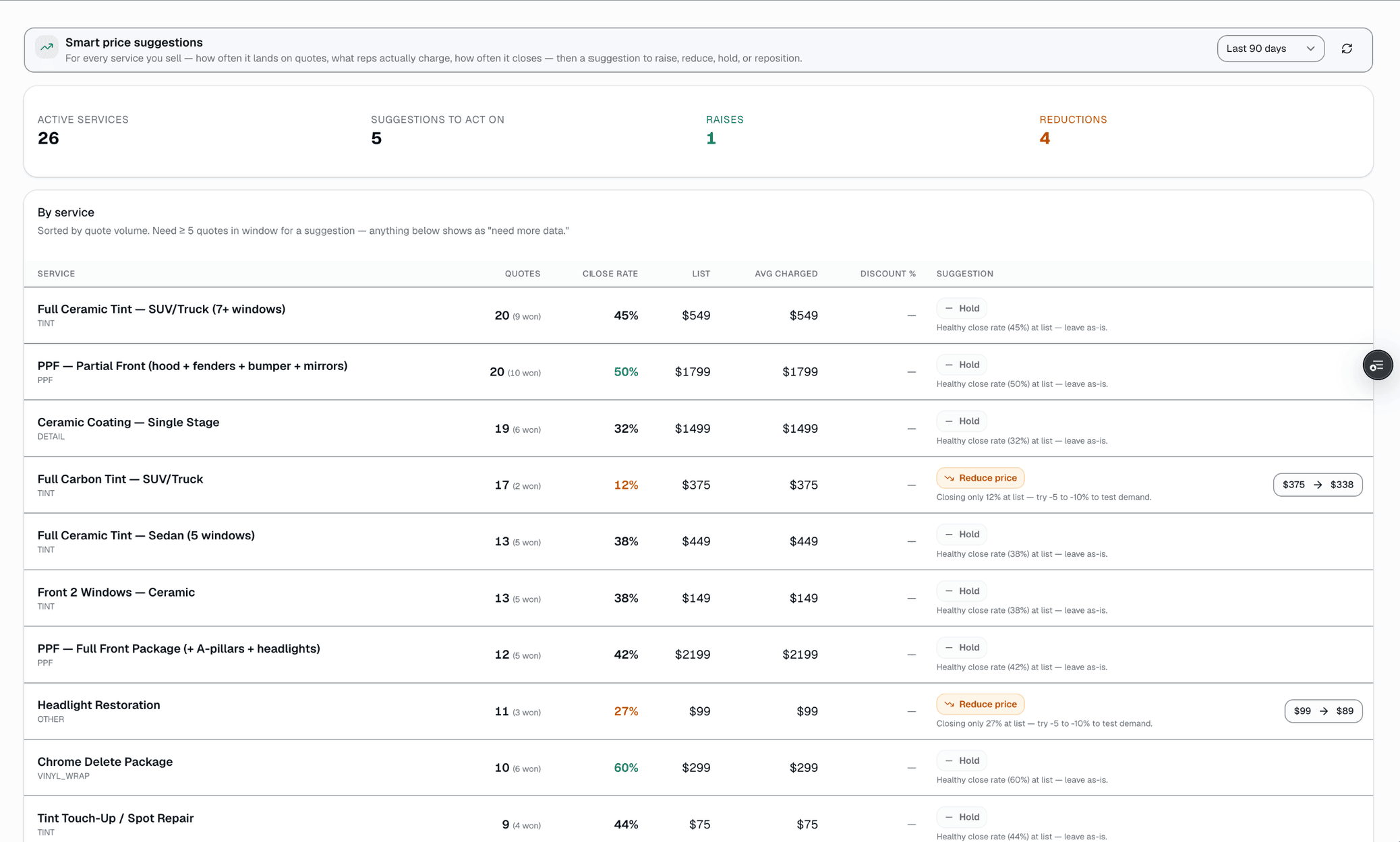
The quick version
Smart pricing: See which service prices to raise, lower or hold.
- Per-service close-rate + quote-volume tracking over a 30- to 365-day lookback (Growth and Pro plans)
- Computed suggestion per service: RAISE / REDUCE / HOLD / REPOSITION
- Discount frequency + average discount factored into every suggestion
Services need 5+ quotes in the window before a suggestion appears. Apply updates your catalog's list price with one click.
A closer look
01
Per-service close rate over whatever window you pick
Every quote line item is tied to a catalog service, and every quote resolves to a status — close rate is the share of quotes in the window that ended APPROVED or CONVERTED — every other status, including drafts and quotes still awaiting an answer, counts as not closed. Pick a lookback window (30 to 365 days) and the engine tallies quote count, close rate, list price vs. what reps actually charged, and how often the service gets discounted, per service. No manual logging — it's all read from quotes you already sent.
- Quote outcome tracked automatically per service
- Lookback window you choose: 30 / 60 / 90 / 180 / 365 days
- List price vs. average and median actually-charged price
- Discount frequency + average discount depth
- Services need 5+ quotes in the window before a suggestion shows
02
One suggestion per service: raise, reduce, hold or reposition
Close rate ≥75% suggests RAISE (+5%, or +8% if reps are already discounting below list) — unless the service is also being discounted heavily without the average charged price actually dropping below list, in which case it holds instead (the price is fine; the discount habit is the thing to fix). Close rate under 30% suggests REDUCE (-10%) — unless it's also getting discounted heavily, in which case the price probably isn't the problem and it suggests REPOSITION instead (rethink the bundle or offer, not just the number). Anything in between holds, unless heavy discounting says the list price itself is the friction. Apply sets the new catalog price directly — there's no dollar-impact projection, no audit trail, and no undo window; the change takes effect on the next quote.
- RAISE / REDUCE / HOLD / REPOSITION / need-more-data, one per service
- Thresholds are fixed in the product, not shop-configurable
- Discount frequency + depth factor into every suggestion
- One-click Apply sets the new catalog price immediately
Everything it does
The complete list. The plan tag above shows which plans include it.
- Per-service close-rate + quote-volume tracking over a 30- to 365-day lookback (Growth and Pro plans)
- Computed suggestion per service: RAISE / REDUCE / HOLD / REPOSITION
- Discount frequency + average discount factored into every suggestion
- List price vs. what reps are actually charging, side by side
- One-click apply updates the catalog price
- "Need more data" flag below 5 quotes in the window, so you don't act on noise
A tour of the screens
Every meaningful view, the path through it, and the moments that matter — so you know exactly what you're buying.
One suggestion, applied with a confirm dialog
Each suggested row opens a dialog showing current vs.
new price before you apply — no dollar-impact estimate, no undo window.
Setting it up
- 1
1. Quotes track their own outcome
Every quote line item ties to a catalog service. When a quote is approved, converted, declined, or expires, that outcome is already recorded — no manual logging.
- 2
2. Pick a window, get one suggestion per service
On /app/pricing-insight, choose a lookback window (30-365 days). Every active service with 5+ quotes in that window gets a RAISE / REDUCE / HOLD / REPOSITION suggestion with the reasoning spelled out in one sentence.
- 3
3. Apply or skip
Click a suggested row to open a confirm dialog showing current vs. new price, then Apply. It updates the catalog's default price immediately; existing quotes already sent are unaffected.
What this looks like in a shop
Illustrative scenario. A shop had Front 2 Ceramic priced at $389. Smart Pricing showed an 84-quote, 90-day sample with a 78% close rate and light discounting — RAISE suggested, +5% to $408. The owner clicked Apply. There's no built-in before/after revenue comparison; the owner would need to re-check the close rate a few weeks later on the same page to see whether it held.
Good to know
- Which plan includes smart pricing?
- Growth and Pro include it. See the Pricing page for everything in each plan.
- What close rate triggers a RAISE vs. a REDUCE?
- 75% or higher usually suggests RAISE — unless it's also being discounted heavily with the average charged price still near list, in which case it holds. Under 30% suggests REDUCE, or REPOSITION if it's also being discounted heavily. Between 30-75% generally holds. These thresholds are fixed in the product today, not a per-shop setting.
- Does it show me the dollar impact of applying a suggestion?
- No — the suggestion is based on close rate and discounting patterns, not a revenue projection. Apply just updates the catalog price; you'd track the effect yourself by re-checking the close rate a few weeks later.
- Can I test a price change before committing?
- Not with a built-in A/B or split-test mode — that doesn't exist today. Applying a suggestion changes the catalog price for every new quote going forward; you can always change it back manually.
Pairs well with
Quotes
Build a quote from real line items — services, film, parts, fees — send it, and the customer approves with a drawn signature and a card deposit on their phone. No account needed on either side.
Reports
SalesThumb's 83 reports live in a 14-category sidebar in the app; grouped here by the decision they answer, they sort into 6 clusters. The six: cash & revenue, job & service profitability, team & schedule performance, marketing & lead performance, customer retention & risk, and customer obligations — the reports inside each cluster export individually to CSV. Basic and Starter include the core reports; Gross Profit per Job, the installer and service-time reports, the close-rate funnel, Referral Attribution, ZIP Code Density, Channel CAC / ROI, Loyalty Program, and the inventory reports need Growth.
Automations
On Growth and up, pick a preset drip sequence — win back lapsed customers, follow up cold leads, or ask for a review after a completed job. It goes live the moment you choose a pace, so edit the messages right away or pause it until you have.
Multi-Location HQ
From a single shop to a franchisor with hundreds of locations, every shop rolls up into one HQ view with consolidated KPIs, centralized catalogs, and push-to-shop pricing and templates.