Before and after photos, with AI that writes up the damage.
Photos are the most under-used tool in a tint shop. Shot right, they win disputes and turn every install into shareable content.
The quick version
Job photos: Before-and-after photos saved with every job.
- One-tap shortcut from today's schedule to the active appointment
- Before / After tabs on the job screen — pick one, then snap
- Photos stage on the job, then upload in one batch — a failed upload stays staged for a retry
SalesThumb captures before and after photos from the installer's phone (damage shots are tagged on the appointment's photo tab in the web app), links each shot to the appointment (and through it to the customer and vehicle), and gives the customer a branded gallery URL they can share. On the Pro plan, AI helps with damage too: mark an inspection item as an issue, snap a photo, and the AI writes up what it sees (the kind of damage, where it is, and how bad) as a draft note the tech can review, edit, or clear. When something goes wrong six months later — 'was that scratch there?' — you open one screen, see the pre-install damage-tagged photo with the timestamp, and the conversation's over.
A closer look
01
A gallery you'd actually send to a customer
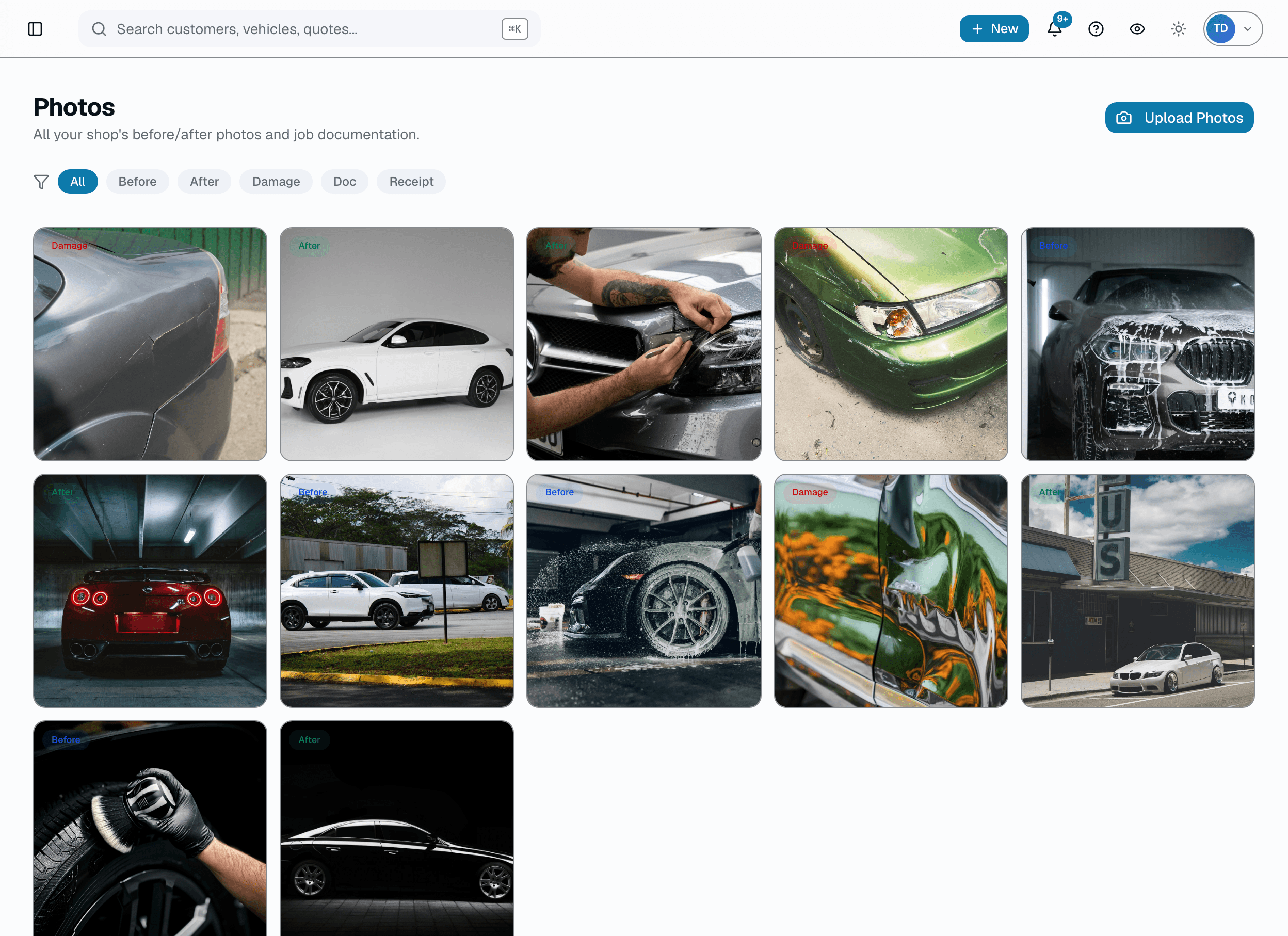
Most shops either don't send photos at all or dump unsorted JPGs in a text thread. SalesThumb opens into a designed gallery: Before and After sections under your logo, a full-screen photo viewer, and a share button. The customer opens it, shows their spouse, shares it with friends.
- Before and After sections, each photo opens full-screen
- Only before and after shots appear — damage, document, and receipt photos stay internal
- Copy the portal link or share via the native share sheet
02
Damage tagging, with AI that writes the note
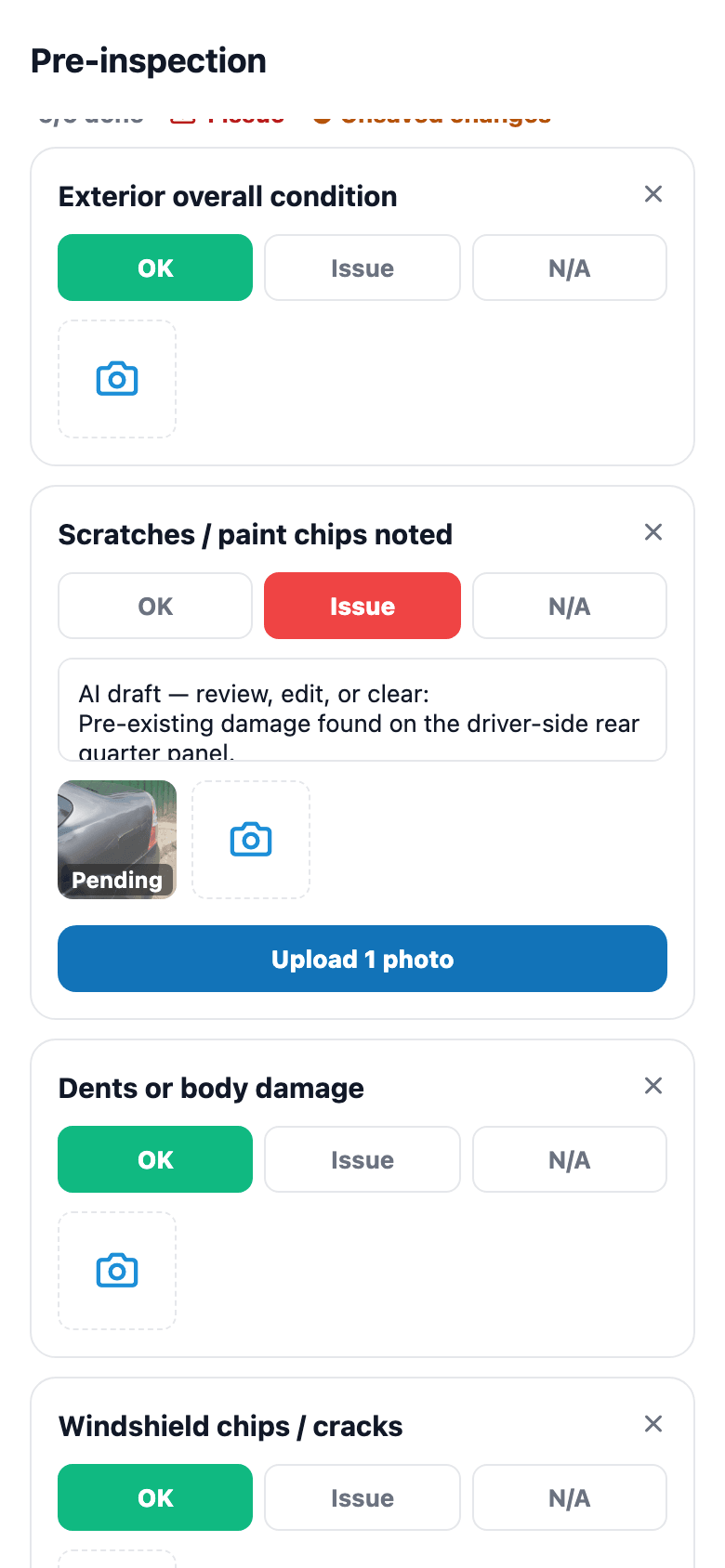
Every dispute in the tint / PPF world comes back to 'was it like that when I dropped it off?' On the pre-install inspection, the tech marks an item as an issue and snaps a photo. On the Pro plan, AI looks at that photo and drafts the damage note — what it is, where it is, and how bad — right in the item's notes, clearly marked as an AI draft to review, edit, or clear. The photo is timestamped and attached to the appointment, so if the customer comes back three months later claiming new damage, you open the inspection and point to it.
- Mark an inspection item as an issue and attach a photo
- Pro: AI drafts the damage note from the photo — nothing is saved until the tech saves the inspection
- Tag any photo's kind as damage and add a caption
- Timestamped and attached to the appointment
03
Mobile capture the tech actually uses
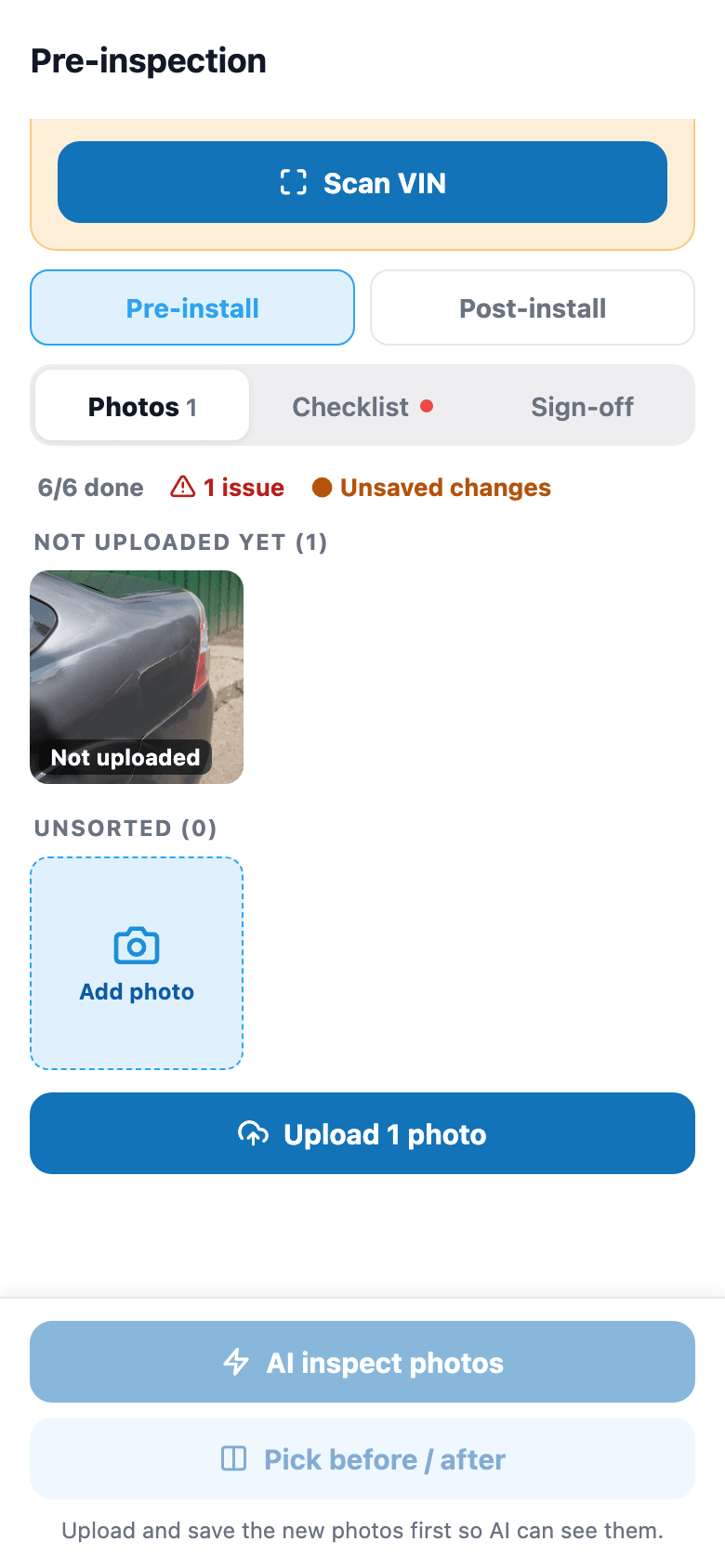
If it takes more than 3 taps, techs skip it. In the installer app you tap a job on today's list and pick the Before or After tab first so you're not doing data entry with dirty gloves. Photos stage on the job and upload in one batch (the app asks the tech to stay on that screen until it finishes); if a connection drops mid-upload, the app surfaces a clear error so the tech knows to retry rather than assuming it's queued.
- Tap a job on today's list — photos attach to that job, no folder picking
- Tab-first UX: tap Before or After, then snap
- Staged photos survive an app restart, with a Resume or Discard prompt
- Snap with the camera or pick from the photo library
04
A customer gallery that earns you a review
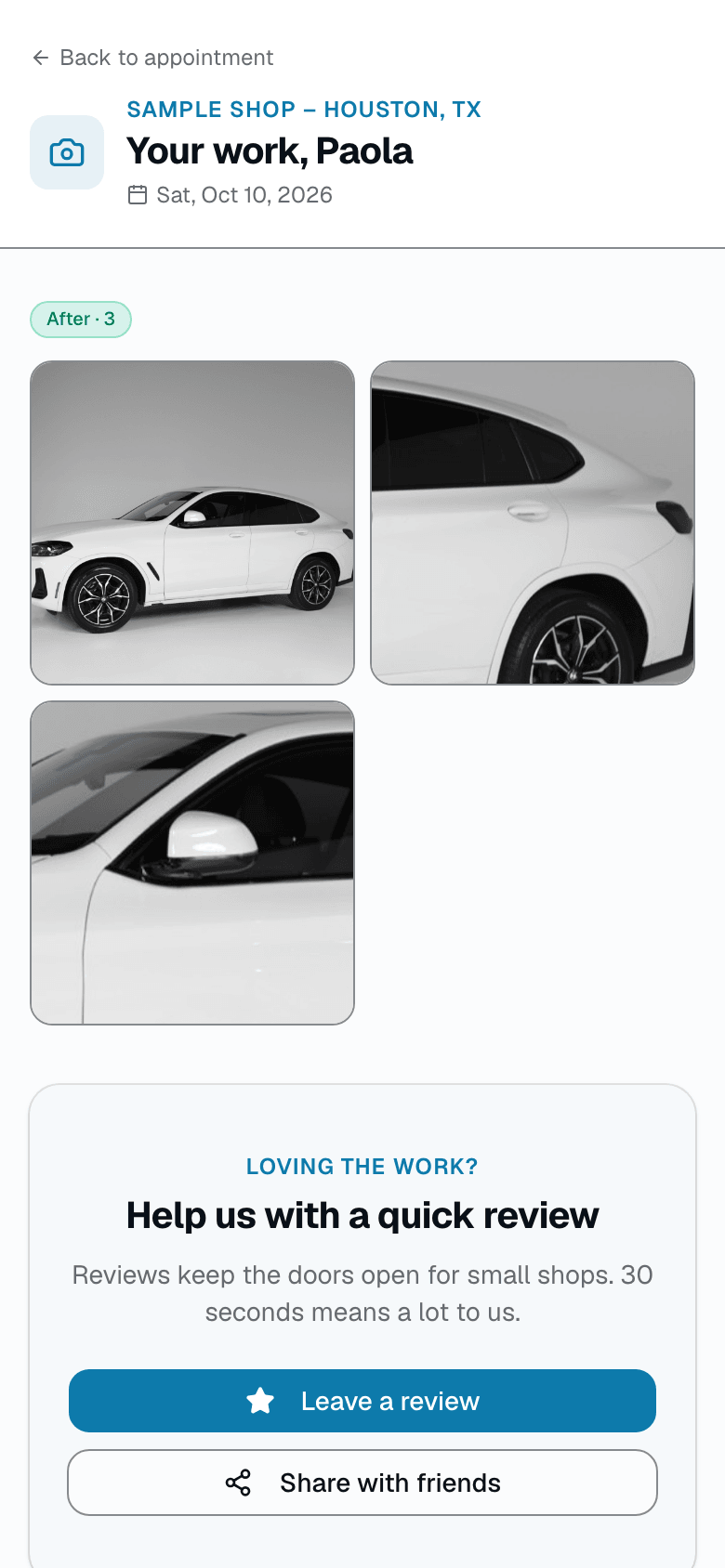
The customer gallery URL is a marketing asset most tint shops never build. SalesThumb's customer gallery is a mobile-first page with your logo, your shop name, the customer's first name, the appointment date, and their before and after photos. Add a review-request CTA and a share-to-friends shortcut via the device's native share sheet.
- Your shop's logo and name at the top
- Mobile-first Before and After sections with a full-screen viewer
- Review-request CTA built into every gallery
- Share via the device's native share sheet
05
Search by customer or vehicle, jump to that visit's gallery
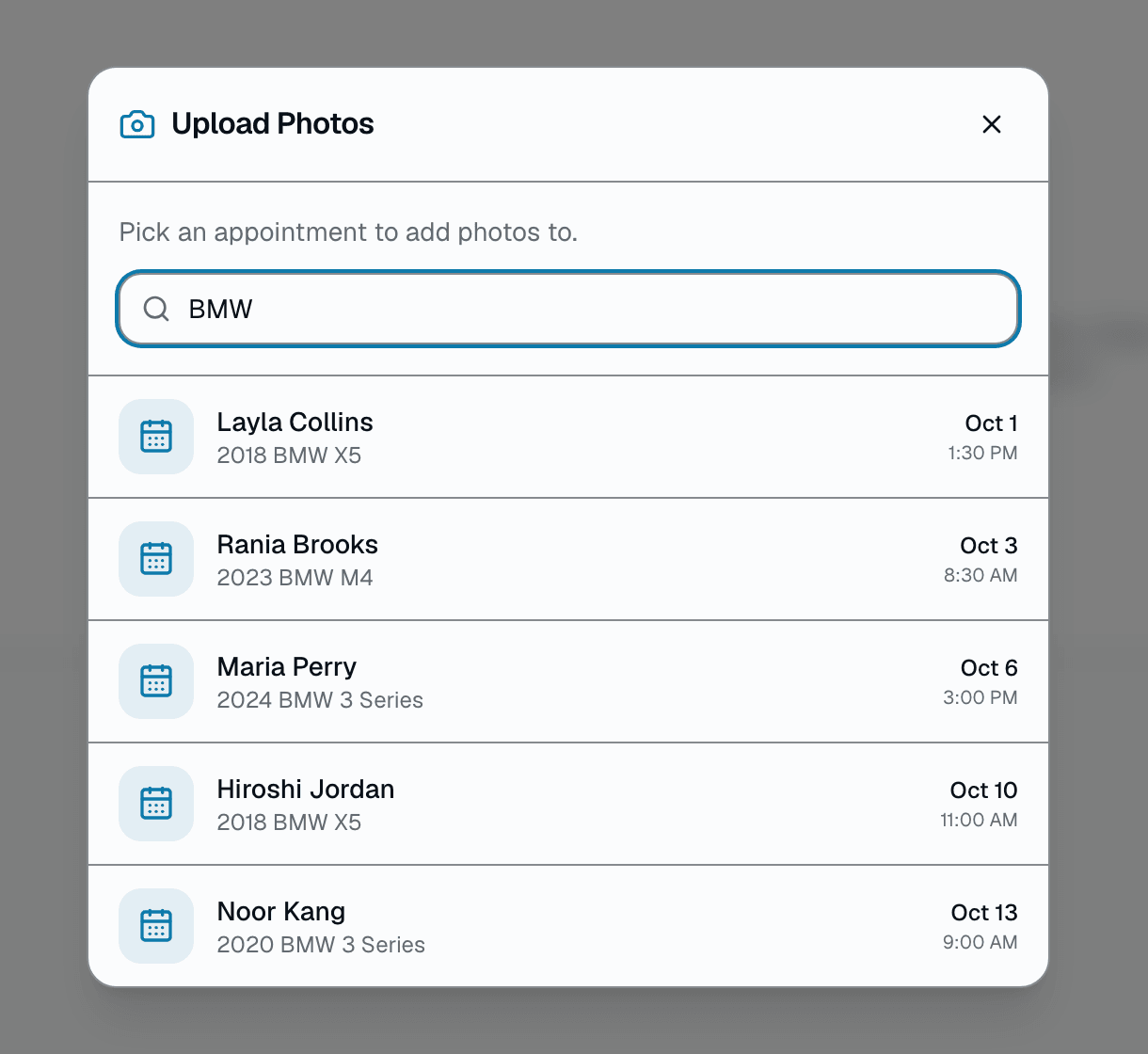
In /app/photos, open Upload Photos and type a customer's name or a vehicle year/make/model — it lists matching appointments from the last 14 days and next 7 — click one to open that appointment's own before/after/damage gallery. It's a text search across your shop's own photos, not a VIN or license-plate lookup, and there's no combined multi-visit timeline, quality-trend chart, or PDF export today — each visit's gallery is its own page.
- Search matches customer name or vehicle year/make/model text
- Results are appointments, not photos — open one to see that visit's gallery
- No VIN/plate field is searched, no combined multi-visit timeline exists
Everything it does
The complete list. The plan tag above shows which plans include it.
Capture (installer)
- One-tap shortcut from today's schedule to the active appointment
- Before / After tabs on the job screen — pick one, then snap
- Photos stage on the job, then upload in one batch — a failed upload stays staged for a retry
- AI-suggested caption per photo in the web app (Pro plan) — edit or accept
Organize (shop)
- Every shot linked to its appointment (and, through it, customer + vehicle)
- Search recent appointments (last 14 days, next 7) by customer name or vehicle text on /app/photos
- Damage tagging: tag a photo's kind as damage, add a caption
- Unlimited storage on Cloudflare R2 — no per-GB fees
Share (customer-facing)
- Customer gallery page (linked from their appointment page) with your logo and shop name
- Before and After photo sections, tap any photo to view it full-screen
- Share via the device's native share sheet (Messages, Instagram, etc. — whatever's installed)
- Review-request CTA on the same page
A tour of the screens
Every meaningful view, the path through it, and the moments that matter — so you know exactly what you're buying.
AI damage notes
Mark an inspection item as an issue and snap a photo; on Pro, AI drafts the damage note for the tech to review, edit, or clear..
Mobile capture
Installer app: open the job → pick Before or After → snap.
Staged photos upload in one batch, with a retry if one fails.
Customer share URL
Customer gallery at salesthumb.com/a/{token}/photos — your logo, one link, shareable via the device's native share sheet..
Search by customer or vehicle
Search recent appointments (last 14 days, next 7) on /app/photos by customer name or vehicle text → open that appointment's photos.
No VIN/plate lookup or combined multi-visit timeline today.
Who it's for
Built specifically for…
- Tint shops tired of 'was that scratch there?' disputes
- PPF installers who compete on craftsmanship and want social proof
- Ceramic coating pros who rely on before/after for marketing
- Shops that want every job's photos filed under its appointment, not a camera roll
- Shop owners who want shareable before/after content without editing
What it replaces
The old way…
- iPhone Photos app + 'which folder did I put it in?'
- Text threads with 40 unsorted JPGs to the customer
- Dropbox / Google Drive folders nobody can find
- Paper damage-inspection forms that get lost
- That one social-media manager you were going to hire
Setting it up
- 1
Capture on the installer app
Open the job → pick Before or After → snap or choose from the library → tap Upload. The screen asks the tech to wait until the batch finishes.
- 2
Find it later
Every photo is linked to its appointment. On /app/photos, filter your most recent photos by kind, or search appointments from the last 14 days and next 7 by customer name or vehicle text; older visits are on each appointment's page.
- 3
Share beautifully
Post-install customer gallery gets a clean URL. Add your brand, share via the native share sheet, ask for a review.
What this looks like in a shop
Illustrative scenario: Black Tesla comes in, has a small scratch on the front bumper. Installer tags it as damage with a photo + caption. Three hours later the ceramic coat is done, installer captures 8 after-shots. Customer gets a laid-out gallery URL they can share with friends. The tagged, timestamped damage photo is there if a 'did you do this?' question comes up.
Good to know
- Which plan includes job photos?
- Starter, Growth and Pro include it. See the Pricing page for everything in each plan.
- How much does photo storage cost?
- Included in every plan. No per-GB fees. Photos live on Cloudflare R2 so egress is free too.
- Do photos get auto-categorized?
- No — the tech picks Before/After/Damage when they upload. On the Pro plan, AI can suggest a one-line caption per photo in the web app (grounded in the actual image via Claude vision), which staff can edit or accept.
- What happens if the tech is offline?
- Photo uploads need a data connection today. Nothing re-sends itself: a failed upload stays staged on the job — visible, removable, and re-uploadable with a tap — so it is never lost silently, and never duplicated by a retry you did not ask for. Full offline capture-and-sync is on the roadmap, not shipped yet.
Works with your stack
Cloudflare R2
Unlimited photo storage + free egress
Expo camera
Native iOS + Android capture
Claude vision
AI-suggested one-line captions per photo (Pro plan)
Native share sheet
Share the gallery link to whatever's installed (Messages, Instagram, etc.)
Pairs well with
Warranty
Register a warranty when a job's done and SalesThumb emails the customer a link to the PDF certificate and its public verification page, usually within about an hour. Warranty registration and certificates are on Growth and Pro. Customers can file a claim from that same link.
Customer CRM
Search by name, plate, or VIN in milliseconds. Every appointment, quote, invoice, warranty, and photo attached to the right record — forever.
Mobile Apps
The installer app shows today's schedule, captures photos, clocks in/out, and updates job status. The customer app shows their active job's progress, appointments, quotes, invoices, and warranty status. Both are native iOS + Android apps, live now on the App Store and Google Play as the SalesThumb app; a fully white-labeled app under your own brand is further out on the roadmap.