Warranty certificates with a QR verify link. Tracked claims. Happier customers.
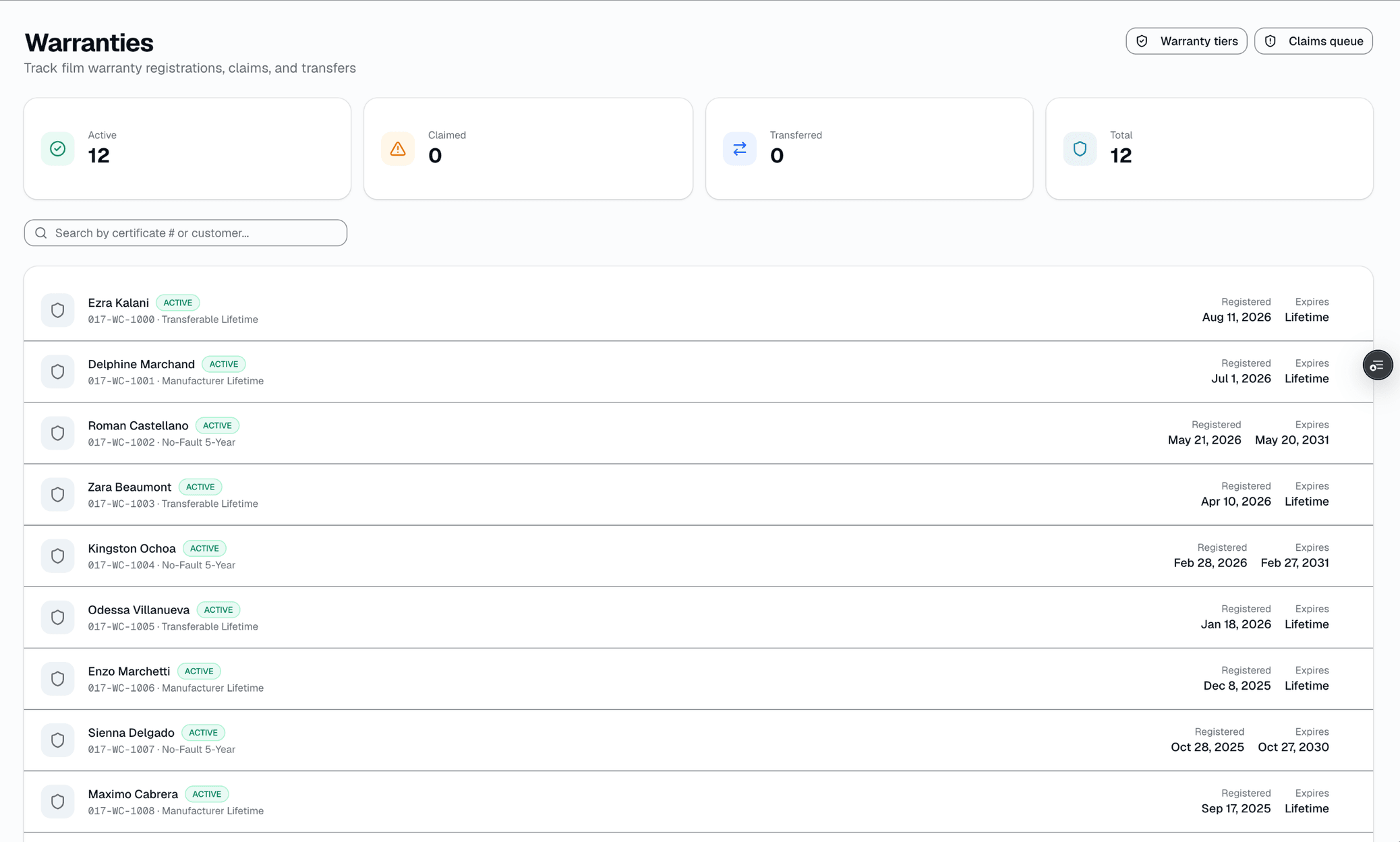
Warranty is the one feature every shop either ignores or does badly on paper. SalesThumb generates a certificate PDF for any completed install — a staff member registers it in a couple clicks, picking one of your saved coverage tiers if you've set them up — with a QR code linking to a public verify page.
The quick version
Warranties: Warranty certificates with a QR check link, and tracked claims.
- Staff registers the warranty from the appointment page — not automatic on job completion, optionally against a saved coverage tier
- Install fields: film/windows description, installer name, install date, warranty period
- Real QR code + link to a public verify page (app.salesthumb.com/warranty/{certNumber})
Customers can file a claim right from that page with nothing but the certificate number. A claim lands in your inbox with the install details already attached — no email chain asking what kind of film they have.
A closer look
01
A certificate with a real, working QR code
Most shops print a photocopy of the manufacturer's warranty sheet and staple it to the receipt. SalesThumb generates a PDF with the customer's name, vehicle (year/make/model — no VIN printed), film details, installer, install date, and a QR code that links to a public verify page. There's no shop logo or brand-color customization on the template today, and it's a manual 'Register Warranty' action from the appointment page, not something that fires automatically when a job is marked complete.
- Manual registration from the appointment detail page
- Real QR code linking to app.salesthumb.com/warranty/{certNumber}
- Generic template — no logo/brand-color customization yet
- Auto-sent by an hourly background job after registration, with manual 'Email certificate' resend still available — email only, no SMS/push
- One coverage tier referenced per certificate
Certificate #WR-20260420-7HKQ3M9XZP
Priya Menon · 2023 Mazda CX-5 · registered manually Apr 20, 2026
CERTIFICATE
of Warranty
This certifies that the window film installation performed by Sample Shop LLC for:
Priya Menon
is warranted against bubbling, peeling, cracking, and color change for the period specified below, when installed according to manufacturer specifications.
Certificate #WR-20260420-7HKQ3M9XZP
Verify online
salesthumb.com/warranty/WR-20260420-7HKQ3M9XZP
Sample Shop LLC · (512) 555-0199 · hello@sampleshop.example
Delivered: email (auto-sent within an hour of registration; manual resend available)
Registered02
A short warranty list on the customer portal
Customers who have a magic-link portal see a small 'Warranties' card: film description, status, certificate number, registered date. It's a summary list, not a dedicated wallet app — full details, days-remaining, and the claim form all live on the certificate's own public page instead, reachable by certificate number without any login.
- Simple list: film, status, cert #, registered date
- No install photos, no progress bar, no per-warranty buttons on this card
- Full details + claim form live on the separate public verify page
- Transfers are requested from the public certificate page and approved by shop staff
Sample Shop LLC · Customer portal
Priya Menon
Warranties
Ceramic IR 70
ACTIVECert #WR-20260420-7HKQ3M9XZPRegistered Apr 20, 2026
Gloss PPF 8 mil
ACTIVECert #WR-20240814-K3PLM8QXTNRegistered Aug 14, 2024
Carbon 35
TRANSFERREDCert #WR-20230202-D7VNH5RKWXRegistered Feb 2, 2023
To file a claim, the customer visits the certificate's own public page — this card is a summary list only.
03
Filing a claim needs nothing but the certificate number
Anyone who lands on a certificate's public page can file a claim — no account, no login. The form asks for name, email, phone, one of 6 issue types (bubbling, peeling, discoloration, scratch, delamination, other), and a description of at least 10 characters. There is no photo upload in the form today, no signature or consent capture, and nothing pre-fills from the warranty record — the customer types their own contact info.
- Public, certificate-number-gated form — no login
- 6 fixed issue types, not customizable per shop
- No photo upload, no video, no signature in the real form
- Rate-limited server-side to prevent abuse
04
A claims inbox with 5 real statuses, no SLA
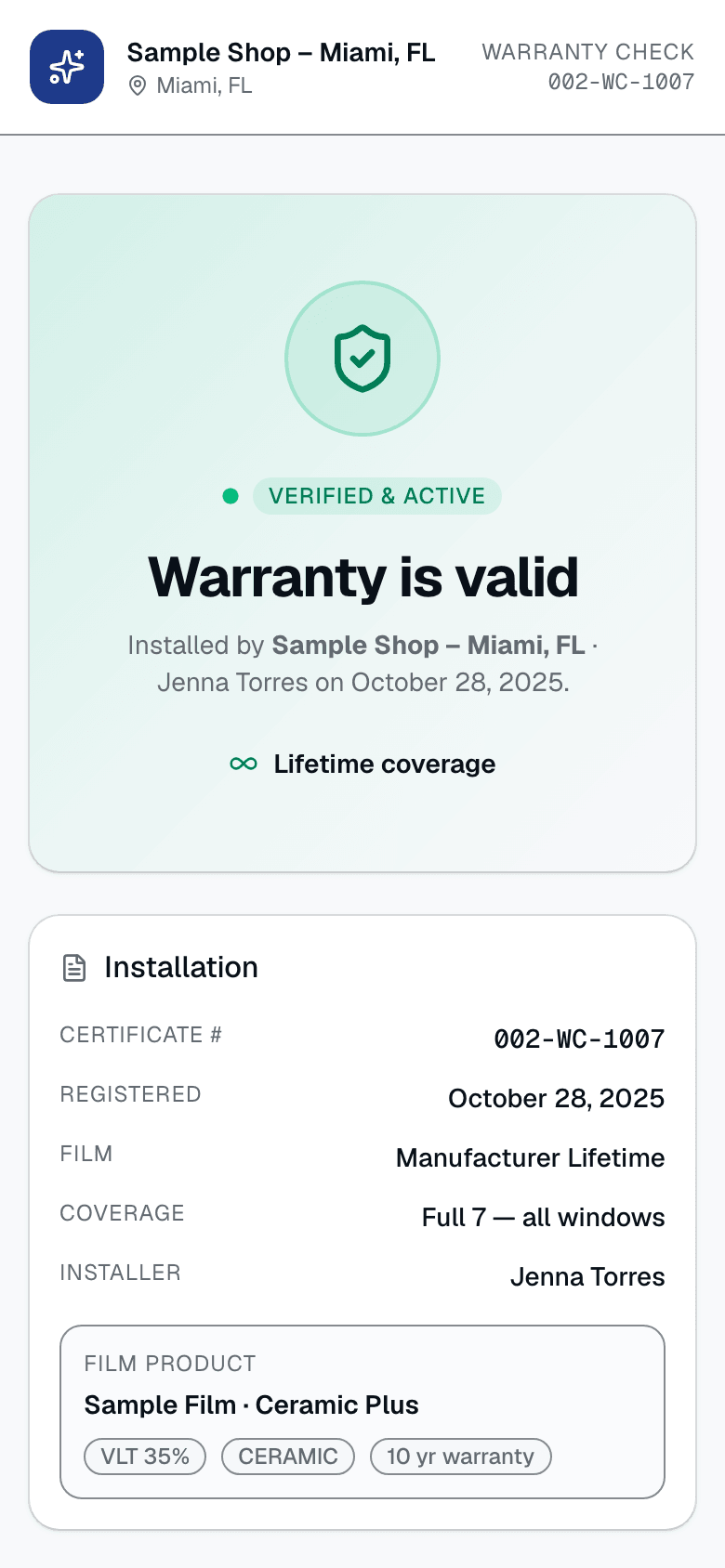
Claims move Submitted → In review → Approved / Denied / Resolved. Each transition is a manual status change with an optional note (shop notes, a denial reason, or resolution notes) — nothing here fires an automatic message to the customer, generates a follow-up appointment, or forwards anything to a film manufacturer. There's no SLA timer, no approval-rate metric, and no roll/batch risk flag; warranties don't carry a batch or roll number at all today.
- 5 real statuses, staff-driven transitions
- Shop notes, denial reason, resolution notes per claim
- No automatic customer messaging on any status change
- No SLA timer, no batch/roll traceability
05
Transfers: customer-requested, staff-approved
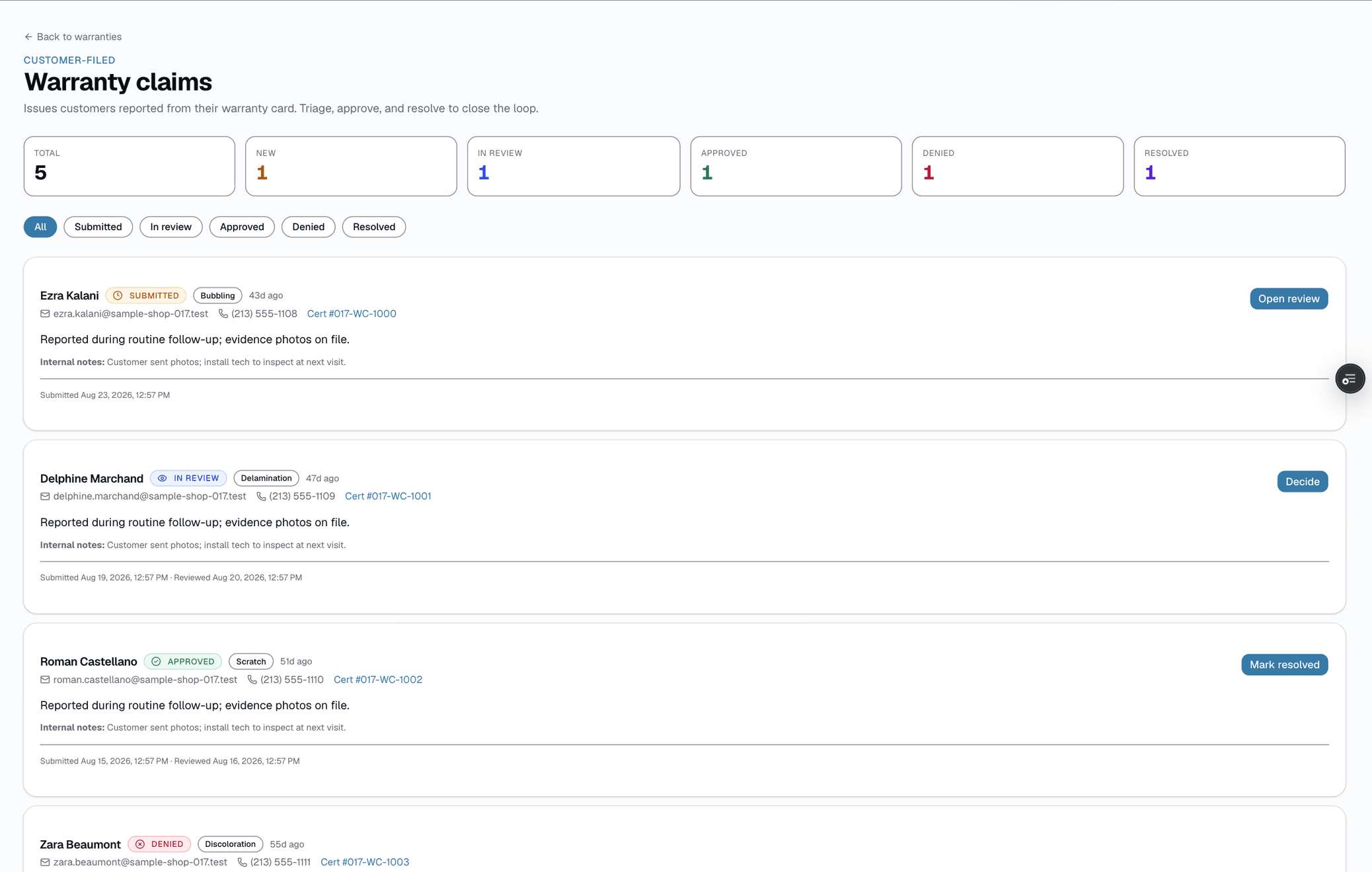
On a transferable warranty, the current owner opens the certificate's public page, confirms with a text code, and hands the phone to the buyer, who enters their name and contact info and uploads a bill of sale or ID. The request waits for a staff member to approve or reject it. Staff can also mark a warranty Transferred directly and type the new owner's name. Either way, a non-transferable tier is blocked from being marked Transferred.
- Customer starts it with a text code; staff approve or reject
- Bill-of-sale or ID photo upload; no VIN check and no new-owner account
- The current owner confirms by text code before the buyer's details are taken
- Non-transferable tiers can't be marked Transferred
Everything it does
The complete list. The plan tag above shows which plans include it.
The certificate
- Staff registers the warranty from the appointment page — not automatic on job completion, optionally against a saved coverage tier
- Install fields: film/windows description, installer name, install date, warranty period
- Real QR code + link to a public verify page (app.salesthumb.com/warranty/{certNumber})
- Generic PDF template — no shop logo or brand-color customization today
- One coverage tier per certificate
The customer side
- Portal shows a simple warranty list: film, status, certificate #, registered date
- Full details (vehicle, film, shop, days remaining) live on the public verify page — VIN and full last name are redacted for privacy
- File a claim with just the certificate number — no account needed
- Claim form: name, email, phone, one of 6 issue types, a description — no photo upload in the form today
- Emailed automatically within about an hour of registration, and viewable in the customer app's Garage tab — no SMS or push delivery
Shop-side claims workflow
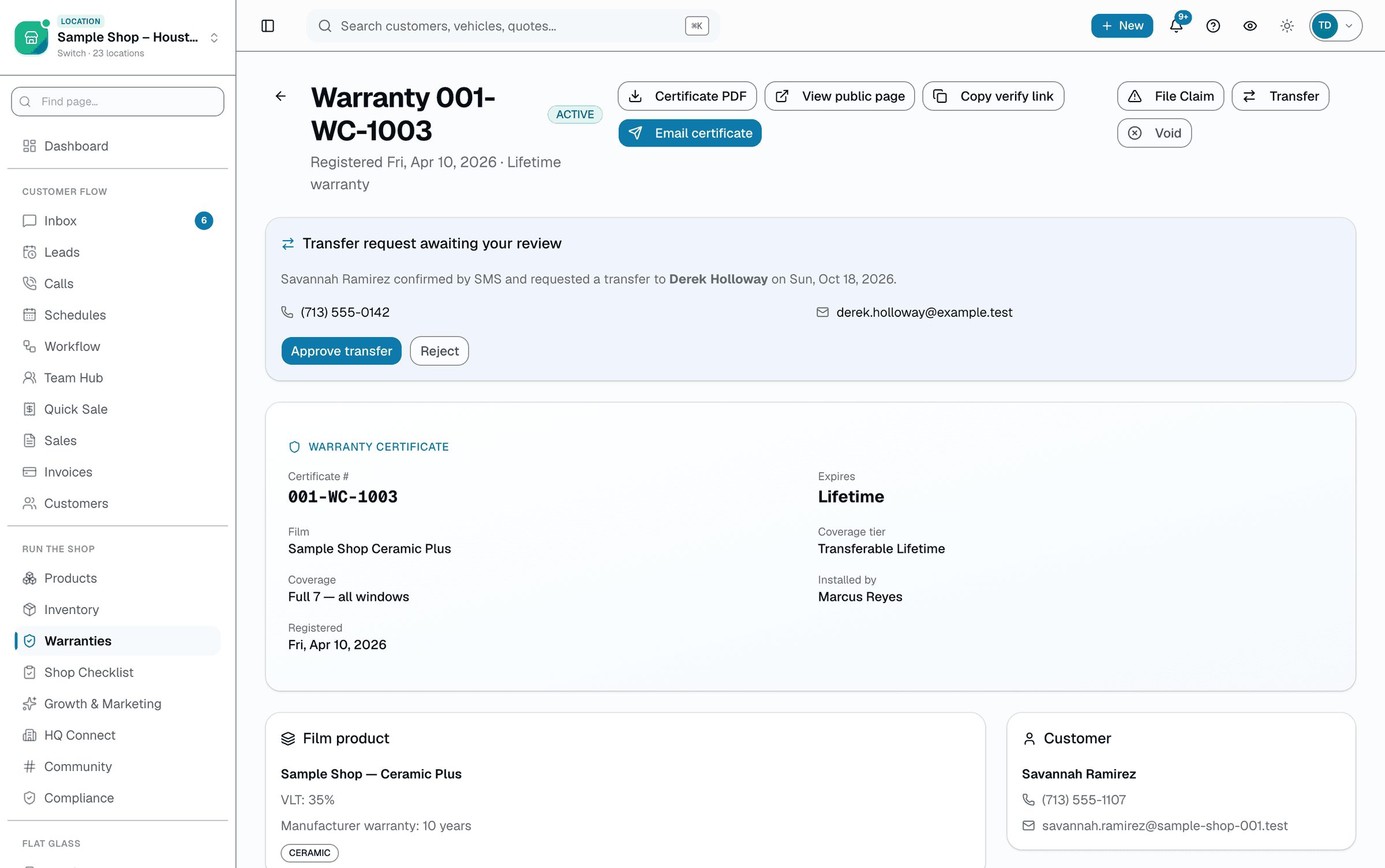
- Claims inbox with Submitted / In review / Approved / Denied / Resolved status
- Install details + certificate context shown alongside each claim
- Status-count summary; a 90-day expiring-soon list on the reports page
- Internal notes, denial reason, and resolution notes per claim
- No SLA timer, no auto-sent customer messages — follow-up is manual
A tour of the screens
Every meaningful view, the path through it, and the moments that matter — so you know exactly what you're buying.
Warranty summary in the portal
A simple list on the customer's magic-link portal page — film, status, cert #, registered date..
Sample Shop LLC · Customer portal
Priya Menon
Warranties
Ceramic IR 70
ACTIVECert #WR-20260420-7HKQ3M9XZPRegistered Apr 20, 2026
Gloss PPF 8 mil
ACTIVECert #WR-20240814-K3PLM8QXTNRegistered Aug 14, 2024
Carbon 35
TRANSFERREDCert #WR-20230202-D7VNH5RKWXRegistered Feb 2, 2023
To file a claim, the customer visits the certificate's own public page — this card is a summary list only.
Claim intake
The public certificate page: the customer sees their coverage, then files a claim further down — name, email, phone, issue type, description.
No login.
Shop claim inbox
Submitted / In review / Approved / Denied / Resolved.
Approve, review, or deny with a note — no SLA, no auto-messages.
Transfer, staff-side
Transfer requests from the public certificate page wait for staff approval; staff can also mark a warranty Transferred directly..
Warranty tiers
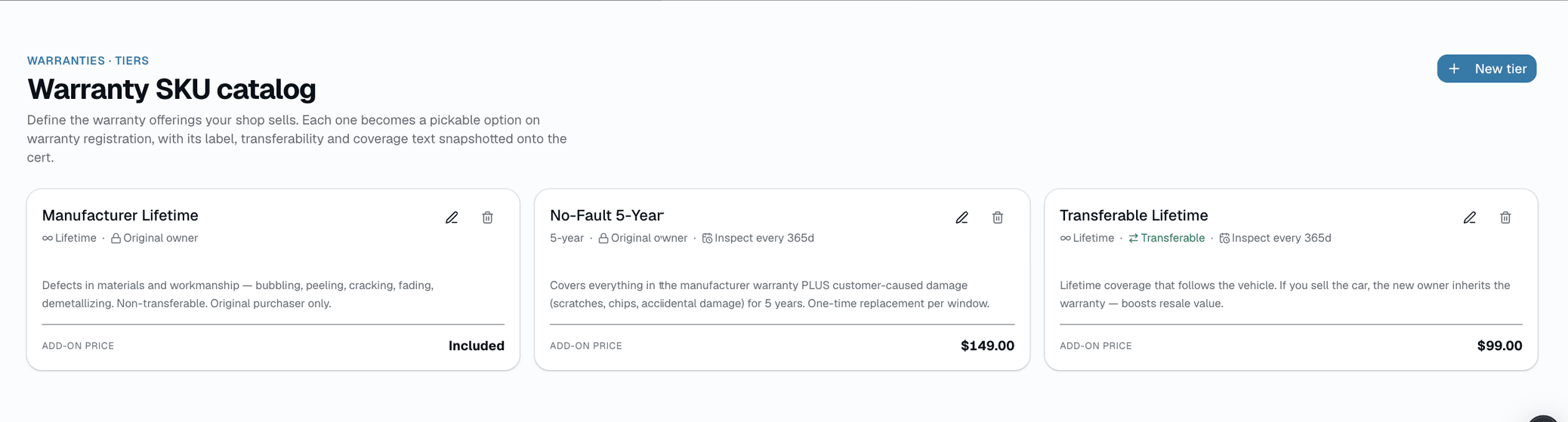
A flat catalog of coverage tiers: duration, coverage text, transferable, add-on price, optional inspection cadence..
Warranty report
Status counts, a 90-day expiring-soon list, and the recoat/inspection-due reminders for tiers that need them..
Warranty report
Status counts + what's coming due
Active
186
Expired
9
Claimed
4
Transferred
3
Expiring in 90 days
Miguel Ramirez
Carbon 35 · WR-20260213-9TZQL4XMHR
in 12 days
Sara Hanson
Carbon 20 · WR-20260122-3FKDW8YBNP
in 41 days
Inspections due
Tiers with an inspection cadence nudge the customer back before their coverage lapses.
Priya Menon
Gloss PPF 8 mil · WR-20260420-7HKQ3M9XZP
Overdue 6 days
Jason Kim
5-Year Ceramic Coating · WR-20260310-C6RJV2NLTQ
Due in 3 days
Who it's for
Built specifically for…
- Tint shops using XPEL / 3M / Glacier lifetime warranty products
- PPF installers competing on 10-year coverage and professional follow-up
- Ceramic coating pros who want coverage + re-treatment tracked
- Shops that have ever lost a dispute because 'we lost the paperwork'
- Owners who want a checkable, permanent warranty record without a spreadsheet
What it replaces
The old way…
- Photocopying the manufacturer's generic warranty sheet
- "Call us if anything's wrong" — no paper trail, no accountability
- Google Drive folder of scanned certs that nobody can find
- Lost warranty claim emails that took 2 weeks to respond to
Setting it up
- 1
Set up warranty tiers once
Create tiers in Settings → Warranties (e.g. Lifetime Ceramic Film, 10-Year PPF) with a duration, coverage text, and whether it's transferable. Add an inspection cadence if the coverage requires a periodic recoat/inspection.
- 2
Register the warranty after install
From the appointment page, a staff member registers the warranty — customer, film/windows description, installer, and a tier. A certificate number and PDF are generated. This is a manual step, not automatic on job completion.
- 3
Claims flow to one inbox
The customer files a claim from the certificate's public page with just the cert number — no account. It lands in your claims inbox with the install details attached. Move it through Submitted → In review → Approved / Denied / Resolved.
What this looks like in a shop
Illustrative scenario. A customer had ceramic tint installed 2 years ago and notices a bubble. She finds her certificate number, opens app.salesthumb.com/warranty/WR-20260420-7HKQ3M9XZP — no login needed — and files a claim: name, email, phone, 'Bubbling,' and a short description. The shop sees it in their claims inbox with the install details already attached and marks it Approved after a quick look.
Good to know
- Which plan includes warranties?
- Growth and Pro include it. See the Pricing page for everything in each plan.
- What software handles warranty registration for tint and PPF shops?
- SalesThumb registers the warranty when a job is done and emails the customer a link to a PDF certificate with a QR code and its public verification page, usually within about an hour. Customers can file a claim from that same link, and your team works claims in a claims inbox. Warranty registration and certificates are on Growth and Pro.
- What if the customer sells the car?
- If the tier is transferable, the current owner can start a transfer from the certificate's public page (text-code check, then the buyer's details and a bill-of-sale or ID photo), and a staff member approves it. Staff can also mark it Transferred directly. There's no VIN verification, and non-transferable tiers can't be transferred.
- Can I print physical warranty cards?
- You can print the certificate PDF directly. There's no separate wallet-card template today.
- Does this auto-register with the film manufacturer (XPEL, 3M, etc.)?
- No — registering a warranty in SalesThumb is separate from any manufacturer registration program. If your film brand requires its own registration, that's still a separate step you handle directly with them.
- Can I customize the claim reasons?
- Not today — the public claim form offers 6 fixed issue types (bubbling, peeling, discoloration, scratch, delamination, other) for every shop.
- Can customers attach photos to a claim?
- Not in the form today — it collects name, email, phone, issue type, and a description. If you need photos, ask the customer to reply to your follow-up with them.
- Is there an SLA or response-time target?
- Not built in — there's no SLA timer or escalation. Claims sit in Submitted until a staff member reviews them.
- Is there any AI help on the shop side?
- On the Pro plan, yes — the mobile app has a 'Warranty Triage' shortcut on the Today screen. A tech can photograph the issue and get an AI-suggested read. It's advisory only — you still make the approve/deny call in the Claims queue.
Works with your stack
React-PDF
Generates the certificate PDF
QR code
Printed on every certificate, links to the public verify page
Twilio SMS
Maintenance/recoat-due reminder texts for tiers with an inspection cadence set (off until you turn it on in Settings → Notifications)
Pairs well with
Inventory
Log the roll, deduct inches after the job in one screen — preview, then apply — get alerted before you run out mid-install. Built for tint, PPF, and ceramic shops. Included on Growth and Pro.
Job Photos
Every appointment gets a photo gallery. Techs capture on mobile (Growth and Pro; the app is view-only on Starter). Customers see a polished post-install gallery. On Pro, AI looks at the damage photos on a vehicle inspection and drafts the damage note for you. You protect yourself from 'it was like that when you got it' claims.
Customer CRM
Search by name, plate, or VIN in milliseconds. Every appointment, quote, invoice, warranty, and photo attached to the right record — forever.
3M and XPEL are trademarks of their respective owners. Use here is for comparison and identification purposes only and does not imply endorsement, partnership, or affiliation.