One connected processor, transparent fees.
Payments in SalesThumb ride on a single integrated payment processor, with flat-rate pricing (one bundled all-in rate) on every plan, or interchange-plus pricing on Growth and Pro. Pay links go out over SMS, open on the phone with card payment above the fold, and tap-through in a few seconds.
The quick version
Payments: Card payments by pay link, with deposits and refunds.
- Pay links over SMS + email with card payment above the fold
- ACH recorded as a manual payment method (like cash/check) — not a self-serve online ACH debit today
- Fast, no-login checkout on every pay-link page
Refunds, deposits, partial pays, and disputes all live in the app. Merchant onboarding is a short hosted application through the processor's own widget; funds settle on the processor's schedule, which SalesThumb doesn't configure. No Square terminal reconciliation. No Venmo screenshots. No "can you send me a text when it goes through?"
A closer look
01
The pay link that closes in seconds
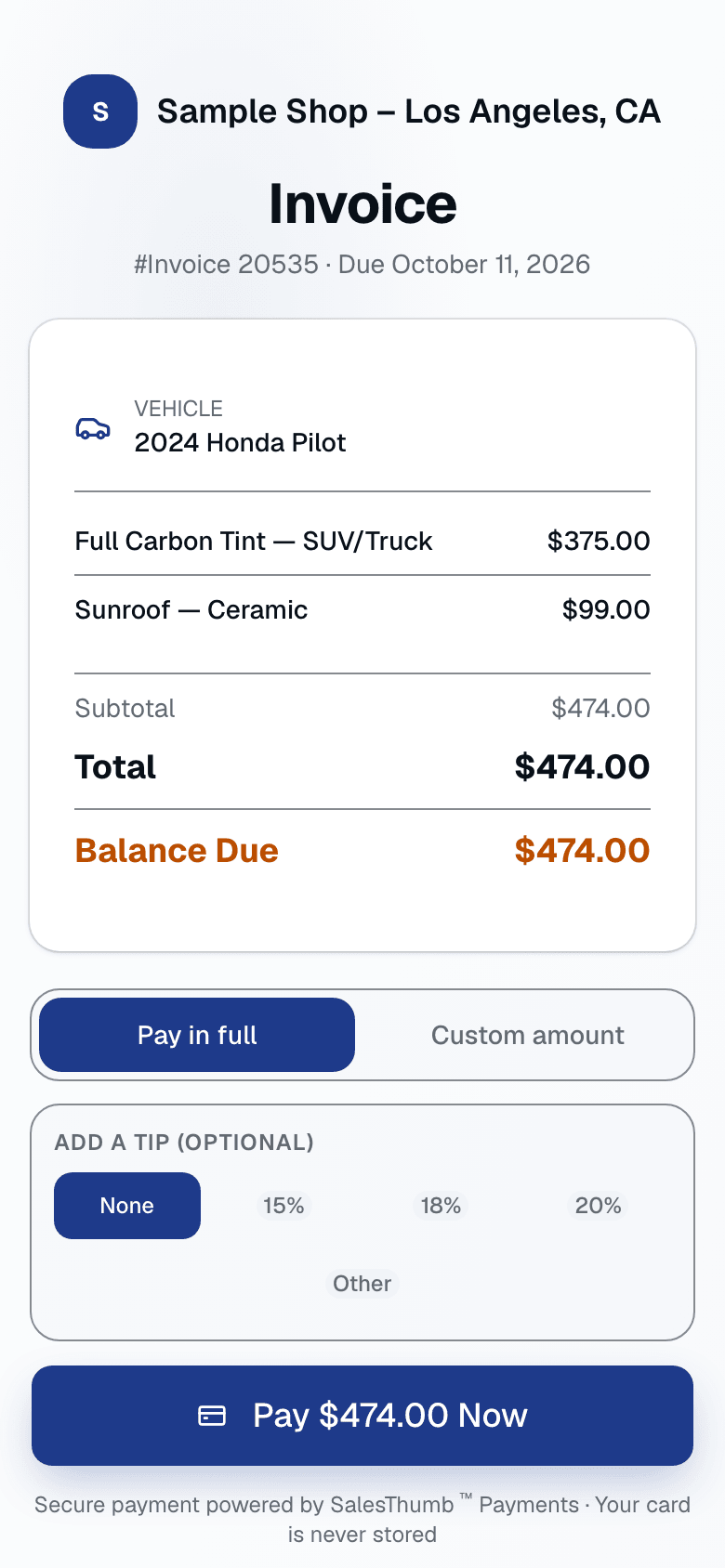
We send the pay link as a short tokenized URL over SMS or email. The customer taps once and lands on a page designed for one job: collect the money. Apple Pay sits front and center for a one-tap checkout, with a card form right below it for anyone who'd rather type in a number, and a trust badge at the bottom that signals it's a secure checkout. There is no account creation, no app install, no "forgot password." Payment processes through our processor and your invoice updates automatically.
- Short tokenized URL (salesthumb.com/i/8f3e2a1c) — works on any phone
- Apple Pay or card — no login barrier either way
- Trust badge signals a secure checkout, no account required
- Tip selector (15/18/20% presets + custom) auto-applied to the invoice
- Success screen shown to the customer right after payment
02
Deposits without the awkward conversation
Your quote requires a deposit? It's baked into the approval flow. Approve the quote, and the deposit amount is already shown as its own line in the total — one fixed quote, one deposit figure, no separate customer-facing tier picker to confuse the moment. One tap, card entered, deposit paid, quote marked approved. If they back out, you cancel the quote and refund the deposit in one click — with a reason code for your records. No "let me Venmo you when I get home" promise that never lands.
- Deposit on quote approval, set as a percent of the quote total
- Shown as its own line in the quote total — transparent pricing, no surprises
- Cancel the quote and refund the deposit in one click — there's no fixed automatic 24h/no-show policy today, it's a manual staff decision
- Deposit auto-credits to the invoice when you convert the quote
Approved — pay your deposit below to lock in your appointment
Quote #1247 for Priya
Your Estimate
Enter your card details
Secure checkout · PCI-DSS Level 1
03
Refunds without leaving the payment record
Every completed card payment is refundable from its detail screen. Pick the payment, tap Refund, enter full or partial amount, pick a reason, and your processor issues the refund. How fast it lands on the customer's card depends on their bank, and your invoice balance updates in the same transaction as the refund.
- Full or partial refunds on any completed card payment
- Reason codes: duplicate, fraudulent, or requested by customer
- Gated to OWNER/ADMIN roles by default (shop.issueRefunds permission) — not a dollar-threshold approval queue
- Refund audit log entry with staff attribution
Refund payment PAY-7744
SalesThumb Payments payin rp_3OqL… · customer requested a partial refund
Original payment
$470.00
Visa
Customer
Priya M.
Invoice
Invoice 1310
Captured
Apr 20 · 11:12 AM
Staff
Alex T.
Fee (bundled, GROWTH tier rate)
Refund amount
Reason
- Requested by customer
- Duplicate payment
- Fraudulent
Refund issued — timing depends on the customer's bank
04
Set up in three steps
Getting set up is one short application. Tap Connect payments in Settings, then fill in your business details, the bank account you want paid to, and an ID check in our payment partner's secure form. As soon as you're approved, card payments switch on and money settles to your bank. Your rate is one bundled number for your plan, and every fee shows in Reports → Fees.
- One button to start, one application to fill out
- You own the merchant account and the money
- Your bank details go to the payment partner's secure form, never to SalesThumb
- Each shop in a multi-shop business gets its own account
Settings · Payments
Sample Shop LLC
Accept payments
Three steps, then you're taking cards.
1. Tap Connect payments
In Settings → Payments. One button.
2. Fill out one application
Business info, the bank account you want paid to, and an ID check — in our payment partner's secure form.
3. You're live
Card payments switch on. Funds settle to your bank.
✓ Payments connected — you're ready to accept charges.
Accepted Payment Methods
Credit / Debit Card
Via SalesThumb Payments
Cash
Record manually
Check
Record manually
05
One bundled fee, no line-item guesswork
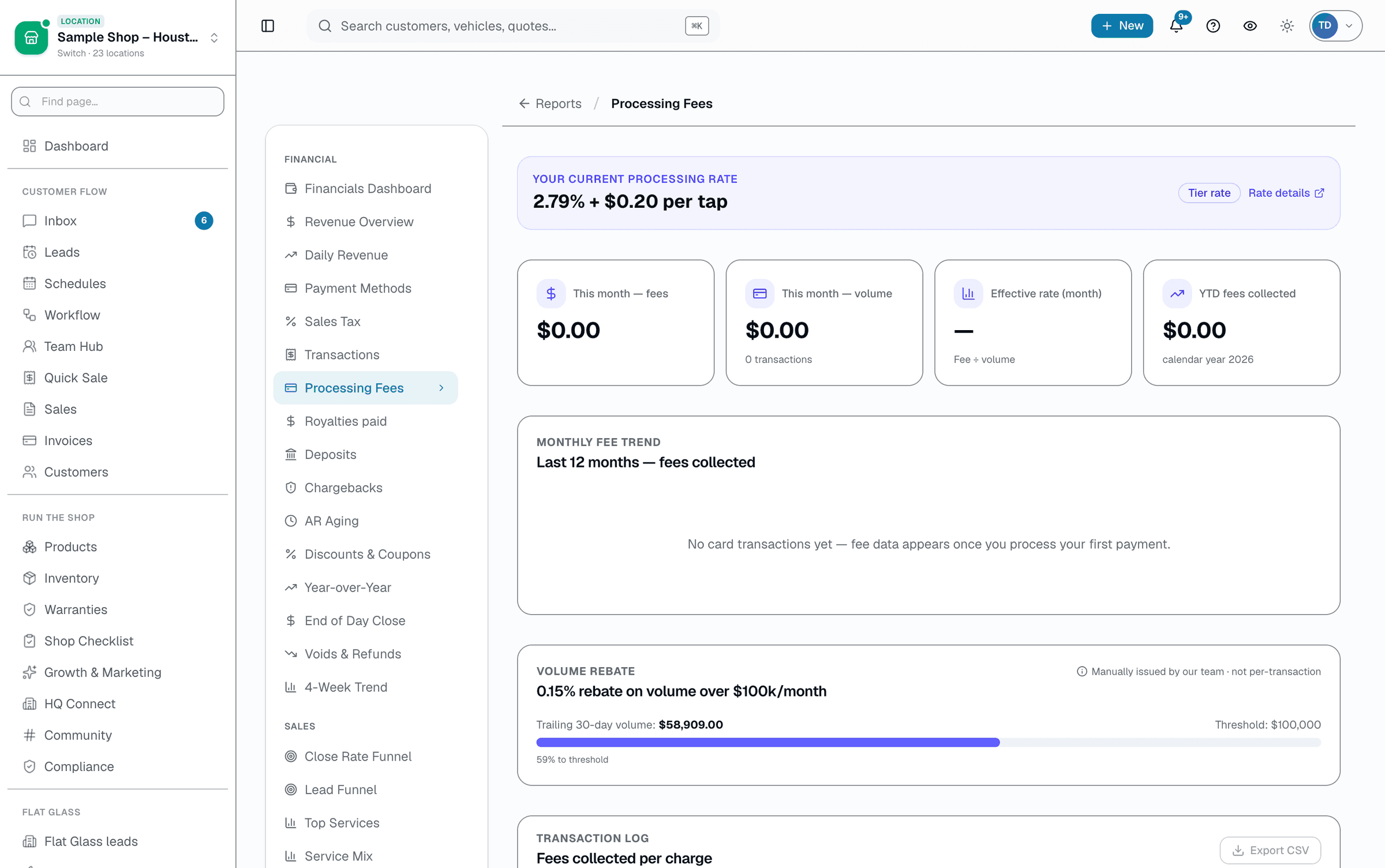
Your processing rate is a single all-in number set by your plan tier — interchange, network fees, and SalesThumb's cut are already folded together, so there's no separate "processor fee" plus "platform markup" to add up. Reports → Fees shows your effective rate, per-transaction fees, and progress toward the volume rebate. Your customer never sees any of this. Passing card fees on to customers is coming soon.
- One bundled all-in rate per tier — no separate processor/platform split
- Reports → Fees: KPI row, 12-month chart, and a per-transaction fee log with CSV export
- 0.15% volume rebate on trailing-30-day volume over $100k/mo — eligibility calculated automatically, credit issued by our team
- Coming soon: optional customer card fee (credit surcharge or cash discount), off until state rules and disclosure wording are signed off
- No monthly minimum, no PCI fee, no batch fee, no statement fee
- 1099-K handled by your processor at year-end
06
One screen, every dollar
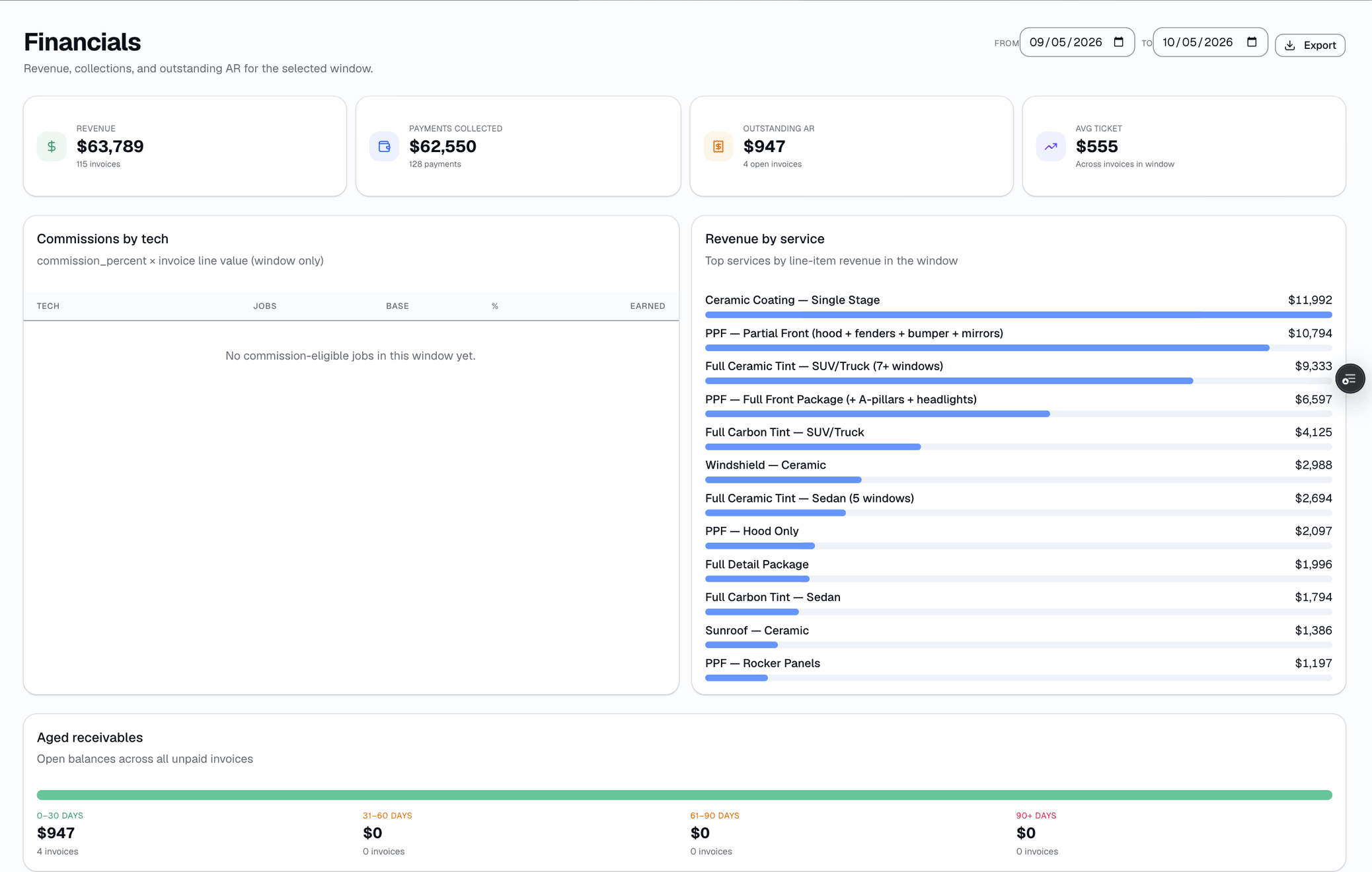
Reports → Transactions puts a KPI row (net collected, gross, refunds, payment count, and average ticket) above a log of every payment — completed, pending, failed, or refunded — filterable by date range, status, and payment method, with CSV export.
- Log of every card, cash, check, ACH, and financing payment
- KPI strip: net collected, gross, refunds, payment count, average ticket
- Filter by date range, status, and payment method
- Payment method shown per transaction (card, cash, check, ACH, financing, other)
Everything it does
The complete list. The plan tag above shows which plans include it.
Accepting payments
- Pay links over SMS + email with card payment above the fold
- ACH recorded as a manual payment method (like cash/check) — not a self-serve online ACH debit today
- Fast, no-login checkout on every pay-link page
- Tip capture on every card transaction (15/18/20% presets + custom)
- Cash, check, ACH, financing — manual entry by staff
Deposits, refunds & disputes
- Deposits on quote approval, set as a percent of the quote total
- Auto-credit deposits to the final invoice on conversion
- One-click refunds — full or partial — with a reason code (duplicate, fraudulent, or requested by customer)
- Chargebacks auto-open in your dispute queue; on Pro, AI suggests an evidence pack you review before submitting
- Customer-initiated refund requests land in the same dispute queue for staff to work
- Refund audit log with staff attribution
Fees & payouts
- Flat-rate card pricing on every plan (lower on higher plans), or interchange-plus on Growth and Pro — your rate is shown in Reports → Fees
- Funds settle on the processor's own schedule — SalesThumb doesn't configure payout timing or offer instant payout
- Per-shop merchant account (useful for multi-location orgs)
- 0.15% volume rebate on trailing-30-day processing over $100k/mo — eligibility calculated automatically, credit issued by our team
- 1099-K handled by your processor automatically
A tour of the screens
Every meaningful view, the path through it, and the moments that matter — so you know exactly what you're buying.
Deposit at quote approval
One quote, one total.
Sees the deposit due as its own line, pays by card — the shop follows up to schedule once it clears.
Approved — pay your deposit below to lock in your appointment
Quote #1247 for Priya
Your Estimate
Enter your card details
Secure checkout · PCI-DSS Level 1
Refund from the payment record
Pick any completed payment, full or partial refund, one of three reason codes — issued through your processor..
Refund payment PAY-7744
SalesThumb Payments payin rp_3OqL… · customer requested a partial refund
Original payment
$470.00
Visa
Customer
Priya M.
Invoice
Invoice 1310
Captured
Apr 20 · 11:12 AM
Staff
Alex T.
Fee (bundled, GROWTH tier rate)
Refund amount
Reason
- Requested by customer
- Duplicate payment
- Fraudulent
Refund issued — timing depends on the customer's bank
Getting set up
Tap Connect payments, fill out one application in our payment partner's secure form, and card payments switch on once you're approved..
Settings · Payments
Sample Shop LLC
Accept payments
Three steps, then you're taking cards.
1. Tap Connect payments
In Settings → Payments. One button.
2. Fill out one application
Business info, the bank account you want paid to, and an ID check — in our payment partner's secure form.
3. You're live
Card payments switch on. Funds settle to your bank.
✓ Payments connected — you're ready to accept charges.
Accepted Payment Methods
Credit / Debit Card
Via SalesThumb Payments
Cash
Record manually
Check
Record manually
Fee transparency
Reports → Fees: one bundled all-in rate per tier, the real volume rebate progress, and a per-transaction fee log — no separate processor-vs-platform split..
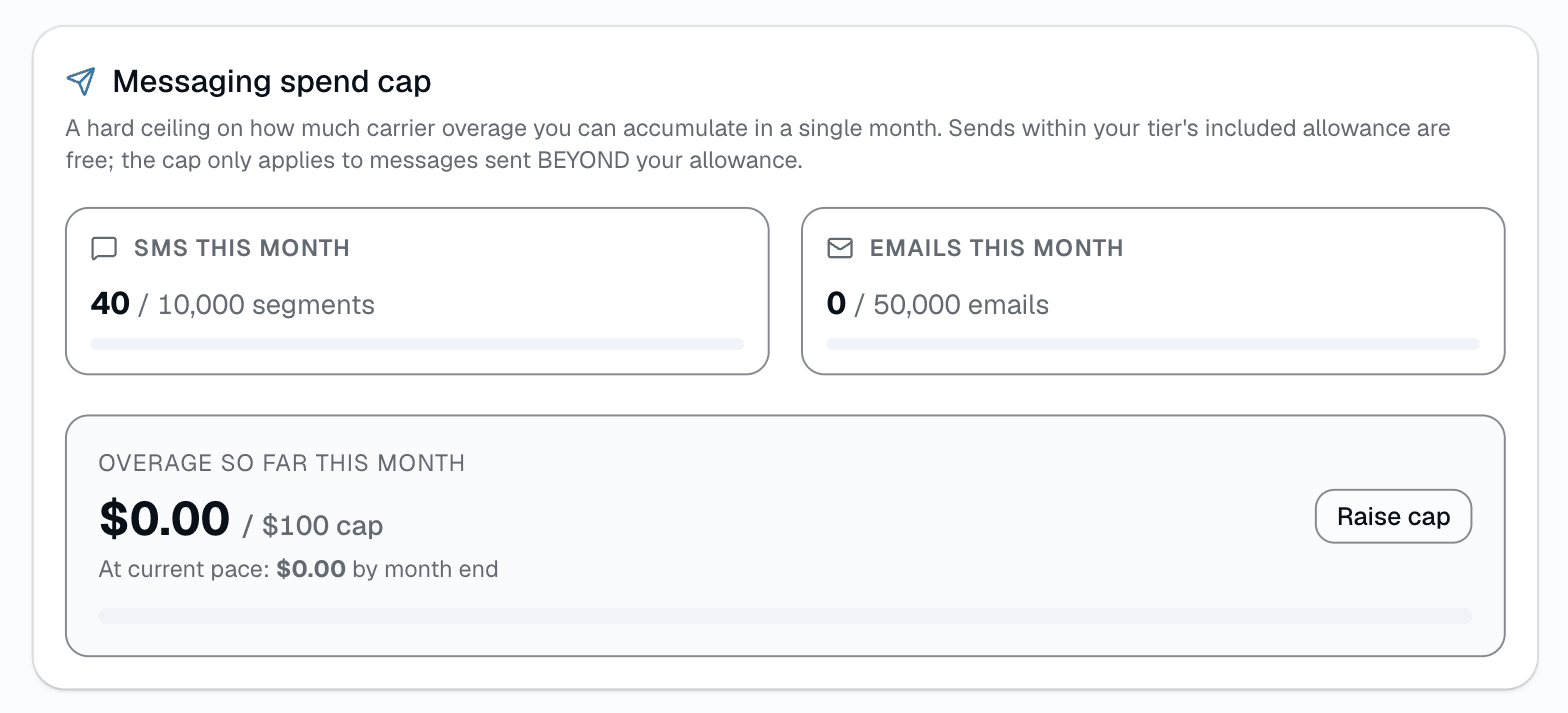
Messaging spend cap
A separate per-shop safeguard: a $100/mo default cap on SMS + email overage, with a live usage bar and a BYOC escape hatch..
Who it's for
Built specifically for…
- Shops still running Square Terminal at the counter + Venmo for deposits
- Owners who want one all-in card rate instead of a processor fee plus a separate software fee
- Anyone who's eaten a $1,200 chargeback because they had no evidence packet
- Multi-location shops that need per-shop bank accounts and payouts
- Installers who want their tips to hit the invoice, not a jar on the counter
What it replaces
The old way…
- Square Terminal + separate Venmo / Zelle for deposits
- "Click here to pay" links from QuickBooks, Wave, or FreshBooks
- PayPal invoices with 3.49% + $0.49 fees
- Competitor software that charges for a payments module on top of processing
- Manual reconciliation spreadsheets at month-end
Setting it up
- 1
Connect your processor once
A short hosted application through our payment processor's own onboarding widget. Funds land in your bank account on the processor's schedule, which SalesThumb doesn't configure.
- 2
Collect from anywhere
Pay links, deposits on the public booking page, tips on the pay page — all reconciled against the same invoice.
- 3
One bundled fee
Your rate is a single all-in number by tier, visible in Reports → Fees — no separate processor-fee-plus-markup line to add up.
What this looks like in a shop
Illustrative scenario: Invoice goes out via text. Customer taps the pay link, pays by card in a few seconds. The payment is reconciled automatically against the invoice. No QuickBooks export. No Square dashboard. No sticky notes.
Good to know
- Which plan includes payments?
- Every plan includes it, Basic through Pro (Basic: no deposits). See the Pricing page for everything in each plan.
- What if I want to use my own payment processor?
- We support one integrated processor today (card payments). Other processors aren't supported today — ping us if you need one.
- How fast do funds arrive?
- On your payment processor's own schedule — SalesThumb doesn't set or expose a per-shop payout schedule today.
- What happens if a customer disputes a charge?
- A chargeback from the network auto-opens a dispute in your queue. On Pro, AI reads the reason code and what evidence you have on file (photos, signed quote, waivers, message thread) and suggests which sections to include in an evidence pack plus a draft cover note — you review, adjust, and submit it yourself; nothing submits automatically.
- Can I pass processing fees on to the customer?
- Not yet — it's coming soon. You can set up a credit surcharge or cash discount in Settings → Payments today, but no fee is added to a customer's bill until it launches. Surcharging is restricted or banned in some states, and debit and prepaid cards can never be surcharged.
- Do you support card readers at the counter?
- Yes — register a card terminal from our payment processor in Settings → Card terminals, then charge an invoice on it from the invoice's Collect payment dialog. You can also key the card in the dashboard, send a pay link the customer taps on their own phone, or record cash, check, ACH, or financing manually. All land on the same invoice as online payments.
- What about tips?
- Every card payment on the pay page prompts a tip selector (15/18/20% presets + custom).
Works with your stack
Payment processor
Card payments; ACH is a manual tender, not a self-serve rail
QuickBooks Online
Paid-invoice push (one-way, Growth and up)
Pairs well with
Invoices
Convert any approved quote to a branded invoice in one click. Partial pays, deposits, and final balance all tracked against the same line items.
Quotes
Build a quote from real line items — services, film, parts, fees — send it, and the customer approves with a drawn signature and a card deposit on their phone. No account needed on either side.
Online Booking
Your own branded booking URL — salesthumb.com/book/your-shop. Customers pick a service, a time, and pay a deposit if you require one. It runs 24/7.