Invoices your customer actually reads.
Invoicing in SalesThumb is a one-tap transition from job-done to money-in. Convert any approved quote to a branded invoice, adjust if scope changed, and send a pay link over SMS or email.
The quick version
Invoices: Turn an approved quote into an invoice in one click.
- One-click quote → invoice (deposits carry, line items lock, number increments)
- Line items with per-line tax, unit price, quantity, discount
- Auto-numbered per shop from one sequence shared with quotes
Your customer opens it on their phone, pays by card, and the invoice ties back to the quote, the deposit, and the appointment. Paid invoices push one-way into QuickBooks Online with a tap, the matching customer created automatically. No more Venmoing yourself from the customer's iPhone while the install waits. You do the work, we collect the money, your paid invoices land in QuickBooks.
A closer look
01
Turn a quote into an invoice without retyping it
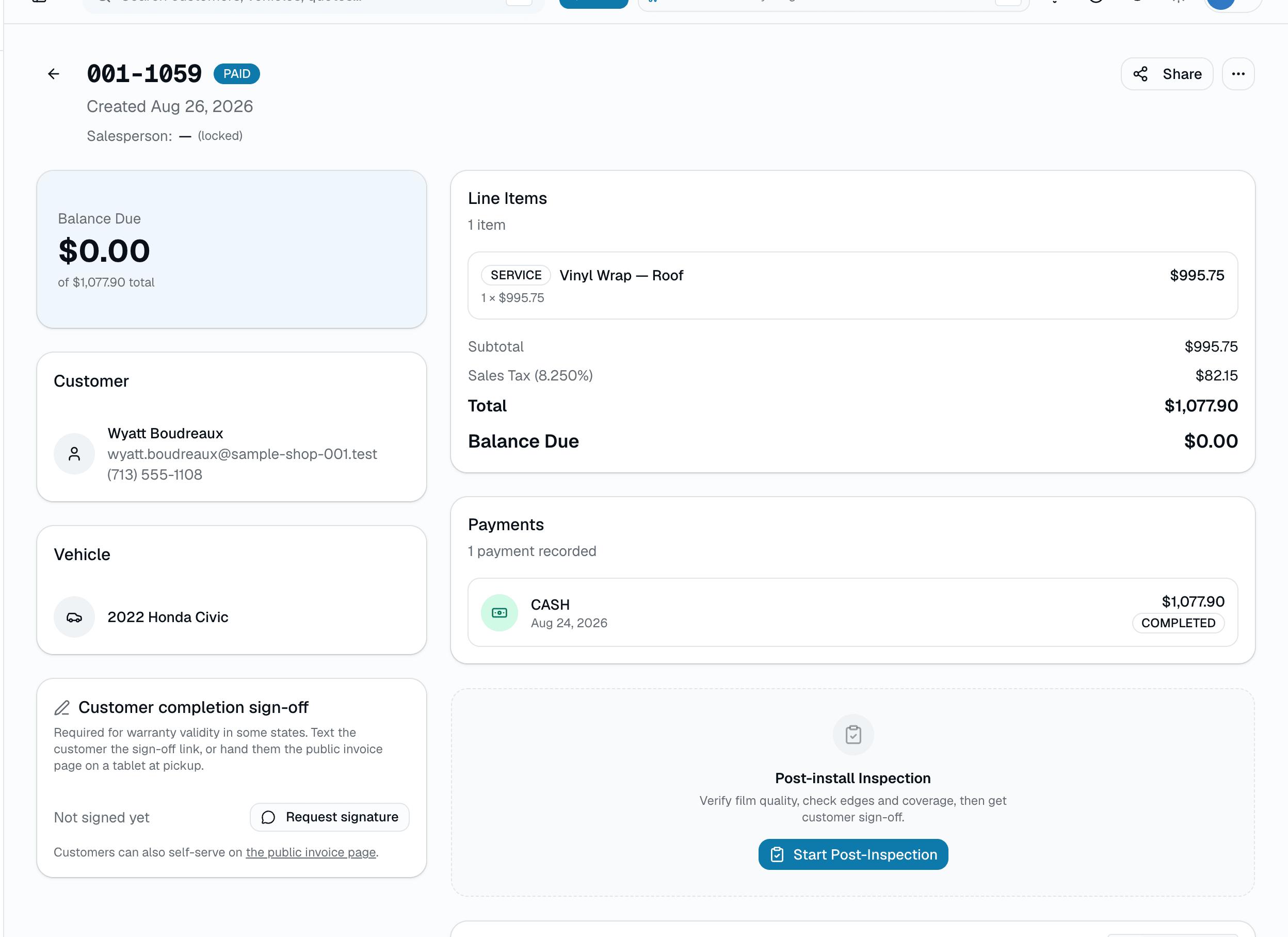
The invoice editor inherits every line from the approved quote. Deposits are pre-credited. Tax carries over from the quote. Invoice numbers come from one per-shop sequence shared with quotes, so they always increase but skip the numbers quotes use. One workflow, from quote to invoice to paid receipt.
- Deposit auto-credited on conversion — balance reflects what's actually owed
- Auto-numbered from a per-shop sequence shared with quotes
- Per-line tax on every line item
- Tied back to the originating quote and appointment
02
The invoice your customer taps once
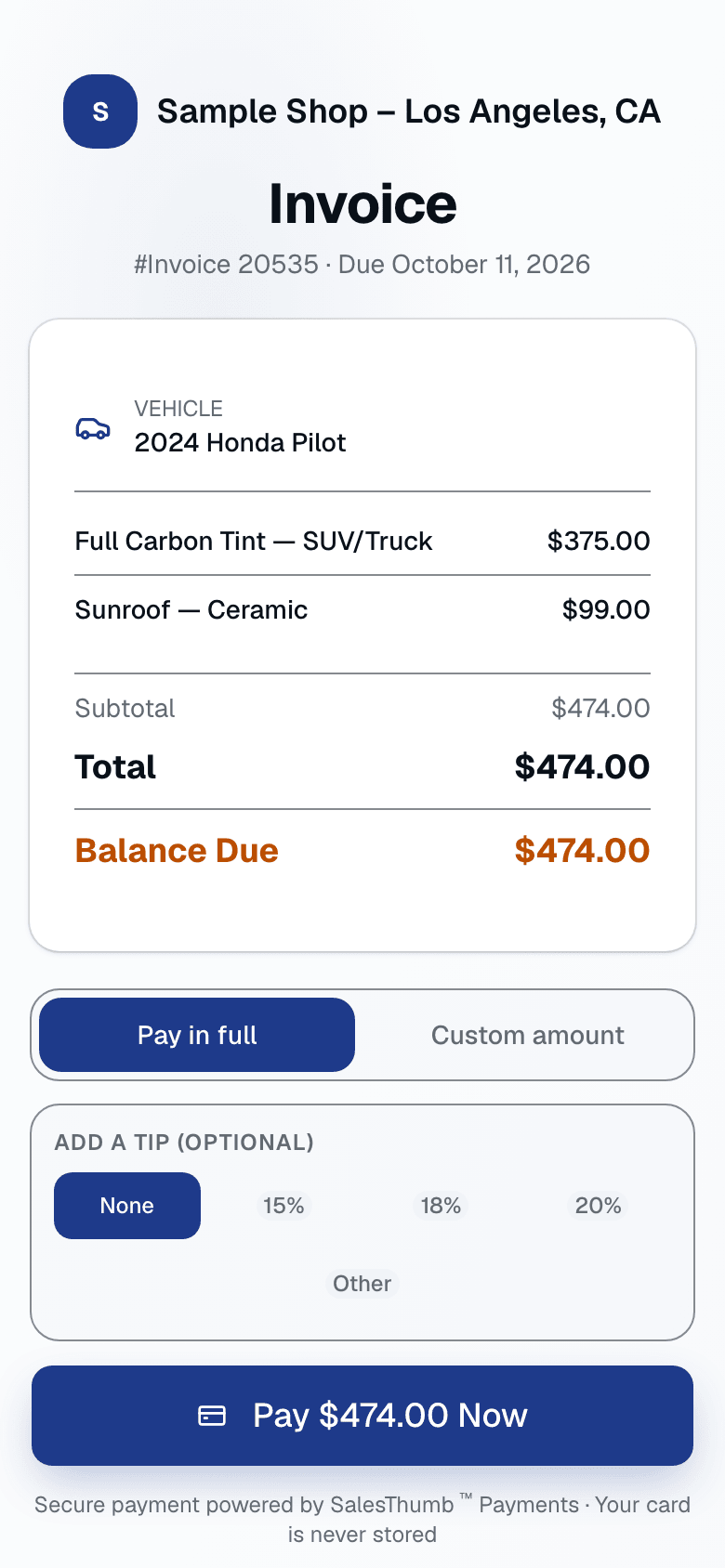
Most of your invoices get read on a phone while standing next to their car. SalesThumb's customer pay page is designed for that moment — brand-stamped, mobile-first, with card payment above the fold, and a choice to pay the full balance or a custom amount. One tap, the payment posts and the invoice is marked paid, ready to push to QuickBooks with a click. No login required, no app install, no "how do I pay this?" text.
- Card payment above the fold on mobile
- Pay the full balance or a custom partial amount
- Success screen on the pay page right after payment
- Status auto-updates on your dashboard (Sent → Partial → Paid)
03
Split payments, no spreadsheet
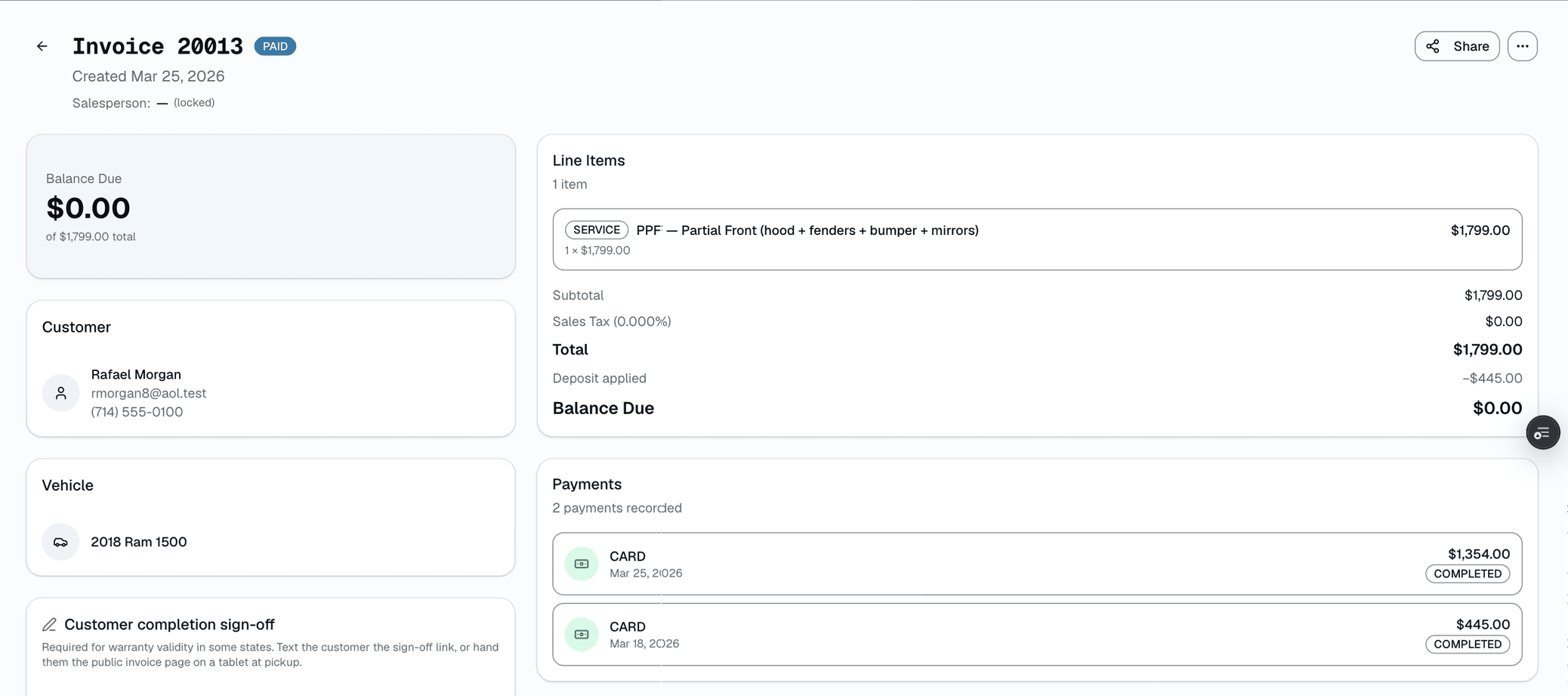
Deposit $200 at booking, $500 cash when the tech starts, $500 card at pickup. Every tender lands on the same invoice with method, staff member, and timestamp. Balance auto-recomputes. No reconciliation dance at end of day — your dashboard already shows the correct total and the invoice already says "Paid in full."
- Unlimited tenders per invoice
- Card, cash, check, ACH, financing — all logged
- Per-tender staff attribution (who took the payment)
- Automatic balance tracking — no more "wait, what did they still owe?"
04
QuickBooks invoice push, one click
Push your paid invoices to QuickBooks Online one-way — each posts as a QuickBooks invoice and the matching customer is created automatically if it's new. Click Sync now in Settings → Integrations and your bookkeeper stops re-keying paid jobs. SalesThumb saves the QuickBooks invoice ID back on each record so nothing double-posts. Two-way sync — changes made in QuickBooks flowing back into SalesThumb — is on the roadmap.
- One-way push from Settings → Integrations (Sync now)
- Matching customer created automatically if new
- QuickBooks invoice ID saved back on each record (no double-posting)
- Clear pushed / error result on every run
QuickBooks Online · invoice push
Last push 2:04 PM · 12 invoices pushed · 0 errors
Recent pushes
Sync nowInvoice 1310 · Priya M.
$1,061.00Pushed to QuickBooks2:04 PMInvoice 1309 · Miguel R.
$529.00Pushed to QuickBooks2:04 PMInvoice 1308 · Sara H.
$749.00Pushed to QuickBooks2:03 PMInvoice 1311 · Jenna P.
$329.00Pending — click Sync nowPending
What gets pushed
- Paid invoice, posted as a QuickBooks invoice
- Line items as entered on the invoice
- Matching customer — created automatically if new
- QuickBooks invoice ID saved back on the record
One-way push
Your accountant keeps QuickBooks as the source of truth — no re-keying paid invoices by hand.
Two-way sync (changes in QBO flow back) is on the roadmap.
Everything it does
The complete list. The plan tag above shows which plans include it.
Invoice creation
- One-click quote → invoice (deposits carry, line items lock, number increments)
- Line items with per-line tax, unit price, quantity, discount
- Auto-numbered per shop from one sequence shared with quotes
- Optional due date per invoice, plus an overdue view (from the dashboard) of unpaid invoices older than 30 days
- Configurable fees (Settings → Fees) — start from presets like Shop Supplies, EPA/Hazmat, Disposal, Fuel Surcharge, and Rush Fee, or add your own; flat or percent, on quotes, invoices, or both
Customer delivery
- PDF with your shop name, address, phone, email, and custom footer text
- Send over SMS, email, or both — customer picks the link they want
- Pay link opens on the phone with card payment at the top
- Partial payments + split tender (card + cash + check on one invoice)
- Customer portal view — they see all their invoices, paid + unpaid
Accounting & QuickBooks
- Push paid invoices one-way to QuickBooks Online with a click
- Matching customer created automatically if new
- QuickBooks invoice ID saved back on each pushed record
- Cash, check, ACH tracking (manual entry with notes)
- One default sales-tax rate per shop (editable per quote or invoice), a taxable toggle per line, and tax-exempt customers
- Export everything as CSV any time
A tour of the screens
Every meaningful view, the path through it, and the moments that matter — so you know exactly what you're buying.
Customer pay page
Mobile-first page with card payment above the fold.
One tap, invoice paid.
Partial payments
Split a $1,200 invoice: $200 deposit → $500 mid-job → $500 final.
Each transaction stamped with method + staff + date.
Branded PDF
PDF with your shop's name, contact details, and custom footer — regenerated fresh every time it's opened..
Sample Shop LLC
4412 W 6th St · Austin, TX 78703 · (512) 555-0199
Billed to
Priya M.
2023 Mazda CX-5 · plate 8RKJ291
Invoice
Invoice 1310
Apr 20 2026
Thank you for choosing Sample Shop LLC. Warranty covered on all ceramic installs for 10 years.
QuickBooks invoice push
Push paid invoices one-way to QuickBooks Online with a click — the matching customer is created automatically..
QuickBooks Online · invoice push
Last push 2:04 PM · 12 invoices pushed · 0 errors
Recent pushes
Sync nowInvoice 1310 · Priya M.
$1,061.00Pushed to QuickBooks2:04 PMInvoice 1309 · Miguel R.
$529.00Pushed to QuickBooks2:04 PMInvoice 1308 · Sara H.
$749.00Pushed to QuickBooks2:03 PMInvoice 1311 · Jenna P.
$329.00Pending — click Sync nowPending
What gets pushed
- Paid invoice, posted as a QuickBooks invoice
- Line items as entered on the invoice
- Matching customer — created automatically if new
- QuickBooks invoice ID saved back on the record
One-way push
Your accountant keeps QuickBooks as the source of truth — no re-keying paid invoices by hand.
Two-way sync (changes in QBO flow back) is on the roadmap.
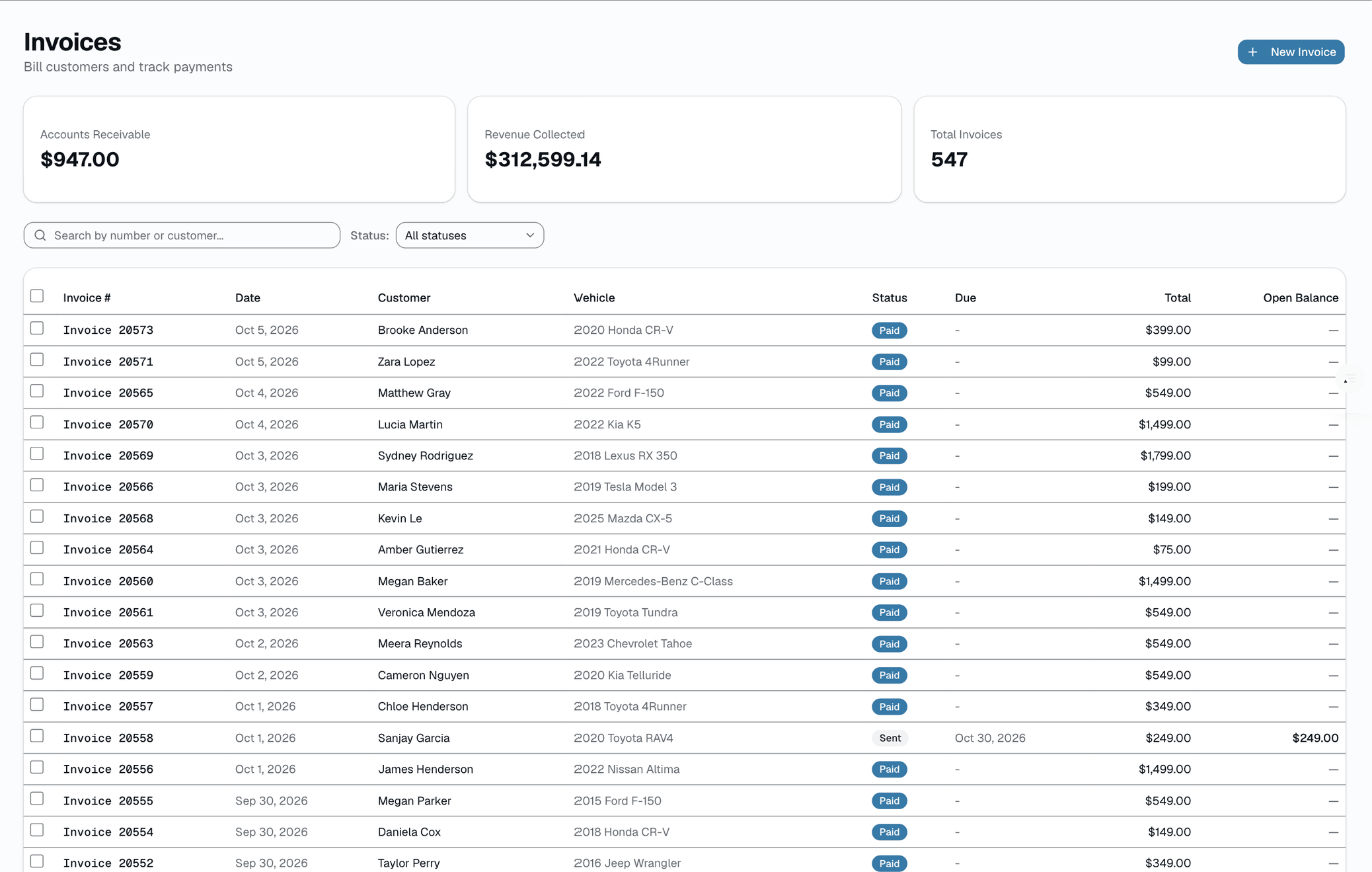
Invoice inbox
Unpaid / partial / overdue / paid — filter and search in one screen..
Lifecycle timeline
Every invoice state transition — drafted, sent, partially paid, paid — on a single per-invoice timeline..
Invoice 1310 · lifecycle
3 days · 5 events · 100% collected
Event log
Paid in full
Today · 11:12 AM$470 card · balance $0 · INV marked paid · Alex T.
Cash payment $300
Today · 9:58 AMReceived at check-in · Dev P.
Invoice sent via SMS
Yesterday · 4:12 PMPay link texted to Priya M. · Alex T.
Deposit $291.30 applied
Apr 18 · 4:08 PMCarried from Quote 1247 · System
Invoice created from quote
Apr 18 · 4:08 PMQuote 1247 → Invoice 1310 · Alex T.
Who it's for
Built specifically for…
- Shops still sending PDFs attached to Gmail messages
- Owners who've ever Venmoed themselves from the customer's iPhone
- Anyone whose customers "forgot" to pay and came back months later for warranty
- Tint shops that take deposits by Zelle and final by card and lose track
- Accountants who need clean QuickBooks data, not a month-end cleanup
What it replaces
The old way…
- Venmo / Zelle / Cash App screenshots for every payment
- PDFs attached to emails that land in spam
- Paper receipts you photograph and file in a drawer
- "Send me a screenshot when it goes through"
- Month-end QuickBooks reconciliation marathons
Setting it up
- 1
From quote to invoice, one tap
No re-entry. Deposits carry over, line items lock in, and the invoice number increments per shop.
- 2
Send a pay link
SMS or email — customer clicks, pays, done. Sent, partial, and paid transitions are logged on the invoice timeline.
- 3
Push to QuickBooks
Card payments hit the invoice. Cash, check, or ACH get a manual entry. Paid invoices push one-way to QuickBooks Online with a click — the matching customer is auto-created.
What this looks like in a shop
Illustrative scenario: You finish a $1,200 ceramic coating. The quote was approved two weeks ago with a $200 deposit. You tap Convert → the invoice appears pre-populated with the quote lines and $200 already credited. Balance due: $1,000. Text the pay link. She taps to pay. Push it to QuickBooks with a click.
Good to know
- Which plan includes invoices?
- Every plan includes it, Basic through Pro. See the Pricing page for everything in each plan.
- Can I customize the invoice layout?
- Partly — the PDF shows your shop's name, address, phone, and email, and you can add custom footer text per shop. Logo, accent color, and alternate templates aren't on the invoice PDF today.
- What about sales tax?
- Set a default sales-tax rate per shop, mark each line taxable or not, and flag tax-exempt customers. The Sales Tax report totals what you collected for any period, breaks it down by rate, keeps a remittance log you tag by jurisdiction, and exports to CSV for your accountant.
- How does the QuickBooks integration work?
- It's a one-way push on Growth and up: connect QuickBooks Online with per-shop OAuth, then push your paid invoices to QuickBooks with a click (Settings → Integrations → Sync now). Each posts as a QuickBooks invoice and the matching customer is created automatically if it's new — so your bookkeeper stops re-keying paid jobs. Two-way sync (changes in QuickBooks flowing back) is on the roadmap.
- Can I void an invoice?
- Yes — voiding marks the invoice VOID and blocks any further payment collection against it. It doesn't automatically refund a payment already taken; issue a separate refund on that payment if money needs to go back.
- Can one invoice be paid with multiple methods?
- Yes. A $1,200 invoice can be $200 deposit via card, $500 cash at pickup, and $500 card on the balance. Every tender is logged with method, date, and the staff member who took it. The invoice is only marked paid when the balance hits zero.
- Do I need my own payment processor account?
- You get your own merchant account, but you don't bring an existing one. Setup is a short application through our payment processor's hosted onboarding — it creates a new merchant account for your shop, and you own that account and its funds; multi-shop orgs get one per shop. Our platform fee is a single bundled, tier-based rate, visible in Reports → Fees before and after you go live.
Works with your stack
Payment processor
Card payments
QuickBooks Online
One-way paid-invoice push
Google Workspace email
Branded email delivery
Twilio
SMS pay-link delivery
React PDF
Branded invoice document generation
Pairs well with
Quotes
Build a quote from real line items — services, film, parts, fees — send it, and the customer approves with a drawn signature and a card deposit on their phone. No account needed on either side.
Payments
Accept cards online with a one-click pay link in SMS or email. Partial payments, deposits, refunds — all handled. Flat-rate card pricing on every plan, or interchange-plus on Growth and Pro — your rate is visible any time in Reports → Fees.
Reports
SalesThumb's 83 reports live in a 14-category sidebar in the app; grouped here by the decision they answer, they sort into 6 clusters. The six: cash & revenue, job & service profitability, team & schedule performance, marketing & lead performance, customer retention & risk, and customer obligations — the reports inside each cluster export individually to CSV. Basic and Starter include the core reports; Gross Profit per Job, the installer and service-time reports, the close-rate funnel, Referral Attribution, ZIP Code Density, Channel CAC / ROI, Loyalty Program, and the inventory reports need Growth.