One clean quote. Line items, e-signature, a deposit link.
The strongest quote is one the customer can read on their phone and approve with a signature. SalesThumb turns a price conversation into a signed commitment and a paid deposit in a couple of minutes — while you're still on the call.
The quick version
Quotes: One clean quote with an e-signature and a deposit link.
- Line items: services, film, parts, fees, discounts, add-ons
- Guided window-tint picker: tap a window, pick a Good/Better/Best film tier + VLT shade, priced against your catalog
- Reusable templates (name/description/optional vehicle-class tag) loaded manually from a search popover
Every quote is one fixed set of line items (services, film, parts, fees, discounts) with one total; there's no separate customer-facing tier picker — if you want to offer a customer a choice, you send them the quote you want them to pick, built with the film tier (Good/Better/Best) you and the customer already agreed on.
A closer look
01
Good, better and best film tiers in one quote
Every film in your catalog is tagged Good, Better, or Best. When you're building a quote, tapping "Add window tint" opens a per-window picker: tap a window, choose a tier + VLT shade, and it prices off your catalog exactly like the in-store Sales Matrix. That's a real, useful tier system — it just lives on the operator's side of the build, not as three separate prices the customer chooses between after you send it. Whatever tier mix you land on becomes the ONE quote total the customer sees.
- Per-window tier + VLT picker, not a fixed "window set" toggle
- Priced off your shop's catalog, same math as the in-store kiosk
- One quote = one price when it's sent — no customer-side tier switch
- Templates let you save a tier mix you use often and reload it
Comparing tiers · 2023 Mazda CX-5 · Full 7 windows
Operator view · pick one price point to build the quote
Good
Dyed film
$329
- 5% · 20% · 35% VLT
- Blocks 99% UV
- 5-year fade warranty
Better
Carbon film
$529
- Signal-safe — no GPS interference
- Blocks 53% heat
- 10-yr bubble + fade warranty
Best
Ceramic IR
$829
- Blocks 88% IR heat
- Blocks 99% UV
- Lifetime transferable warranty
02
Quotes expire on their own
A quote you send gets a valid-for window (default 30 days, editable per quote). A daily sweep flips any SENT or VIEWED quote past its expiry date to EXPIRED automatically — that's the only automatic thing that happens to a stale quote. There's no built-in messaging sequence that chases the customer for you; if you want an automated nudge, you build one yourself in Drips, triggered off the quote's status.
- Configurable valid-for window per quote (default 30 days)
- Daily automatic sweep flips lapsed quotes to Expired
- No automatic follow-up SMS or email is sent by this feature
- Build your own status-triggered nudge in Drips if you want one
03
Every quote in one filterable list
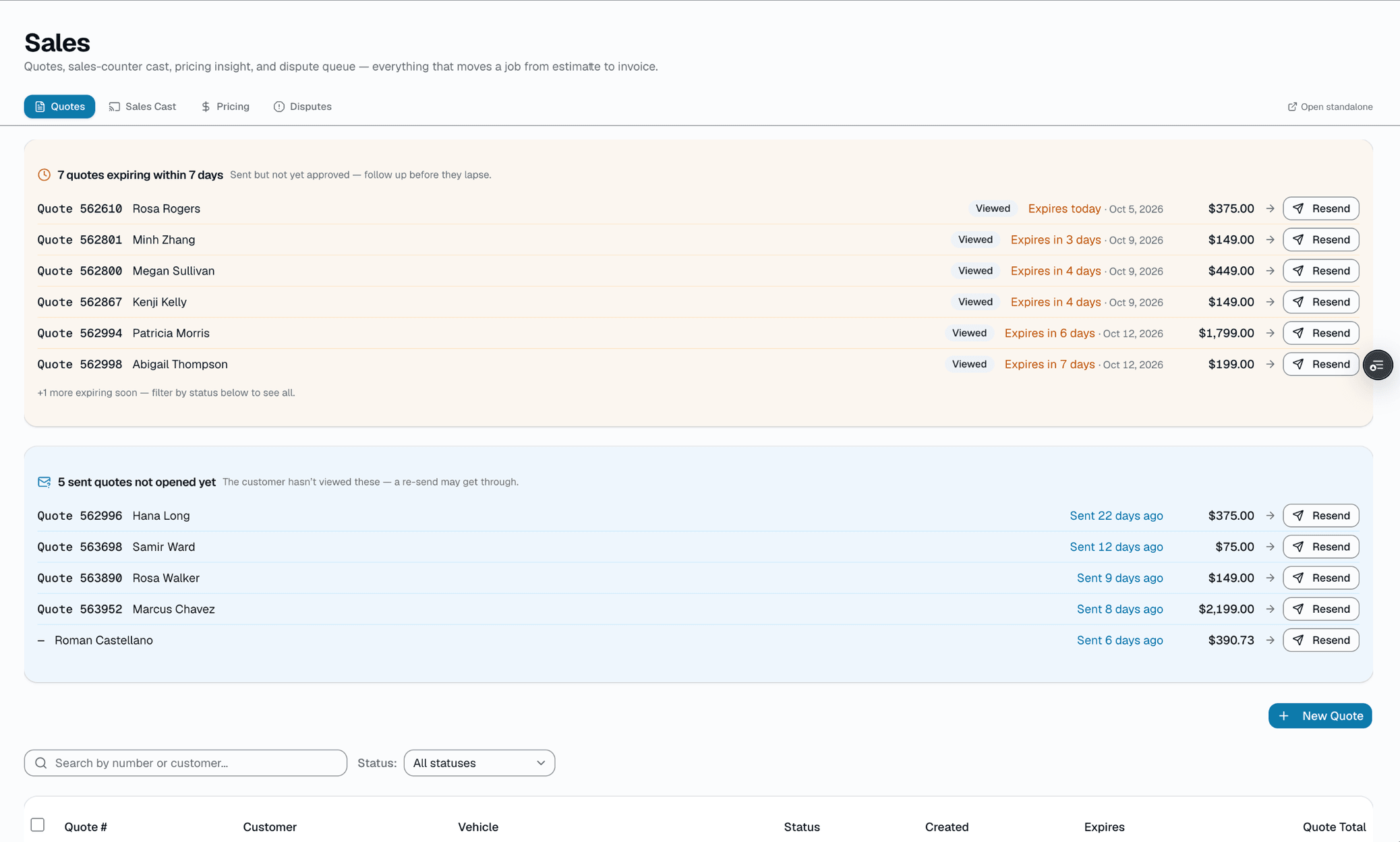
The quotes page is a plain, searchable table — not a drag-and-drop board. Filter by status (Draft / Sent / Viewed / Approved / Declined / Expired / Converted), search by number or customer, and a callout surfaces quotes that were sent but never opened so you know exactly who to call.
- Search + status filter, not a kanban board
- "Sent but never opened" callout
- Bulk-select to change status or send
- Duplicate a quote to re-quote a near-identical job in one click
Everything it does
The complete list. The plan tag above shows which plans include it.
Quote building
- Line items: services, film, parts, fees, discounts, add-ons
- Guided window-tint picker: tap a window, pick a Good/Better/Best film tier + VLT shade, priced against your catalog
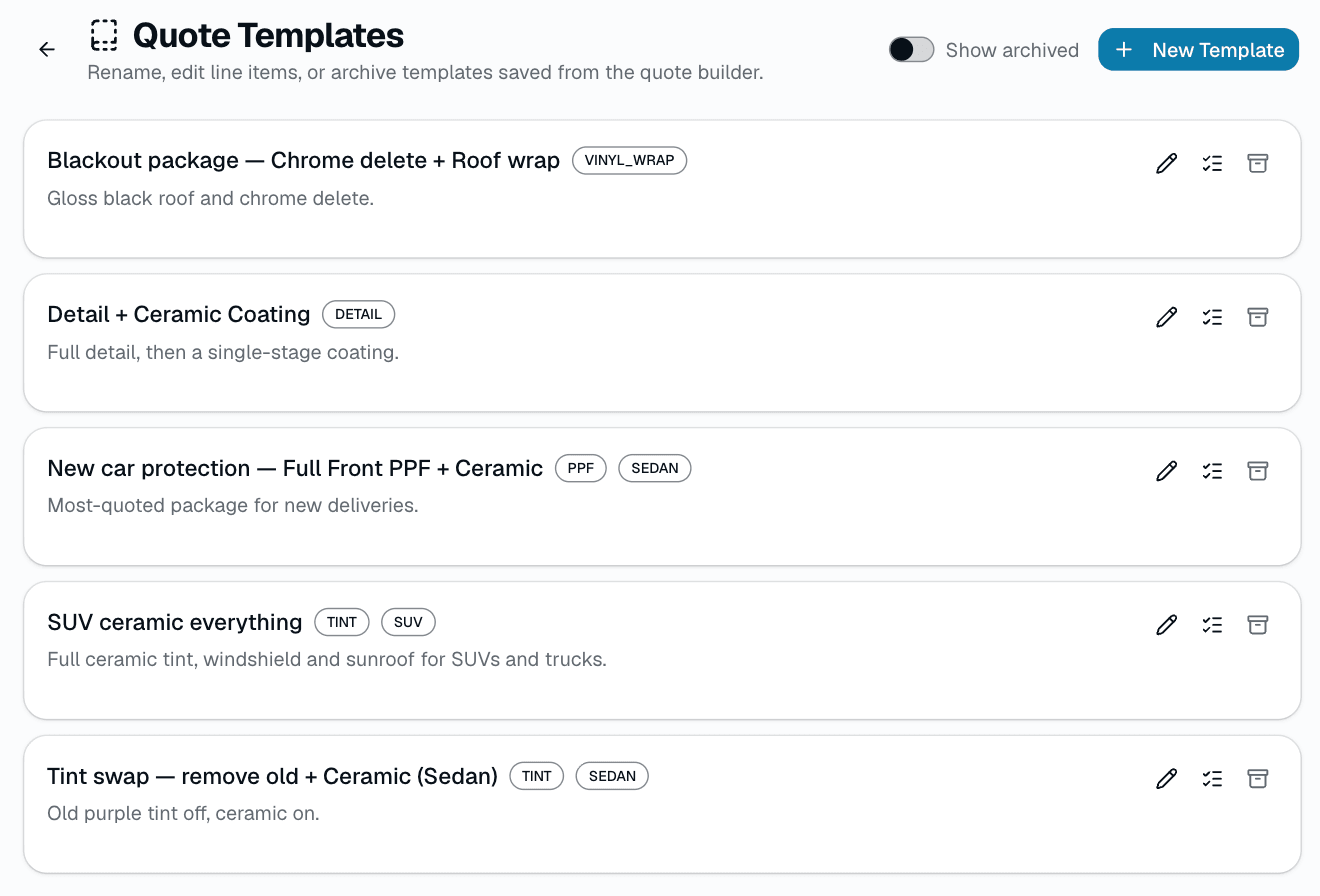
- Reusable templates (name/description/optional vehicle-class tag) loaded manually from a search popover
- AI quote-suggest (Pro): describe the job in plain English, get pre-filled line items
- Draft auto-saves to your browser as you type (not shown as a live counter)
- Contract pricing overrides: a standing flat price or % off for fleet, dealer-group, and VIP accounts, set once in Settings → Fleet Pricing and applied automatically on every future quote
Customer delivery
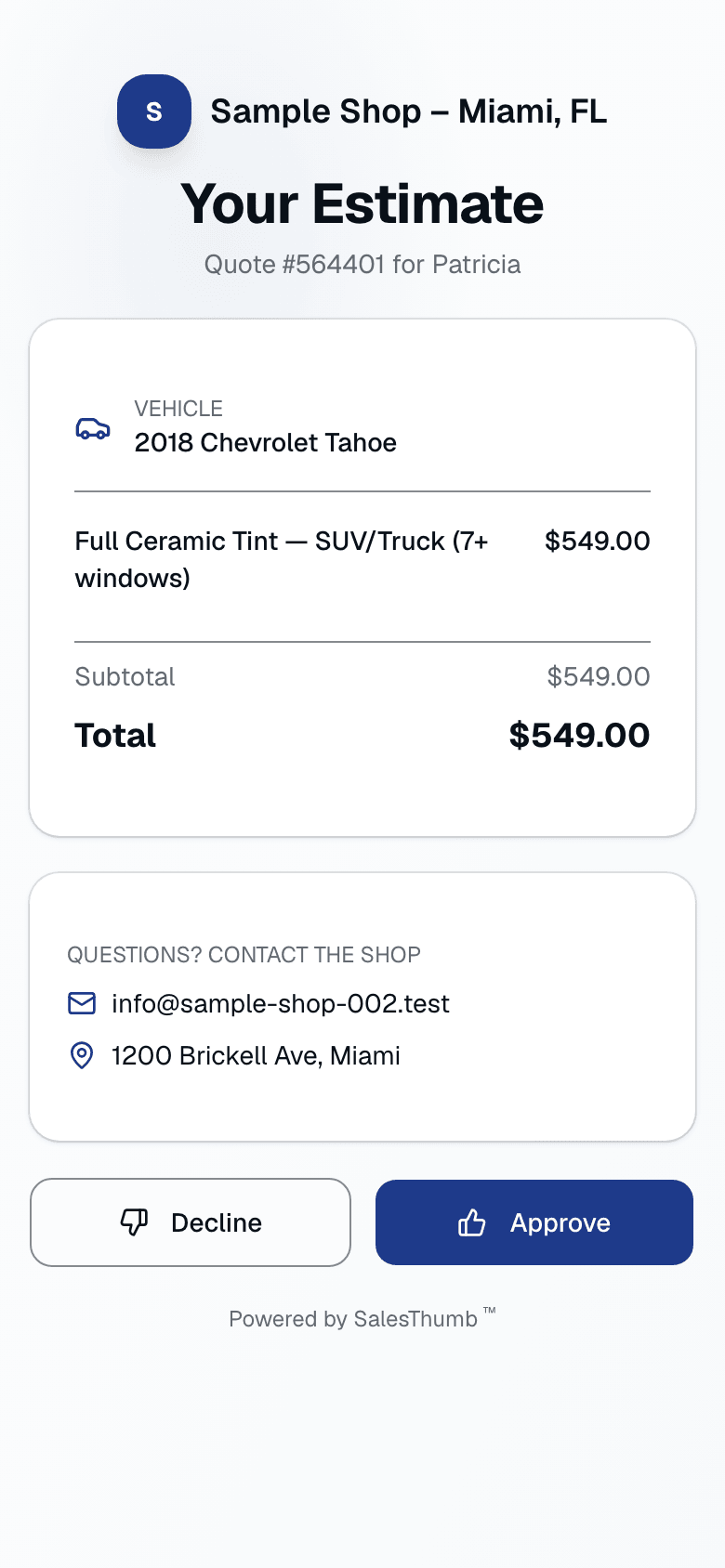
- Mobile-first interactive viewer (no login required)
- One quote, one total — no tier-picker on the customer side
- Digital signature on approval (drawn + typed name)
- Deposit collected at approval (card payment)
- Customer can decline with an optional reason
Shop operations
- Filterable, searchable quote list — Draft / Sent / Viewed / Approved / Declined / Expired / Converted
- "Sent but never opened" callout so nothing quietly goes cold
- Auto-expire past a configurable valid-for window (daily sweep — no messaging sent)
- Convert any approved quote to an invoice in one click
- Bulk status actions from the list (send, expire)
A tour of the screens
Every meaningful view, the path through it, and the moments that matter — so you know exactly what you're buying.
Good / Better / Best tiers
The real tier system — three film price points you compare while building a quote, not a customer-facing choice..
Comparing tiers · 2023 Mazda CX-5 · Full 7 windows
Operator view · pick one price point to build the quote
Good
Dyed film
$329
- 5% · 20% · 35% VLT
- Blocks 99% UV
- 5-year fade warranty
Better
Carbon film
$529
- Signal-safe — no GPS interference
- Blocks 53% heat
- 10-yr bubble + fade warranty
Best
Ceramic IR
$829
- Blocks 88% IR heat
- Blocks 99% UV
- Lifetime transferable warranty
Customer view
Mobile-first approval page.
One quote, one total — the customer approves from their phone, no account needed.
Quote list
A searchable, status-filterable table — not a kanban board — with a callout for quotes sent but never opened..
Quote templates
Reusable named line-item bundles, loaded manually from a search popover — no usage stats or auto-detection..
Who it's for
Built specifically for…
- Tint shops that quote 20+ jobs a week
- PPF / wrap shops with complex multi-package pricing
- Shops selling good/better/best film tiers
- Detail shops building recurring-service packages
- Any shop that quotes customers before scheduling
What it replaces
The old way…
- Texting a number from a mental price list
- PDF quotes nobody reads and can't sign
- Spreadsheet pricing books that are always out of date
- Calling back three days later to follow up
- Paper estimate books in the desk drawer
Setting it up
- 1
Build the line items
Use the guided window-tint picker (Good/Better/Best per window) or add plain services/parts/fees. Save common combinations as a template.
- 2
Send one quote
One set of line items, one total, one approval link — SMS and/or email. The customer sees exactly what you sent, nothing more.
- 3
Approve with a signature
Customer opens the quote on their phone, signs, and pays the deposit by card. You're notified; the quote's status flips to Approved.
What this looks like in a shop
Illustrative scenario: Your phone rings: 'What's a full ceramic tint on a Model Y?' You open a new quote, tap 'Add window tint,' and paint the Better tier across the full 7 windows — it prices off your catalog automatically. Send. Two minutes later she signs on her phone and pays the deposit — the job is approved and the deposit is in while you're still on the call.
Good to know
- Which plan includes quotes?
- Every plan includes it, Basic through Pro. See the Pricing page for everything in each plan.
- Does the customer get to choose between multiple price tiers?
- No — a quote you send is one fixed set of line items and one total. Good/Better/Best is a tier system you use while building the quote (per window, on the film you're pricing), not something the customer picks between after you hit send.
- Do quotes expire?
- Yes, a configurable valid-for window per quote (default 30 days). A daily sweep automatically flips a lapsed Sent/Viewed quote to Expired — no follow-up message is sent as part of that.
- Does SalesThumb automatically follow up on quotes that go cold?
- Not out of the box. The quotes list flags quotes that were sent but never opened so you can follow up yourself, and you can build your own automated nudge in Drips (triggered on the quote's status) if you want one.
- What if the customer wants to negotiate?
- For a one-off ask, duplicate the quote, adjust the line items, and send the new one — the "Duplicate quote" action on a quote's detail page copies everything (customer, vehicle, line items, tax, deposit, notes) into a fresh draft. For a standing account — a fleet, a dealer group, a VIP who should always get the same rate — set up a contract pricing override once (Settings → Fleet Pricing): a flat price or a % off per service, film, or category, with an optional contract number and effective dates. It applies automatically to every quote for that customer or fleet from then on, no re-typing the discount each time.
- What deposit percentage should I use?
- You set it per quote (0-100%), or leave it blank for no deposit. There's no platform default beyond whatever you last used.
Works with your stack
Payment processor
Deposits on approval via card payment
Twilio
Quote delivery via SMS
Google Workspace email
Branded email delivery of PDF + approval link
Inngest
Drives the daily auto-expiry sweep
React PDF
PDF rendering of every quote
Pairs well with
Invoices
Convert any approved quote to a branded invoice in one click. Partial pays, deposits, and final balance all tracked against the same line items.
Payments
Accept cards online with a one-click pay link in SMS or email. Partial payments, deposits, refunds — all handled. Flat-rate card pricing on every plan, or interchange-plus on Growth and Pro — your rate is visible any time in Reports → Fees.
Smart pricing
Tracks every quote outcome, computes close rate per service, suggests RAISE/REDUCE/HOLD/REPOSITION price moves per service. One-click apply to your catalog.