Texts, email, Facebook, Instagram, WhatsApp. One inbox.
Messaging is the glue that keeps your shop from feeling like a bureaucracy. Customers reach you wherever they already are, so SalesThumb pulls texts, emails, Facebook Messenger, Instagram and WhatsApp messages into one shared inbox (connect each account once in Settings → Integrations).
The quick version
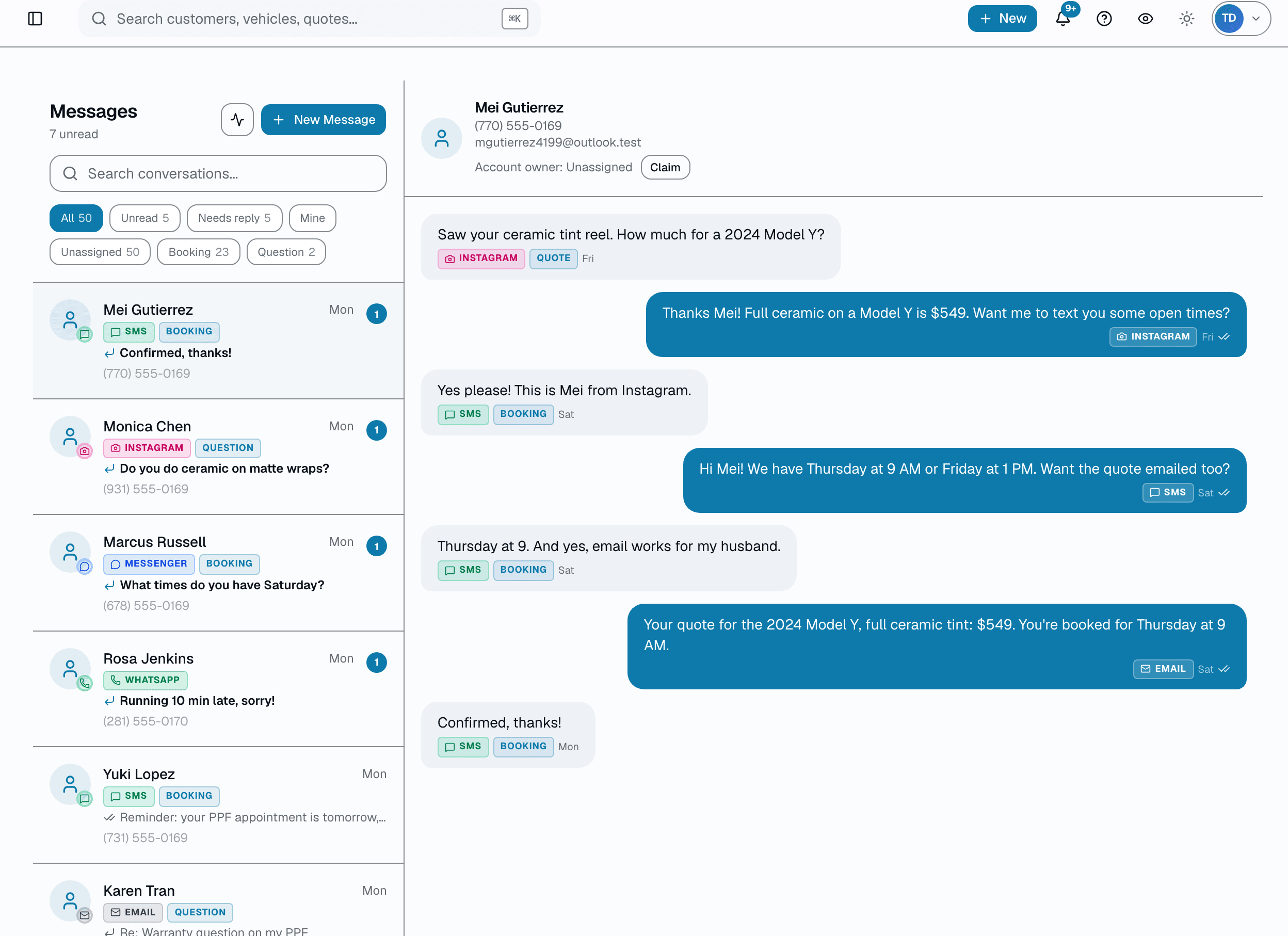
One inbox: Texts, email, Facebook, Instagram and WhatsApp messages all land in one inbox.
- Shared inbox — every installer + front-desk sees the same threads
- Texts, email, Facebook Messenger, Instagram and WhatsApp land in the same inbox, no app-switching
- Unread badges per thread
A customer who DMs you on Instagram and then texts shows up as one conversation, not two. In that same inbox your auto-reminders live next to your one-off replies, your MMS bubble photos, your blast campaigns, and your review requests — all attached to the right customer record, with full history. Reply from your phone on the couch or your front-desk terminal; the thread picks up where the last person left off. Every message is delivered through Twilio's compliant 10DLC channel, opt-outs honored automatically, and overage metered at a flat per-segment rate.
A closer look
01
One inbox, one source of truth
Messaging chaos is a common reason shops double-text customers and miss replies. SalesThumb puts every conversation in one shared inbox — front desk, installers, owner, all seeing the same threads. The thread list and each open conversation refresh on a 10-15 second poll, not a live socket, so a reply from a teammate shows up within seconds, not instantly. Filter chips (All / Unread / Needs reply / Urgent) and a name-or-phone search narrow the list down fast.
- Shared inbox, polling refresh (10-15s) across every seat
- Thread header shows the customer's name + phone, with one-tap call/email
- Filter chips: All / Unread / Needs reply / Urgent
- Search by customer name or phone
02
A focused thread, not a cluttered dashboard
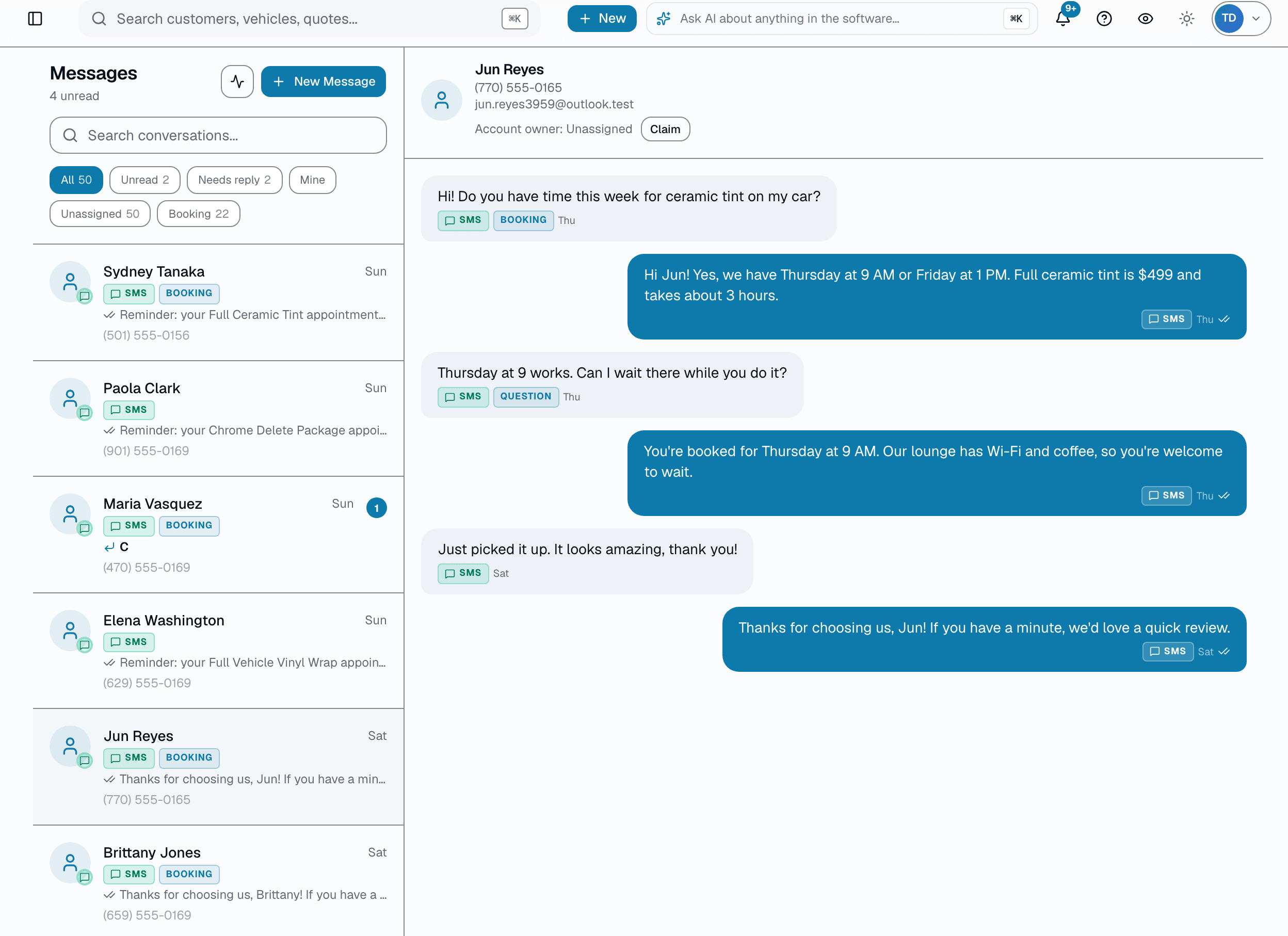
Open a thread and you get exactly what you need to reply: the message history and a composer. No right-rail context panel — no vehicle card, no open-invoice card, no notes. Attach a photo (MMS, up to 5MB), click the Sparkles icon to drop in one of your shop's SMS templates as a quick reply (personalized with the customer's first name and your shop name), or, on Growth and up, click the separate Wand2 icon for 2-3 AI-drafted, conversation-grounded reply suggestions you edit before sending. Threads with 8+ messages also get a short AI summary card above the conversation — a 1-2 sentence recap, an urgency badge, and a suggested next action.
- Message history + composer — that's the whole thread view
- Photo attachments up to 5MB (image files only)
- Quick replies from your SMS templates via the Sparkles icon, no slash command
- AI-drafted reply suggestions via a separate icon (Growth and up) — always editable before sending, never auto-sent
- AI thread-summary card on 8+ message threads: recap + urgency + suggested next action
- No read receipts, no typing indicators, no per-thread assignee
03
Blast campaigns that don't feel like spam
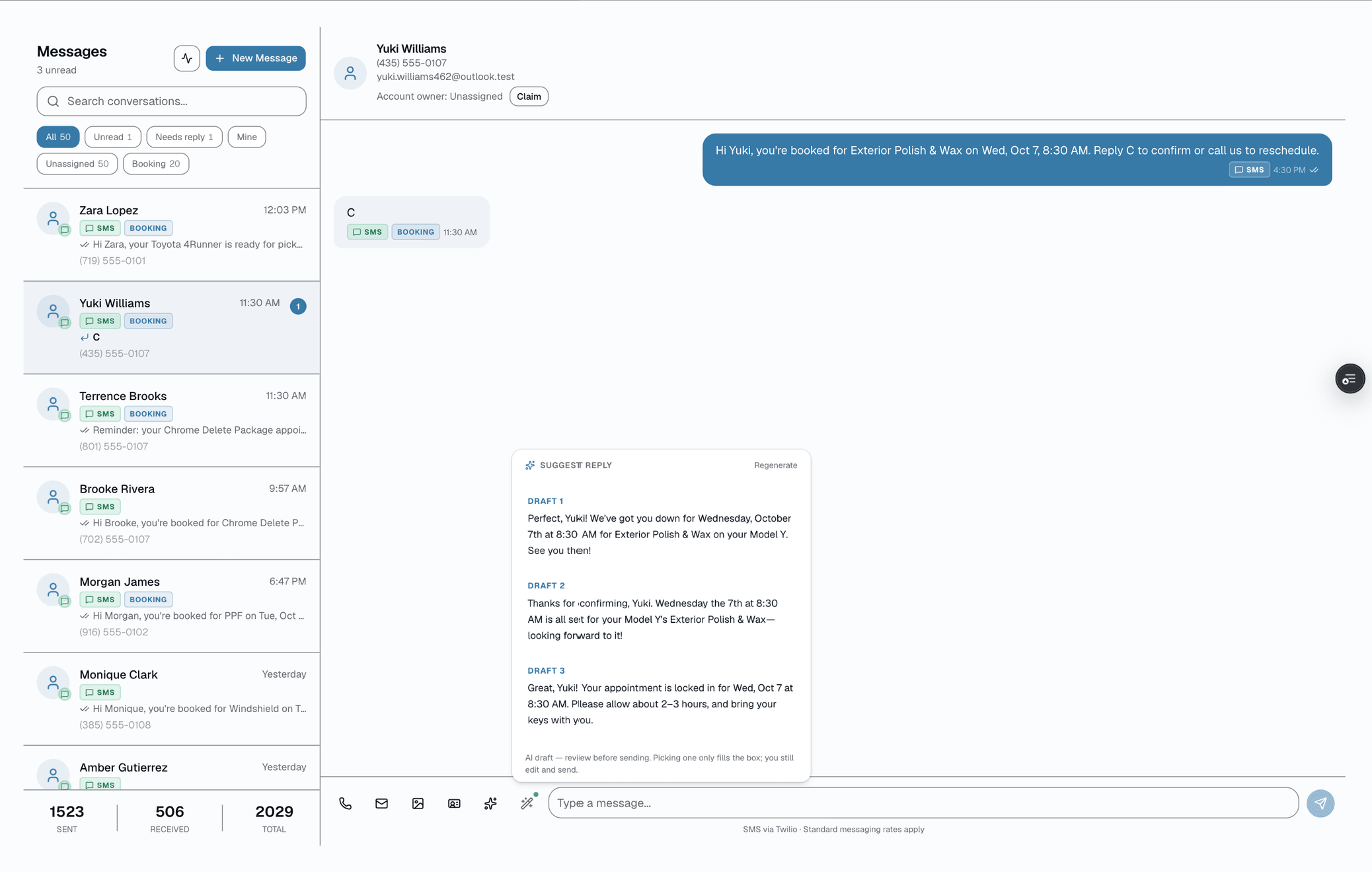
On Growth and up, pick one of 7 built-in segments — all customers, new in 30 days, high lifetime value, just completed, quiet 90+/180+ days, or churned (or a custom list handed off from an AI tool) — preview exactly who will receive it and how many are excluded for opting out, compose the message with a first-name merge field, and send by SMS or email. Built-in STOP compliance means opt-outs stop future sends automatically — no accidental re-contacts.
- Seven built-in segments, single-select; the older Campaigns page adds a VIPs segment (customers tagged VIP); no combining or vehicle-based filters
- First-name merge field rendered per-recipient in preview before send
- One channel per send — SMS or email
- Sent / failed / skipped counts shown right after you send; campaigns sent from the older Campaigns page also keep a history of past batches
- STOP keyword honored automatically, independent of any other logic
04
Quick replies for the scenarios you text about all day
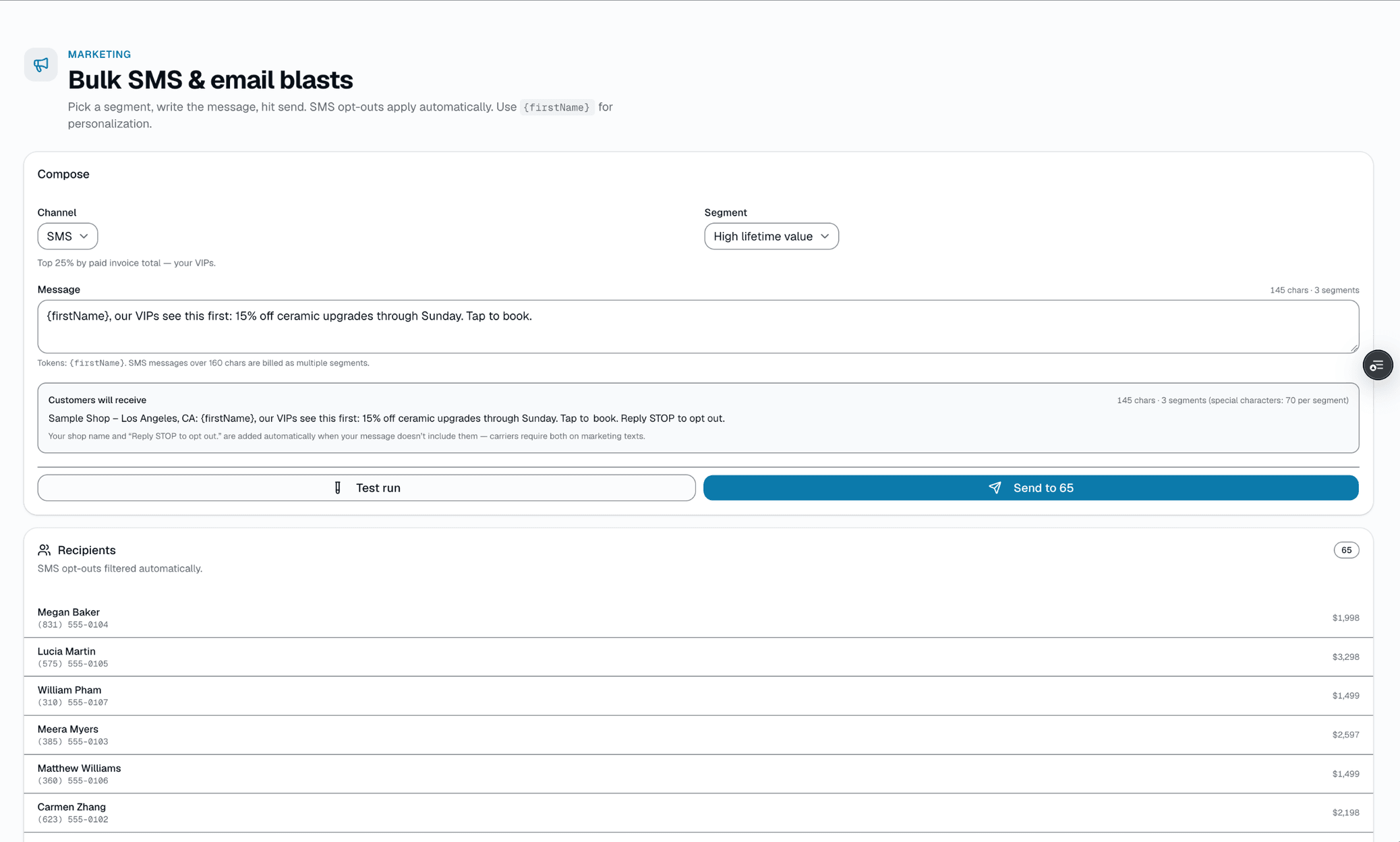
"We're running a few minutes late," "your car is ready," "just confirming your appointment" — your quick replies are your shop's own SMS templates — a ready-made starter set you can edit, add to, or switch off in Settings → Notifications. Click the Sparkles icon in any thread's composer to open the list and insert one — it fills in the customer's first name and your shop name, then drops into the composer ready to edit before you send. There are no categories, no photo attachments on a template, and no version history.
- Editable in Settings → Notifications; only active SMS templates appear
- Merge tags {{first_name}} (falls back to "there" if no name on file) and {{shop_name}}
- Opened via the Sparkles icon in the composer
- Drops into the composer as plain text — edit before sending
Quick replies
6 fixed replies · not editable · opened from the composer
Click the Sparkles icon in any conversation's composer to open this list and insert one:
We're ready
Hi {firstName}! Your vehicle is ready for pickup. Please stop by at your convenience — thanks for choosing us!
Running a few minutes late
Hi {firstName}, we're running about 15 minutes behind schedule. Apologies for the wait — we'll have you in as soon as possible.
Confirm appointment
Hi {firstName}, just confirming your appointment tomorrow. Reply YES to confirm or call us if you need to reschedule.
Post-service follow-up
Hi {firstName}! Thanks again for your business. Loving the result? A quick Google review would mean the world to us.
Deposit reminder
Hi {firstName}, we still need the deposit to lock in your appointment slot. You can pay via the secure link we sent — let us know if you didn't get it.
Before/after photos
Hi {firstName}! Attaching the before/after photos from today. Looks amazing! Let us know if you have any questions.
Merge tag
{firstName} is replaced with the customer's first name (or "there" if none on file) when you pick a reply. That's the only merge tag — no vehicle, appointment, or shop fields.
05
10DLC compliance, handled for you
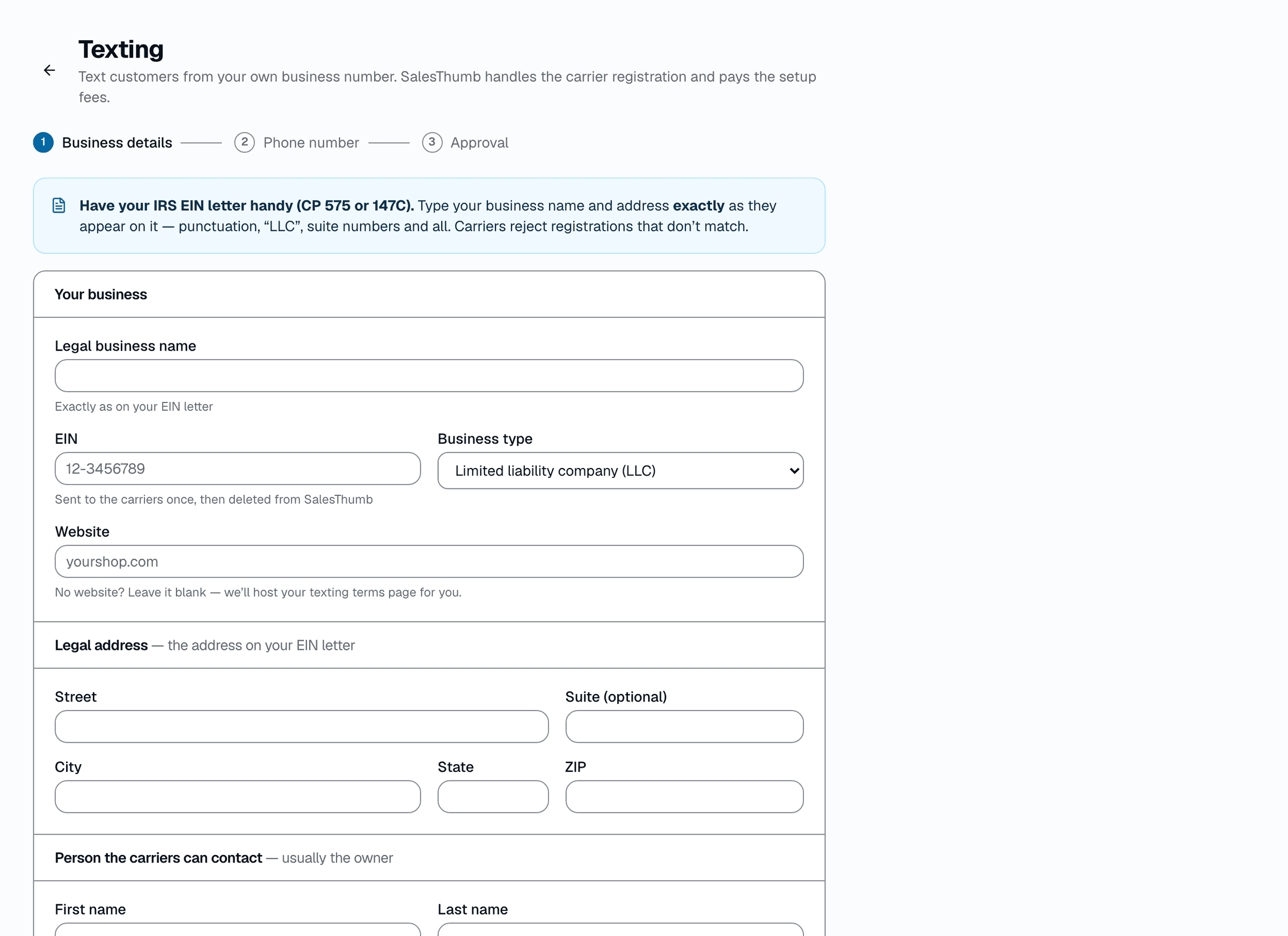
US carriers require business SMS to run through 10DLC registration or you hit throttled delivery + high failure rates. Every shop texts from its own approved number — there's no shared SalesThumb texting number. In Settings → Texting, apply for a new text number or use your current business phone number; SalesThumb registers your business with the carriers (A2P 10DLC) and pays the setup fees, and texting turns on once it's approved. Shops that already have a Twilio account can connect it instead (Bring Your Own Carrier); in that case 10DLC brand/campaign registration happens directly with Twilio and typically takes 1-6 weeks. Opt-out status is tracked per customer and enforced automatically on every send.
- Your own approved number — a new text number or your current business phone — set up in Settings → Texting
- Bring Your Own Carrier: register your own brand/campaign directly with Twilio
- Messages → Deliverability flags likely causes if delivery dips
- STOP + START keywords honored automatically
- Opt-out status tracked per customer, enforced on every send
Everything it does
The complete list. The plan tag above shows which plans include it.
The inbox
- Shared inbox — every installer + front-desk sees the same threads
- Texts, email, Facebook Messenger, Instagram and WhatsApp land in the same inbox, no app-switching
- Unread badges per thread
- MMS send + receive — photos, up to 5MB per message
- Quick replies from your own editable SMS templates, one tap from the composer's Sparkles button
- Search by customer name or phone
- Threads link to the customer record
Automation that sounds like you
- 24h and 1h appointment reminders
- Ready-for-pickup ping when status flips to Ready
- Automatic review-request text 24h after a job completes (adjustable)
- Win-back sequence (Growth and up) for customers with nothing booked and no completed visit in 90+ days
- Cold-lead follow-up sequence (Growth and up) for new leads nobody has messaged or booked yet
- AI SMS receptionist (Growth and up) — auto-replies to inbound texts during your after-hours window
Marketing blasts
- Growth and up: pick one of 7 built-in segments (everyone, new in 30d, high-LTV, just completed, quiet 90+/180+ days, churned)
- {firstName} merge tag + per-recipient preview before send
- Send now (SMS or email, one channel per send)
- Unsubscribe compliance auto-included (STOP keyword for SMS, unsubscribe link for email)
- Per-campaign stats: sent / failed / skipped counts
A tour of the screens
Every meaningful view, the path through it, and the moments that matter — so you know exactly what you're buying.
A focused conversation thread
Message history + composer — attach a photo or drop in a quick reply, then send..
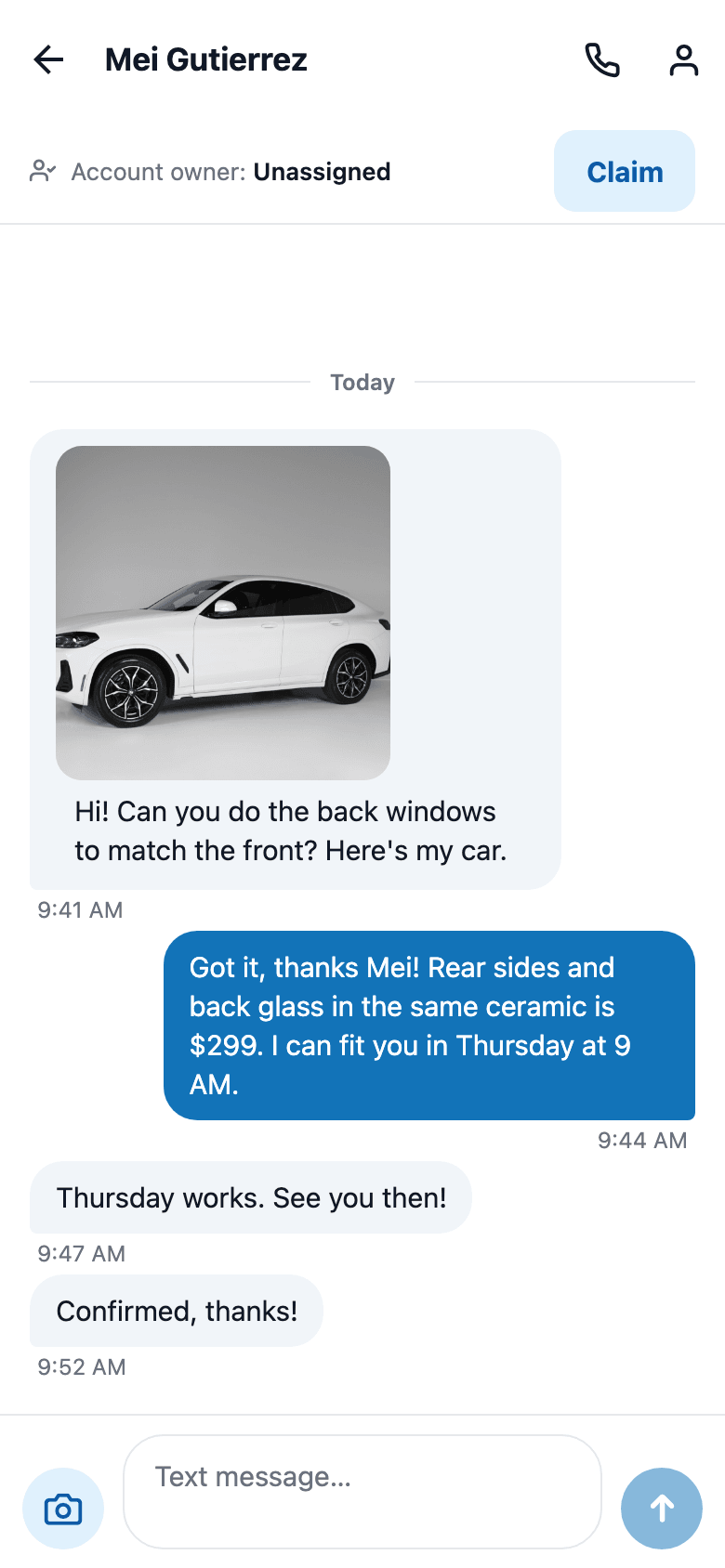
Photos by text
A customer texts a photo of their car and you answer with a price and a time, right from your phone.
Photos up to 5MB each way.
Blast campaign
Segment → compose with a first-name merge field → preview recipients and opt-outs excluded → send.
STOP handled automatically.
Quick replies
Your shop's own SMS templates, opened from the composer's Sparkles icon and edited in Settings → Notifications..
Quick replies
6 fixed replies · not editable · opened from the composer
Click the Sparkles icon in any conversation's composer to open this list and insert one:
We're ready
Hi {firstName}! Your vehicle is ready for pickup. Please stop by at your convenience — thanks for choosing us!
Running a few minutes late
Hi {firstName}, we're running about 15 minutes behind schedule. Apologies for the wait — we'll have you in as soon as possible.
Confirm appointment
Hi {firstName}, just confirming your appointment tomorrow. Reply YES to confirm or call us if you need to reschedule.
Post-service follow-up
Hi {firstName}! Thanks again for your business. Loving the result? A quick Google review would mean the world to us.
Deposit reminder
Hi {firstName}, we still need the deposit to lock in your appointment slot. You can pay via the secure link we sent — let us know if you didn't get it.
Before/after photos
Hi {firstName}! Attaching the before/after photos from today. Looks amazing! Let us know if you have any questions.
Merge tag
{firstName} is replaced with the customer's first name (or "there" if none on file) when you pick a reply. That's the only merge tag — no vehicle, appointment, or shop fields.
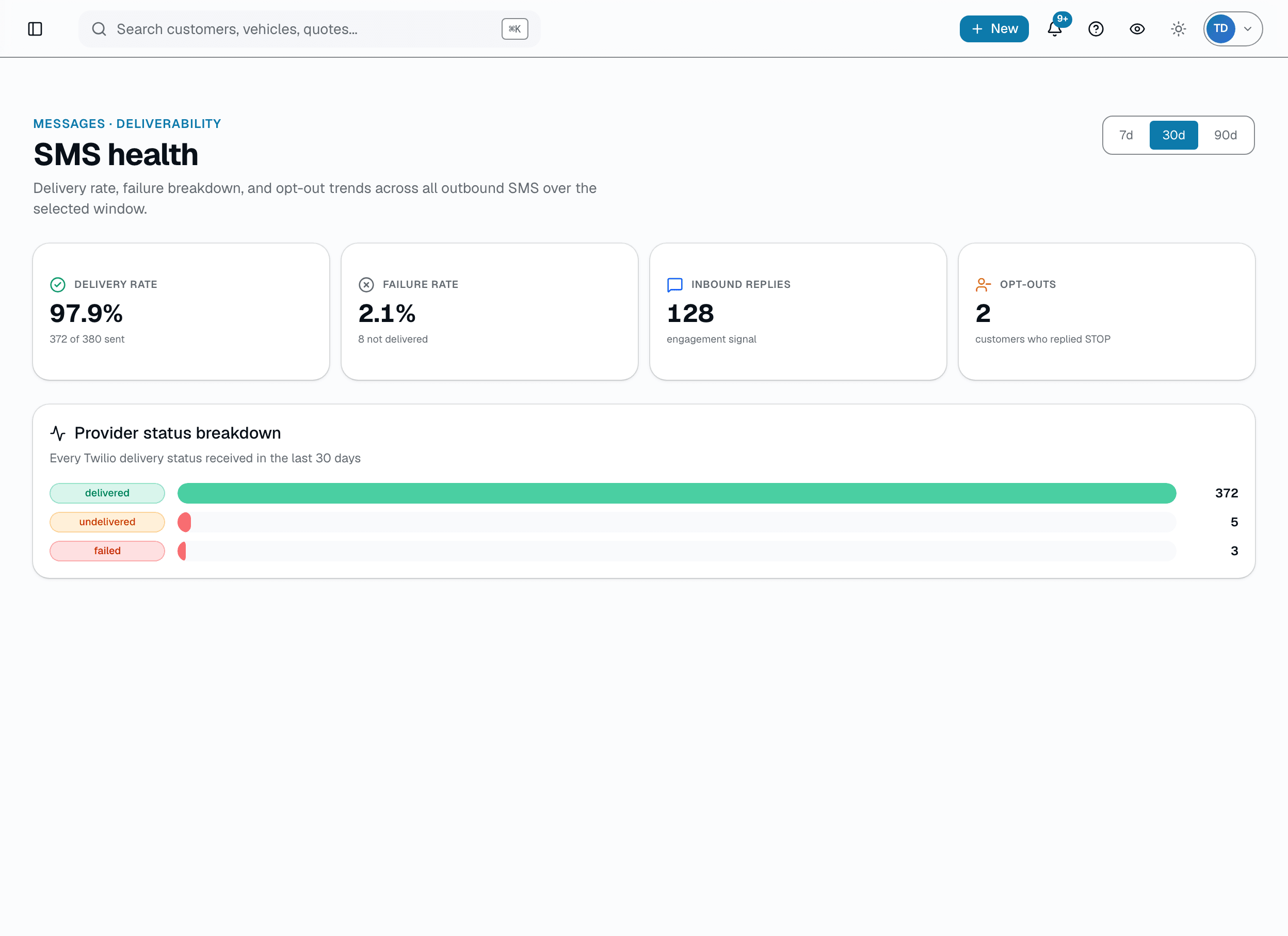
Compliance center
Delivery, failures and opt-outs in one place.
Messages → Deliverability shows your delivery rate, failures and STOP opt-outs over 7, 30 or 90 days; opt-outs are honored on every send, and a banner warns you if delivery slips below healthy ranges. Sample numbers shown.
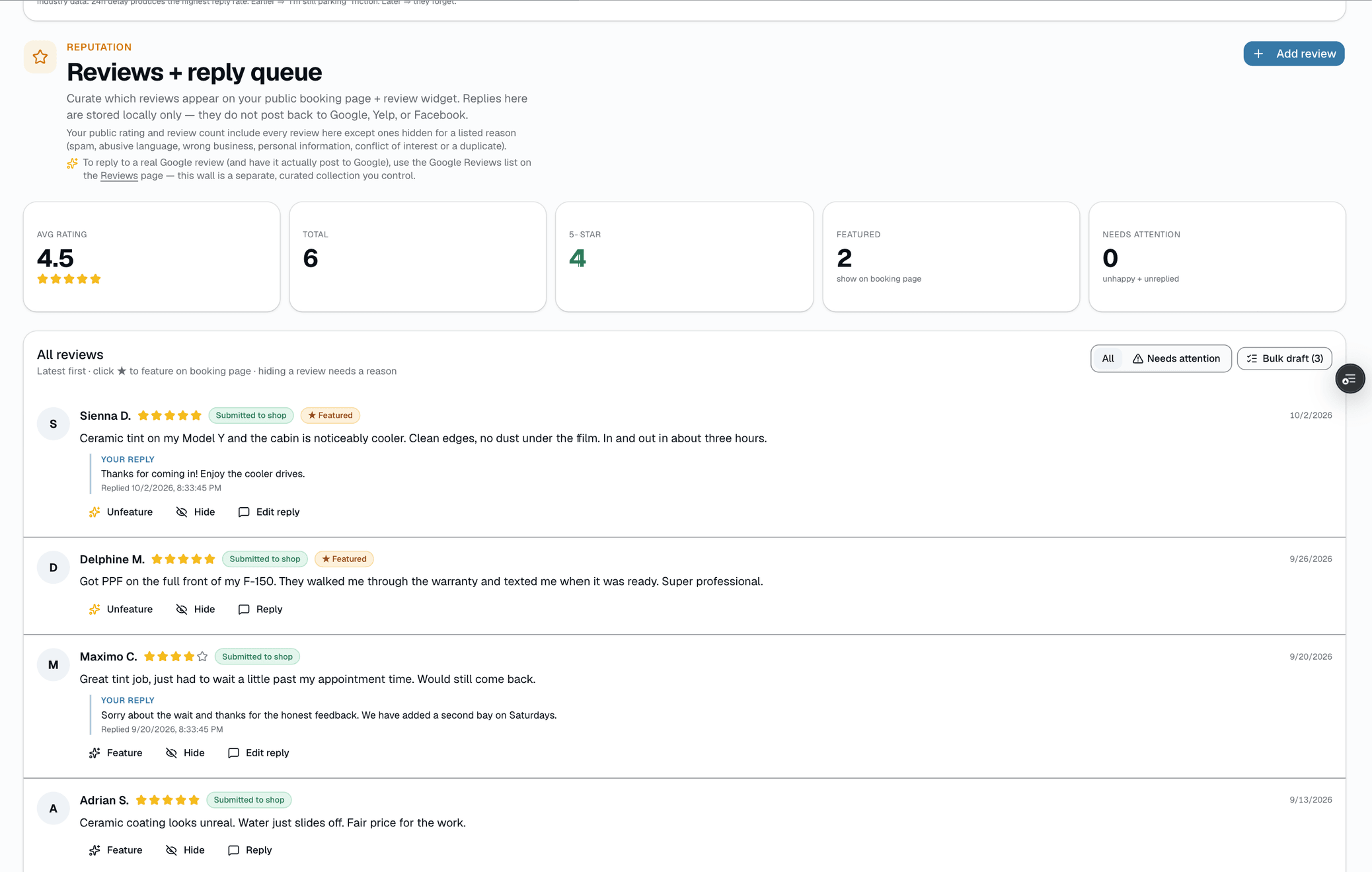
Review request automations
Post-service texts ask for a review 24 hours after a job (adjustable).
Staff mark a request "reviewed" by hand once they see it land.
Who it's for
Built specifically for…
- Shops where the owner's personal cell phone is the business number
- Front desks juggling texts, Instagram DMs, and Facebook Messenger
- Any shop whose "missed appointment" rate lives in double digits
- Owners paying $400+/mo for Podium or Birdeye who want two-way SMS built into their shop software
- Shops running Google review campaigns manually ("hey can you leave us a 5-star?")
What it replaces
The old way…
- Your personal iPhone's Messages app as the business inbox
- Podium / Birdeye / Thryv SMS tools at $300-700/mo
- Checking Instagram's app separately from your text inbox
- Google Forms + Zapier to ask for reviews
- Spreadsheets of opt-outs (which you forget, then get complaints)
Setting it up
- 1
Pick your number
Get a new number or keep your existing business number. SalesThumb registers your shop's texting with the carriers for you (Settings → Texting) and pays the fees; carrier review typically takes 1–3 weeks.
- 2
Automate the boring stuff
24h and 1h appointment reminders and ready-for-pickup alerts fire automatically. A review-request text goes out 24 hours after a job completes (adjustable).
- 3
Reply like a human
Inbound messages land in a shared inbox. Reply as yourself, drop in a template, or attach a photo — all without switching apps.
What this looks like in a shop
Illustrative scenario: Customer texts back 'running 20 min late.' Your front desk sees it in the shared inbox, replies 'no problem, we'll hold your bay.' Two-way SMS stops missed appointments — and the thread attaches to her customer record so the next visit you've got context.
Good to know
- Which plan includes one inbox?
- Starter, Growth and Pro include it. See the Pricing page for everything in each plan.
- What's 10DLC and do I need it?
- 10DLC is the carrier-registered business SMS channel in the US. Every shop texts from its own approved number — there's no shared SalesThumb texting number. In Settings → Texting, apply for a new text number or use your current business phone number; SalesThumb registers your business for 10DLC and pays the setup fees, and texting turns on once it's approved. If you connect your own Twilio account via Bring Your Own Carrier, that registration happens directly with Twilio and can take 1-6 weeks for carrier review.
- How much do messages cost?
- Each plan includes an SMS allotment that scales by tier — Starter 500/mo, Growth 2,500/mo, Pro 10,000/mo (Basic doesn't include SMS). Overage is metered at $0.015/segment.
- Can I port my existing business number?
- Yes, for texting — connect your existing business number and we move its SMS to SalesThumb while your voice service stays with your current carrier. Twilio confirms you own the number with an automated verification call.
- What happens if a customer replies STOP?
- They're automatically opted out in both our system and carrier-side. Future blasts skip them. Reminders, drips, and other automated texts to that number stop too, and Twilio's standard opt-out handling blocks further texts to it. The opt-out status is stored on the customer record and stays in effect until they text START.
- Can I send from my cell when I'm on the go?
- Yes. Our iOS + Android apps mirror the shared inbox. Reply from your phone; the thread updates on the front-desk terminal on the same 10-15 second poll the web app uses, and staff signed in to the mobile app get a push notification when a new customer message arrives.
- Do you support international SMS?
- SalesThumb is built for US (+1) numbers; there's no international SMS program today. DM us if you need specific country coverage.
- What happens if a customer texts after hours?
- On Growth and up, turn on the AI SMS receptionist in Settings → AI Assistant and set an after-hours schedule (independent of your public booking-page hours). It auto-replies using only the business info, services, and pricing you've entered — it never invents a price, and if it recognizes a service you offer it can send a real quote automatically; otherwise it just acknowledges the text. There's no staff-review step before it sends, so you also set a daily quote cap and a per-customer cooldown as a safety limit. Below Growth, or with it off, after-hours texts just sit in the inbox for your team like any other reply.
Works with your stack
Twilio
10DLC SMS + MMS carrier
Google Workspace email
Email fallback delivery
Google Business Profile
Review request redirect link
Facebook Messenger
Two-way DMs — inbound lands in the inbox, replies send through Messenger
Two-way DMs — inbound lands in the inbox, replies send through Instagram
Pairs well with
Automations
On Growth and up, pick a preset drip sequence — win back lapsed customers, follow up cold leads, or ask for a review after a completed job. It goes live the moment you choose a pace, so edit the messages right away or pause it until you have.
Drip Campaigns
Included with Starter, Growth, and Pro (Basic has no outbound SMS or email). 7 starter templates (welcome, win-back, post-service review, quote follow-up, more), auto-enrollment on NO_VISIT_DAYS, STATUS_CHANGE, and SEGMENT_ADD triggers, exit-on-reply, per-campaign analytics. No extra fee — sends draw from your shop's existing SMS + email quota, capped at $100/mo by default so a runaway sequence can't bankrupt you.
Customer CRM
Search by name, plate, or VIN in milliseconds. Every appointment, quote, invoice, warranty, and photo attached to the right record — forever.