Set it once. Let it run while you focus on installs.
Automations covers the follow-up you'd otherwise do by hand: nudging past customers who haven't booked in a while, nurturing a lead who didn't book right away, and asking for a review after a job wraps. Each one is a preset sequence of steps — a delay, a channel (SMS or email), and a message with merge fields like {{first_name}} and {{shop_name}} — that you can edit line by line after install.
The quick version
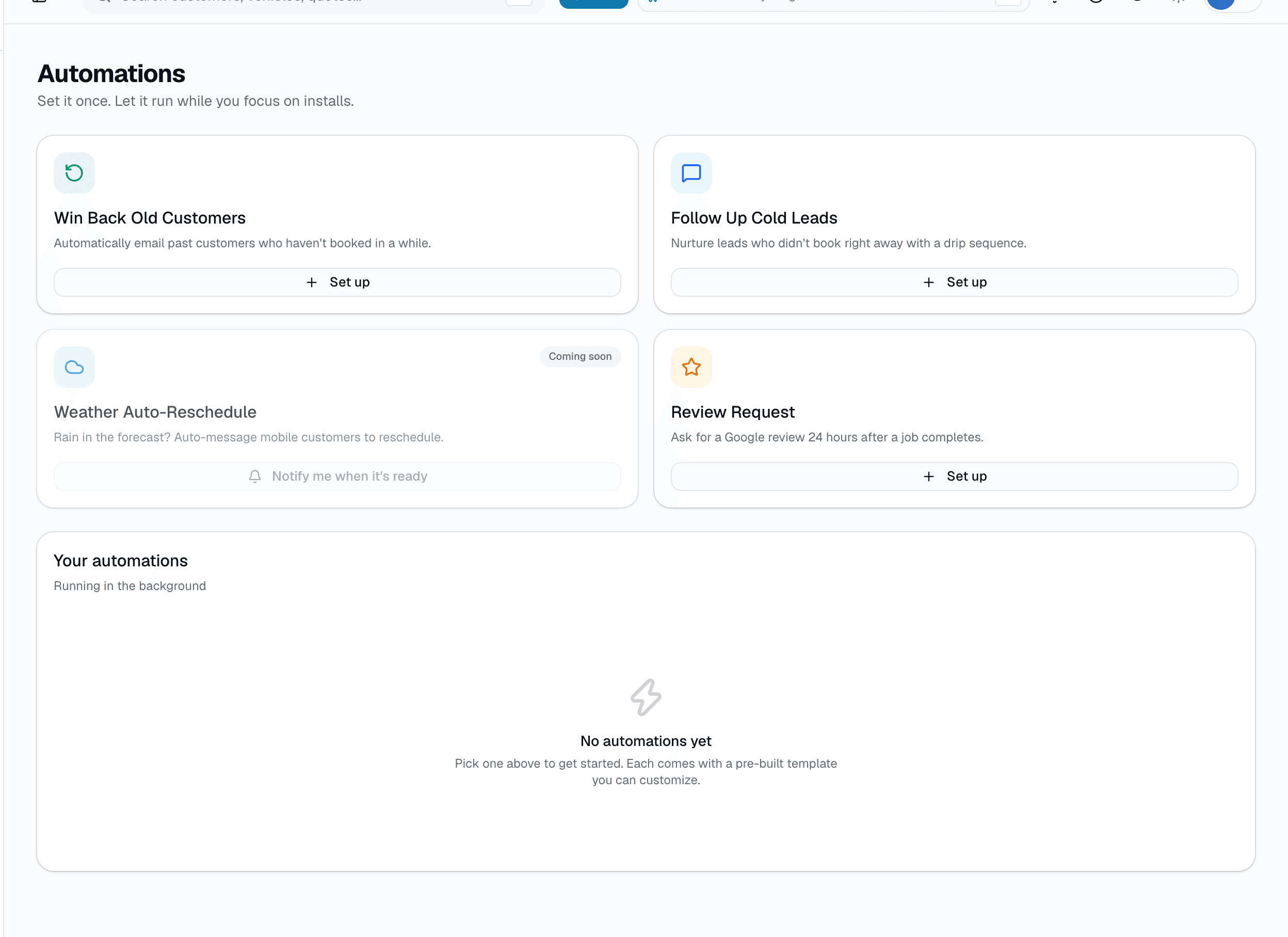
Automations: Reminders and follow-ups that run on their own once set.
- Win Back Old Customers: re-engages customers with nothing booked once their last completed visit is more than 90 days old
- Follow Up Cold Leads: nurture sequence for leads who didn't book right away
- Review Request: enrolls each job 24 hours after it's marked complete (the preset copy has no review link, so add your Google review URL to a step)
Pick Minimal (3 touches), Recommended (5 touches), or Beast Mode (8 touches) to start. Every kind starts from the same starter copy, written as a tint lead follow-up, and it goes live as soon as you pick a pace, so edit it to fit or toggle it off first. Each automation shows how many messages it has sent.
Everything it does
The complete list. The plan tag above shows which plans include it.
Live today
- Win Back Old Customers: re-engages customers with nothing booked once their last completed visit is more than 90 days old
- Follow Up Cold Leads: nurture sequence for leads who didn't book right away
- Review Request: enrolls each job 24 hours after it's marked complete (the preset copy has no review link, so add your Google review URL to a step)
Every step you can configure
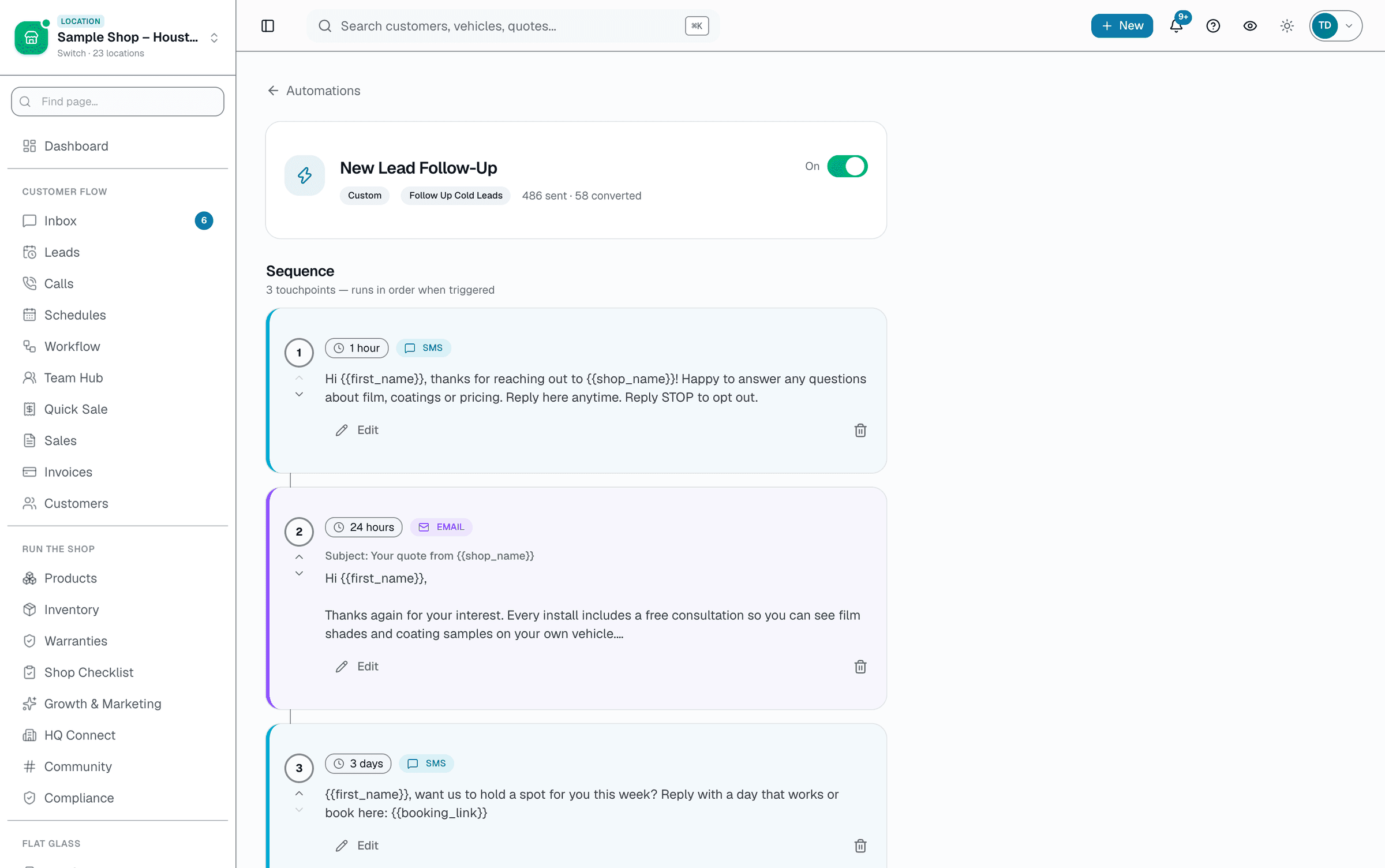
- Delay: immediately up to 1 month, picked from a fixed list of common intervals
- Channel: SMS or email, per step
- Message body (and subject line for email) with merge-field chips
- Reorder, add, or remove steps from any preset after install
- Dedupe guard — an automation won't re-enroll the same customer within its lookback window
A tour of the screens
Every meaningful view, the path through it, and the moments that matter — so you know exactly what you're buying.
Every step, editable
Each step shows its delay, channel, and message — edit the copy, change the timing, or add a step without touching the rest..
Who it's for
Built specifically for…
- Owners doing review requests manually and wondering why their rating is 4.3
- Shops with a list of lapsed customers nobody has time to text
- Anyone whose new leads never hear back because nobody had time to text them
What it replaces
The old way…
- "I'll remember to text them" (you won't, nobody does)
- Manual review requests that only go to the customers you remember to ask
- A sticky note or spreadsheet of leads to follow up with
Setting it up
- 1
Pick a kind and a pace
Choose Win Back, Lead Follow-Up, or Review Request, then Minimal, Recommended, or Beast Mode for how many touches you want.
- 2
Edit the steps
Every step shows its delay, channel, and message — tweak the copy or timing, add or remove a step, right from the list.
- 3
Turn it on
It's live as soon as you pick a pace; flip the toggle to pause it. The sent count shows up on the automation as it runs.
What this looks like in a shop
Illustrative scenario: A new lead lands in your customer list, but a day later nobody has messaged them and they haven't booked. The Follow Up Cold Leads automation enrolls them: an SMS an hour later, an email the next day with film details, an SMS at 72 hours with a discount code, and a final check-in a couple weeks out — no one on staff has to remember to chase it.
Good to know
- Which plan includes automations?
- Growth and Pro include it. See the Pricing page for everything in each plan.
- Do I have to know code?
- No. Presets come pre-written — you're editing plain-language message text and picking delays from a dropdown, not writing logic.
- Can I edit a preset after I install it?
- Yes. Every step's delay, channel, subject, and message body is editable, and you can add or remove steps.
- Is weather-based rescheduling live?
- Not yet — it's shown as a coming-soon card in the app so you can ask to be notified when it ships.
- Can automations trigger off things outside SalesThumb, like Zapier or a webhook?
- Not currently. Automations run on the kinds built into SalesThumb (win-back, lead follow-up, review request) — there's no external webhook trigger or custom-condition builder today.
Works with your stack
Twilio
SMS delivery for automation steps
Google Workspace email
Email delivery for automation steps
Pairs well with
Two-way SMS
However a customer reaches you — a text, an email, a Facebook or Instagram message, or WhatsApp — it lands in the same inbox, on the same customer, and you answer from there.
Scheduling
Every installer, every bay, every appointment in one view. Drag to reschedule. Color-coded by status. Double-book detection with explicit confirm-to-override.
Warranty
Register a warranty when a job's done and SalesThumb emails the customer a link to the PDF certificate and its public verification page, usually within about an hour. Warranty registration and certificates are on Growth and Pro. Customers can file a claim from that same link.