The quick version
Multi-location HQ: See every location from one dashboard.
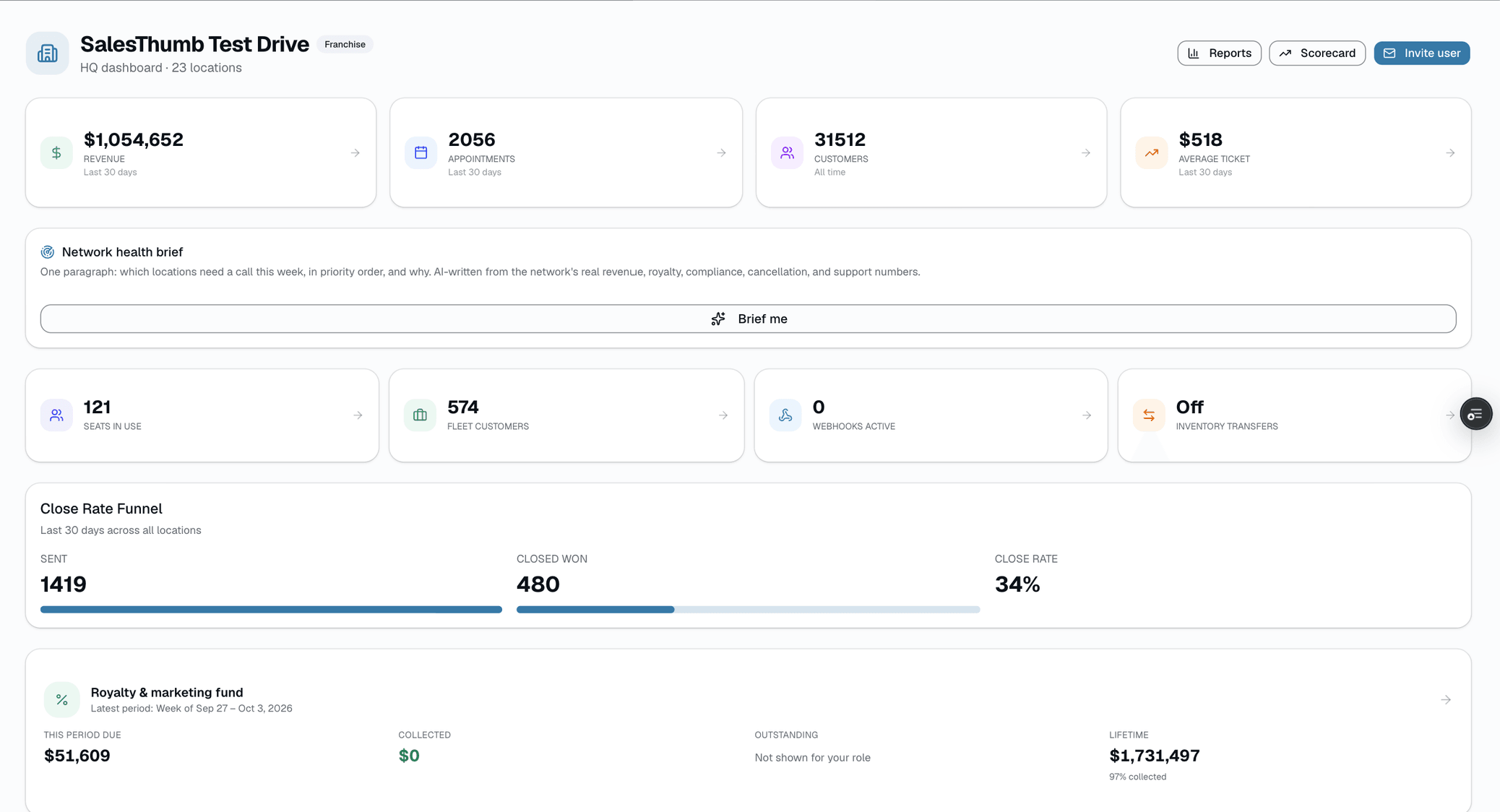
- Consolidated KPI strip: revenue, appointments, customers, avg ticket across every shop (30 days)
- Location leaderboard ranked by 30-day revenue
- Shop scorecard: every location, every core metric, one table ranked by trailing-twelve-month revenue
Two price books. Two texts with managers about invoices. SalesThumb HQ is the rollup that makes multi-location feel like one business again: consolidated revenue, appointments, and customers across every shop, a service catalog you add once and push to whichever locations don't have it yet, royalty and marketing-fund statements you generate on demand, with collection handled as a manual step after (a Chase NACHA CSV batch if you bank with Chase, or recorded by hand), and org-wide pricing floors so franchisees can't quietly discount below your margin. Open it Monday morning and you know — in under a minute — which shop needs help this week and which one is already winning.
A closer look
01
Know how every location is doing in a minute
Every shop on one screen. A KPI strip along the top shows the network's revenue, appointments, customers, and average ticket over the last 30 days, each one tile that drills into the surface that breaks it down by location. Below, a ranked leaderboard shows every shop's 30-day revenue and payment count, and a top-customers panel shows lifetime spend across every location. You know where to focus without digging into five separate shop dashboards.
- One screen · every shop · revenue, appointments, customers, avg ticket (30d)
- Ranked location leaderboard by 30-day revenue
- Every tile drills into the report that breaks the number down by shop
- Top customers across the network, ranked by lifetime spend
- Royalty pulse card shows the latest period the moment there's history
02
A scorecard that shows which shops are winning and why
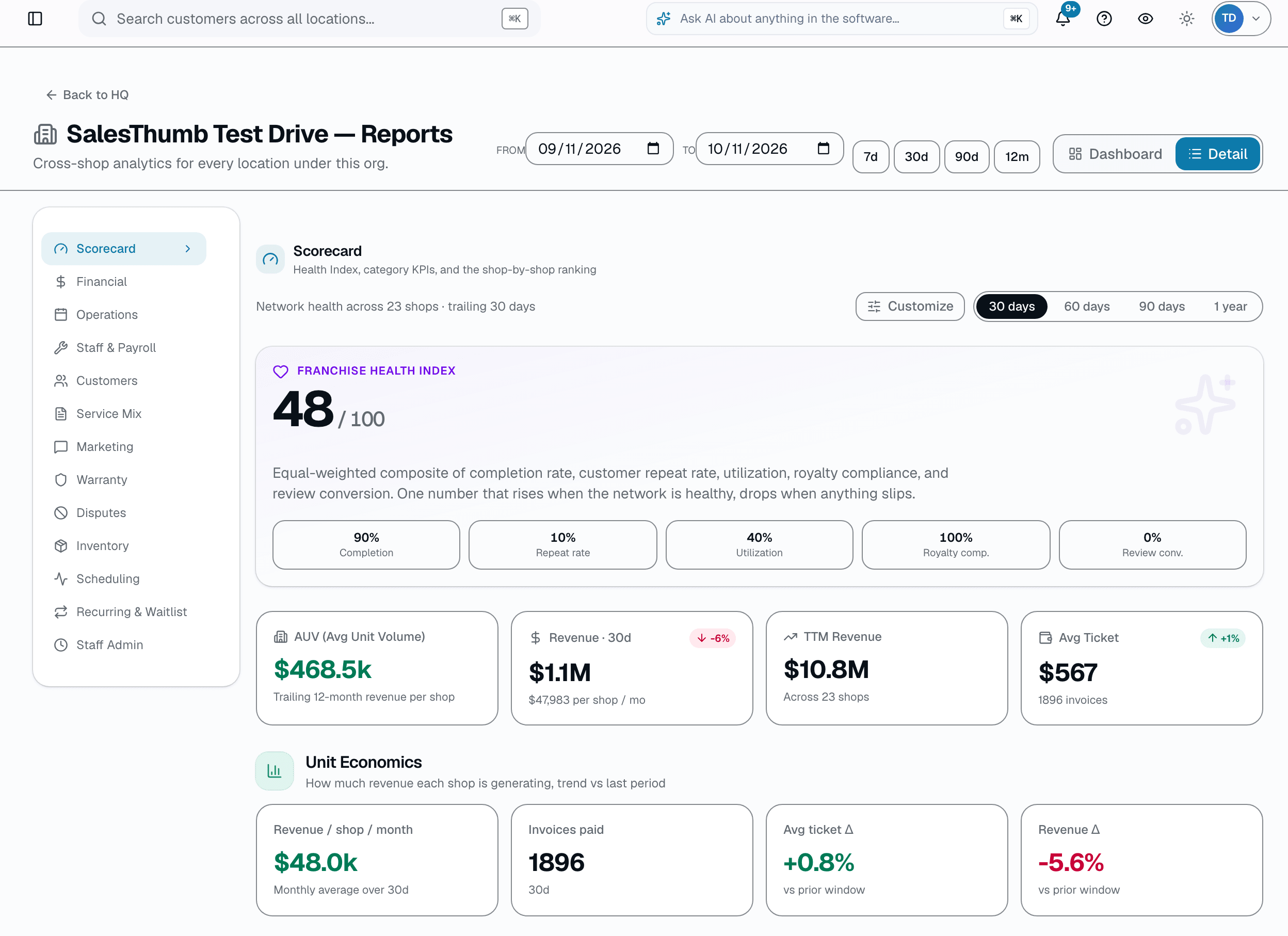
The Shop Scorecard table on the HQ Reports page lines up every location side by side — trailing-twelve-month revenue, appointments, completion rate, no-show rate, customers, repeat rate, average LTV and royalty compliance — ranked by trailing-twelve-month revenue, with completion rate, no-show rate and royalty compliance flagged green/amber/red against fixed targets and a per-shop health dot that rolls those signals up. Spot the pattern fast: which location is carrying the network, and which one's completion or no-show rate is dragging. It replaced a separate 'Compare shops' page in July 2026 — same underlying data, one table instead of two.
- Every shop, every core metric, one table — ranked by trailing-twelve-month revenue
- Completion, no-show and royalty columns flagged green/amber/red against fixed targets, plus a per-shop health dot
- Trailing-twelve-month view, not just the current period
- Same URL your bookmarks already point at redirects here automatically
03
Push a service to every shop at once
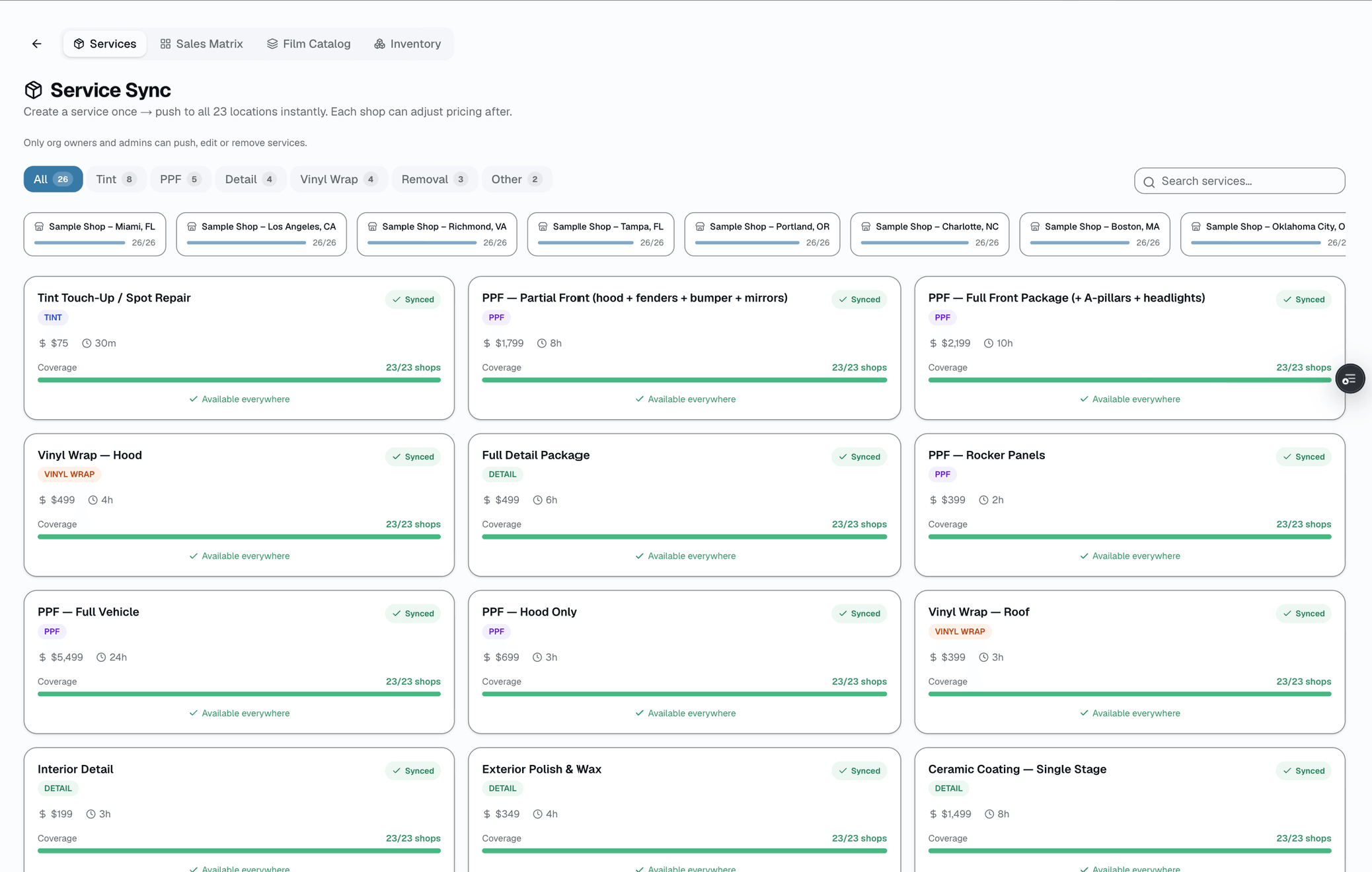
Add a new service once at the org level — name, category, price, duration — and push it to every location that doesn't have it yet in a single click. Each shop can adjust its own price and duration afterward; the push just gets everyone started from the same definition instead of someone re-typing it four times. A coverage bar per service shows how many of your shops already carry it.
- Push a new service to every location, or top up the shops missing an existing one
- Coverage bar per service: how many of your shops carry it today
- Each shop can adjust price and duration after the push — this isn't a locked field
- Category tabs (Tint, PPF, Detail, Vinyl Wrap, Removal, Other) + search
04
Royalty and marketing-fund statements that build themselves
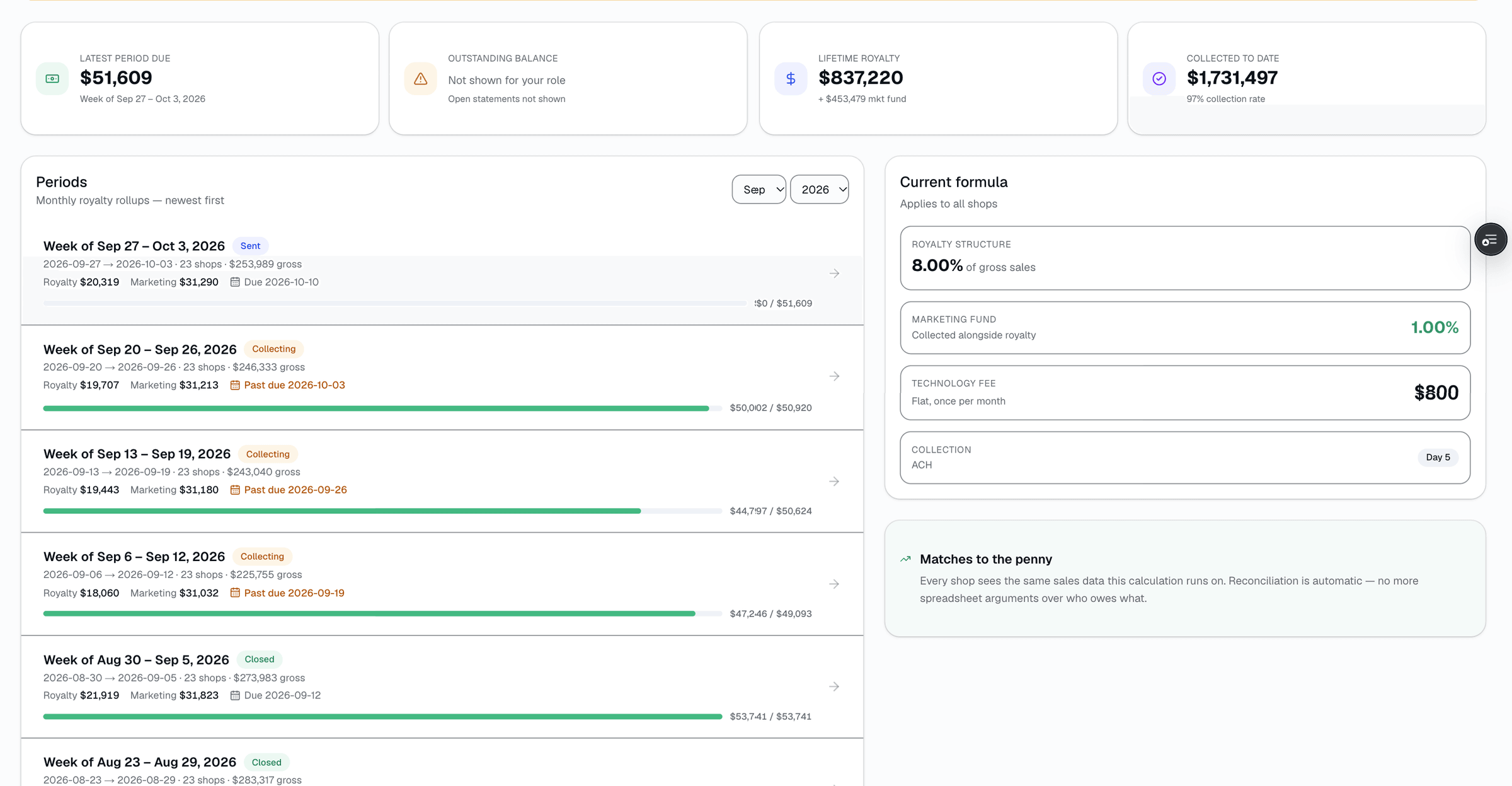
Every period, SalesThumb adds up gross sales per shop, applies your royalty formula (flat %, tiered brackets, minimum floor, cap), splits out the marketing-fund contribution, and generates a per-shop statement. If you bank with Chase, generate a Chase NACHA CSV file to collect through Chase Business Online; otherwise record payments by hand as they arrive. QuickBooks just relabels the statement as a QuickBooks bill for your own bookkeeping — SalesThumb doesn't push it to QuickBooks Online automatically. The old spreadsheet-and-cross-your-fingers workflow is gone — the number matches to the penny because it's computed from the same sales data the shop sees.
- Royalty formula editor: flat / tiered / min-floor / cap
- Marketing-fund split calculated + invoiced automatically
- Per-shop statement emailed with a secure link, queued the day after the period closes
- Generate a Chase NACHA CSV file (Chase accounts only) or record payments by hand — QuickBooks only relabels the statement for your own bookkeeping, it isn't an automatic push
- History view: every period, every shop, every calculation line
05
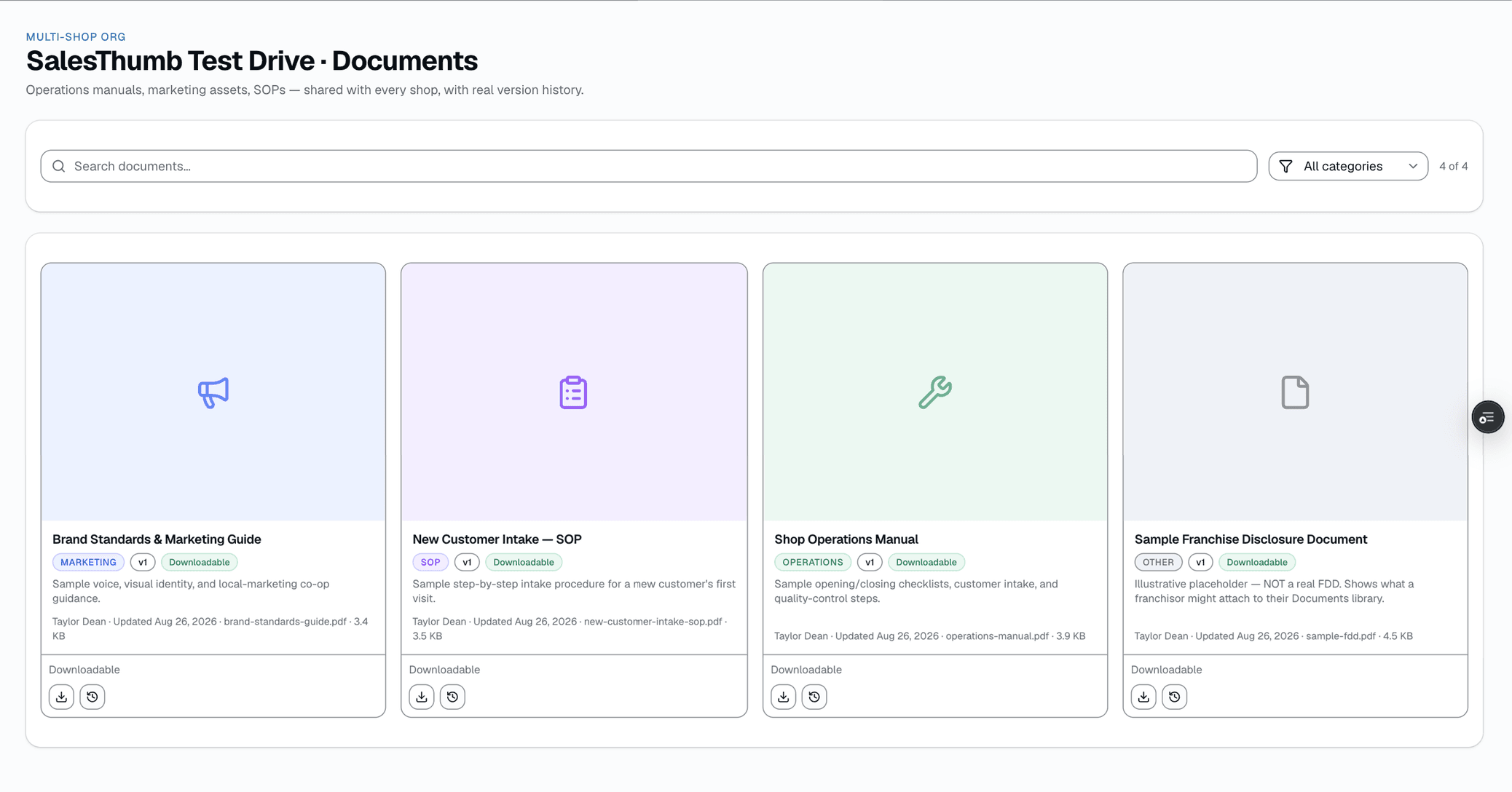
One document library, pushed to every shop
Ops manuals, brand kits, marketing assets, SOPs, legal and financial documents — upload once at the org level and every shop sees it. Re-uploading the same document creates a new version instead of overwriting the old one, so you always have the history. Categorize across 11 types, mark a document view-only when it shouldn't be downloaded, then search or filter by category to find what you need.
- One shared library, visible to every shop in the org
- Real version history: every re-upload keeps the prior version, nothing is overwritten
- 11 categories: SOP, Marketing, Operations, Legal, FDD, Financial, Compliance, Real Estate, HR, Training, Other
- Per-document View only/Downloadable toggle
Everything it does
The complete list. The plan tag above shows which plans include it.
See the whole network
- Consolidated KPI strip: revenue, appointments, customers, avg ticket across every shop (30 days)
- Location leaderboard ranked by 30-day revenue
- Shop scorecard: every location, every core metric, one table ranked by trailing-twelve-month revenue
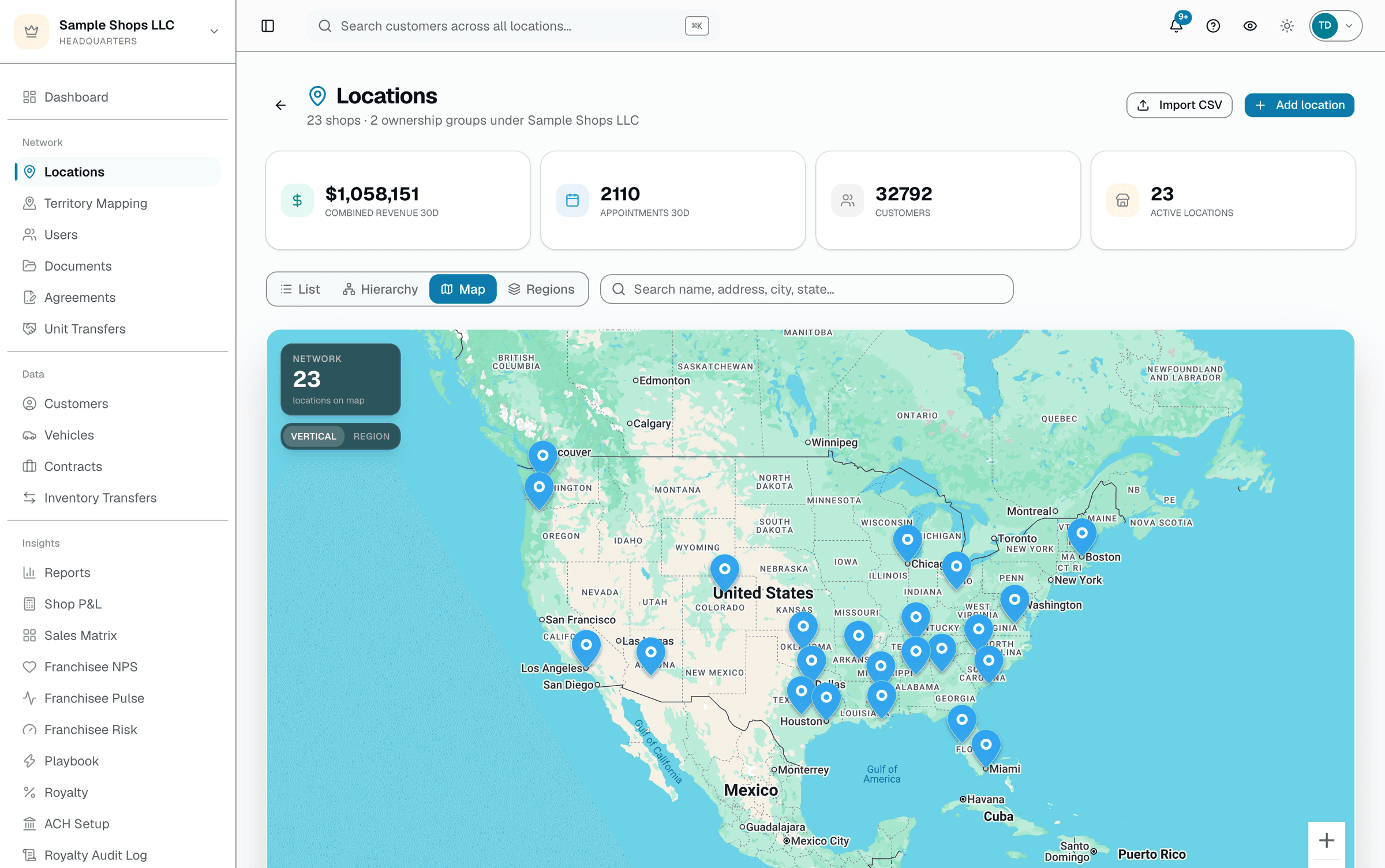
- Interactive map view with pins color-coded by vertical + a link into each shop
- Top customers across the whole network, ranked by lifetime spend
Push standards down
- Add a service once at org level · push to shops missing it in one click
- Each shop can adjust its own price and duration on a pushed service
- Org-wide pricing floors + max-discount caps set from HQ
- Shared document library (SOPs, brand kits, marketing assets) with real version history
Franchise operations
- Royalty calculation: % of gross, tiered brackets, min floor, marketing-fund split
- Generate a period's statements on demand; statement delivery runs on a daily schedule — collection is a manual step (a Chase NACHA CSV batch if you bank with Chase, or recorded by hand)
- Document hub: SOPs, ops manuals, brand kits — searchable, version-tracked
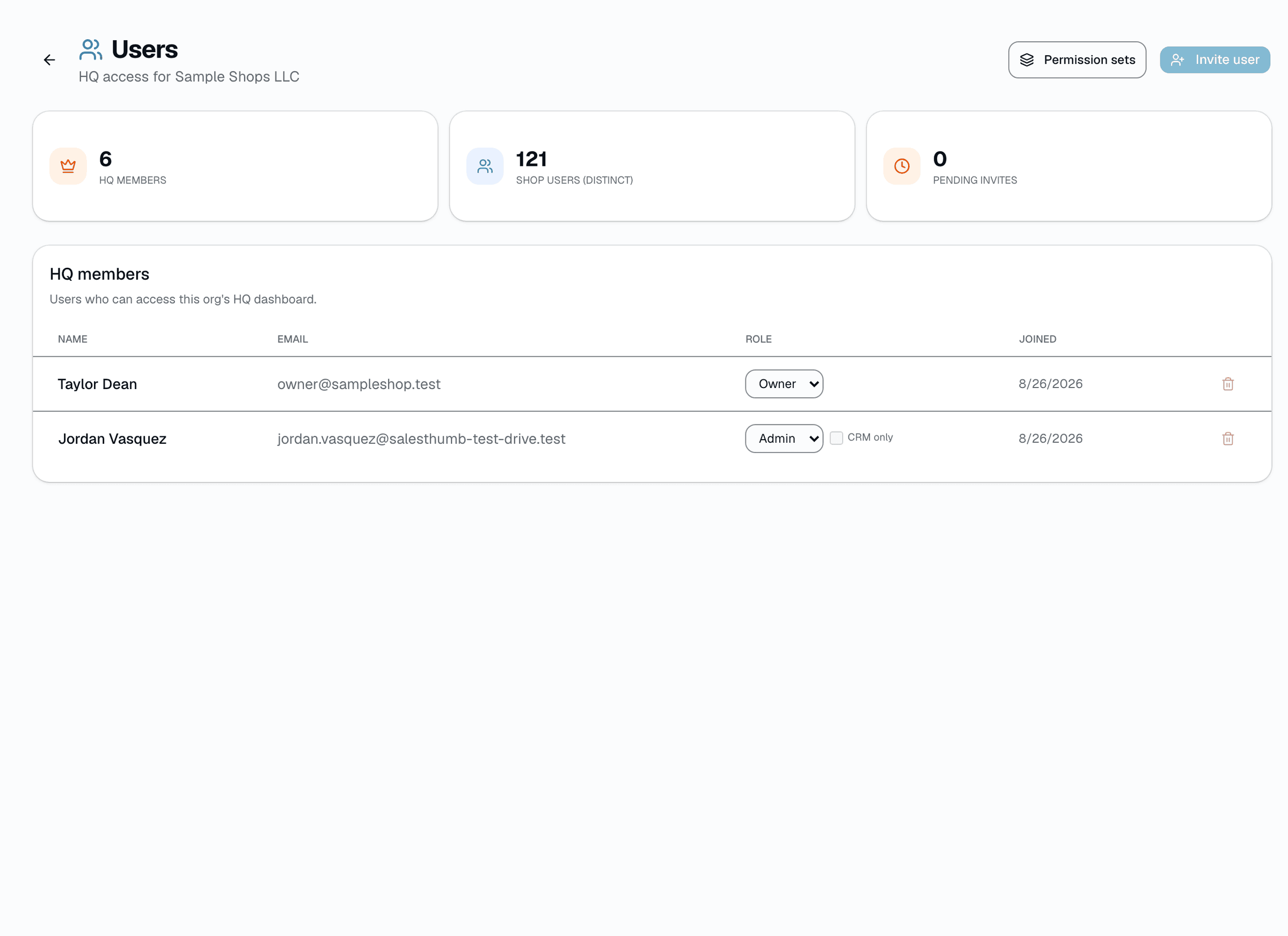
- HQ-level access management: invite Owners, Admins, and Viewers with a shareable link
- Custom HQ domain (e.g. hq.yourbrand.com) — point a CNAME record at the target HQ → Branding gives you, then verify it from the same screen
A tour of the screens
Every meaningful view, the path through it, and the moments that matter — so you know exactly what you're buying.
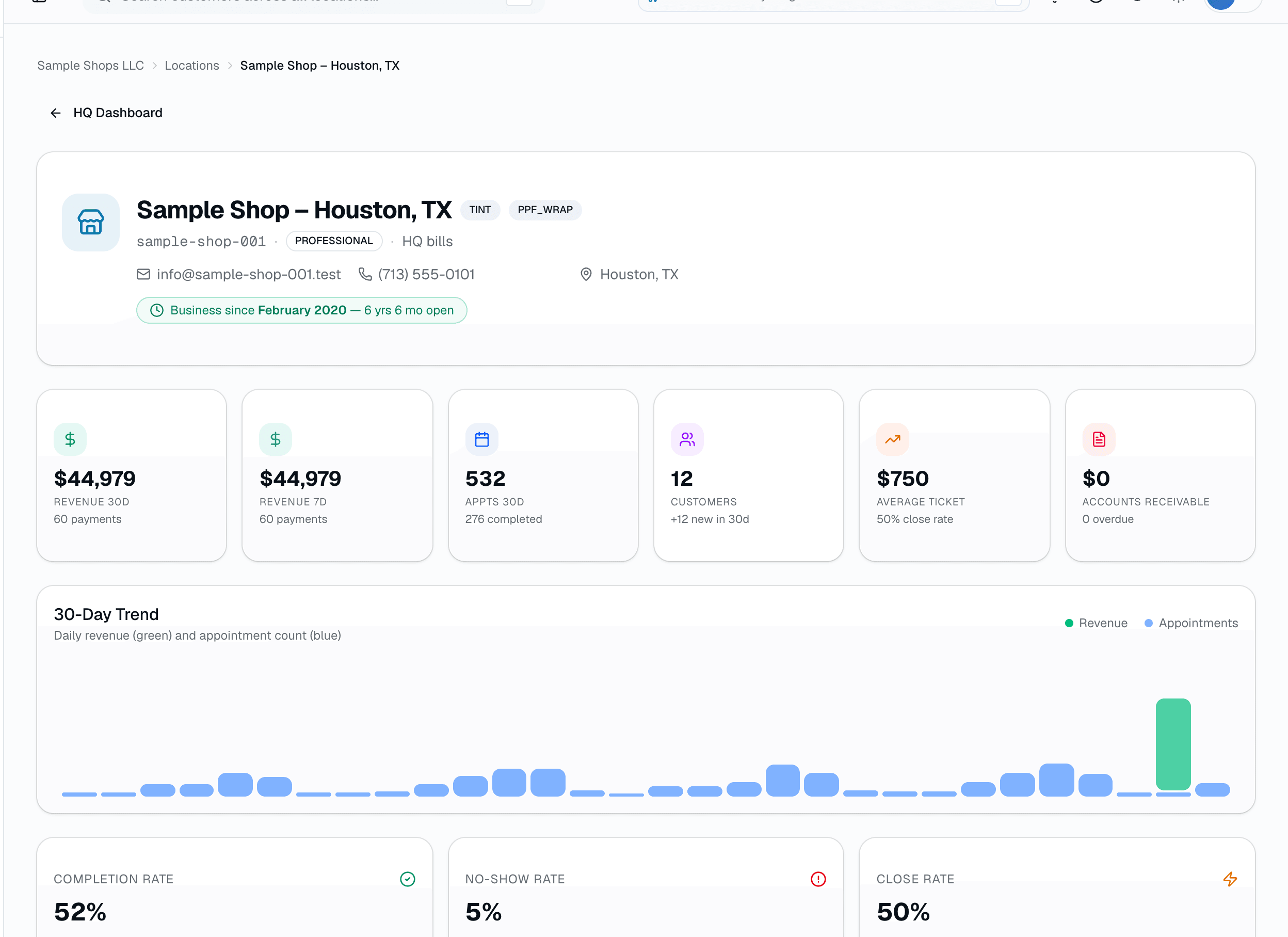
Shop scorecard
Drill into any location: 30-day revenue and appointments, average ticket, close rate, no-shows, AR, and a daily trend..
Service sync
Add a service once at org level → push to every shop missing it.
Each shop can adjust its own price and duration after.
Location map
Interactive map of every shop, pins color-coded by vertical (tint, PPF/wrap, detail, flat glass).
Click a pin for the address and a link into that shop.
Royalty reporter
Gross sales per location with tiered brackets, min floor, marketing-fund split.
Click Generate to close a period; statement delivery runs on schedule from there, but ACH collection is a manual step HQ handles through their own bank.
HQ users
Org-level access: invite people as Owner, Admin, or Viewer with a shareable link.
Per-shop staff roles are managed separately, in each shop's own team settings.
Document hub
Ops manuals, brand kits, marketing assets, SOPs — one shared library, real version history on every re-upload..
Who it's for
Built specifically for…
- Owners running their second (or third, or twentieth) location
- Franchisors enforcing brand + pricing standards across a network
- Regional operators comparing shops to spot best practices
- HQ finance teams tracking royalty + marketing fund without spreadsheets
- Ops leaders shipping new SOPs + making sure everyone actually reads them
What it replaces
The old way…
- Three Google Sheets + a Slack DM trying to compare shops
- Emailing PDF price books every time a supplier cost changes
- Quarterly royalty spreadsheet reconciliation done by hand
- 'Did you see the new SOP?' phone calls to every franchisee
- Hiring a multi-location ops coordinator just to keep the books aligned
Setting it up
- 1
Create an Organization
Your first shop stays as-is. Add the HQ add-on, connect your existing shops. The org becomes the parent, shops become children.
- 2
Sync your service catalog
Add a service once at the org level — name, category, price, duration — and push it to every shop that doesn't already have it. Each shop can adjust its own price and duration afterward.
- 3
See the whole picture
Revenue, appointments, customers, and royalty — all rolled up in one dashboard, with a ranked location leaderboard and drill-down by shop.
What this looks like in a shop
Illustrative scenario: You own 4 shops across Texas. From HQ you see: Houston is crushing it at $28k/month, Austin is at $12k (investigate), San Antonio is on track, Dallas has an installer shortage. You add a new ceramic-coating service once and push it to the shops that don't have it yet. You click Generate on the April royalty period — every shop's statement lands in their inbox with the royalty and marketing-fund amounts owed calculated automatically; collecting the payment is still a manual step (originate an ACH batch or record payments by hand).
Good to know
- Which plan includes multi-location hq?
- It's part of the HQ add-on, which you can add to any plan. See the Pricing page for everything in each plan.
- Is this separate software from the per-shop platform?
- No — same codebase, same login. HQ is a role + a navigation layer over the existing shops. Turn it on, turn it off, the shops keep working either way.
- Can franchisees override an org-pushed service?
- Yes. Pushing a service from HQ creates it at each shop with a starting price and duration — every shop can then adjust its own price and duration afterward. It's a shared starting point, not a locked field.
- How does royalty calculation work?
- You set the formula once — flat %, tiered brackets ('5% up to $30k, 4% above'), minimum floor, maximum cap. SalesThumb applies it to each shop's gross sales per period and generates a statement. Collecting it is a manual step: if you bank with Chase, generate a Chase NACHA CSV file to run through Chase Business Online, or record payments by hand — there's no processor-side auto-debit. QuickBooks is just a bookkeeping label on the statement, not an automatic push to QuickBooks Online.
- Do franchisees see everything I see?
- No. Franchisees see their own shop's data only. HQ role sees rollup + drill into any shop. In a franchise org, an Org Viewer only sees the shops they're staffed on; HQ Regions group shops for reporting, but there's no separate regional-manager role.
- What happens if a franchisee leaves the network?
- Remove their shop's link to the org from HQ → Locations. The shop keeps running under its own subscription — leaving the network doesn't touch their day-to-day data or customer records.
- Does HQ cost extra on top of the per-shop subscription?
- HQ is a $599/mo flat add-on that covers your first 5 locations at no extra per-shop charge. Beyond 5, it's $35/shop.
- Can my HQ dashboard live on my own domain instead of salesthumb.com?
- Yes. From HQ → Branding, enter a domain you own (like hq.yourbrand.com), add the CNAME record it gives you at your DNS registrar, and click Verify — HQ checks that the record actually resolves before marking it live.
Works with your stack
Payment processor
Per-shop payout routing (royalty collection is a separate manual step — a Chase NACHA CSV file if you bank with Chase, or recorded by hand)
QuickBooks Online
Labels the statement a QuickBooks bill — not an automatic push, you record it yourself
OpenStreetMap
Interactive map view of every location
CSV export
Network-wide CSV on each HQ report table
Pairs well with
Reports
SalesThumb's 83 reports live in a 14-category sidebar in the app; grouped here by the decision they answer, they sort into 6 clusters. The six: cash & revenue, job & service profitability, team & schedule performance, marketing & lead performance, customer retention & risk, and customer obligations — the reports inside each cluster export individually to CSV. Basic and Starter include the core reports; Gross Profit per Job, the installer and service-time reports, the close-rate funnel, Referral Attribution, ZIP Code Density, Channel CAC / ROI, Loyalty Program, and the inventory reports need Growth.
Customer CRM
Search by name, plate, or VIN in milliseconds. Every appointment, quote, invoice, warranty, and photo attached to the right record — forever.
Automations
On Growth and up, pick a preset drip sequence — win back lapsed customers, follow up cold leads, or ask for a review after a completed job. It goes live the moment you choose a pace, so edit the messages right away or pause it until you have.
Territory Mapping
Your franchise territories on a live map: draw or pick areas, see Census population and demographics, print location reports. $199/mo per HQ org, on top of +HQ.