The monthly royalty close computes itself. Collection is still on you.
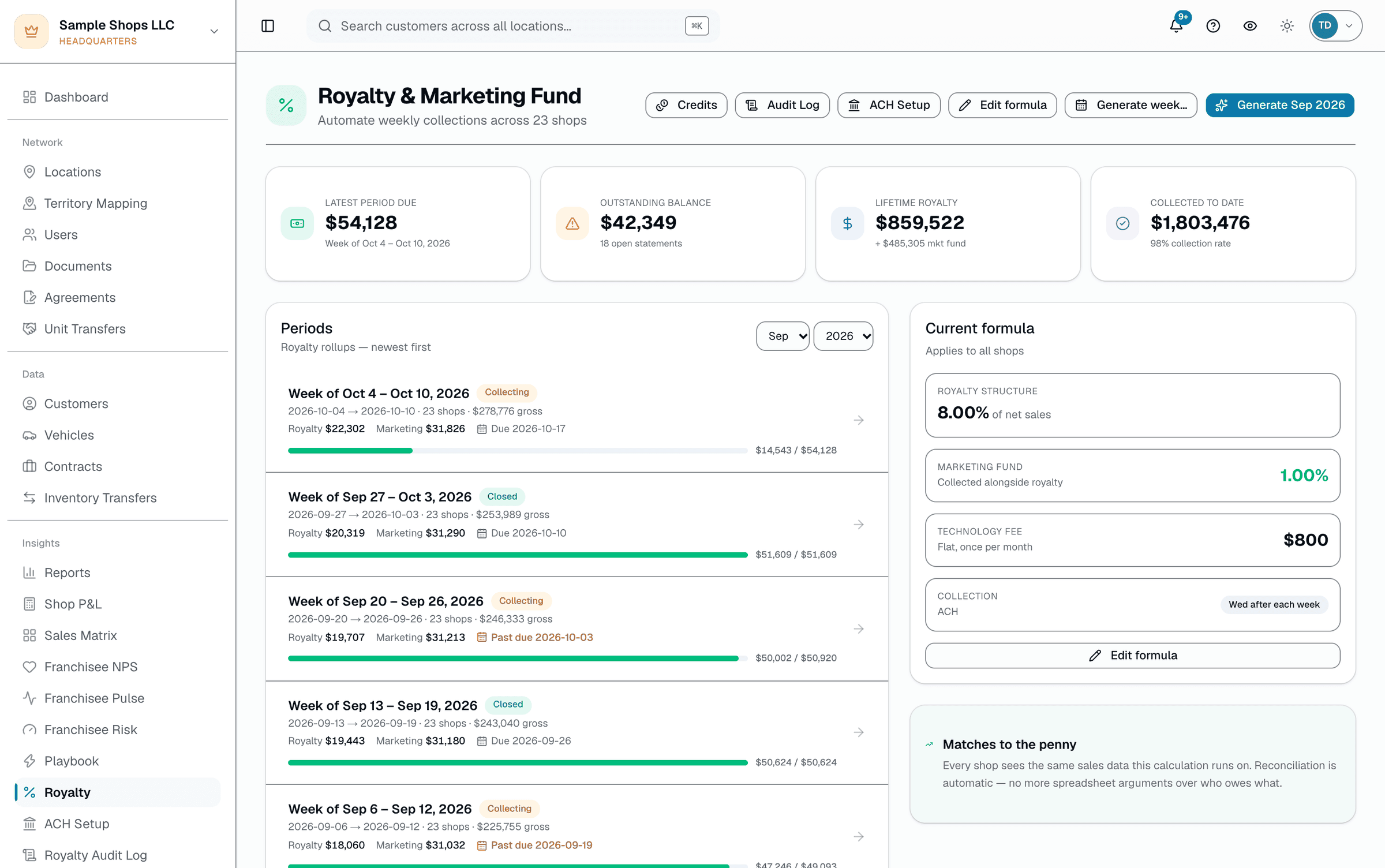
Royalty collection at most franchises is a spreadsheet, a chase-list, and an awkward call on the 15th of every month. SalesThumb automates the math: on the 1st of the month, a cron walks every shop in the chain, sums its invoiced sales for the month (any invoice that's been sent, partially paid, or paid in full — not only fully collected invoices), applies that shop's rate rule (tiered brackets, marketing fund %, tech fee), and generates an itemized statement — no one has to kick it off.
The quick version
Franchise fees: Monthly franchise-fee totals calculate themselves; you still collect.
- Close cron — monthly rules close on the 1st; weekly rules close the day after each billing week ends
- Per-shop rate rules: tiered brackets, marketing fund %, tech fee, other fees
- Idempotent — re-running a closed period skips shops that already have a statement
What it doesn't do is move money. There's no automatic ACH debit: HQ either generates a Chase NACHA CSV file and originates it through Chase Business Online (Chase accounts only), or records payments by hand as they come in. Disputes are HQ marking one statement disputed with a free-text reason when a franchisee raises a question, then resolving it by hand — not an automated retry queue.
A closer look
01
Monthly close does the math
On the 1st of every month at 12:00 UTC once scheduled, the close walks every franchise org, then every shop in it: sums that shop's invoiced sales for the prior month (any invoice sent, partially paid, or paid in full — by default the shop owes royalty on a sale the moment it's invoiced (pre-tax, net of refunds); a rule can instead use a collected-cash basis), applies its rate rule (a shop-specific override if one exists, otherwise the org default — including tiered brackets, marketing-fund %, and technology fee), and inserts an itemized statement. For monthly rules the close is always the 1st; a rule set to weekly billing closes the day after its billing week ends. A separate daily schedule (14:00 UTC) emails any statement that hasn't gone out yet, so delivery can land up to a day after the close.
- Monthly rules close on the 1st; a rule can instead bill weekly, with its own week-start day
- Per-shop rate overrides read from that shop's royalty rule
- Re-run safe — a shop that already has a statement for the period is skipped
- Statement emailing is a separate, later cron — not the same run
02
You collect it with a Chase NACHA file or a recorded payment
SalesThumb stores each franchisee's bank details (encrypted) so HQ can generate a Chase NACHA CSV file for a period and originate the debit batch through Chase Business Online — the platform never initiates a debit itself, and this file format only works with a Chase account. The alternative (or the fallback when a franchisee pays another way, or when HQ doesn't bank with Chase) is recording the payment by hand against the statement. Nothing auto-reconciles beyond that manual entry.
Collecting · April statementsmanual
Bank on file per shop · SalesThumb never debits it automatically
Recorded this period
2 of 4 shown recorded
$8,126.60 / $15,120.77
Shop A
Bank on file · Payment recorded May 8 · check
Shop B
Bank on file · Payment recorded May 9 · included in NACHA batch
Shop C
Bank on file · Statement sent · no payment recorded yet
Shop D
Bank on file · Franchisee contacted HQ · statement marked disputed
Two ways money gets marked collected: HQ generates a NACHA file and originates it through your own bank, or HQ types in a payment (check, wire, portal) — either way, a human records it. Nothing debits a franchisee's account on its own.
Everything it does
The complete list. The plan tag above shows which plans include it.
- Close cron — monthly rules close on the 1st; weekly rules close the day after each billing week ends
- Per-shop rate rules: tiered brackets, marketing fund %, tech fee, other fees
- Idempotent — re-running a closed period skips shops that already have a statement
- Itemized statements (gross → tier splits → royalty → marketing → tech fee → credits)
- HQ-side "mark disputed" on a statement, with a free-text reason
- Chase NACHA CSV file generation for origination through Chase Business Online (Chase accounts only)
- Manual payment recording per statement
- HQ correction tools — void a mistaken payment, reverse an accidental waive, or reopen a dispute closed too soon, each requiring a reason and logged to the audit trail
A tour of the screens
Every meaningful view, the path through it, and the moments that matter — so you know exactly what you're buying.
Statement PDF (franchisee view)
One gross-revenue figure, then royalty / marketing-fund / tech-fee lines — never broken out by service category.
No auto-debit; collection notes explain how payment actually happens.
Sample Shop LLC
Franchise royalty statement
Statement 2024-04
Period Apr 1 – Apr 30 · issued May 1
Franchisee
Sample Shop LLC
Tampa · Westshore
Royalty rate
5.0%
shop-level rate override
| Line | Amount |
|---|---|
| Collected revenue (basis) | $61,480.00 |
| Royalty @ 5.0% | $3,074.00 |
| Marketing fund @ 2.0% | $1,229.60 |
| Technology fee | $99.00 |
| Credits applied | -$0.00 |
| Total due | $4,402.60 |
How this gets collected
Nothing debits automatically. HQ will either include your bank details in a NACHA batch they originate through their own bank, or record a payment once it’s received (check, wire, portal).
Questions about this statement? Contact HQ, who can mark it disputed.
Disputed statements
A free-text dispute reason HQ records on a single statement — reviewed and resolved by a human, not a retry queue..
Disputed statements2 open
HQ marked the statement disputed after the franchisee got in touch, with a free-text reason — no automated resolution
Seattle · Bellevue
$4,118.25Statement 2024-04 · raised May 9
Gross includes returns that were voided — recalculate.
Nashville · Berry Hill
$3,866.40Statement 2024-03 · raised Apr 28
One invoice was double-counted after a refund + rebook.
No retry, no processor codes, no auto-resolve — HQ follows up directly with the franchisee, then either issues a manual royalty credit (applied at the next close) or corrects the recorded payment.
Who it's for
Built specifically for…
- Franchisors on the +HQ add-on who want the royalty math automated
- Multi-location operators with internal cost allocation
- Master-franchisees managing sub-franchisee billing
What it replaces
The old way…
- Spreadsheet math for what each shop owes
- Manually building a statement from raw revenue numbers each month
- Re-deriving tiered rates and fund percentages by hand
Setting it up
- 1
Configure your rate rules
Set a tiered or flat royalty rate per org, with shop-level overrides for legacy contracts. Marketing fund % and technology fee are configured as separate line items.
- 2
Cron runs the close
1st of the month, every shop's prior-month revenue is rolled up and an itemized statement is generated. You review any disputed statements (usually none).
- 3
You collect it
If you bank with Chase, generate a Chase NACHA CSV file and originate it through Chase Business Online; otherwise record payments as they come in. Nothing debits a franchisee's account automatically.
What this looks like in a shop
Illustrative scenario: a 14-location PPF franchise used to spend the first week of every month reconstructing what each shop owed from raw POS exports. With the close cron doing that math automatically on the 1st, the owner's remaining work each month is generating a Chase NACHA CSV file for the shops paying by ACH through Chase and following up on the couple that don't — down from a week of spreadsheet work to about an hour.
Good to know
- Which plan includes franchise fees?
- It's part of the HQ add-on, which you can add to any plan. See the Pricing page for everything in each plan.
- What if a franchisee disputes the statement?
- They contact HQ, and HQ marks that statement disputed with a free-text reason (franchisees can't flag a dispute themselves in the app). There's no automated resolution — HQ reviews it, follows up directly, and either issues a manual royalty credit (applied at the next close) or corrects the recorded payment.
- What if HQ makes a mistake — waives the wrong statement or records the wrong payment?
- There's a dedicated correction path, not a database edit. HQ can void a mistaken payment (it appends an offsetting negative entry rather than deleting the original, so the record stays intact), reverse an accidental waive, or reopen a dispute that was resolved too soon — each requires a typed reason and writes its own entry to the Royalty & Marketing Fund Audit Log. None of it touches a real bank transaction; it only corrects SalesThumb's own record.
- Can we charge different rates by shop?
- Yes — royalty rate rules are configurable per org with per-shop overrides (useful for legacy contracts). Rates can be flat or tiered by revenue bracket; marketing-fund % and technology fee are separate line items on the same rule.
- Does SalesThumb pull the money automatically?
- No. SalesThumb computes what's owed and can generate a Chase NACHA CSV file (Chase accounts only), but HQ originates that batch through Chase Business Online. The alternative is recording payments by hand as they arrive. There's no processor-side auto-debit or auto-retry.
- Does this work for tech-fee-only chains (not full royalty)?
- Yes. Set the royalty rate to 0 and just configure a flat tech fee per shop — the cron still runs and generates a statement with the tech fee as its only line.
Works with your stack
Chase Business Online
HQ originates the debit batch there — SalesThumb only generates the Chase NACHA CSV file (Chase accounts only)
QuickBooks Online
Labels the statement a QuickBooks bill — not an automatic push, you record it yourself
Inngest
Schedules the monthly-close + daily-send crons
Pairs well with
FDD Compliance
Server-enforced brand-color locks, network-wide minimum pricing, and a structured visit-checklist runner that turns every failed item into a tracked corrective action — not a spreadsheet note.
Marketing Fund
A single org-level marketing fund: each shop's contribution is calculated automatically from revenue at monthly royalty close (no bank-level auto-debit — collection is manual, same as royalty payments), HQ-run campaigns logged by hand, and a franchisee-submitted claim queue HQ reviews and pays manually — with an AI suggestion chip to speed triage, never to auto-decide.
Multi-Location HQ
From a single shop to a franchisor with hundreds of locations, every shop rolls up into one HQ view with consolidated KPIs, centralized catalogs, and push-to-shop pricing and templates.
Reports
SalesThumb's 83 reports live in a 14-category sidebar in the app; grouped here by the decision they answer, they sort into 6 clusters. The six: cash & revenue, job & service profitability, team & schedule performance, marketing & lead performance, customer retention & risk, and customer obligations — the reports inside each cluster export individually to CSV. Basic and Starter include the core reports; Gross Profit per Job, the installer and service-time reports, the close-rate funnel, Referral Attribution, ZIP Code Density, Channel CAC / ROI, Loyalty Program, and the inventory reports need Growth.