Brand-color locks, network pricing floors, and a real audit trail.
Most franchisors write brand controls into the FDD and then hope. SalesThumb enforces these at the server (plus an optional full service-pricing lock): lock a franchisee's brand color and the picker is disabled — and the same save is rejected server-side no matter which client sends it; set a network minimum price and a franchisee's quote can never net less than that floor after discounts (the system quietly re-caps the discount rather than rejecting the sale).
The quick version
Brand standards: Brand-color locks, price floors and a real audit trail.
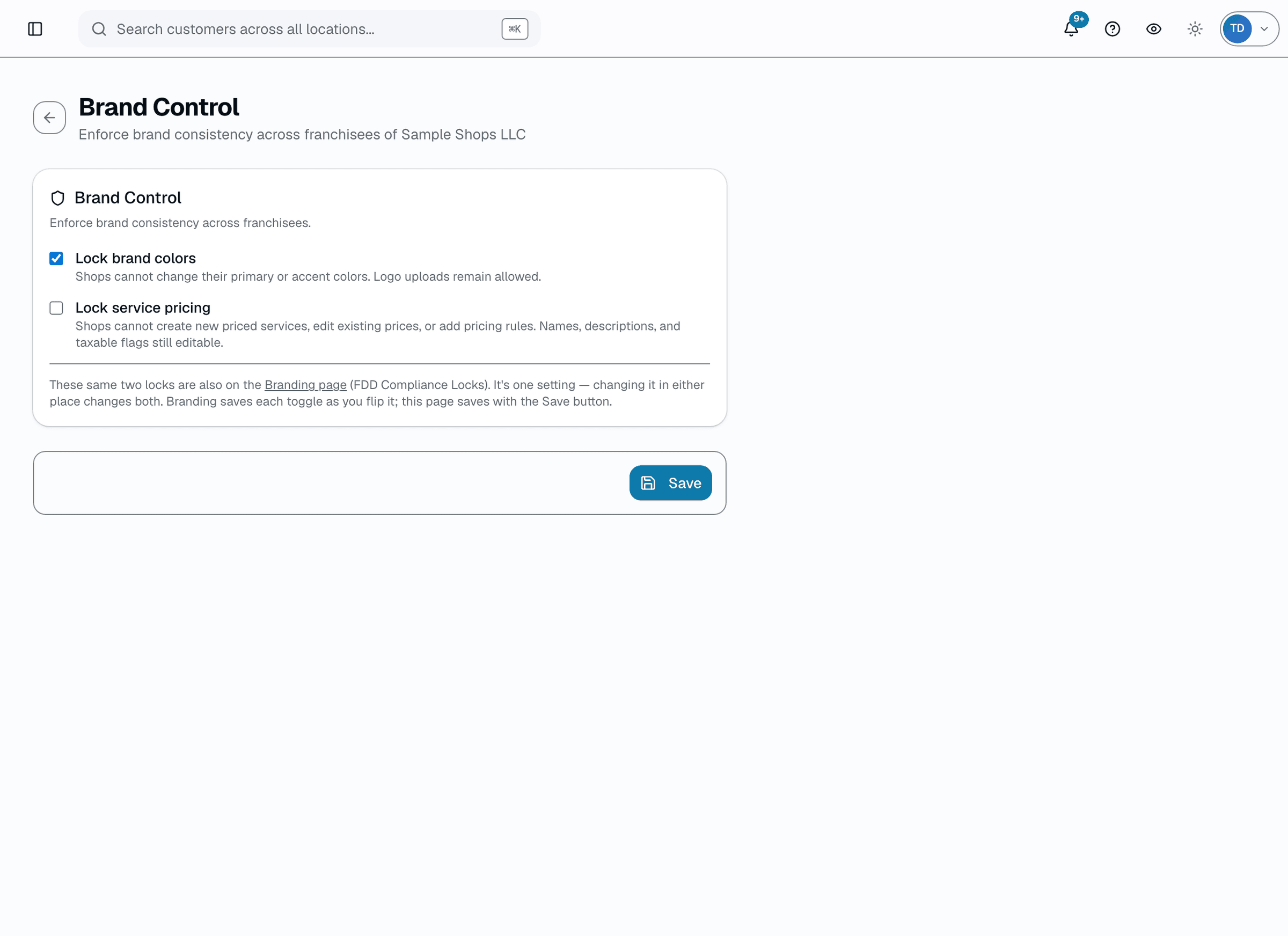
- Brand-color lock — franchisees can't change primary/accent colors; enforced on every save attempt, not just the UI
- Network-wide minimum price + maximum-discount cap per service category or name pattern
- Pricing floor auto-caps the effective discount so net price never drops below the floor (never blocks the sale outright)
On top of that, an auditor from either side — HQ or the shop's own staff — runs a structured PASS/FAIL/N-A checklist during a visit, attaches evidence photos, and every FAIL becomes a tracked corrective action with an assignee and due date; once every item has a result, the shop and HQ each sign off independently instead of a single auditor's word closing it out.
A closer look
01
Brand colors locked on the server
HQ → Branding → 'FDD Compliance Locks' → 'Lock brand colors.' Once enabled, the shop-settings save endpoint rejects any attempt to change primaryColor/accentColor for that org's shops, regardless of which client sends the request. Logo uploads stay allowed. Toggling the lock writes an audit-log entry; there's no separate violation ledger — the rejection itself is the enforcement.
- Brand-color picker disabled at the franchisee level once locked
- Rejected server-side on save, not just greyed out client-side
- Logo uploads remain allowed — only primary/accent color are locked
- Toggling the lock is itself an audited action
02
Compliance checklist + independent sign-off + corrective actions
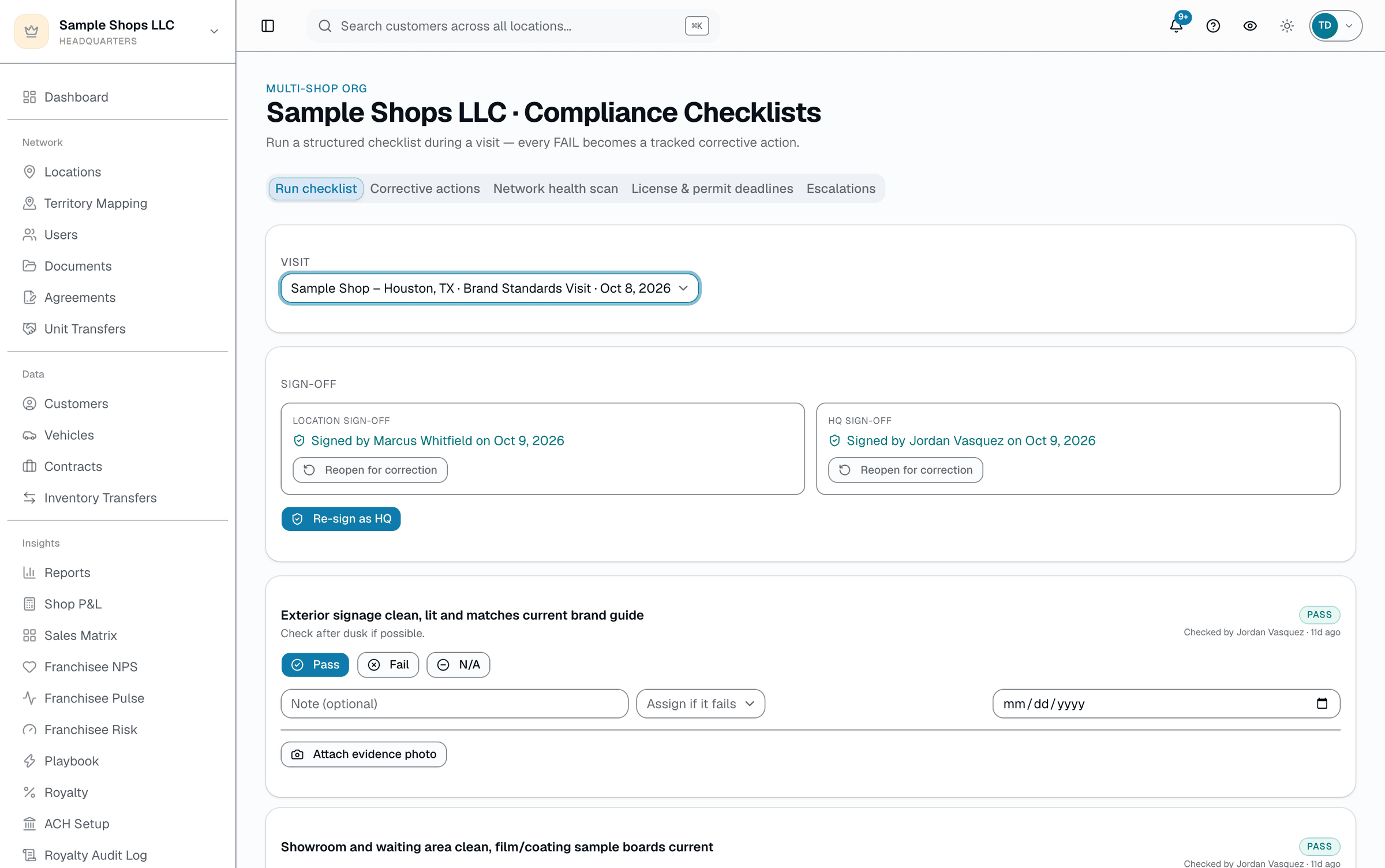
An auditor — HQ or the shop's own staff — picks a scheduled or completed visit and works through that template's checklist item-by-item (Pass / Fail / N/A), attaching a photo as evidence where it matters. Once every item on the checklist has a result, the shop and HQ can each sign off independently — two separate attestations, not a single auditor's word: the shop's own staff sign from their own compliance page, HQ signs from its side, and each signature records who signed, when, and requires an Owner, Admin, or Manager role at that location on the shop's side (or org-admin access on HQ's side). Every FAIL still automatically opens a corrective action the whole org can see — with an assignee, a due date, and a status (Open, In Progress, Overdue, Resolved) — instead of a note that only one auditor remembers.
- Checklist items come from HQ-defined audit templates
- Evidence photo attaches to whichever result you save
- A shop Owner/Admin/Manager and HQ each sign off independently, only once every item has a result
- Every FAIL opens a corrective action automatically
- Corrective actions are resolved with a required resolution note
Everything it does
The complete list. The plan tag above shows which plans include it.
- Brand-color lock — franchisees can't change primary/accent colors; enforced on every save attempt, not just the UI
- Network-wide minimum price + maximum-discount cap per service category or name pattern
- Pricing floor auto-caps the effective discount so net price never drops below the floor (never blocks the sale outright)
- Compliance checklist runner — PASS / FAIL / N/A per item during a visit, with an optional evidence photo
- Independent shop-side + HQ-side sign-off on a completed checklist — two attestations, not one
- Every FAIL becomes a tracked corrective action (assignee + due date)
- Org-wide corrective-action list with Open / In Progress / Overdue / Resolved status and resolution notes
A tour of the screens
Every meaningful view, the path through it, and the moments that matter — so you know exactly what you're buying.
Compliance checklist runner
Pick a visit, score each item Pass/Fail/N-A with an optional evidence photo.
Once every item has a result, the shop and HQ each sign off independently, and every FAIL becomes a tracked corrective action.
Who it's for
Built specifically for…
- Franchisors on the +HQ add-on with a network-wide brand standard they want technically enforced
- Multi-location operators wanting a pricing floor franchisees can't quietly undercut
- Compliance officers running structured visit checklists instead of ad-hoc notes
What it replaces
The old way…
- FDD-in-a-drawer brand enforcement nobody actually checks
- A pricing floor that only exists as a line in the operations manual
- Manual visit notes that never turn into a tracked follow-up
Setting it up
- 1
1. Set the standards
Lock brand colors from HQ → Branding if you want them technically enforced. Set minimum price / max discount rules per service category from HQ → Pricing Rules.
- 2
2. Run the checklist during a visit
Pick the visit, work through the template's items (Pass / Fail / N/A), attach a photo where it matters. Every FAIL opens a corrective action automatically.
- 3
3. Track corrective actions to resolved
The org-wide corrective-actions list shows Open / In Progress / Overdue at a glance. Resolving one requires a note describing what was fixed.
What this looks like in a shop
Illustrative scenario: An HQ auditor visits a location, works through the standard 12-item checklist on her phone, and two items fail — a missing required signage element and a walkaround-photo step the tech skipped. Both automatically become corrective actions assigned to the shop manager with a due date. Meanwhile, on the pricing side, a franchisee tries to discount a ceramic-coating line below the network floor; the system silently caps the discount at the floor instead of letting the sale go through underpriced.
Good to know
- Which plan includes brand standards?
- It's part of the HQ add-on, which you can add to any plan. See the Pricing page for everything in each plan.
- What happens if a franchisee tries to price below the floor?
- The discount is automatically capped so the net price after discount can never drop below the floor — the sale still goes through, just not underpriced. If the franchisee's own price is under the floor, the line is raised to the floor; otherwise it only limits how far a discount can push the price down.
- Can a franchisee change their brand color if HQ hasn't locked it?
- Yes — the lock is an explicit HQ toggle per org. Until you turn it on, shops can set their own brand colors as usual.
- What happens to a failed checklist item?
- It automatically creates a corrective action visible org-wide, with a status of Open (or Overdue once past its due date). An admin resolves it by adding a note describing the fix — there's no auto-remediation: a human sets the due date. The assignee gets an email when it's assigned and reminders once it's overdue, and HQ gets a daily digest of anything overdue 7+ days.
- Who actually signs off on a completed visit — just the HQ auditor?
- No — sign-off is independent on both sides. Once every checklist item has a Pass/Fail/N-A result, the shop's Owner, Admin, or Manager signs off from their location's own compliance page, and HQ signs off separately from its side. Each signature records who signed and when; one side signing doesn't complete or hide the other's independent attestation.
Pairs well with
Royalty Automation
A cron closes the month automatically — sums each shop's invoiced sales (sent, partially paid, or paid in full), applies each shop's rate, generates itemized statements. Collecting the money is a manual step: a Chase NACHA CSV file you originate through Chase Business Online (Chase accounts only), or payments you record by hand.
Master Catalog
One screen shows every service across every shop with a coverage bar (X of N shops carry it). Push a service to the shops missing it — a starting point, not a lock — and set network-wide minimum prices or max-discount caps by category.
Multi-Location HQ
From a single shop to a franchisor with hundreds of locations, every shop rolls up into one HQ view with consolidated KPIs, centralized catalogs, and push-to-shop pricing and templates.
Reports
SalesThumb's 83 reports live in a 14-category sidebar in the app; grouped here by the decision they answer, they sort into 6 clusters. The six: cash & revenue, job & service profitability, team & schedule performance, marketing & lead performance, customer retention & risk, and customer obligations — the reports inside each cluster export individually to CSV. Basic and Starter include the core reports; Gross Profit per Job, the installer and service-time reports, the close-rate funnel, Referral Attribution, ZIP Code Density, Channel CAC / ROI, Loyalty Program, and the inventory reports need Growth.