See every shop's services in one place. Push new ones. Set a price floor.
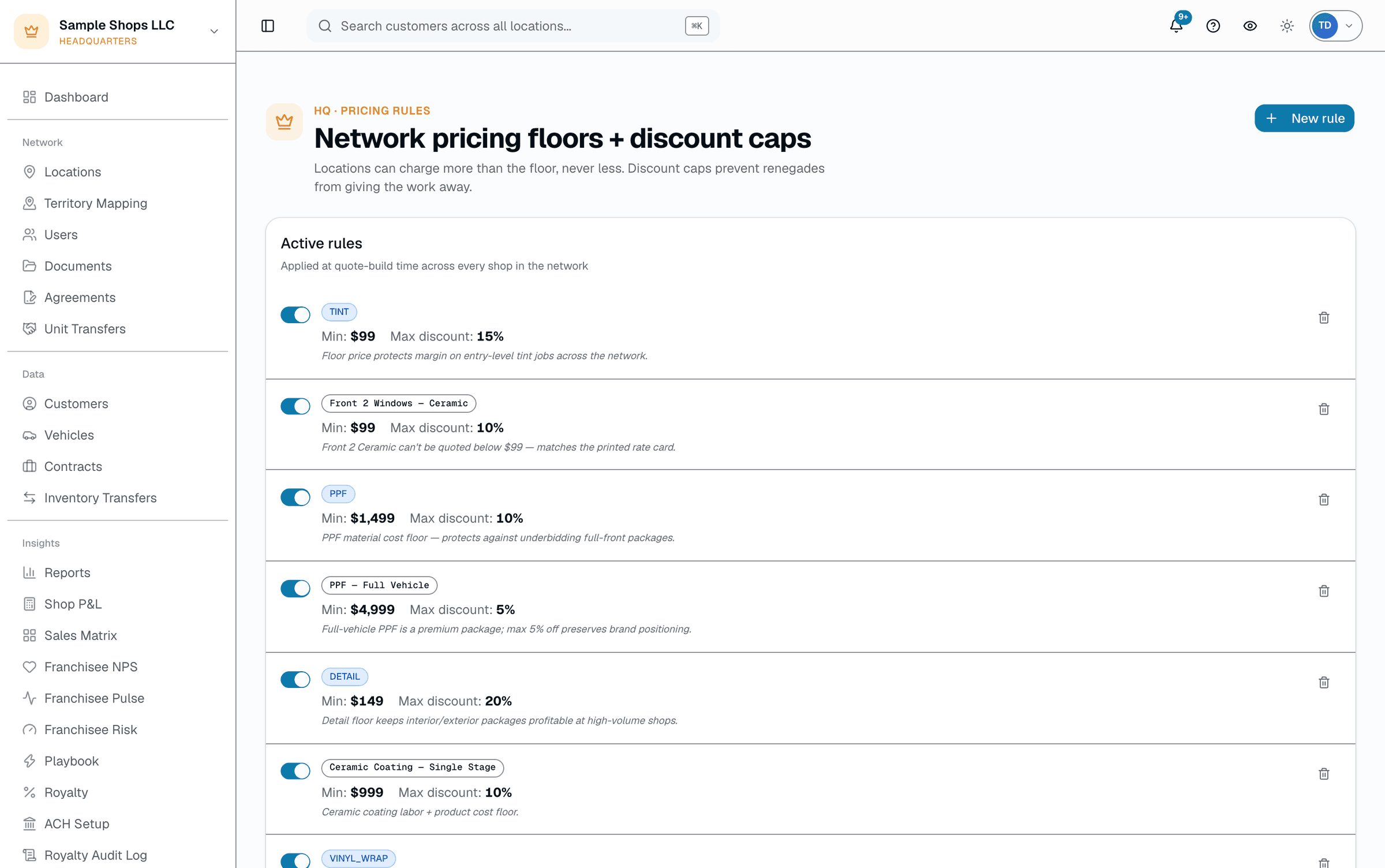
Every franchise wrestles with menu drift — corporate wants a new service everywhere and three months later only 60% of shops have it. SalesThumb's Service Sync shows every service across the org with a coverage bar and a one-click "push to N shops" button that creates it (name, category, price, duration) in whichever shops don't already have it — each shop can change the price or duration afterward (HQ's optional service-pricing lock blocks price changes only) — it's a seed.
The quick version
Master catalog: See every shop's services, push new ones, set price floors.
- Service Sync — every service across the org, one screen, coverage bar per service
- One-click push of a service to every shop that doesn't already have it
- Pushed services seed name/category/price/duration — shops can edit afterward; HQ's optional service-pricing lock blocks price changes only
A separate, related tool — Pricing Rules — lets HQ set a network-wide minimum price floor or a maximum discount % by service category or name pattern; shops can charge more than the floor, never less.
A closer look
01
Push a service without locking the catalog
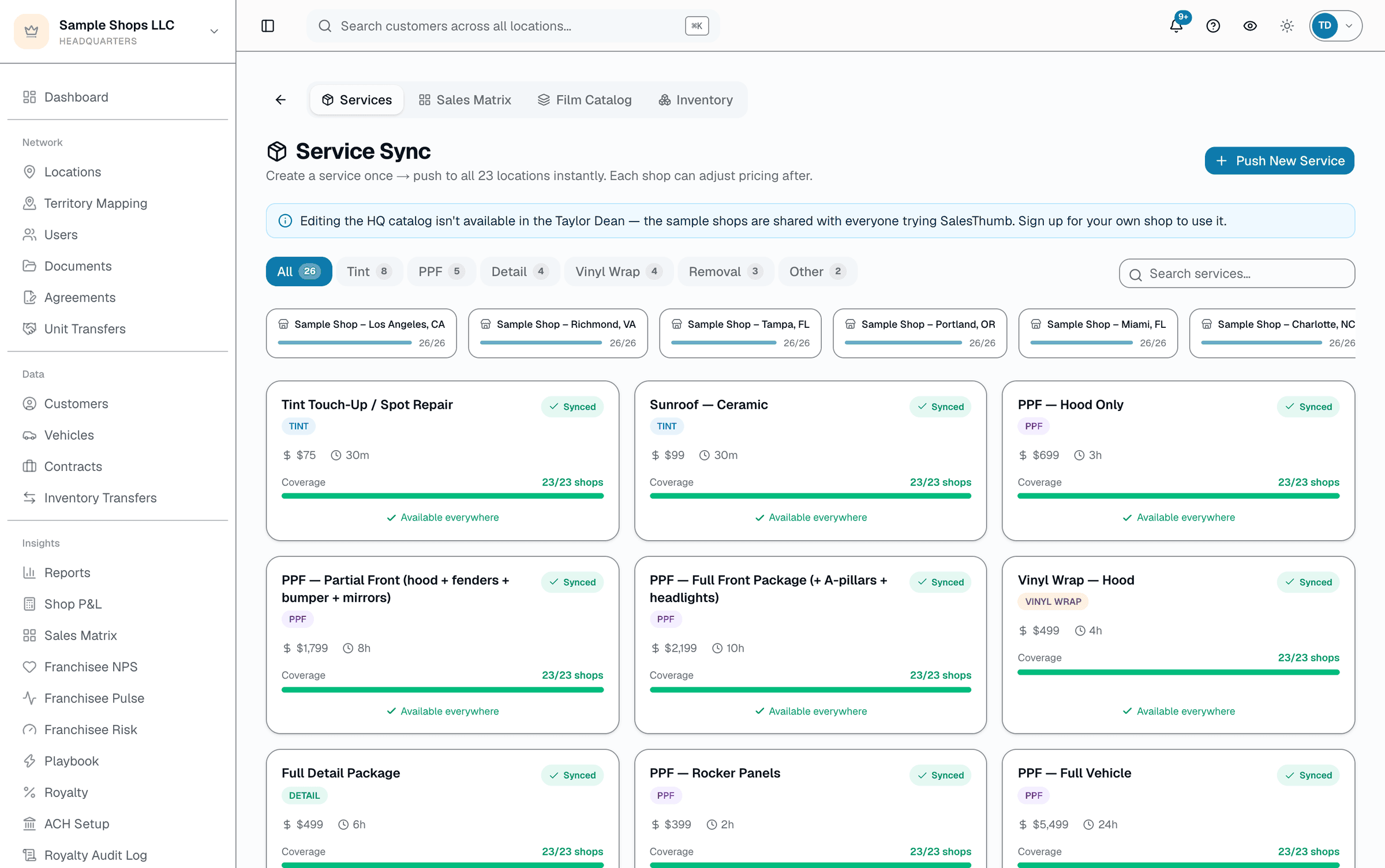
Service Sync is a live view of every shop's actual services with a coverage count (e.g. 3 of 5 shops carry 'PPF · full front'). Click "Push to 2 shops" and it creates that service, at the price/duration you set, in the shops that don't have it yet. There's no draft state, no scheduling, no scoped rollout, and no required-service lock — a shop can rename or delete what got pushed to it, and reprice it unless HQ has turned on the service-pricing lock. HQ can later edit or remove a pushed service; the change only reaches shops that never changed their copy.
- Coverage bar per service: X of N shops
- Push creates the service in the shops missing it, skips shops that already have a matching name + category
- Once a shop changes its copy, HQ edits never overwrite it — no version history
02
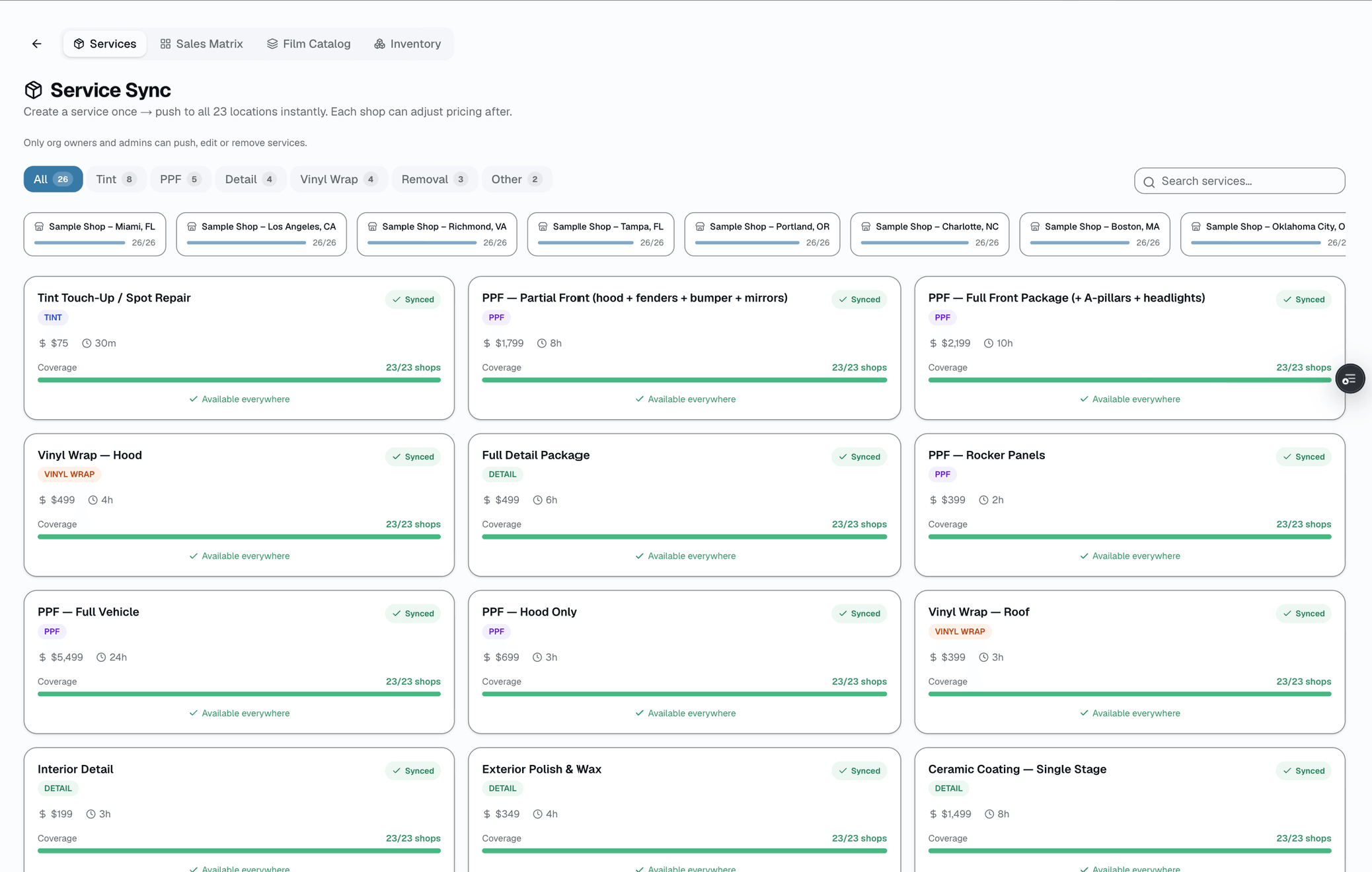
Pricing rules set a floor and a discount cap
A separate HQ page lets you set a minimum price a shop can quote, and/or a maximum discount % off list, scoped to a service category (e.g. TINT) or a free-text service-name pattern. Shops can price above the floor freely; they can't go below it or discount past the cap. There's no price ceiling field, no per-service required flag, and no warranty-tier or tip-eligibility control here — those live in their own separate parts of the product.
- Minimum price floor and/or max-discount % — scoped by category or name pattern
- Optional effective-from / effective-until window, and an enable/disable toggle
- No price ceiling field — floors and discount caps only
Everything it does
The complete list. The plan tag above shows which plans include it.
- Service Sync — every service across the org, one screen, coverage bar per service
- One-click push of a service to every shop that doesn't already have it
- Pushed services seed name/category/price/duration — shops can edit afterward; HQ's optional service-pricing lock blocks price changes only
- Pricing Rules — minimum price floor and/or max-discount % by category or service-name pattern
- Pricing rules can be time-boxed (effective-from / effective-until) and enabled/disabled
A tour of the screens
Every meaningful view, the path through it, and the moments that matter — so you know exactly what you're buying.
Service Sync — push preview
Every service, every shop, a coverage bar, and a push button that seeds the shops missing it..
Who it's for
Built specifically for…
- Franchisors on the +HQ add-on with a defined service menu
- Multi-location chains wanting pricing consistency
- Operators rolling out a new service across many shops
What it replaces
The old way…
- PDF service menus emailed to franchisees
- Manual menu edits per shop, with no visibility into who's missing what
- Spreadsheet pricing matrices
Setting it up
- 1
Check coverage
Open Service Sync at HQ. Every service across every shop, with a coverage bar showing how many shops carry it.
- 2
Push what's missing
Pick a service, set name/category/price/duration, click "Push to N shops." It's created in the shops that don't already have it — shops that already have a matching service are skipped.
- 3
Set a floor if you need one
On the separate Pricing Rules page, add a minimum price and/or max-discount % scoped to a category or name pattern. Shops can't quote below it.
What this looks like in a shop
Illustrative scenario: an auto-detailing franchise with 5 locations rolls out 'interior ceramic protection' as a new service. From Service Sync, HQ sees 0 of 5 shops carry it, sets the name/category/price/duration once, and pushes — it appears in all 5 shops' service lists immediately. Separately, HQ sets a $349 minimum price floor on the DETAIL category so no shop discounts it below cost.
Good to know
- Which plan includes master catalog?
- It's part of the HQ add-on, which you can add to any plan. See the Pricing page for everything in each plan.
- What if a shop already has a service with the same name?
- Service Sync skips it — the push only creates the service in shops that don't already have a service with a matching name and category, so it never overwrites a shop's existing price.
- Can different shops have different pricing floors?
- Pricing rules are set per org and scoped by service category or name pattern, not per shop — every shop in the org sees the same floor/cap for a given rule.
- Does pushing a service lock it so shops can't change it?
- No. Pushing seeds the service at a starting price/duration; every shop can edit or delete its own copy afterward. The real locks are HQ's optional service-pricing lock and any Pricing Rules floor/cap you've set for that category.
Pairs well with
FDD Compliance
Server-enforced brand-color locks, network-wide minimum pricing, and a structured visit-checklist runner that turns every failed item into a tracked corrective action — not a spreadsheet note.
Royalty Automation
A cron closes the month automatically — sums each shop's invoiced sales (sent, partially paid, or paid in full), applies each shop's rate, generates itemized statements. Collecting the money is a manual step: a Chase NACHA CSV file you originate through Chase Business Online (Chase accounts only), or payments you record by hand.
Warranty
Register a warranty when a job's done and SalesThumb emails the customer a link to the PDF certificate and its public verification page, usually within about an hour. Warranty registration and certificates are on Growth and Pro. Customers can file a claim from that same link.
Quotes
Build a quote from real line items — services, film, parts, fees — send it, and the customer approves with a drawn signature and a card deposit on their phone. No account needed on either side.