The quick version
Marketing fund: Track a shared marketing fund, not in a spreadsheet.
- Auto-calculated contribution per shop (configurable % of gross revenue, computed monthly at royalty close — collection itself is manual)
- HQ campaign log — channel, budget, spend, impressions, leads, awarded franchisees (entered by HQ, not auto-synced from ad platforms)
- Franchisee claim submission — amount, category, description, optional receipt photo/PDF
SalesThumb tracks one org-level fund: each shop's contribution (a configurable % of gross revenue) is calculated automatically once a month when royalties close — the collection itself is a manual step, not a bank-level auto-debit — HQ logs its own national campaigns (channel, budget, spend, leads, awarded franchisees) by hand, and franchisees submit reimbursement claims for their own local spend — a flyer run, a sponsorship, a local ad buy — that HQ approves, rejects, or marks paid. Every step is visible on one balance: contributions in, minus campaign spend, minus paid claims.
A closer look
01
One fund, not three pools
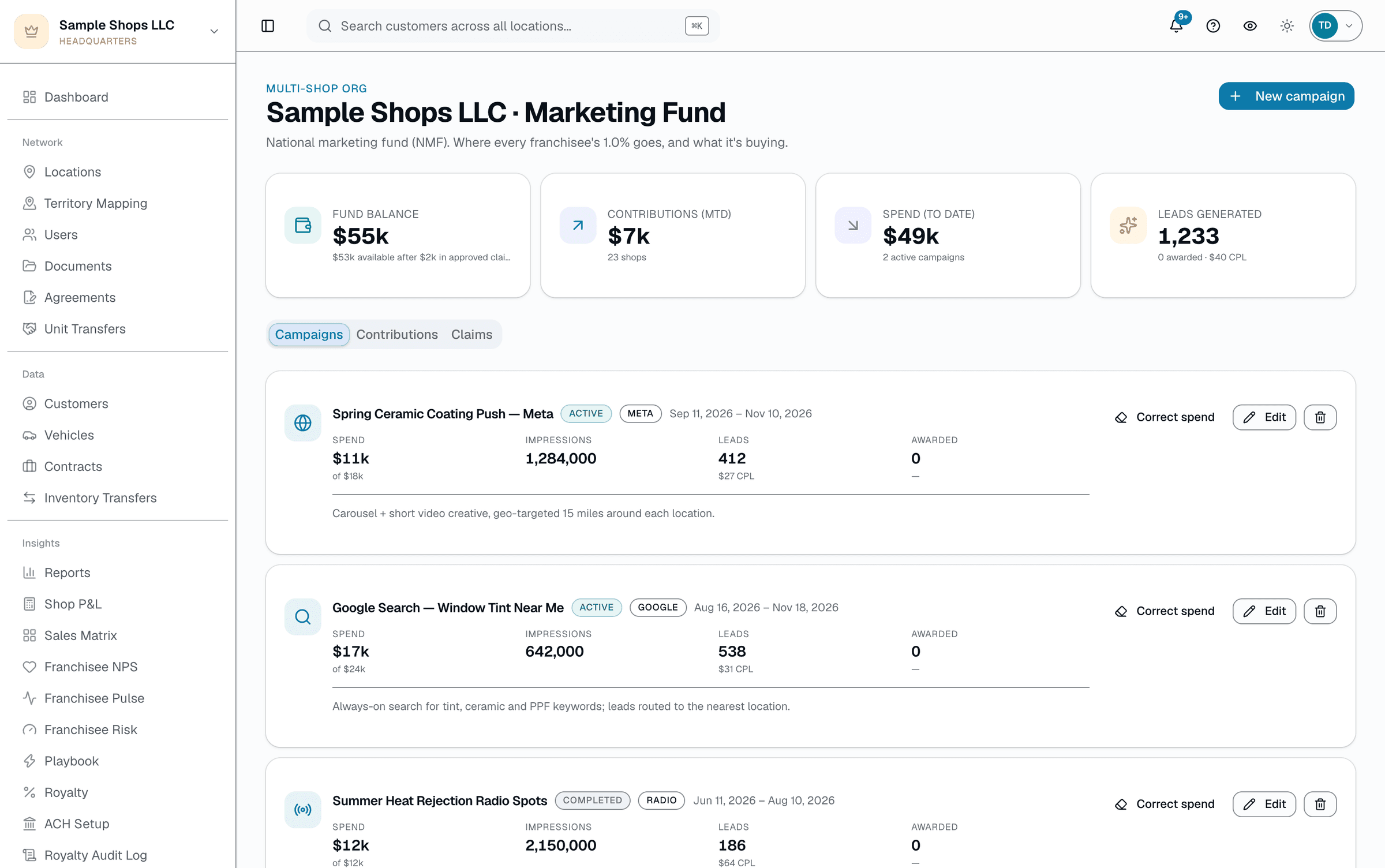
The Marketing Fund page tracks one pooled fund (a separate local-marketing charge, if you use one, is billed on the royalty statement instead) — every shop in an org contributes into the same fund, and HQ spends from the same balance whether it's a national campaign or a franchisee's local reimbursement claim. The Contributions tab shows exactly what each shop's revenue generated this month at the org's configured rate; the Campaigns tab is where HQ logs what it spent (channel, budget, spend, leads) by hand, since there's no live ad-platform sync.
- One fund balance = contributions received − campaign spend − paid claims
- Contribution rate is set org-wide with an optional per-shop override
- Campaigns are entered by HQ staff, not pulled automatically from Meta/Google
02
Claims are submitted, reviewed and paid by a person
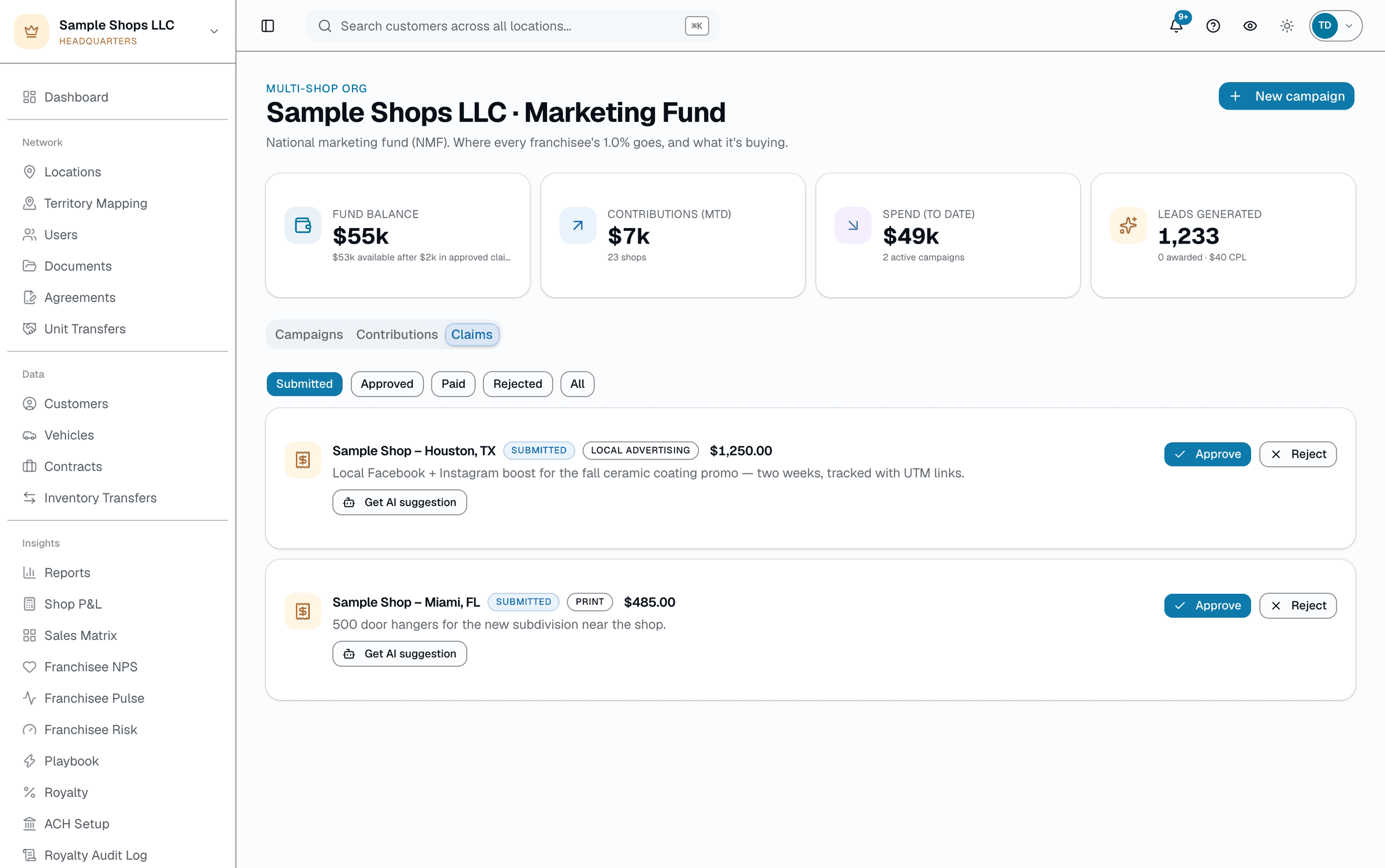
A franchisee submits a claim (amount, category, description, optional receipt) from their own settings page. It lands in HQ's Claims queue as Submitted. HQ can ask the AI-suggestion chip to read the claim and receipt for a suggested verdict and reason — that's a suggestion only, never an action. HQ clicks Approve or Reject (with a note) themselves. Once approved, HQ marks it Paid by typing a reference note (check #, wire ref) once money actually moves outside the platform — there's no payment-rail integration on this path.
Everything it does
The complete list. The plan tag above shows which plans include it.
- Auto-calculated contribution per shop (configurable % of gross revenue, computed monthly at royalty close — collection itself is manual)
- HQ campaign log — channel, budget, spend, impressions, leads, awarded franchisees (entered by HQ, not auto-synced from ad platforms)
- Franchisee claim submission — amount, category, description, optional receipt photo/PDF
- HQ review queue — Approve / Reject / Mark paid, with a required note on reject and a reference note on mark-paid
- AI suggestion chip on submitted claims (reads the claim + receipt, suggests a verdict + reason) — never auto-approves, the reviewer always clicks the real button
- Real-money fund balance: contributions received minus campaign spend minus paid claims
- Every approve/reject/mark-paid write to an audit-log row (who, when)
- Correction tools for HQ mistakes — reopen an approved or rejected claim for re-review, or un-mark a claim paid, each requiring a reason and its own audit-log entry
A tour of the screens
Every meaningful view, the path through it, and the moments that matter — so you know exactly what you're buying.
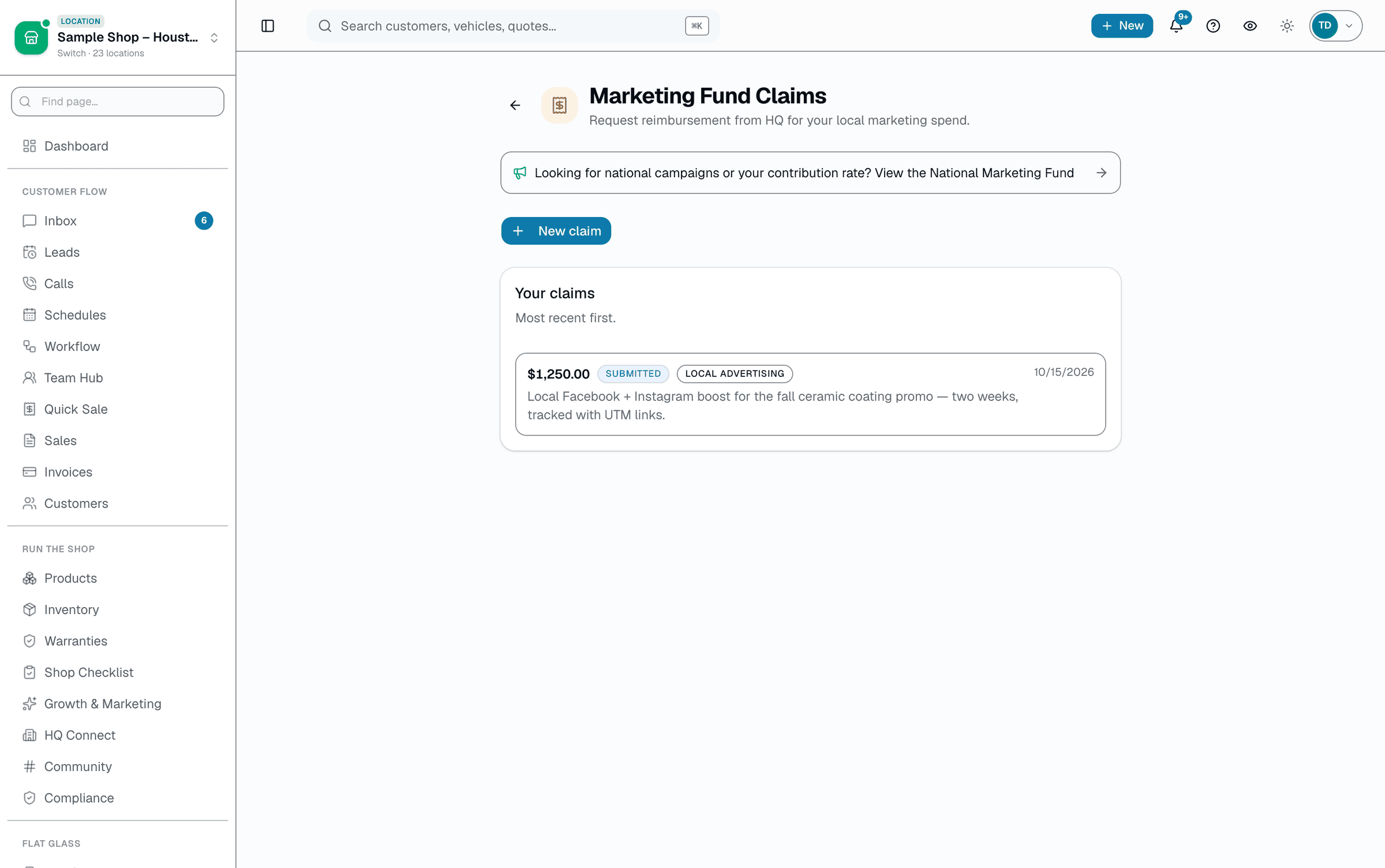
Claim submission (franchisee side)
Amount, category, description, optional receipt — plus the shop's own claim history with status and any HQ note..
Who it's for
Built specifically for…
- Franchisors on the +HQ add-on collecting a marketing fund contribution
- Multi-location operators with shared brand spend
- Franchisees who want a paper trail instead of an email thread for reimbursement requests
What it replaces
The old way…
- Marketing-fund spreadsheets
- Email-based reimbursement requests
- Guessing what a franchisee's contribution actually funded
Setting it up
- 1
Set the contribution rate
One org-wide rate (a % of gross revenue), with an optional per-shop override. No regional tiers; a separate local-marketing charge, if you use one, lives on the royalty rule.
- 2
Contribute + log campaigns
The royalty-close cron calculates each shop's contribution automatically once a month — collection is a manual step, not a bank-level auto-debit. HQ logs its own campaigns (channel, budget, spend, leads) by hand as it spends.
- 3
Franchisees submit, HQ reviews
A franchisee submits a claim with an optional receipt. HQ can ask for an AI suggestion, then approves, rejects, or marks it paid by hand — every action lands in the audit log.
What this looks like in a shop
Illustrative scenario: Sample Franchise Group runs one national marketing fund across 5 shops at a 2% contribution rate. HQ logs its Q2 paid-social campaign in the Campaigns tab by hand as spend comes in. Austin submits a $400 claim for two weeks of local radio spots with a receipt attached; it shows up in HQ's queue, the AI-suggestion chip flags it as a likely approve since the receipt matches the claimed amount, and HQ approves it — then marks it paid once the check goes out.
Good to know
- Which plan includes marketing fund?
- It's part of the HQ add-on, which you can add to any plan. See the Pricing page for everything in each plan.
- Can franchisees see the national campaign spend?
- Not currently — the Campaigns tab (channel, budget, spend, leads) is an HQ-only view on /app/hq/[orgId]/marketing-fund. A franchisee's own settings page shows their contribution history, their own claims, and a read-only list of active and completed HQ campaigns (name, channel, dates) without budget, spend, or lead figures.
- How do we handle a rejected claim?
- Reject requires a note (why), which the franchisee sees on their claim in their own claims list. There's no separate dispute queue — if they disagree, they resubmit with more detail or take it up outside the platform.
- What if HQ approves or rejects the wrong claim?
- HQ can reopen an approved or rejected claim back to Submitted for re-review, or un-mark a claim paid if it was recorded in error — the franchisee doesn't need to resubmit. Each correction requires a typed reason and writes its own entry to the Royalty & Marketing Fund Audit Log.
- Does the AI suggestion chip approve claims automatically?
- No. It reads the claim and any attached receipt and shows a suggested verdict with a one-line reason — the reviewer still has to click the real Approve or Reject button themselves. It never acts on its own.
Works with your stack
Royalty engine
Calculates each shop's fund contribution automatically at monthly close (collection is a manual step, same as royalty payments)
R2 file storage
Franchisee-uploaded receipt photos/PDFs
Pairs well with
Royalty Automation
A cron closes the month automatically — sums each shop's invoiced sales (sent, partially paid, or paid in full), applies each shop's rate, generates itemized statements. Collecting the money is a manual step: a Chase NACHA CSV file you originate through Chase Business Online (Chase accounts only), or payments you record by hand.
FDD Compliance
Server-enforced brand-color locks, network-wide minimum pricing, and a structured visit-checklist runner that turns every failed item into a tracked corrective action — not a spreadsheet note.
Multi-Location HQ
From a single shop to a franchisor with hundreds of locations, every shop rolls up into one HQ view with consolidated KPIs, centralized catalogs, and push-to-shop pricing and templates.
Bulk blast
Built-in segments (everyone, new in 30 days, top spenders, inactive 90+ days, or a list handed over from an AI tool), a full recipient preview before you send, and replies that land in your normal inbox — not a separate tool to babysit.