Pick a segment. Preview the recipients. Send. Opt-outs filtered automatically.
Most shops blast their list quarterly through Mailchimp ($20/mo) or BombBomb ($36-42/mo per user) or just the shop owner's personal phone (worst). SalesThumb's blast composer is built into the shop OS so segments are a live query against your actual customer table instead of a stale CSV.
The quick version
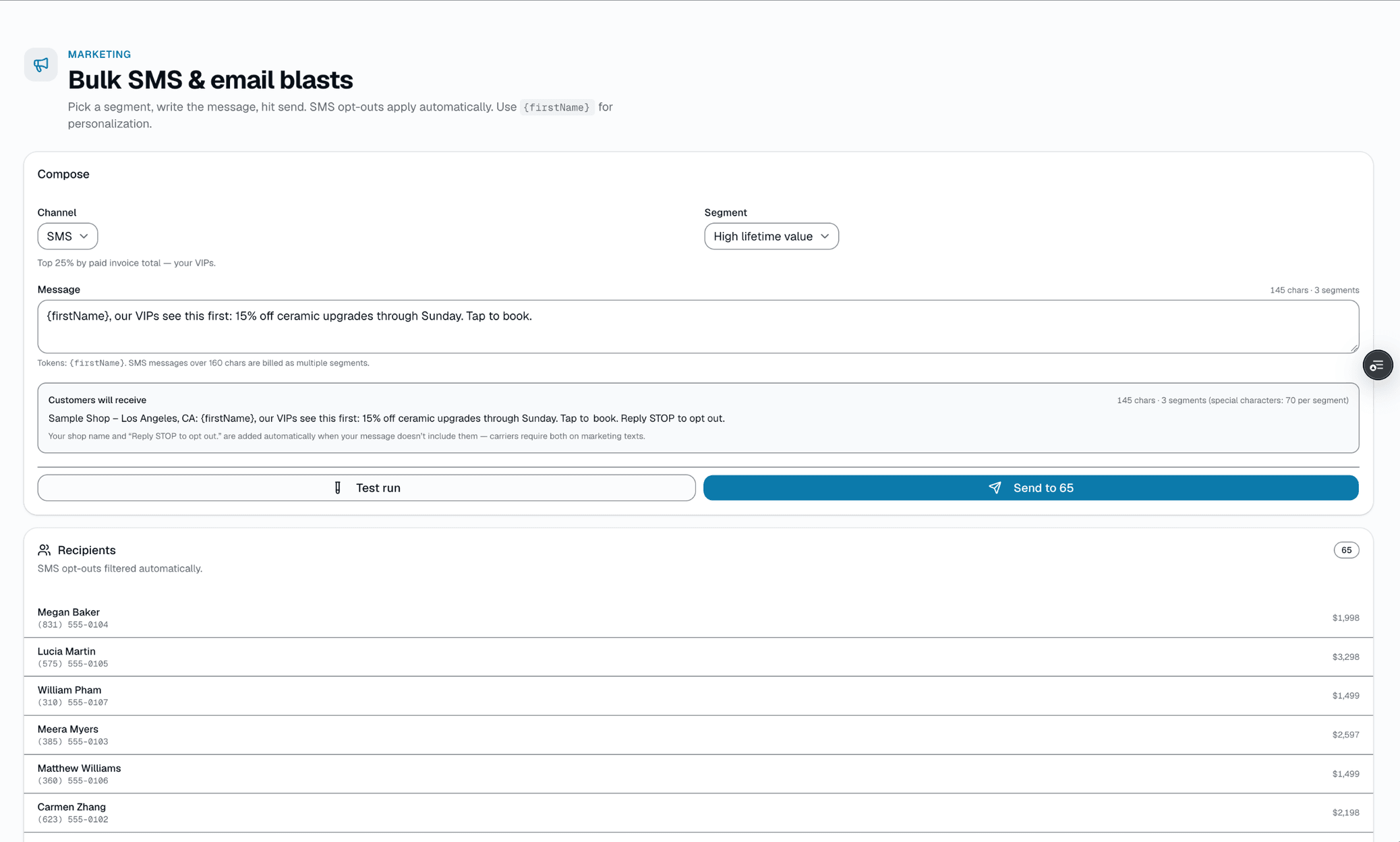
Group texts & emails: Pick a group of customers, preview who gets it, send.
- Built-in segments: everyone, new in 30 days, top spenders, just completed, inactive 90+ days, or a list handed over from an AI tool — always limited to customers marked as opted in to marketing
- Recipient preview before send (count + sample names + opt-out count excluded)
- One channel per send — SMS or email
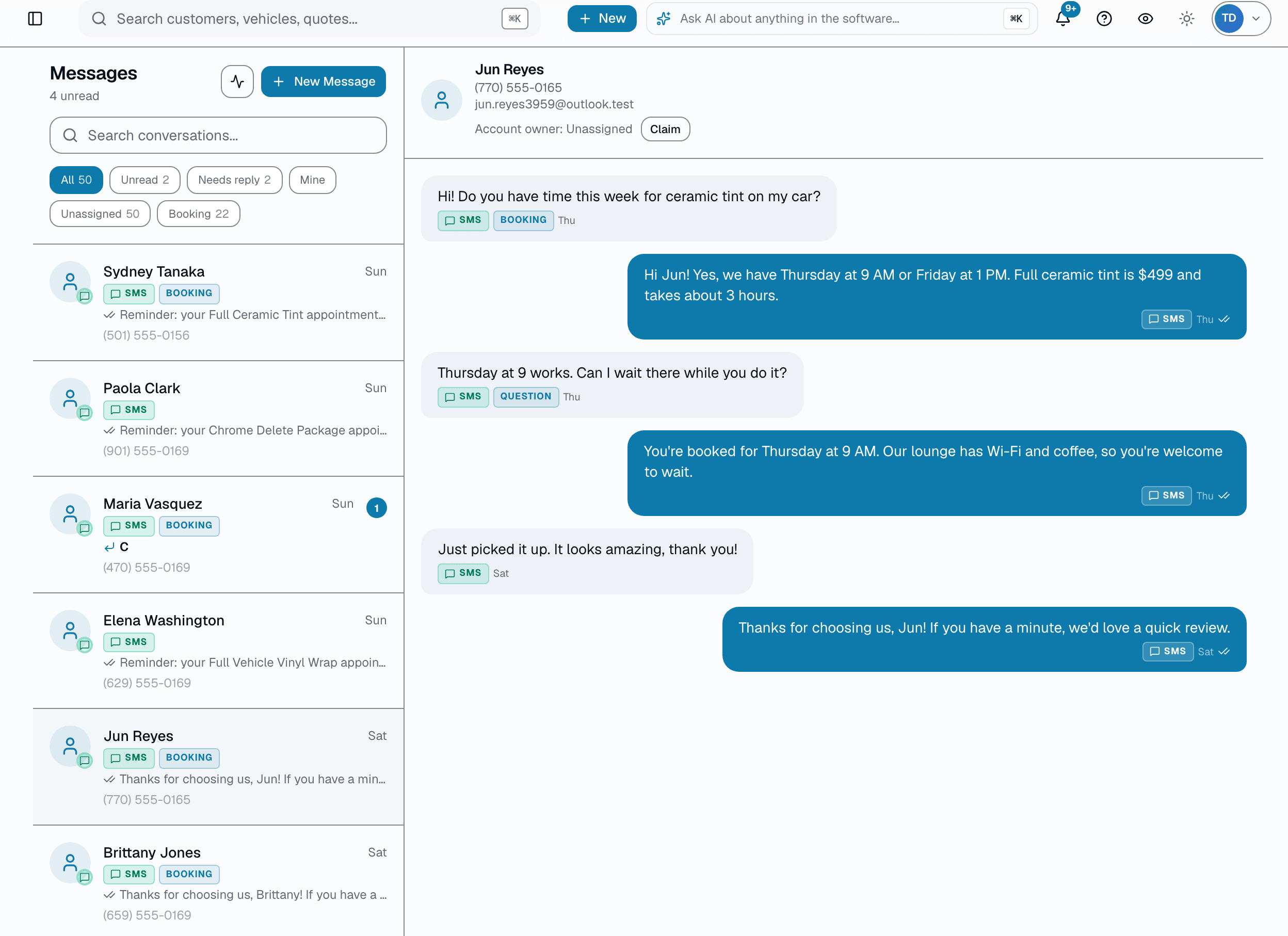
Pick a segment, preview exactly who will receive it (and how many are excluded for opting out), write the message, send by SMS or email. Replies land in the same inbox as every other customer conversation, with the same AI intent tagging the rest of your messages get.
A closer look
01
Segments that query your live customer table
Other tools sync from your CRM nightly via webhook. SalesThumb's segments — everyone, new in the last 30 days, top spenders, inactive 90+ days, or a list handed over from an AI tool — are live SQL queries against the shop's actual customer records, so the count is accurate the moment you pick the segment. The recipient preview shows a sample of real names plus how many matched customers are excluded because they opted out, before you send anything.
- Live query — no nightly sync, no stale lists
- Recipient preview shows a sample of names, total count, and opt-outs excluded
- Built-in segments: everyone, new in 30d, top spenders, just completed, inactive 90+d or 6+ months, churned, or a custom list from an AI tool
- SMS-opted-out customers are automatically excluded from SMS blasts
Everything it does
The complete list. The plan tag above shows which plans include it.
- Built-in segments: everyone, new in 30 days, top spenders, just completed, inactive 90+ days, or a list handed over from an AI tool — always limited to customers marked as opted in to marketing
- Recipient preview before send (count + sample names + opt-out count excluded)
- One channel per send — SMS or email
- TCPA opt-out compliance: STOP/UNSUBSCRIBE honored automatically, excluded from every SMS blast
- Email: blast and campaign emails, marketing drips, Win Back Old Customers and Follow Up Cold Leads automations, and service and maintenance reminders carry an unsubscribe link, one-click unsubscribe and your shop's mailing address; unsubscribed addresses are skipped
- Sent / failed / skipped counts after every send; campaigns sent from the older Campaigns page also keep a history of past batches
- Replies land in the normal customer inbox, AI-tagged by intent like any other message
A tour of the screens
Every meaningful view, the path through it, and the moments that matter — so you know exactly what you're buying.
Recent campaigns
Campaigns sent from the older Campaigns page, with sent / failed / skipped counts per batch..
Who it's for
Built specifically for…
- Shops doing seasonal pushes (back-to-school tint, pre-summer ceramic)
- Shops with a large-enough customer base that personalizing each touch by hand isn't realistic
- Anyone currently blasting their list from a personal phone with no opt-out tracking
What it replaces
The old way…
- Mailchimp + a stale CSV export from your CRM ($20/mo + sync delay)
- BombBomb / personal-phone group texts (TCPA risk, no opt-out filter)
- "Just shoot them all a text" from the shop owner's phone
Setting it up
- 1
1. Pick a segment
Everyone, new in 30 days, top spenders, inactive 90+ days, or a list handed over from an AI tool.
- 2
2. Preview + write
See the real recipient count, a sample of names, and how many are excluded for opting out. Write the message and pick SMS or email.
- 3
3. Replies land in your inbox
Every reply shows up in the same unified inbox as any other customer message, tagged with its likely intent.
What this looks like in a shop
Illustrative scenario: Sample Shop LLC queues a blast to everyone marked "inactive 90+ days." The recipient preview shows 218 customers will get it, with 14 more excluded because they've opted out of SMS. Mike writes the message, picks SMS, hits send. Replies — "yes book me Saturday," a STOP, a question about pricing — land in the same inbox he already checks every morning, each one tagged with its likely intent.
Good to know
- Which plan includes group texts & emails?
- Growth and Pro include it. See the Pricing page for everything in each plan.
- Will this get me in trouble with TCPA?
- SMS-opted-out customers (anyone who's texted STOP) are automatically excluded from every SMS blast, and the recipient preview shows you exactly how many were excluded before you send.
- Do marketing emails include an unsubscribe link?
- Yes, on blast and campaign emails, marketing drips, Win Back Old Customers and Follow Up Cold Leads automations, and service and maintenance reminders: each carries an unsubscribe link, one-click unsubscribe headers that many mail apps show as an unsubscribe button, and your shop's name and mailing address in the footer. Anyone who unsubscribes gets no more marketing email from your shop at that address; text messages follow their own opt-out rules (reply STOP). Service messages don't get the footer: customer-care drips, appointment reminders and confirmations, review requests, and a one-off email you type in a customer conversation (which also isn't checked against unsubscribes). Don't use those for promotions. Because the mailing address is required, you'll need a complete shop address in Settings before you can send an email blast.
- Can I send to SMS and email at the same time?
- Not in a single blast — pick SMS or email per send. Bulk blasts are on the Growth and Pro plans.
- Can I build a custom segment beyond the built-in ones?
- Today the built-in segments are everyone, new in 30 days, top spenders, just completed, inactive 90+ days or 6+ months, and churned (1+ year), plus a custom list handed over from an AI tool. There isn't a freeform segment builder yet.
- Can I use my existing Twilio number?
- Yes — Bring Your Own Carrier (Settings → Integrations) lets you connect your own Twilio account and existing messaging service. If you don't have one, apply for a new text number or use your current business phone number in Settings → Texting — SalesThumb handles the carrier registration, and texting turns on once it's approved. There's no shared SalesThumb texting number, so texting stays off until one of the two is in place.
Works with your stack
Twilio
SMS sending + opt-out (STOP) compliance
Email (SMTP)
Email channel
Pairs well with
Two-way SMS
However a customer reaches you — a text, an email, a Facebook or Instagram message, or WhatsApp — it lands in the same inbox, on the same customer, and you answer from there.
Automations
On Growth and up, pick a preset drip sequence — win back lapsed customers, follow up cold leads, or ask for a review after a completed job. It goes live the moment you choose a pace, so edit the messages right away or pause it until you have.
Reports
SalesThumb's 83 reports live in a 14-category sidebar in the app; grouped here by the decision they answer, they sort into 6 clusters. The six: cash & revenue, job & service profitability, team & schedule performance, marketing & lead performance, customer retention & risk, and customer obligations — the reports inside each cluster export individually to CSV. Basic and Starter include the core reports; Gross Profit per Job, the installer and service-time reports, the close-rate funnel, Referral Attribution, ZIP Code Density, Channel CAC / ROI, Loyalty Program, and the inventory reports need Growth.
Customer CRM
Search by name, plate, or VIN in milliseconds. Every appointment, quote, invoice, warranty, and photo attached to the right record — forever.