Text or email a link and they land in their portal, no password
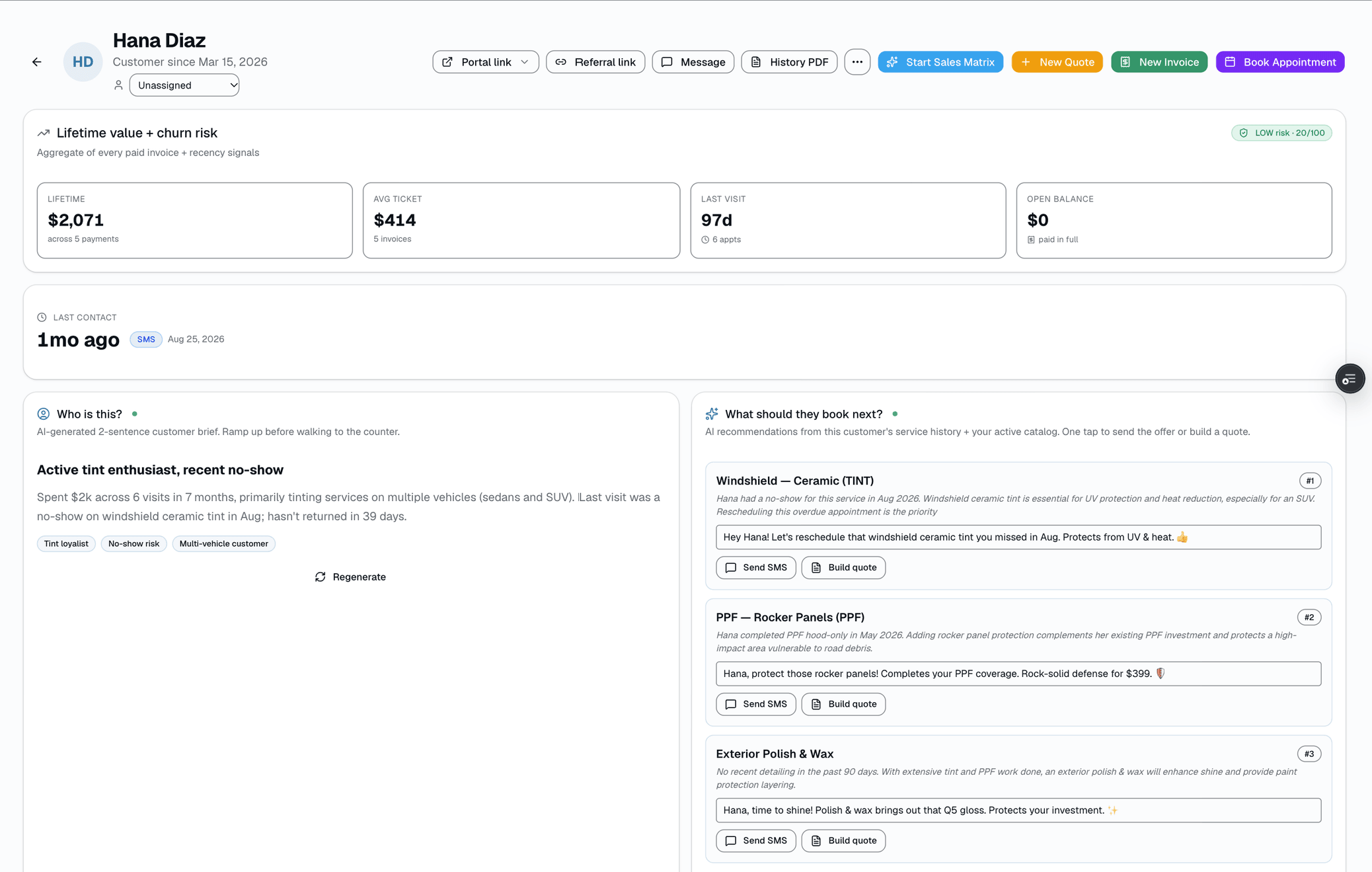
The fastest path to put a customer in their own self-serve portal: text or email them a magic link from the customer detail page. They tap once, they're in.
The quick version
Customer portal: Customers open their portal from a link, no password.
- 'Portal link' dropdown on the customer detail page — Copy link / Text to customer / Email to customer
- 30-day token expiry — sending again mints a new token, it doesn't revoke the old one
- SMS or email delivery (operator picks per send)
No password setup, no app install, no forgotten-credentials tickets to your front desk. Every send mints a fresh 30-day token — the old one keeps working too, it isn't revoked. The mobile app's SMS-code login mints a similarly-shaped token into the same table, though the two flows currently generate different-length hex strings under the hood.
A closer look
01
Send from any customer record
From the customer detail page, click 'Portal link' → Copy link, Text to customer, or Email to customer. Sending mints a fresh token and delivers it through the existing Twilio + SMTP email stack; the button label flashes 'Texted!' or 'Emailed!' for a couple seconds as confirmation. There's no per-row send button on the customer list — this lives on each customer's own detail page.
- 'Portal link' dropdown on the customer detail page
- Operator picks Copy / SMS / Email per send
- Transient button-label confirmation, no persistent 'last sent' or open-tracking
- Sending again mints a new token — it doesn't invalidate the old one
02
What the customer actually lands on
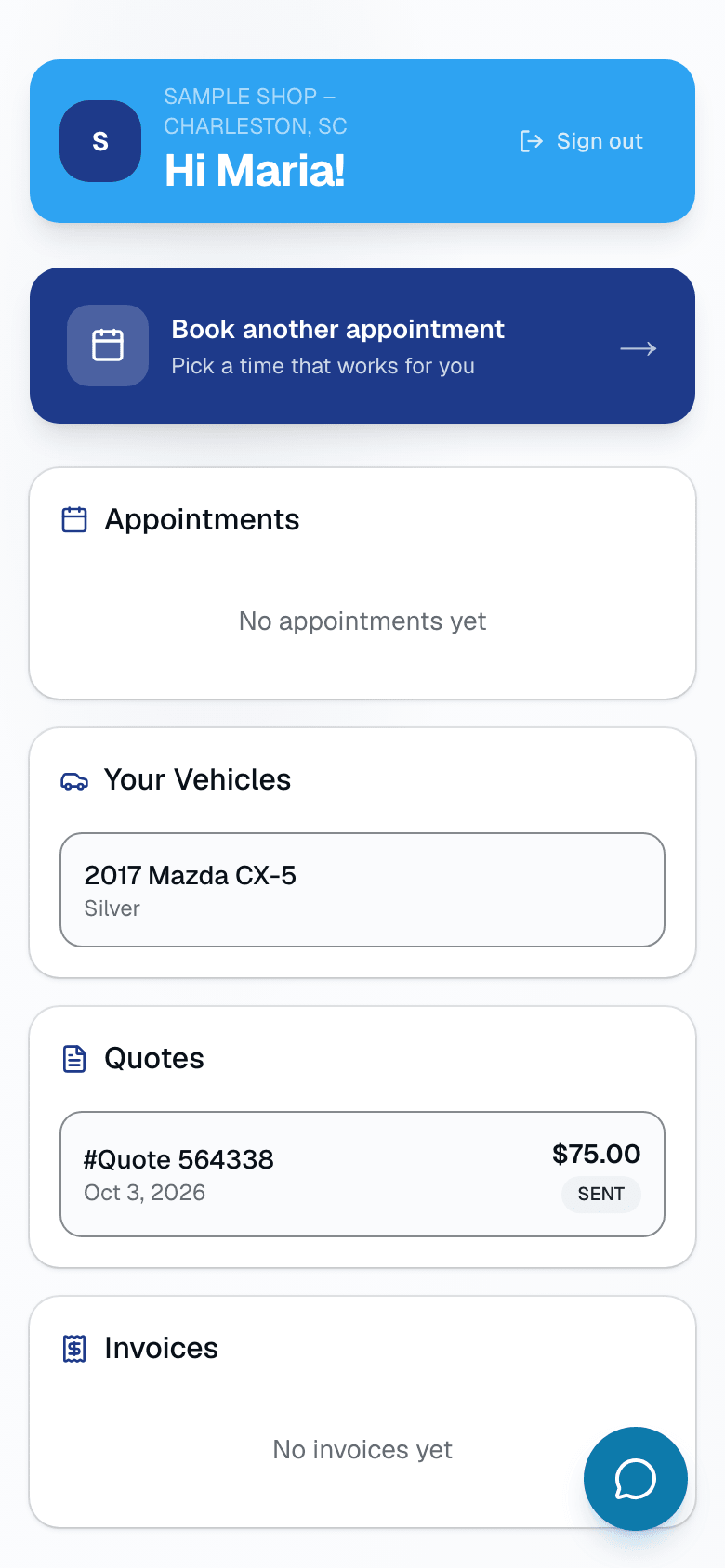
Tapping the link drops them at /portal/<token> — no login form, no account creation, no app install. They see their own appointments (with a link to before/after photos once a job is complete, or reschedule/cancel while upcoming), quotes, invoices with balance owed, warranty status, their vehicles, and a loyalty card. Token-scoped, so they only see their own data.
- Appointments, with photos linked from completed jobs
- Quotes and invoices with balance owed
- Warranty status, cert number, and registration date (no PDF download)
- Vehicles on file + a loyalty card
03
How the token actually works
The token is stored in plain text in customer_portal_tokens (there's no hashing step) and validated server-side on every request, expiring in 30 days. Web-issued links use a 48-character hex token; the mobile app's SMS-code login flow mints a 64-character hex token into the same table. Token-scoped means no auth bleed between customers, even on a shared phone.
- Web links: 48-char hex token
- Mobile SMS-code login: 64-char hex token, same table
- Server-side validation on every request
- Token-scoped — no cross-customer leakage
- Customer can bookmark the URL until expiry
🔗 Web · magic link
48-char hex token
a3f9e2c8b1...(48 chars)
randomBytes(24).toString("hex") — /portal/<token>
📱 Mobile · SMS code
64-char hex token
8h2f4d91...(64 chars)
randomBytes(32).toString("hex") — verifyCode() mints it
↓ both insert into ↓
customer_portal_tokens
id
uuid
shop_id
uuid · not null
customer_id
uuid
token
plain text
expires_at
+30 days
used_at
null until first use
One table, stored as plain text (not hashed) · 48-char (web) or 64-char (mobile) hex · 30-day expiry · reusable until it expires
Every lookup re-scopes to the token's own shop_id — a token can never resolve against another shop's data.
Everything it does
The complete list. The plan tag above shows which plans include it.
- 'Portal link' dropdown on the customer detail page — Copy link / Text to customer / Email to customer
- 30-day token expiry — sending again mints a new token, it doesn't revoke the old one
- SMS or email delivery (operator picks per send)
- Lands at /portal/<token> — no password, no signup
- Customer sees: appointments, invoices, quotes, warranties, vehicles, loyalty card
- Token-scoped — no auth bleed between customers
- Works for one-off jobs (no full account needed)
A tour of the screens
Every meaningful view, the path through it, and the moments that matter — so you know exactly what you're buying.
Customer-facing portal
Lands at /portal/<token>.
Sees appointments, quotes, invoices, warranty status, vehicles, loyalty card. Token-scoped, no auth bleed.
Setting it up
- 1
1. Operator sends the link
From any customer page, click 'Portal link' → pick Copy, Text, or Email. A fresh token is generated and sent via the existing Twilio / SMTP email stack.
- 2
2. Customer taps the link
Lands at /portal/<token>. The token is validated server-side (expiry check only) before the page renders. Customer sees their own data scoped by that token.
- 3
3. Token survives 30 days
Expires at +30d. The operator can send again any time — that mints a new token but doesn't revoke the old one, so an older link a customer already has keeps working too. Customers can bookmark the URL and use it until it expires.
What this looks like in a shop
Illustrative scenario: Sample Shop LLC just finished a $1,840 ceramic coating. Mike opens Sarah's customer page, clicks 'Portal link' → Text to customer. She gets an SMS with a link to view her job. She taps it, sees her warranty status and her invoice. No account creation, no support call, and Mike never had to email her a PDF.
Good to know
- Which plan includes customer portal?
- Starter, Growth and Pro include it. See the Pricing page for everything in each plan.
- What if the customer loses the link?
- The operator clicks 'Portal link' → Text to customer (or Email) again from the customer page. That mints a fresh token and sends a new link — the old link, if the customer still has it, keeps working until its own 30-day expiry.
- Can two customers share a portal?
- Each portal is token-scoped to ONE customer record. There's no multi-customer portal for a fleet manager today — the customer mobile login also opens just the one record matching that phone number.
- What about security?
- The token is validated against the customer_portal_tokens table on every request and expires in 30 days. It's stored as plain text, not hashed, and it isn't single-use — anyone who has the link can use it until it expires. Fine for the customer-self-serve use case; not a substitute for staff Better-Auth sessions.
Pairs well with
Customer login
One app, two ways to sign in. Customers type name + phone, get a 6-digit SMS code, land in their own portal. Staff use email + password. Role decides which tabs they see.
Two-way SMS
However a customer reaches you — a text, an email, a Facebook or Instagram message, or WhatsApp — it lands in the same inbox, on the same customer, and you answer from there.
Warranty
Register a warranty when a job's done and SalesThumb emails the customer a link to the PDF certificate and its public verification page, usually within about an hour. Warranty registration and certificates are on Growth and Pro. Customers can file a claim from that same link.
Job Photos
Every appointment gets a photo gallery. Techs capture on mobile (Growth and Pro; the app is view-only on Starter). Customers see a polished post-install gallery. On Pro, AI looks at the damage photos on a vehicle inspection and drafts the damage note for you. You protect yourself from 'it was like that when you got it' claims.