Pair a TV in 30 seconds. Auto-rotate upsells. Cast live products.
The lobby TV that's currently showing CNN should be selling your $1,299 ceramic upgrade. SalesThumb's signage feature pairs any browser-equipped TV (smart TV, Chromecast-attached, Apple TV via AirPlay from a phone or Mac, even a $40 Mini-PC running Chrome) in 30 seconds — the TV shows a code, you type it in Settings → Signage, done.
Paired displays
3 online · 1 offline
- Lobby TV
Lobby reel
- Sales counter
Cast-ready
- Bay 1
Service info
- Bay 2
Last seen 18h ago
Lobby reel
6 slides · 130s total cycle · auto-rotates
- 130s
Services + prices
Promo card
- 220s← LIVE
Recent customer photos
Before / after
- 315s
5★ reviews this month
Reviews feed
- 430s
Ceramic vs Tint comparison
Web page
- 515s
47 active warranties
Warranty trust
- 620s
Meet the team
Image
Drag to reorder · click any slide to edit · TV picks up changes within ~15s
The quick version
Lobby TVs: Show promos and products on any TV in your shop.
- 30-second pair flow — the TV shows a code, you type it in Settings → Signage
- Lobby playlists with rotating slides (services, photos, reviews, laws widget)
- Sales-counter cast — push from any rep's tablet, live on the TV within ~15 seconds
Lobby playlists auto-rotate slides (services + prices, customer photo galleries, reviews, tint-laws widget). Sales-counter screens are different — they don't rotate, they CAST live: rep on the iPad picks a film swatch and the TV picks it up on its next poll, within about 15 seconds, so the customer sees the actual product on a 65" screen instead of a phone.
A closer look
01
Why pair-by-code beats every other casting protocol
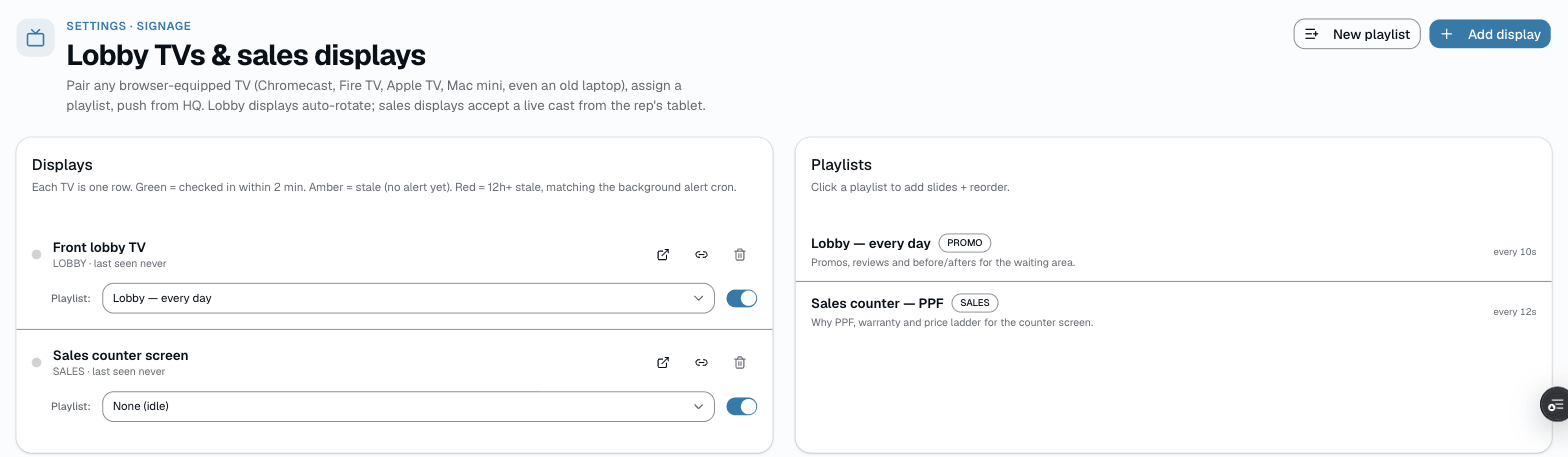
Most digital signage is a hardware sell — buy a dedicated player box, pay a per-screen monthly fee, suffer through firmware updates. SalesThumb cuts the box. Any browser-equipped TV (smart-TV browser, Chromecast, Apple TV via AirPlay mirroring, $40 Mini-PC running Chrome — anything that can hit a URL) is enough. The operator opens /app/settings/signage, clicks Add display to get a 6-digit code, opens /signage/pair on the TV, types the code, and the TV is bound to that display's playlist. Refresh-to-update, zero firmware.
- Works on ANY browser — no proprietary hardware required
- Pair in 30s; unpair in 5s; re-pair in 30s when a TV moves rooms
- Playlists update automatically — edit on your phone, TVs pick it up within 15 seconds
- 15-second refresh across the chain, no manual reload needed
02
Cast the upsell to the counter TV
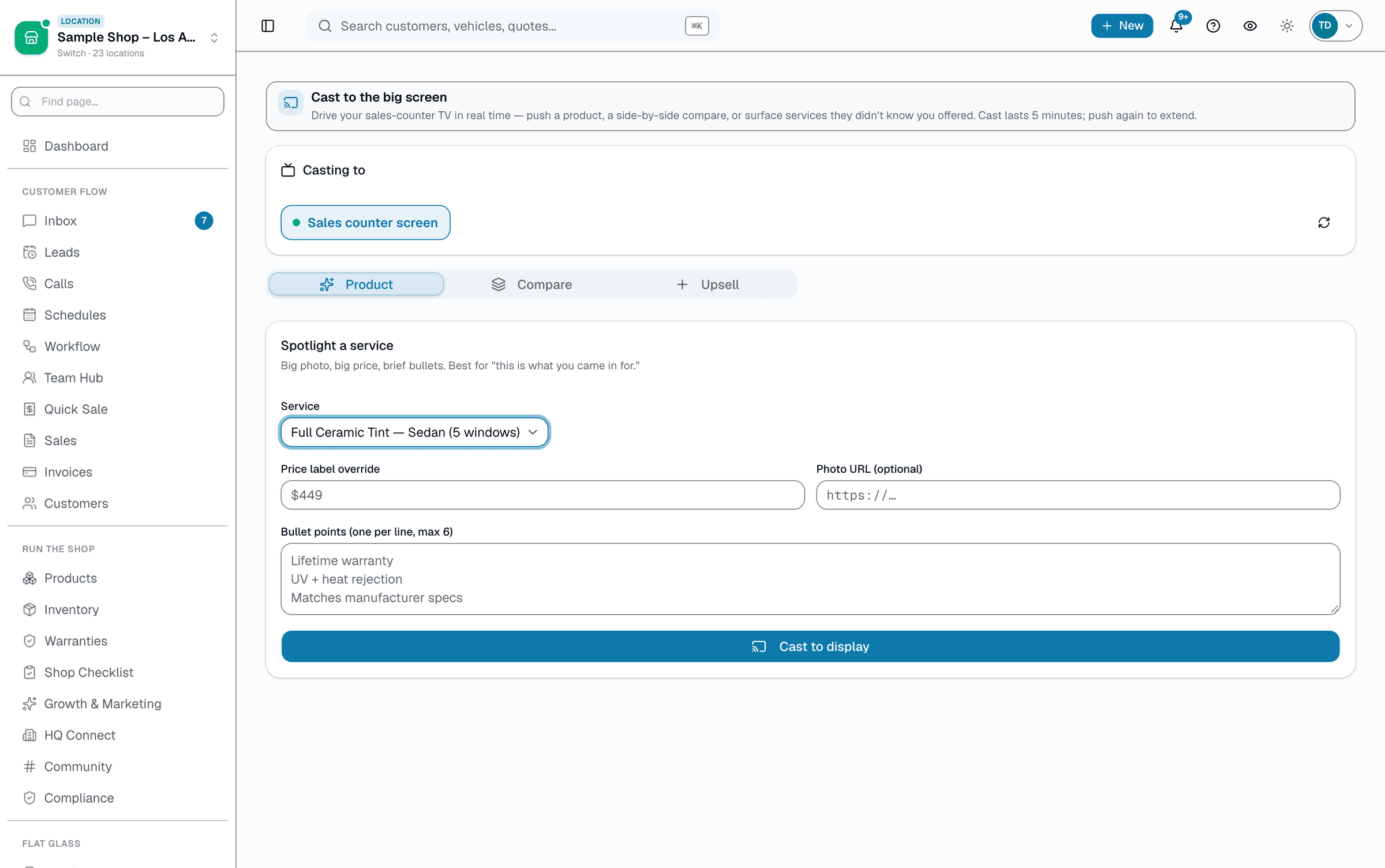
Lobby playlists are passive sell. Sales-counter cast is active sell. The rep is at the counter with a customer, picks a service (with optional photo, price override, and bullets) on the /app/sales-cast page, and pushes it to the 65" TV behind them — the TV polls for updates every 15 seconds, so the new product is up within about 15 seconds, not a phone screen. Cast lasts 5 minutes and pushing again extends it.
- Cast button on the quote detail page, customer detail page, and the tech/appointment page
- Push from the rep's tablet — live on the TV within ~15 seconds (the TV polls, it isn't a live video push)
- Cast is shop-scoped — multiple TVs in the same shop can be cast targets
- Auto-clears to the branded idle screen (shop logo) when the 5-minute cast expires or is stopped
Everything it does
The complete list. The plan tag above shows which plans include it.
- 30-second pair flow — the TV shows a code, you type it in Settings → Signage
- Lobby playlists with rotating slides (services, photos, reviews, laws widget)
- Sales-counter cast — push from any rep's tablet, live on the TV within ~15 seconds
- Per-shop playlist library + HQ-curated playlists shops can opt into (chain-wide branding, +HQ add-on)
- Custom rotation timing per slide (1-60s, 8s default)
- Display health digest — emails when a TV goes offline > 12h
- Branded fallback: shop logo + shop name while idle
A tour of the screens
Every meaningful view, the path through it, and the moments that matter — so you know exactly what you're buying.
Pair flow — 30 seconds
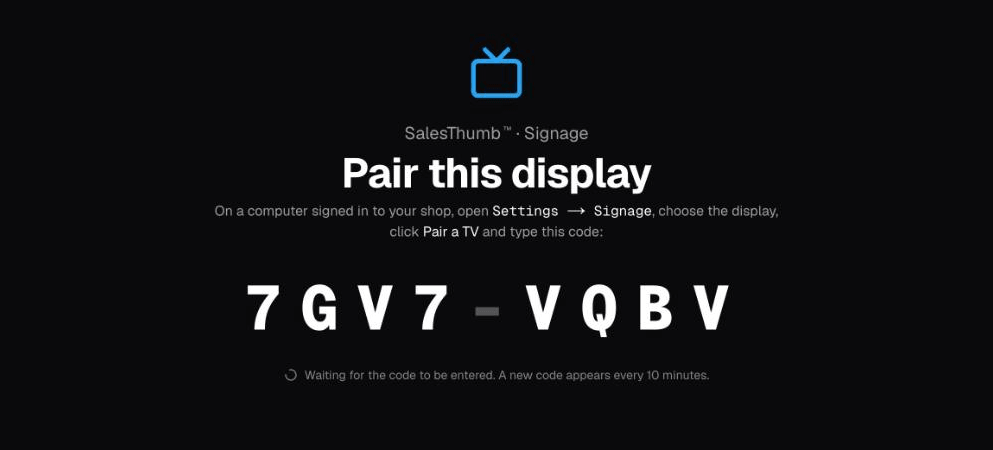
The TV shows a code; type it in Settings → Signage → Pair a TV.
Display is bound to the shop. Done.
Sales-counter cast
Rep picks a service on /app/sales-cast → TV behind the counter picks it up on its next poll, within about 15 seconds.
Customer sees the product at full 65" size.
Who it's for
Built specifically for…
- Shops with foot traffic and existing TVs (lobby waits = upsell window)
- Ceramic + PPF shops where 'see the product on a 65" screen' closes the haggle
- Multi-location franchises that want consistent branding across every lobby
What it replaces
The old way…
- Brightsign / OptiSign / Yodeck hardware + per-screen monthly fees
- Tablet-based product catalogs that customers can't read from across the room
- Lobby TVs running cable news that have nothing to do with your shop
Setting it up
- 1
1. Open /signage/pair on the TV
On the TV, open salesthumb.com/signage/pair in the browser. The TV shows an 8-character code.
- 2
2. Type the code on your phone
On your phone, open /app/settings/signage → Add display (or Pair a TV) and type the code the TV is showing. TV is now bound to your shop. Pick a playlist to assign.
- 3
3. Edit playlist anywhere
From any device on /app, edit the playlist (add slides, reorder, change rotation timing). TVs pick up the change within 15 seconds. Cast a product from the quote or customer detail page by tapping the cast icon → TV picks it up on its next poll, within about 15 seconds.
What this looks like in a shop
Illustrative scenario: Sample Shop LLC hung two cheap $200 smart TVs — one in the lobby, one behind the sales counter. Lobby plays a 6-slide rotation: services + prices, last 12 customer photos, recent 5★ reviews, ceramic vs tint comparison, the shop's tint-laws widget in a web-page slide, and a 'meet the team' slide. Behind the counter: the rep picks the customer's actual service from the catalog and casts it from /app/sales-cast to the TV during the consult, live within about 15 seconds.
Good to know
- Which plan includes lobby tvs?
- Growth and Pro include it. See the Pricing page for everything in each plan.
- Do I need a special TV?
- No. Any TV with a built-in browser or that can run Chromecast / Apple TV. That includes smart TVs with a built-in browser (such as Samsung Tizen, LG webOS, or Android TV), Chromecast, or Apple TV via AirPlay mirroring from a phone or Mac, or a mini-PC running Chrome. A used Chromebox on an inexpensive TV is a low-cost setup.
- What about offline?
- There's no explicit offline cache — if the TV's browser tab stays open through a brief WiFi drop, it keeps showing whatever it last loaded until it can poll again, but there's no guaranteed offline duration. The TV self-reports last-seen-at every time it successfully polls; the signage health digest emails the operator when a display has been offline > 12h.
- Can I push the same playlist to all my shops?
- Yes — with the +HQ add-on you can build a chain-wide playlist and publish it so it appears in every shop's playlist picker as an HQ-curated option shops can lock in. Shops assign it to a display like any other playlist; it isn't force-pushed onto screens automatically, and it can't be merged with a shop's own playlist on the same display — pick the HQ reel for one display and a shop-built reel for another if you want both.
- Is this just OptiSign with extra steps?
- OptiSign is a great product for what it does. The difference: SalesThumb's signage is part of the shop OS, so the playlist content (services, prices, photos, reviews) updates automatically when you update them in the app. No double-entry, no separate dashboard, no separate bill — lobby TVs are included on the Growth and Pro plans.
Works with your stack
Inngest
Health-digest cron emails when a TV goes offline > 12h
Pairs well with
Job Photos
Every appointment gets a photo gallery. Techs capture on mobile (Growth and Pro; the app is view-only on Starter). Customers see a polished post-install gallery. On Pro, AI looks at the damage photos on a vehicle inspection and drafts the damage note for you. You protect yourself from 'it was like that when you got it' claims.
Quotes
Build a quote from real line items — services, film, parts, fees — send it, and the customer approves with a drawn signature and a card deposit on their phone. No account needed on either side.
Multi-Location HQ
From a single shop to a franchisor with hundreds of locations, every shop rolls up into one HQ view with consolidated KPIs, centralized catalogs, and push-to-shop pricing and templates.
Automations
On Growth and up, pick a preset drip sequence — win back lapsed customers, follow up cold leads, or ask for a review after a completed job. It goes live the moment you choose a pace, so edit the messages right away or pause it until you have.