Open the app. Read one paragraph. Know your day.
The shop owner's morning ritual is currently: open three tabs (calendar, AR, inbox), scroll each, mentally stitch a picture together, then start the day. My Day collapses part of that into one paragraph.
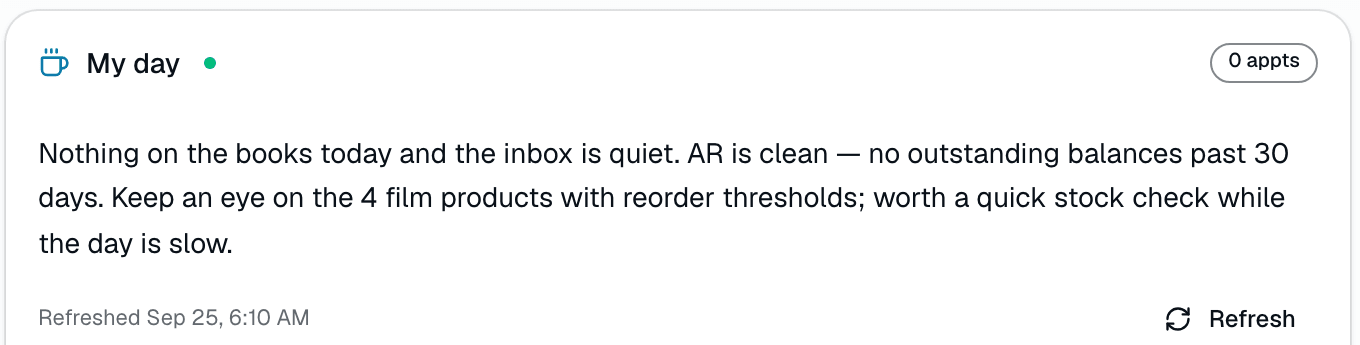
The quick version
My Day brief: One paragraph on today's shop when you open the app.
- One-paragraph plain-English summary of today's state
- Reads from real DB: today's appointments, urgent inbox count (30d), AR aged 30+ days, count of film products with a reorder threshold
- Click 'Brief me' to generate on demand — no auto-refresh polling
Click 'Brief me' and it's generated fresh from real numbers — not a chatbot, not a static template. It's built from exactly four sources: today's appointments, urgent inbox threads from the last 30 days, unpaid invoices created 30+ days ago, and a count of active film products with a reorder threshold set. It doesn't read reviews or playbook plays, and there's no clickable action-chip system — it's a paragraph plus three summary badges (appointment count, urgent count, AR total); the film-stock count only shows up in the AI's paragraph, not as its own badge. Your last brief stays saved right there until you refresh it.
A closer look
01
Built from real numbers, not LLM hallucination
Every fact in the My Day paragraph traces back to a deterministic DB query that runs first. The AI gets a structured summary of today's actual numbers — appointments (time, customer, service, status), urgent inbound-message count over the last 30 days, AR aged 30+ days (balance + invoice count), and a count of active film products with a reorder threshold set — and rewrites it as 2-3 plain-English sentences. It does not have access to reviews or playbook/automation data. No 'maybe' or 'I think' — every claim has a source row in the database.
- DB queries run first, AI gets structured input only
- Four data sources: today's appointments, urgent inbox (30d), AR aged 30+ days, count of film products with a reorder threshold
- No fixed refresh interval — the last brief stays saved until you ask for a new one
Everything it does
The complete list. The plan tag above shows which plans include it.
- One-paragraph plain-English summary of today's state
- Reads from real DB: today's appointments, urgent inbox count (30d), AR aged 30+ days, count of film products with a reorder threshold
- Click 'Brief me' to generate on demand — no auto-refresh polling
- Last brief stays saved (in your browser) until you refresh it
- Stub fallback on Basic and Starter (the AI-written brief is on Growth and Pro) or when ANTHROPIC_API_KEY is unset (deterministic placeholder built from the appointment/urgent/AR sources — the fallback stub doesn't mention film stock, only a live AI-generated brief can)
- Shows the exact date/time it was generated, plus appointment/urgent/AR badges
Who it's for
Built specifically for…
- Shop owners who open 5 tabs every morning to figure out where to start
- Multi-location managers who can't visit every shop daily
- Schedulers who need today's high-friction items surfaced first
What it replaces
The old way…
- Morning standup meetings that recap what everyone could read on the dashboard
- Manually scrolling calendar + AR + inbox to assemble a mental picture
- Generic 'good morning, here's your dashboard!' wrapper text
Setting it up
- 1
1. Tap 'Brief me' to trigger a structured query
The click fetches today's appointments (time, customer, service, status), the count of urgent inbound messages over the last 30 days, AR aged 30+ days (balance + invoice count), and a count of active film products with a reorder threshold set.
- 2
2. AI rewrites the numbers as a paragraph
The structured fact bundle goes to Claude Sonnet with a system prompt: 'You're the shop owner's morning briefing. Write 2-3 punchy sentences from real numbers... no fluff, no opinions.' Falls back to a deterministic stub sentence built from the same numbers if no API key is set.
- 3
3. Saved until you ask again
The paragraph renders on the dashboard with three badges (appointment count, urgent count, AR total) and stays saved right there — in your browser — until you tap 'Brief me' again.
What this looks like in a shop
Illustrative scenario: Mike opens SalesThumb at 7:42am with his coffee and taps 'Brief me.' A couple of sentences tell him: 7 jobs on the books today, 2 urgent inbox threads need attention, and $4,820 is sitting in 30+ day AR. He knows where to start the day — reviews and playbook activity aren't part of this brief, so he still checks those separately.
Good to know
- Which plan includes my day brief?
- Growth and Pro include it. See the Pricing page for everything in each plan.
- What if I don't have ANTHROPIC_API_KEY set?
- My Day degrades to a deterministic stub sentence built from the appointment/urgent/AR sources (the stub doesn't reference film stock). Less personable, but the operator still gets the numbers. Flip the key on later to upgrade to AI-written.
- Does the brief include reviews or playbook activity?
- Not today — the brief is built from exactly four sources: today's appointments, urgent inbox threads (30d), AR aged 30+ days, and a count of film products with a reorder threshold set. Per-shop customization (e.g. adding a review trend) is on the roadmap but not yet built.
- How often does it refresh?
- Click 'Brief me' for a one-paragraph summary of today. Your last brief stays saved until you refresh it — there's no background polling and no fixed cache window.
- Can I tap a chip in the brief to jump straight to the work?
- No — the brief is a plain paragraph plus three summary badges (appointments / urgent / AR). There's no clickable action-chip or deep-link system today.
Works with your stack
Anthropic Claude
Rewrites structured DB output as plain-English paragraph (Claude Sonnet)
Pairs well with
Reports
SalesThumb's 83 reports live in a 14-category sidebar in the app; grouped here by the decision they answer, they sort into 6 clusters. The six: cash & revenue, job & service profitability, team & schedule performance, marketing & lead performance, customer retention & risk, and customer obligations — the reports inside each cluster export individually to CSV. Basic and Starter include the core reports; Gross Profit per Job, the installer and service-time reports, the close-rate funnel, Referral Attribution, ZIP Code Density, Channel CAC / ROI, Loyalty Program, and the inventory reports need Growth.
Two-way SMS
However a customer reaches you — a text, an email, a Facebook or Instagram message, or WhatsApp — it lands in the same inbox, on the same customer, and you answer from there.
Automations
On Growth and up, pick a preset drip sequence — win back lapsed customers, follow up cold leads, or ask for a review after a completed job. It goes live the moment you choose a pace, so edit the messages right away or pause it until you have.
Scheduling
Every installer, every bay, every appointment in one view. Drag to reschedule. Color-coded by status. Double-book detection with explicit confirm-to-override.