Fill the calendar
Growth tools built into the shop OS
Bulk SMS + email blasts, lobby + sales-counter TVs, smart pricing tied to close-rate, ZIP-density referral analytics, and HQ-pushable signage playlists. Grow demand without bolting on a separate marketing platform. (Mirrors the in-app /app/growth hub.)
No credit card · Cancel anytime
Bulk SMS / email composer
Pick a segment. Preview the recipients. Send. Opt-outs filtered automatically.
Most shops blast their list quarterly through Mailchimp ($20/mo) or BombBomb ($36-42/mo per user) or just the shop owner's personal phone (worst). SalesThumb's blast composer is built into the shop OS so segments are a live query against your actual customer table instead of a stale CSV. Pick a segment, preview exactly who will receive it (and how many are excluded for opting out), write the message, send by SMS or email. Replies land in the same inbox as every other customer conversation, with the same AI intent tagging the rest of your messages get.
- Built-in segments: everyone, new in 30 days, inactive 90+ days, VIPs, or a single tag — always limited to customers marked as opted in to marketing
- Recipient preview before send (count + sample names + opt-out count excluded)
- One channel per send — SMS or email
- TCPA opt-out compliance: STOP/UNSUBSCRIBE honored automatically, excluded from every SMS blast
- Email: blast and campaign emails, marketing drips, Win Back Old Customers and Follow Up Cold Leads automations, and service and maintenance reminders carry an unsubscribe link, one-click unsubscribe and your shop's mailing address; unsubscribed addresses are skipped
- Sent / failed / skipped counts after every send; campaigns sent from the Campaigns page also keep a history of past batches
What this looks like in a shop
Illustrative scenario: Sample Shop LLC queues a blast to everyone marked "inactive 90+ days." The recipient preview shows 218 customers will get it, with 14 more excluded because they've opted out of SMS. Mike writes the message, picks SMS, hits send. Replies — "yes book me Saturday," a STOP, a question about pricing — land in the same inbox he already checks every morning, each one tagged with its likely intent.
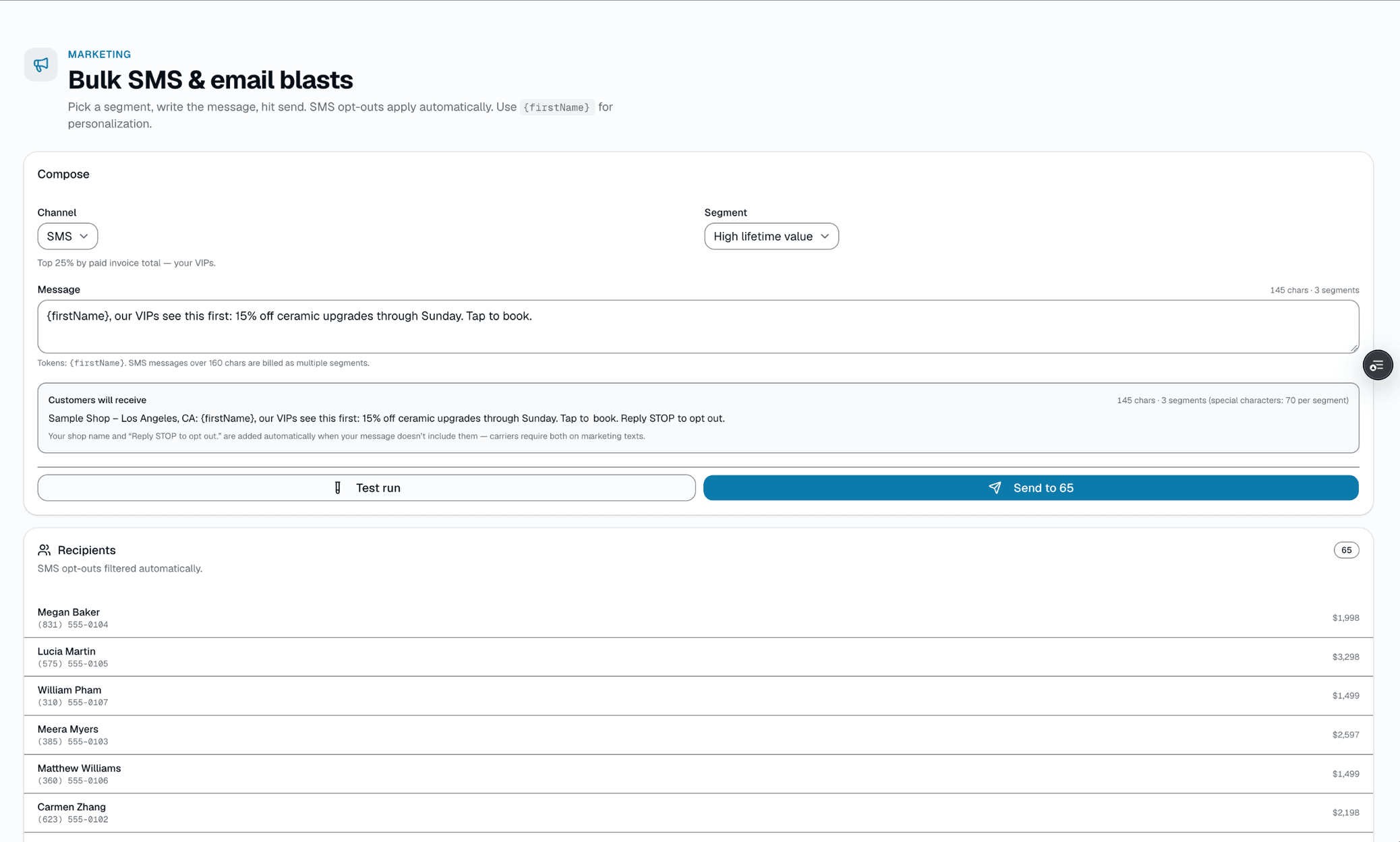
Segment picker + recipient preview
Smart pricing
Per-service close-rate analysis. Raise / reduce / hold suggestions you can actually trust.
Most shops set prices once and forget them. Smart Pricing looks at every active service's quote history over a lookback window you pick (30-365 days) and computes one suggestion per service: RAISE (closing 75%+ of the time — room to charge more), REDUCE (closing under 30% — try a lower price), REPOSITION (closing under 30% even after heavy discounting — the offer itself needs to change, not just the number), or HOLD (in a healthy range already). Services need 5+ quotes in the window before a suggestion appears. Apply updates your catalog's list price with one click.
- Per-service close-rate + quote-volume tracking over a 30- to 365-day lookback (Growth and Pro plans)
- Computed suggestion per service: RAISE / REDUCE / HOLD / REPOSITION
- Discount frequency + average discount factored into every suggestion
- List price vs. what reps are actually charging, side by side
- One-click apply updates the catalog price
- "Need more data" flag below 5 quotes in the window, so you don't act on noise
What this looks like in a shop
Illustrative scenario. A shop had Front 2 Ceramic priced at $389. Smart Pricing showed an 84-quote, 90-day sample with a 78% close rate and light discounting — RAISE suggested, +5% to $408. The owner clicked Apply. There's no built-in before/after revenue comparison; the owner would need to re-check the close rate a few weeks later on the same page to see whether it held.
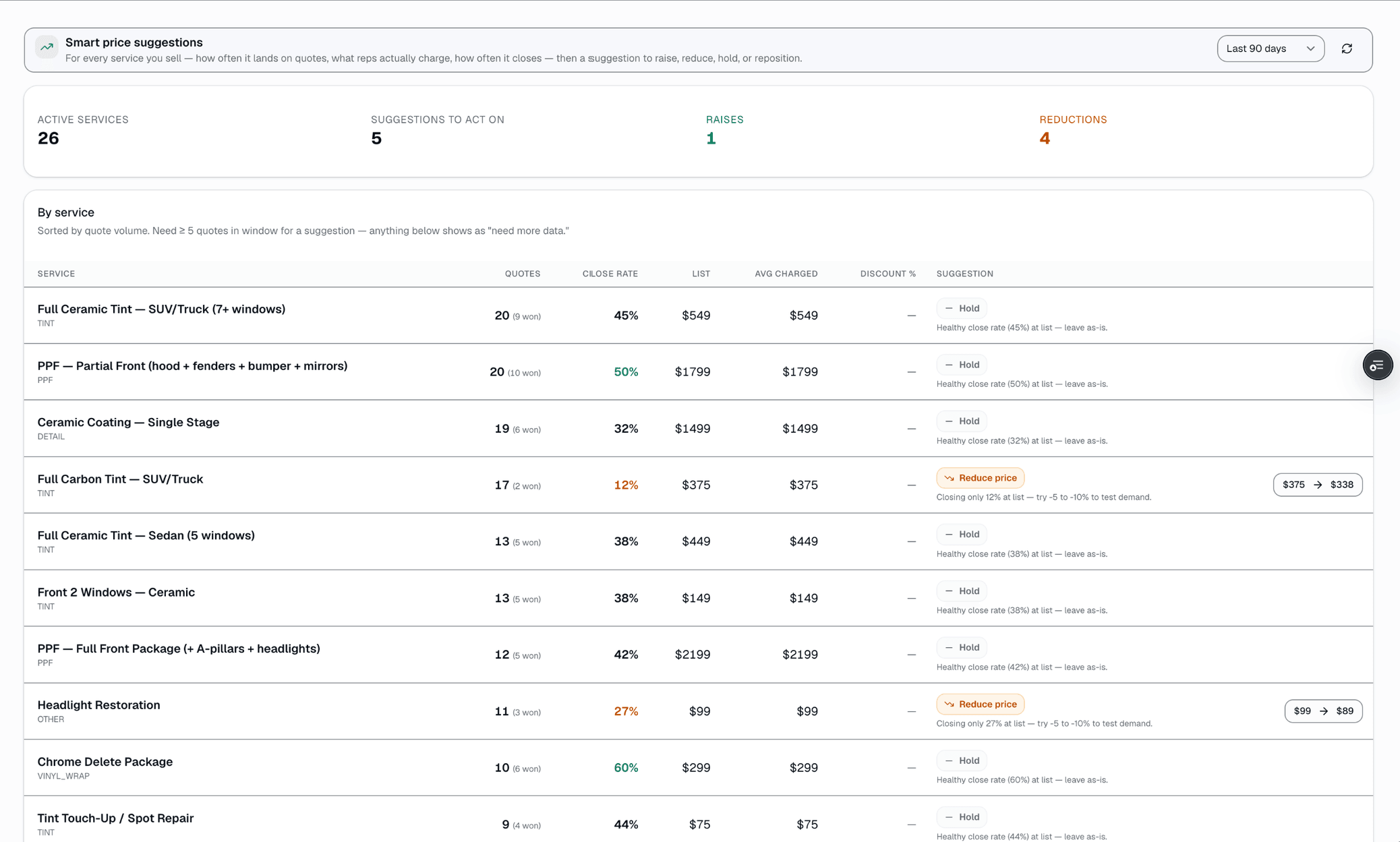
Smart pricing recommendations
Digital signage + cast
Pair a TV in 30 seconds. Auto-rotate upsells. Cast live products.
The lobby TV that's currently showing CNN should be selling your $1,299 ceramic upgrade. SalesThumb's signage feature pairs any browser-equipped TV (smart TV, Chromecast-attached, Apple TV via AirPlay from a phone or Mac, even a $40 Mini-PC running Chrome) in 30 seconds — the TV shows a code, you type it in Settings → Signage, done. Lobby playlists auto-rotate slides (services + prices, customer photo galleries, reviews, tint-laws widget). Sales-counter screens are different — they don't rotate, they CAST live: rep on the iPad picks a film swatch and the TV picks it up on its next poll, within about 15 seconds, so the customer sees the actual product on a 65" screen instead of a phone.
- 30-second pair flow — the TV shows a code, you type it in Settings → Signage
- Lobby playlists with rotating slides (services, photos, reviews, laws widget)
- Sales-counter cast — push from any rep's tablet, live on the TV within ~15 seconds
- Per-shop playlist library + HQ-curated playlists shops can opt into (chain-wide branding, +HQ add-on)
- Custom rotation timing per slide (1-60s, 8s default)
- Display health digest — emails when a TV goes offline > 12h
What this looks like in a shop
Illustrative scenario: Sample Shop LLC hung two cheap $200 smart TVs — one in the lobby, one behind the sales counter. Lobby plays a 6-slide rotation: services + prices, last 12 customer photos, recent 5★ reviews, ceramic vs tint comparison, the shop's tint-laws widget in a web-page slide, and a 'meet the team' slide. Behind the counter: the rep picks the customer's actual service from the catalog and casts it from /app/sales-cast to the TV during the consult, live within about 15 seconds.
Paired displays
3 online · 1 offline
- Lobby TV
Lobby reel
- Sales counter
Cast-ready
- Bay 1
Service info
- Bay 2
Last seen 18h ago
Lobby reel
6 slides · 130s total cycle · auto-rotates
- 130s
Services + prices
Promo card
- 220s← LIVE
Recent customer photos
Before / after
- 315s
5★ reviews this month
Reviews feed
- 430s
Ceramic vs Tint comparison
Web page
- 515s
47 active warranties
Warranty trust
- 620s
Meet the team
Image
Drag to reorder · click any slide to edit · TV picks up changes within ~15s
Lobby TV — auto-rotating upsell reel
Multi-step nurture sequences
Multi-step drips that nurture customers automatically.
Drip Campaigns are included with every SalesThumb plan that sends SMS or email (Starter and up) for shops who want their nurture sequences to fire themselves. Unlike marketing tools that charge per message, drips here cost nothing extra — every send comes out of your shop's existing SMS + email allowance, the same pool that powers your blasts and transactional comms. Auto-enrollment is wired to the triggers shops actually care about: NO_VISIT_DAYS (re-engage anyone past 90/180/365 days), STATUS_CHANGE (welcome anyone who flips to ACTIVE), and SEGMENT_ADD (catch a customer the moment they newly cross into High LTV, Dormant 90+, or any other segment). Every shop gets a $100/mo overage cap by default so a mis-configured sequence can't bleed the messaging budget overnight.
- 7 starter templates — new customer welcome, post-service review request, win-back (90-day dormant), quote sent (no response), annual service reminder, birthday discount, and pre-appointment prep
- Builder for your own multi-step sequences with merge tags + per-step delays
- Auto-enrollment triggers: NO_VISIT_DAYS, STATUS_CHANGE, SEGMENT_ADD (all customers, high LTV, dormant 90/180+, churned, new-30-day, playbook-replied, and more)
- Exit-on-reply — drips stop once a customer replies; opted-out numbers (STOP) are suppressed at the messaging layer regardless of any drip
- Per-campaign analytics: enrolled, in-flight, completed, replied (replies are counted before a drip's final step, on drips set to exit on reply, the default)
- Included on Starter, Growth, and Pro — no extra fee (Basic has no outbound SMS or email)
What this looks like in a shop
Illustrative scenario: Sample Shop LLC turns on three starter templates (new customer welcome, win-back (90-day dormant), post-service review request) — auto-enrollment wired to NO_VISIT_DAYS=90 and STATUS_CHANGE=COMPLETED. Messaging cost stays inside the shop's existing SMS allowance; the spend cap is there in case it doesn't.
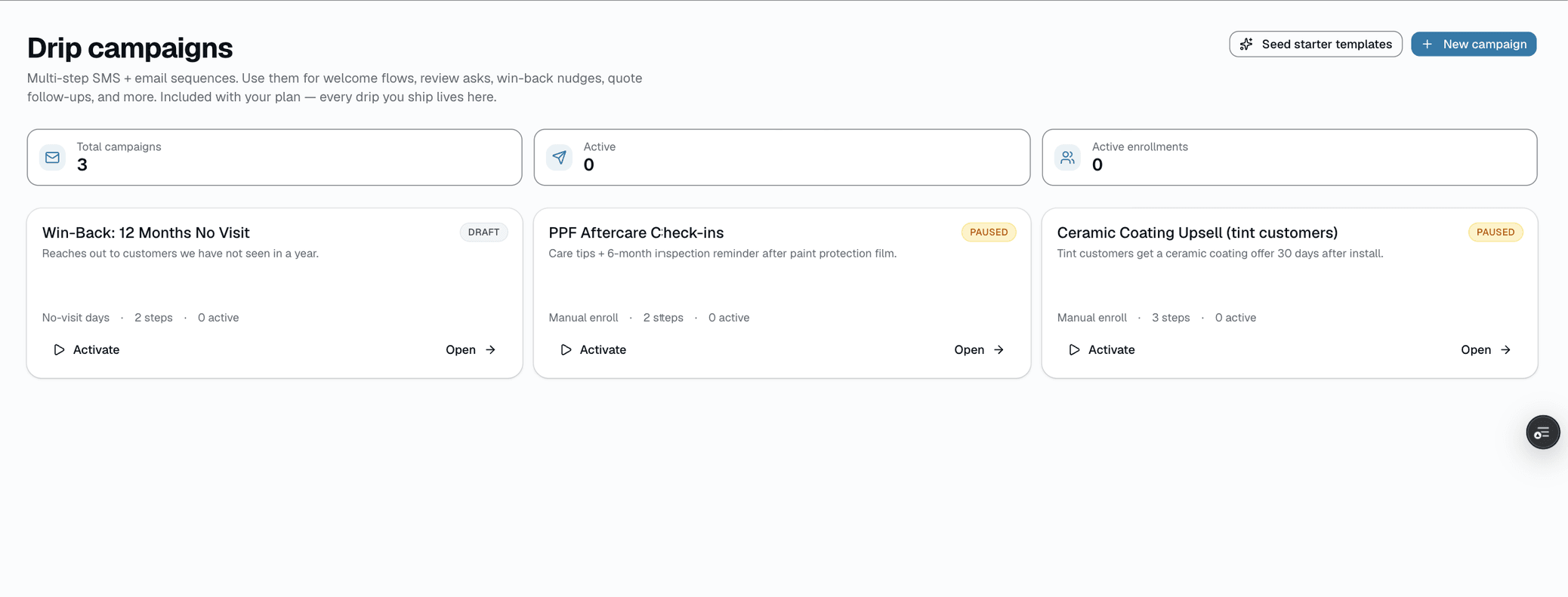
Drip Pack dashboard
Automated Follow-Up
Set it once. Let it run while you focus on installs.
Automations covers the follow-up you'd otherwise do by hand: nudging past customers who haven't booked in a while, nurturing a lead who didn't book right away, and asking for a review after a job wraps. Each one is a preset sequence of steps — a delay, a channel (SMS or email), and a message with merge fields like {{first_name}} and {{shop_name}} — that you can edit line by line after install. Pick Minimal (3 touches), Recommended (5 touches), or Beast Mode (8 touches) to start. Every kind starts from the same starter copy, written as a tint lead follow-up, and it goes live as soon as you pick a pace, so edit it to fit or toggle it off first. Each automation shows how many messages it has sent.
- Win Back Old Customers: re-engages customers with nothing booked once their last completed visit is more than 90 days old
- Follow Up Cold Leads: nurture sequence for leads who didn't book right away
- Review Request: enrolls each job 24 hours after it's marked complete (the preset copy has no review link, so add your Google review URL to a step)
What this looks like in a shop
Illustrative scenario: A new lead lands in your customer list, but a day later nobody has messaged them and they haven't booked. The Follow Up Cold Leads automation enrolls them: an SMS an hour later, an email the next day with film details, an SMS at 72 hours with a discount code, and a final check-in a couple weeks out — no one on staff has to remember to chase it.
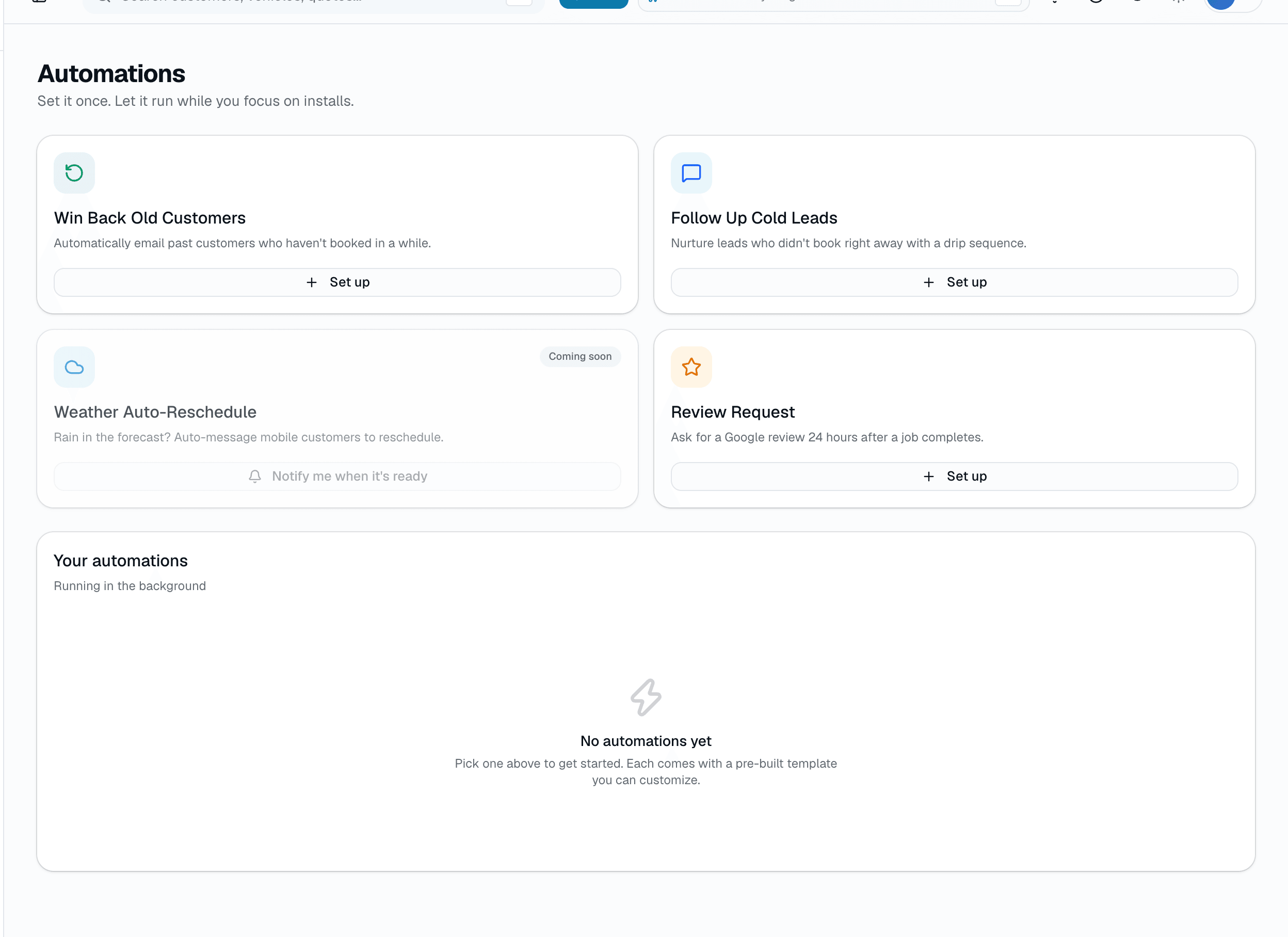
Pick a kind, pick a pace
More in growth
Supporting tools that round out the pillar.
HQ-pushable signage playlists
Build a playlist at HQ, push to every shop in the chain. Signage health digest emails when a display goes offline.
Referral + ZIP density reports
Which acquisition channels convert + which ZIPs convert. Pair with the marketing blast composer to target the next campaign with data.
Referral tracking
Give customers a shareable referral link from their profile and see how many referred customers book. Rewards aren't issued automatically — you choose what to offer.
Other pillars
The full feature taxonomy.
Run the shop day to day
Run your shop
18 features
AI that does the busywork
AI built in
15 features
What your customers see
Customer experience
16 features
One app for techs, sales and customers
Mobile app
8 features
Run more than one shop
Multi-location & franchise
12 features
Selling new franchise units
Franchise Sales
6 features