AI dashboard summary
Open the app. Read one paragraph. Know your day.
The shop owner's morning ritual is currently: open three tabs (calendar, AR, inbox), scroll each, mentally stitch a picture together, then start the day. My Day collapses part of that into one paragraph. Click 'Brief me' and it's generated fresh from real numbers — not a chatbot, not a static template. It's built from exactly four sources: today's appointments, urgent inbox threads from the last 30 days, unpaid invoices created 30+ days ago, and a count of active film products with a reorder threshold set. It doesn't read reviews or playbook plays, and there's no clickable action-chip system — it's a paragraph plus three summary badges (appointment count, urgent count, AR total); the film-stock count only shows up in the AI's paragraph, not as its own badge. Your last brief stays saved right there until you refresh it.
- One-paragraph plain-English summary of today's state
- Reads from real DB: today's appointments, urgent inbox count (30d), AR aged 30+ days, count of film products with a reorder threshold
- Click 'Brief me' to generate on demand — no auto-refresh polling
- Last brief stays saved (in your browser) until you refresh it
- Stub fallback on Basic and Starter (the AI-written brief is on Growth and Pro) or when ANTHROPIC_API_KEY is unset (deterministic placeholder built from the appointment/urgent/AR sources — the fallback stub doesn't mention film stock, only a live AI-generated brief can)
- Shows the exact date/time it was generated, plus appointment/urgent/AR badges
What this looks like in a shop
Illustrative scenario: Mike opens SalesThumb at 7:42am with his coffee and taps 'Brief me.' A couple of sentences tell him: 7 jobs on the books today, 2 urgent inbox threads need attention, and $4,820 is sitting in 30+ day AR. He knows where to start the day — reviews and playbook activity aren't part of this brief, so he still checks those separately.
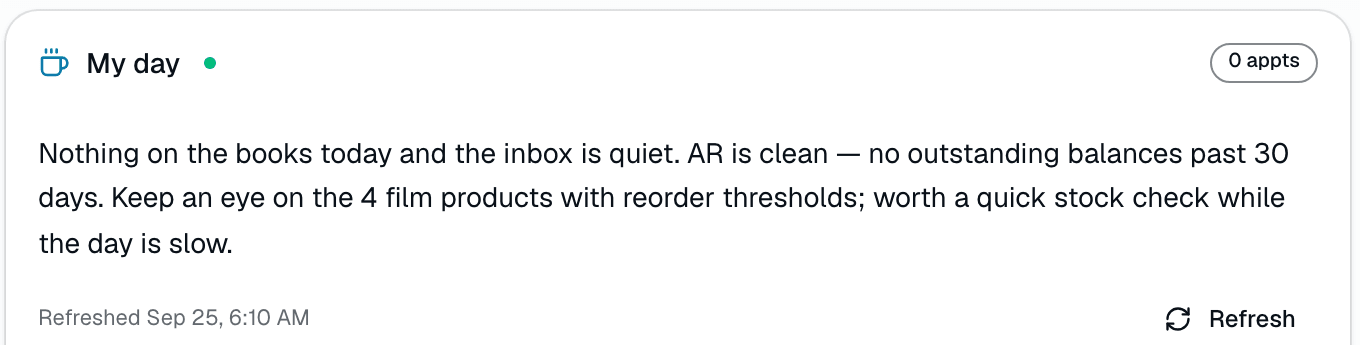
My Day card on the dashboard
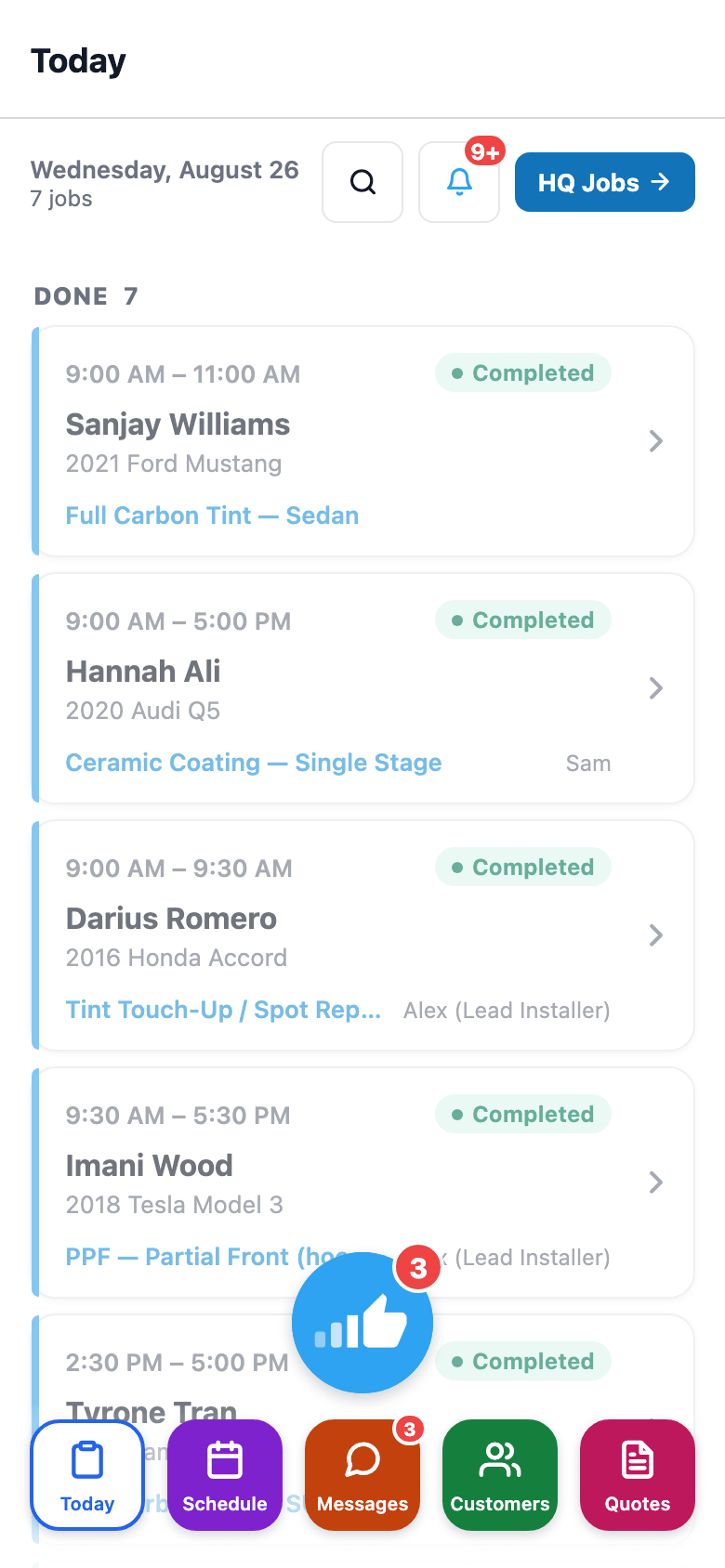
Also on mobile
The mobile app's Today screen — today's job queue plus an AI Tools shortcut row (Intake Scan, Install QC, Photo → Quote, Warranty Triage) for whoever's on the floor.
Reports & Analytics
83 reports. Grouped here by the decision they answer.
SalesThumb ships 83 real reports, organized in the app into 14 sidebar categories. Grouped a different way — by the decision you're actually making — the same 83 reports sort into six clusters: cash & revenue, job & service profitability, team & schedule performance, marketing & lead performance, customer retention & risk, and customer obligations. Pick the decision below and you'll find the handful of reports that answer it — the same reports you'll recognize once you're in the app's 14-category sidebar. Two daily digest emails (a revenue recap and a morning standup) land in your inbox automatically, and most individual reports export to CSV on demand. There's still no single unified home screen with every metric crammed onto it — what's here instead is the report you need, findable by the question you're actually asking.
- Revenue Overview, Daily Revenue, Payment Methods, Sales Tax, AR Aging, Discounts & Coupons, Year-over-Year, End of Day Close, 12-Week Trend, Voids & Refunds
- Transactions, Processing Fees, Royalties paid, Deposits, Chargebacks — where the money actually moved
- Close Rate Funnel (quotes sent → approved → converted) plus the kiosk's own Sales Matrix — pivot grid, funnel, and scorecard views
- Quote Aging — which open quotes are going cold
What this looks like in a shop
Illustrative scenario: You open Reports and pick Gross Profit per Job: 58 completed jobs this month, $31k profit after material cost, one PPF job standing out at a thin 58% margin worth a second look. Separately, the 8am revenue-recap email already told you yesterday brought in $2,340 — you didn't have to open the app to know that.
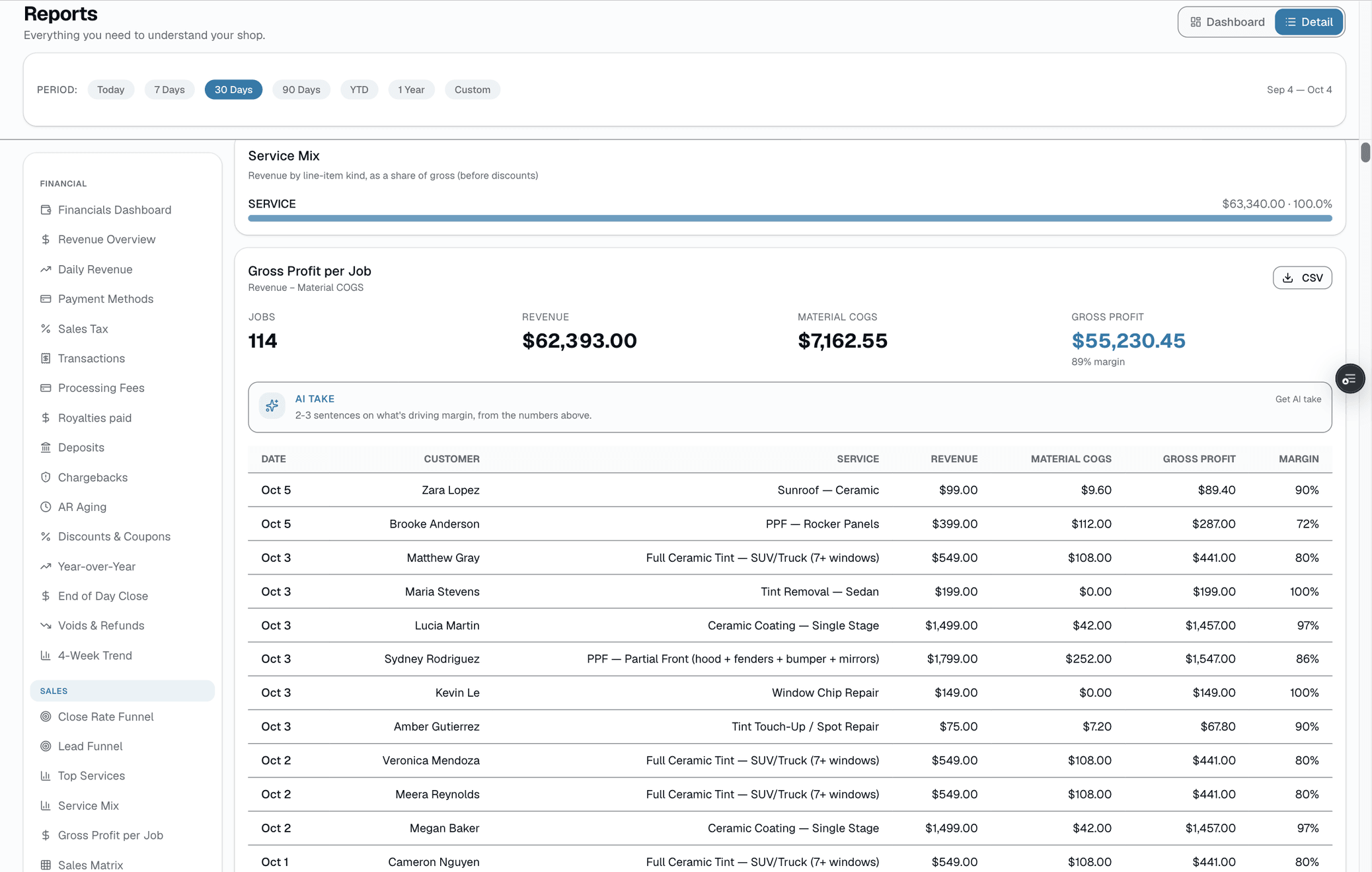
Gross profit per job
Messaging & SMS
Texts, email, Facebook, Instagram, WhatsApp. One inbox.
Messaging is the glue that keeps your shop from feeling like a bureaucracy. Customers reach you wherever they already are, so SalesThumb pulls texts, emails, Facebook Messenger, Instagram and WhatsApp messages into one shared inbox (connect each account once in Settings → Integrations). A customer who DMs you on Instagram and then texts shows up as one conversation, not two. In that same inbox your auto-reminders live next to your one-off replies, your MMS bubble photos, your blast campaigns, and your review requests — all attached to the right customer record, with full history. Reply from your phone on the couch or your front-desk terminal; the thread picks up where the last person left off. Every message is delivered through Twilio's compliant 10DLC channel, opt-outs honored automatically, and overage metered at a flat per-segment rate.
- Shared inbox — every installer + front-desk sees the same threads
- Texts, email, Facebook Messenger, Instagram and WhatsApp land in the same inbox, no app-switching
- Unread badges per thread
- MMS send + receive — photos, up to 5MB per message
- Quick replies from your own editable SMS templates, one tap from the composer's Sparkles button
- Search by customer name or phone
What this looks like in a shop
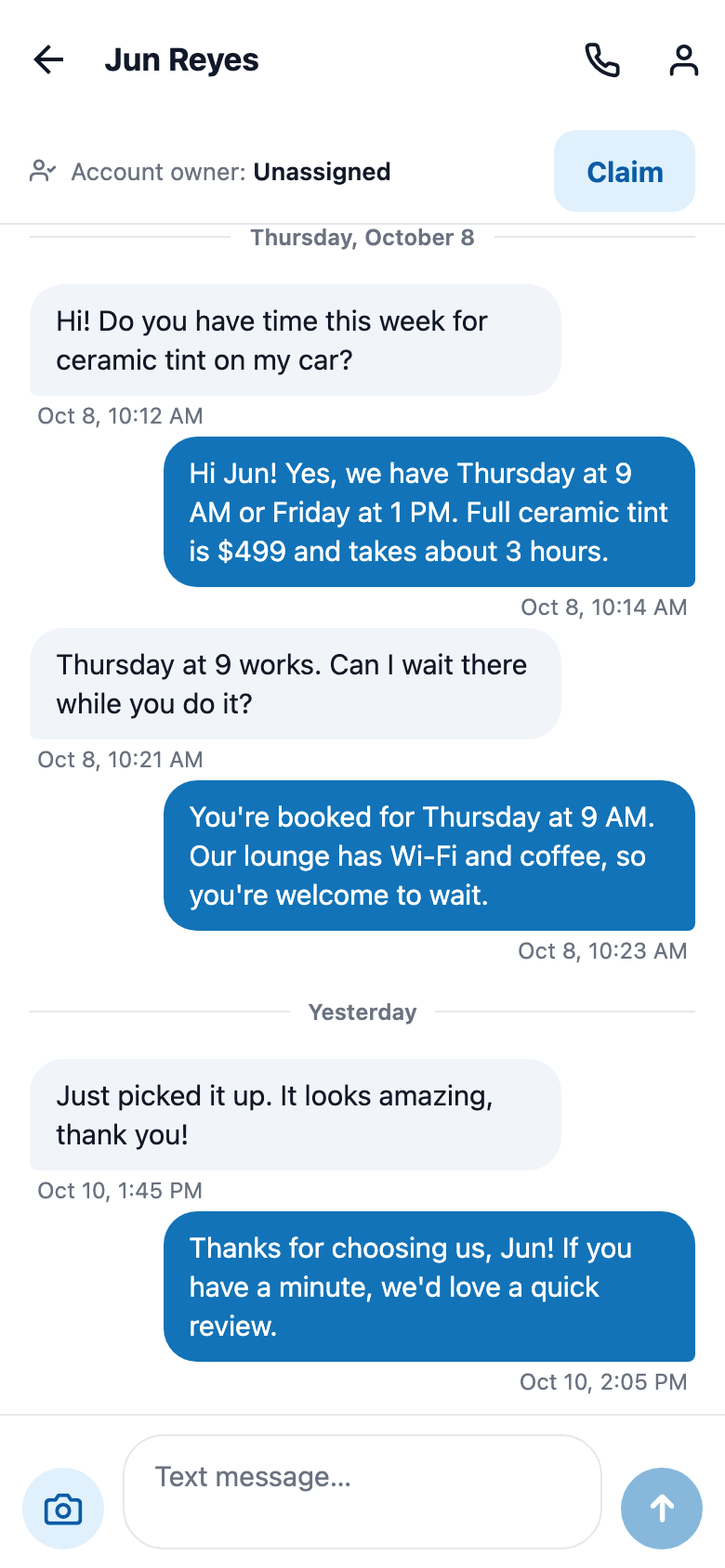
Illustrative scenario: Customer texts back 'running 20 min late.' Your front desk sees it in the shared inbox, replies 'no problem, we'll hold your bay.' Two-way SMS stops missed appointments — and the thread attaches to her customer record so the next visit you've got context.
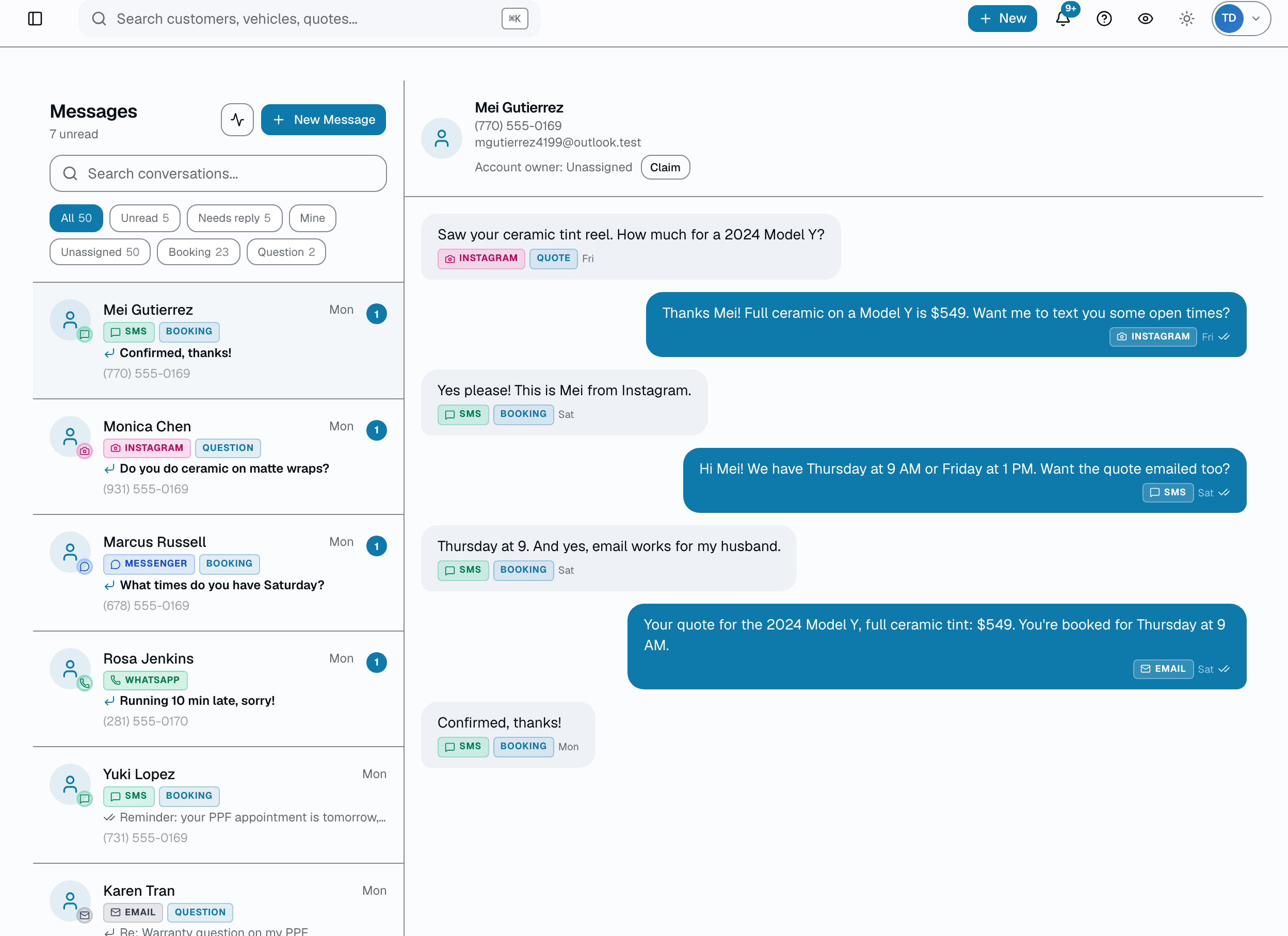
Every channel, one inbox
Also on mobile
The mobile app's Messages tab is the same two-way customer messaging inbox as the web app — reply from the floor, not just the front desk.
AI inbox assistant
Three voice-matched replies, ready to edit and send.
Replying to the same tint, PPF, and coating questions all day is the quiet tax on a busy shop. AI reply drafts read the existing thread — the customer's first name, the vehicle on file, the last few messages — and hand you up to three distinct, SMS-length reply options written in your shop's voice. It's strictly advisory: drafts drop into the same Inbox composer you already use, so you edit, swap, or rewrite before anything sends. Nothing goes out until you tap send. The assistant never invents a price, a date, an appointment time, or a promise — if a detail is missing, it asks the customer for it instead of guessing.
- Up to three distinct reply drafts per thread, one tap from the composer (Growth and Pro plans)
- Grounded in the real conversation — last several messages, customer first name, vehicle on file
- Written in a warm, SMS-length shop voice (1-2 sentences, no robotic boilerplate)
- Advisory only — drafts land in the existing Inbox composer for you to edit and send
- Never invents a price, date, time, promo, or guarantee — asks for missing details instead
- Reads only your shop's data; every message pulled is scoped to your shop and that one customer
What this looks like in a shop
Illustrative scenario: A service writer at Sample Shop LLC opens a thread where a customer asked about ceramic coating for a 2022 Tesla Model 3. Instead of typing from scratch, she taps Suggest reply and gets three options — one that answers the durability question and offers to book, one that asks the two follow-up details needed to quote accurately, and one shorter confirmation-style reply. She picks the second, adds a sentence about their current availability, and sends. The draft saved her the blank-page moment; the words that went out were still hers.
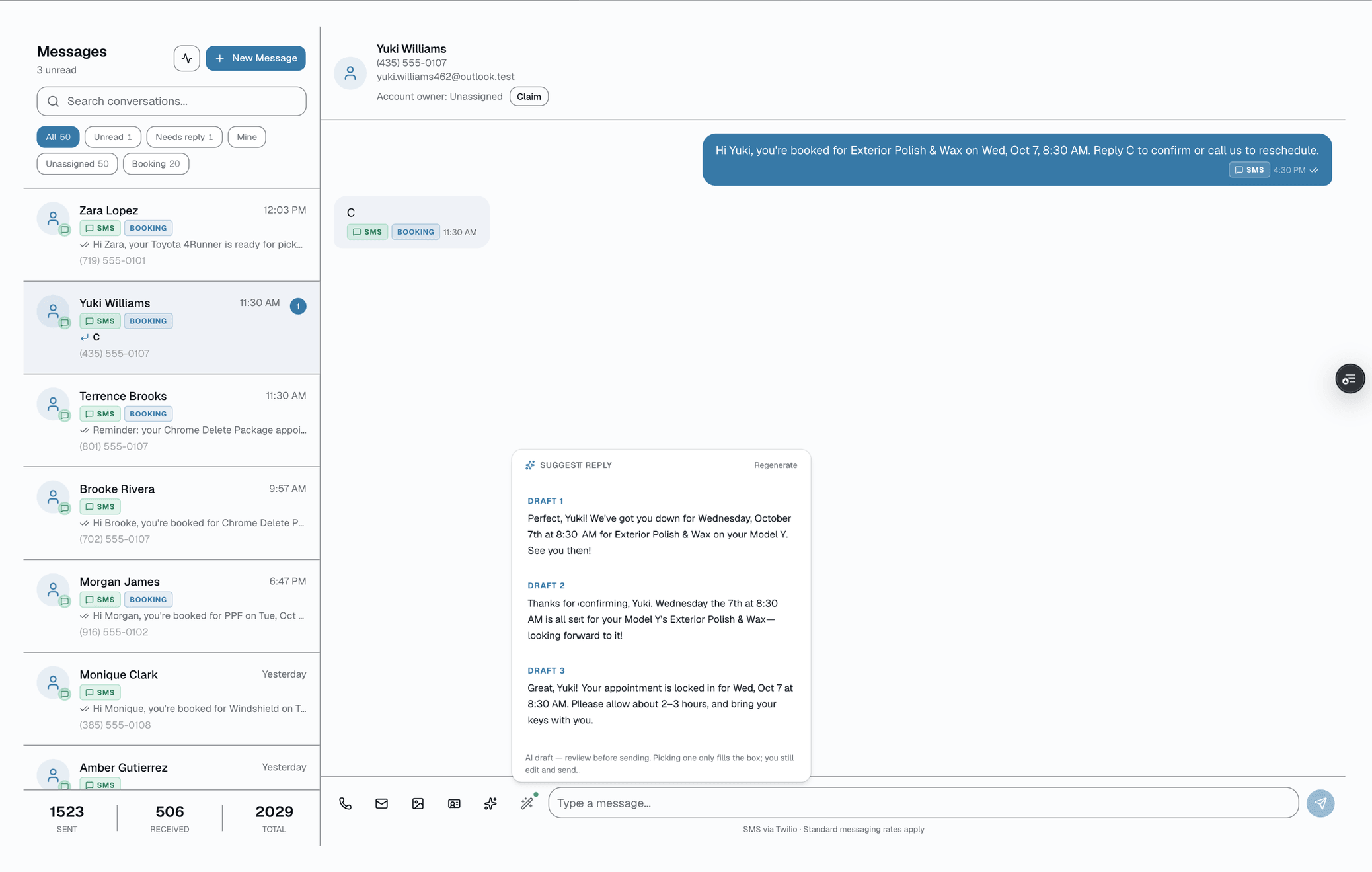
Suggest reply in the thread
AI customer brief
One click on any customer drafts a 2-sentence brief before you call.
Before you call a customer back, you want the 10-second version: are they a repeat, what did they buy, when were they last in, is there an obvious gap in what they've tried? The AI customer brief drafts exactly that. One click on any customer pulls their vehicle on file, appointment history (services + categories + dates), lifetime spend, open balance, and days since their last visit — then an AI writes a short headline, a 1-2 sentence relationship summary, and a few quick tags. It's read-only context generated from real records: it never invents a fact that isn't in the data, and it leaves the customer's name off because the page already shows it. The brief is a draft to inform your next move, not a message that gets sent — you read it, then you decide.
- One-click draft on any customer profile — headline, 1-2 sentence body, 1-4 tags (Growth and Pro plans)
- Built only from real records: vehicle on file, appointment history, spend, open balance, last-visit recency
- Surfaces what they buy and when they last came in, with the category history to spot an obvious gap
- Read-only by design — the brief informs your next call; it is never auto-sent to the customer
- Never invents facts not present in the data; omits the name the page already displays
- Auto-tags like "VIP", "Repeat customer", "Open balance", "At-risk" derived from the same history
What this looks like in a shop
Illustrative scenario: a rep at a busy ceramic-and-tint shop has eight callbacks to clear before lunch. On each customer profile she clicks the brief. One reads "Repeat customer, 4 tint visits over 14 months" with a one-line body noting the last visit was nine months ago and that the history shows tint only, no ceramic — tagged "Repeat customer" and "At-risk". She now knows to lead with a ceramic check-up offer instead of opening cold. The brief didn't send anything or change the record; it just meant she started the call already knowing the customer. The numbers above are an example, not a reported result.
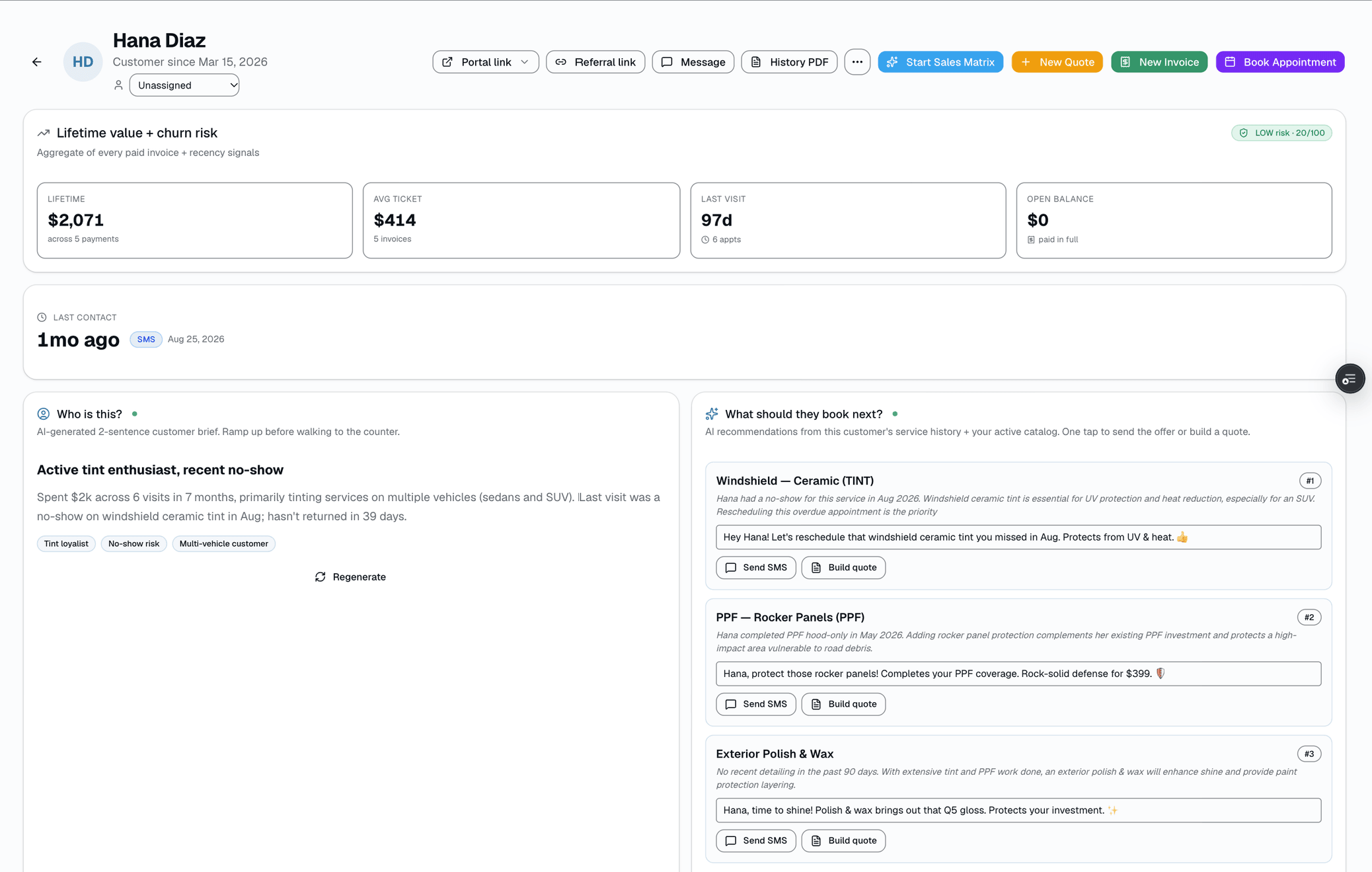
Customer brief on the profile
AI next-service suggestions
On any customer, AI suggests the next 1-3 services to pitch.
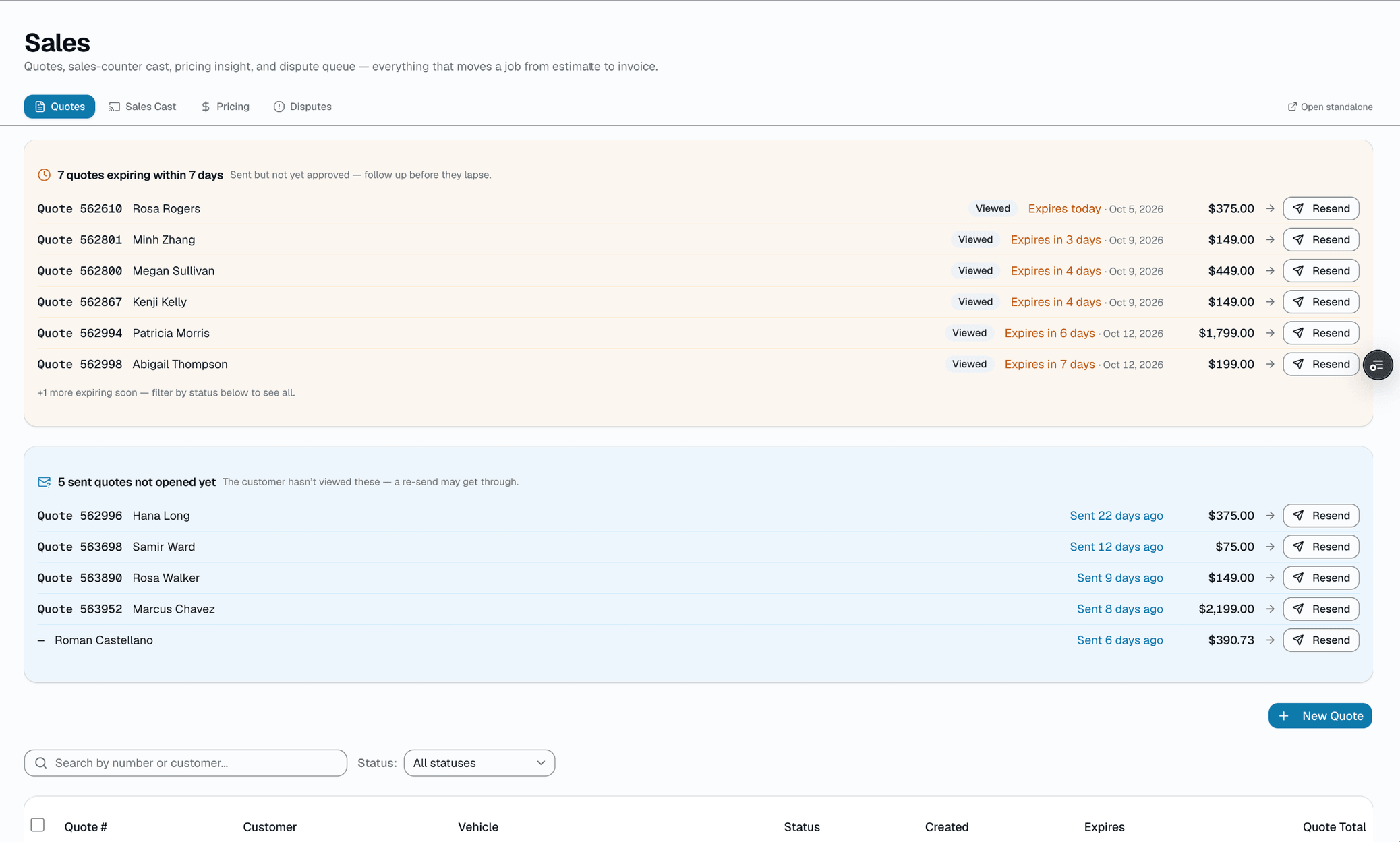
On any customer profile, click Generate suggestions and the AI reads that customer's real service history plus your active catalog, then proposes one to three services worth pitching next — ranked, each with a short reason and a ready-to-edit SMS pitch line that includes their first name. The model does the selecting and ranking; the code keeps it honest by only allowing services that exist in your catalog (it drops any the model invents) and capping the list at three. It's advisory: each suggestion has a Send SMS button that opens the messages composer prefilled with the pitch, and a Build quote button that opens a new quote with the customer and service prefilled. You decide which to act on, edit the wording, and send. If no AI key is set, a deterministic catalog-gap heuristic fills in instead, so the button always returns something usable.
- One click on a customer profile returns 1-3 ranked next-service suggestions (Growth and Pro plans)
- The AI model selects and ranks; results are constrained to your active catalog and capped at 3
- Each card has a reason and an SMS-ready pitch line with the customer's first name
- Two real actions per card: Send SMS (composer prefilled) and Build quote (when a catalog service is matched)
- Suggestions carrying a service id that isn't in your catalog are dropped; one with no service id can still come through, without a Build quote button
- A passive badge flags when the Sales Playbook already has a nudge queued, so you don't double-message
What this looks like in a shop
Illustrative scenario: a service writer at Sample Shop LLC opens a returning customer who's had window tint done but never ceramic. She clicks Generate suggestions and the panel returns two ranked picks from the shop's own catalog — a ceramic coating with a reason noting the tint-only history, and a maintenance detail — each with a short pitch line that already includes the customer's first name. She taps Send SMS on the ceramic pick, tightens one sentence in the composer, and sends; for the second she taps Build quote to price it out. This is the intended workflow, not a reported result.
Next-service suggestions on the profile
Quotes & Estimates
One clean quote. Line items, e-signature, a deposit link.
The strongest quote is one the customer can read on their phone and approve with a signature. SalesThumb turns a price conversation into a signed commitment and a paid deposit in a couple of minutes — while you're still on the call. Every quote is one fixed set of line items (services, film, parts, fees, discounts) with one total; there's no separate customer-facing tier picker — if you want to offer a customer a choice, you send them the quote you want them to pick, built with the film tier (Good/Better/Best) you and the customer already agreed on.
- Line items: services, film, parts, fees, discounts, add-ons
- Guided window-tint picker: tap a window, pick a Good/Better/Best film tier + VLT shade, priced against your catalog
- Reusable templates (name/description/optional vehicle-class tag) loaded manually from a search popover
- AI quote-suggest (Pro): describe the job in plain English, get pre-filled line items
- Draft auto-saves to your browser as you type (not shown as a live counter)
- Contract pricing overrides: a standing flat price or % off for fleet, dealer-group, and VIP accounts, set once in Settings → Fleet Pricing and applied automatically on every future quote
What this looks like in a shop
Illustrative scenario: Your phone rings: 'What's a full ceramic tint on a Model Y?' You open a new quote, tap 'Add window tint,' and paint the Better tier across the full 7 windows — it prices off your catalog automatically. Send. Two minutes later she signs on her phone and pays the deposit — the job is approved and the deposit is in while you're still on the call.
Quote builder
Also on mobile
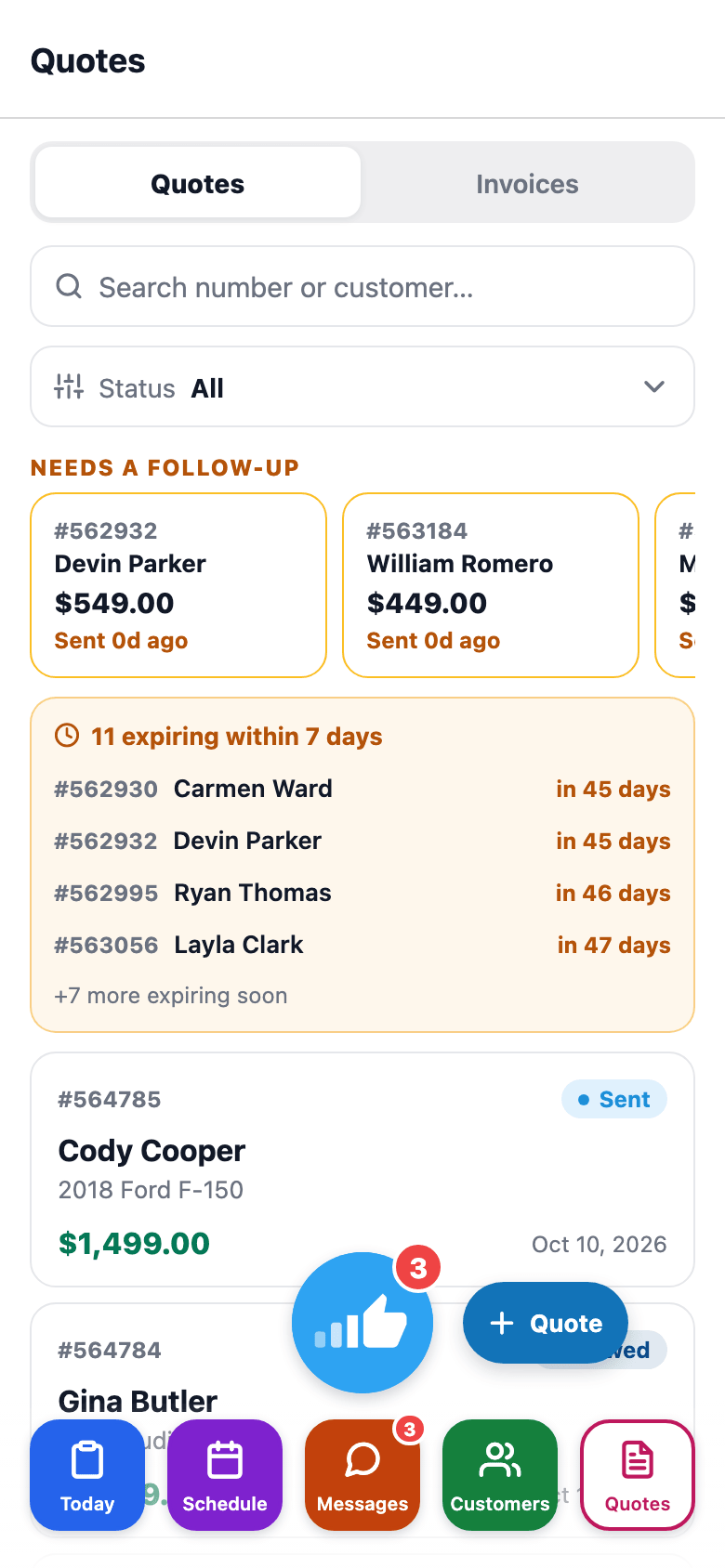
The mobile app's Quotes tab shows quotes and invoices with status badges — sales staff can check status without opening a laptop.
Job Photos (Before / After / Damage)
Before and after photos, with AI that writes up the damage.
Photos are the most under-used tool in a tint shop. Shot right, they win disputes and turn every install into shareable content. SalesThumb captures before and after photos from the installer's phone (damage shots are tagged on the appointment's photo tab in the web app), links each shot to the appointment (and through it to the customer and vehicle), and gives the customer a branded gallery URL they can share. On the Pro plan, AI helps with damage too: mark an inspection item as an issue, snap a photo, and the AI writes up what it sees (the kind of damage, where it is, and how bad) as a draft note the tech can review, edit, or clear. When something goes wrong six months later — 'was that scratch there?' — you open one screen, see the pre-install damage-tagged photo with the timestamp, and the conversation's over.
- One-tap shortcut from today's schedule to the active appointment
- Before / After tabs on the job screen — pick one, then snap
- Photos stage on the job, then upload in one batch — a failed upload stays staged for a retry
- AI-suggested caption per photo in the web app (Pro plan) — edit or accept
What this looks like in a shop
Illustrative scenario: Black Tesla comes in, has a small scratch on the front bumper. Installer tags it as damage with a photo + caption. Three hours later the ceramic coat is done, installer captures 8 after-shots. Customer gets a laid-out gallery URL they can share with friends. The tagged, timestamped damage photo is there if a 'did you do this?' question comes up.
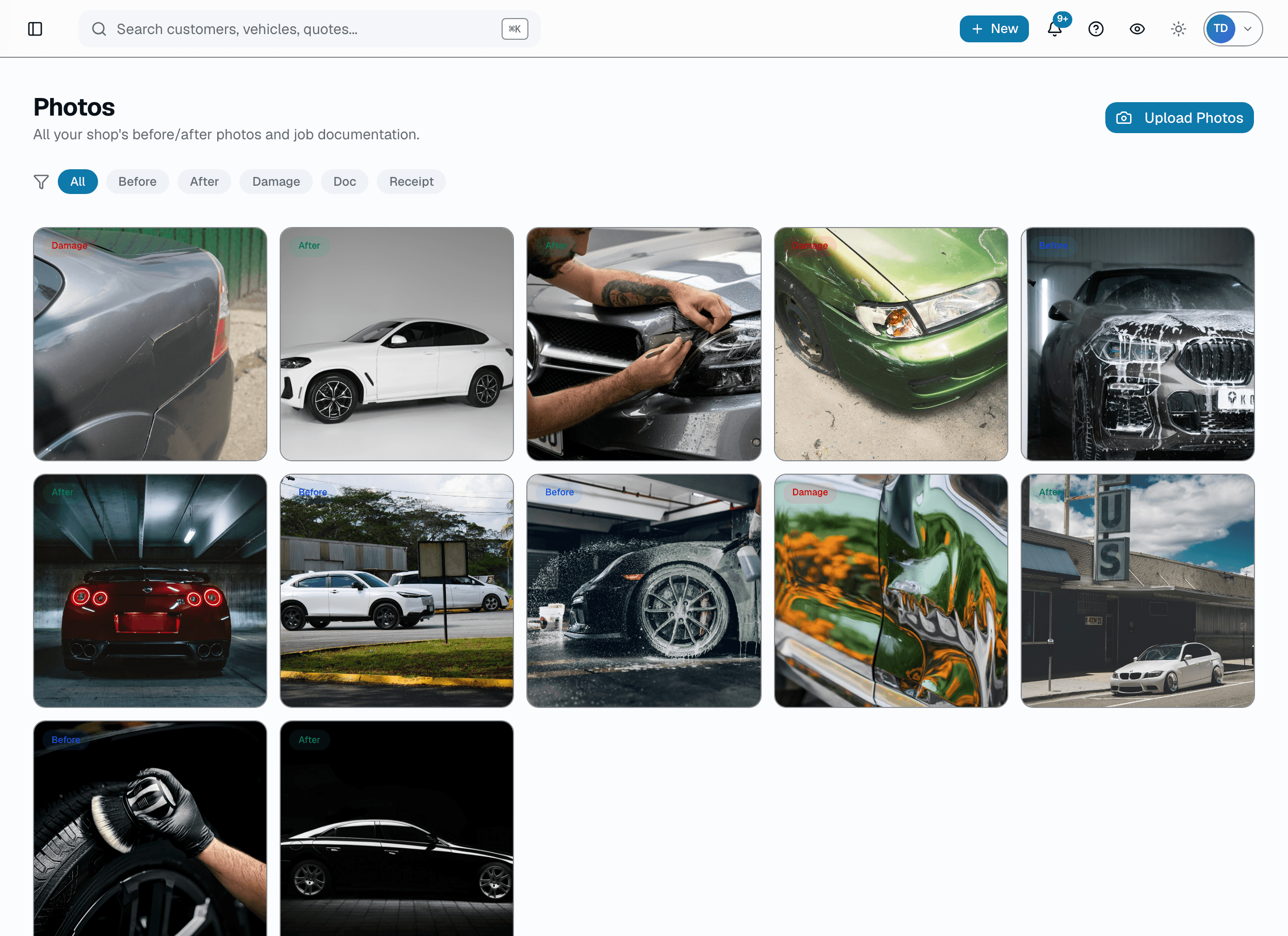
Gallery view
Also on mobile
Photo → Quote and Install QC — the two AI photo tools, on the Pro plan — sit right on the mobile app's Today screen, one tap from the installer's job queue.
AI chargeback defense
A chargeback hits. AI surveys your evidence and drafts the response.
Chargebacks land at the worst possible time, and assembling an evidence pack by hand eats time most shops don't have. Dispute Defender does the survey for you: when a dispute opens, AI reads the reason code and inventories what artifacts the shop already has on file — invoices, signed quotes, job photos, the message thread, warranties, past appointments — then recommends exactly which sections to include and drafts a factual 2-3 sentence cover note arguing your case. It is a recommendation, not an autopilot: the suggestion lands behind an 'Apply' button you review first, and you submit the response yourself. Empty sections are filtered out automatically so the pack never claims evidence you don't have.
- AI surveys on-file evidence (invoices, quotes, photos, messages, warranties, appointments) when you ask it to — Pro plan
- Recommends which sections to include in the evidence pack, keyed to the chargeback reason code
- Drafts a short, factual cover note in past tense — no apologies, no speculation
- One-tap 'Apply suggestion' writes the recommendation into your evidence manifest; you stay in control of submit
- Sections with zero on-file items (quotes, invoices, photos, messages, warranties, appointments) are force-disabled
- Deterministic fallback when ANTHROPIC_API_KEY is unset, so the recommendation still works without AI
What this looks like in a shop
Illustrative scenario: A shop gets a $1,240 chargeback flagged 'fraudulent' on a ceramic-coating job. The owner opens the dispute and clicks Suggest evidence pack. AI sees the signed quote, the invoice, 14 job photos, a two-week message thread, and the appointment that put the customer on premises — and recommends including all of them, while skipping the warranty section (not relevant to a fraud claim) and drafting a cover note noting the customer was on-site, signed the work order, and was in direct two-way contact during scheduling. The owner reads it, tightens one sentence, clicks Apply, and submits the response.
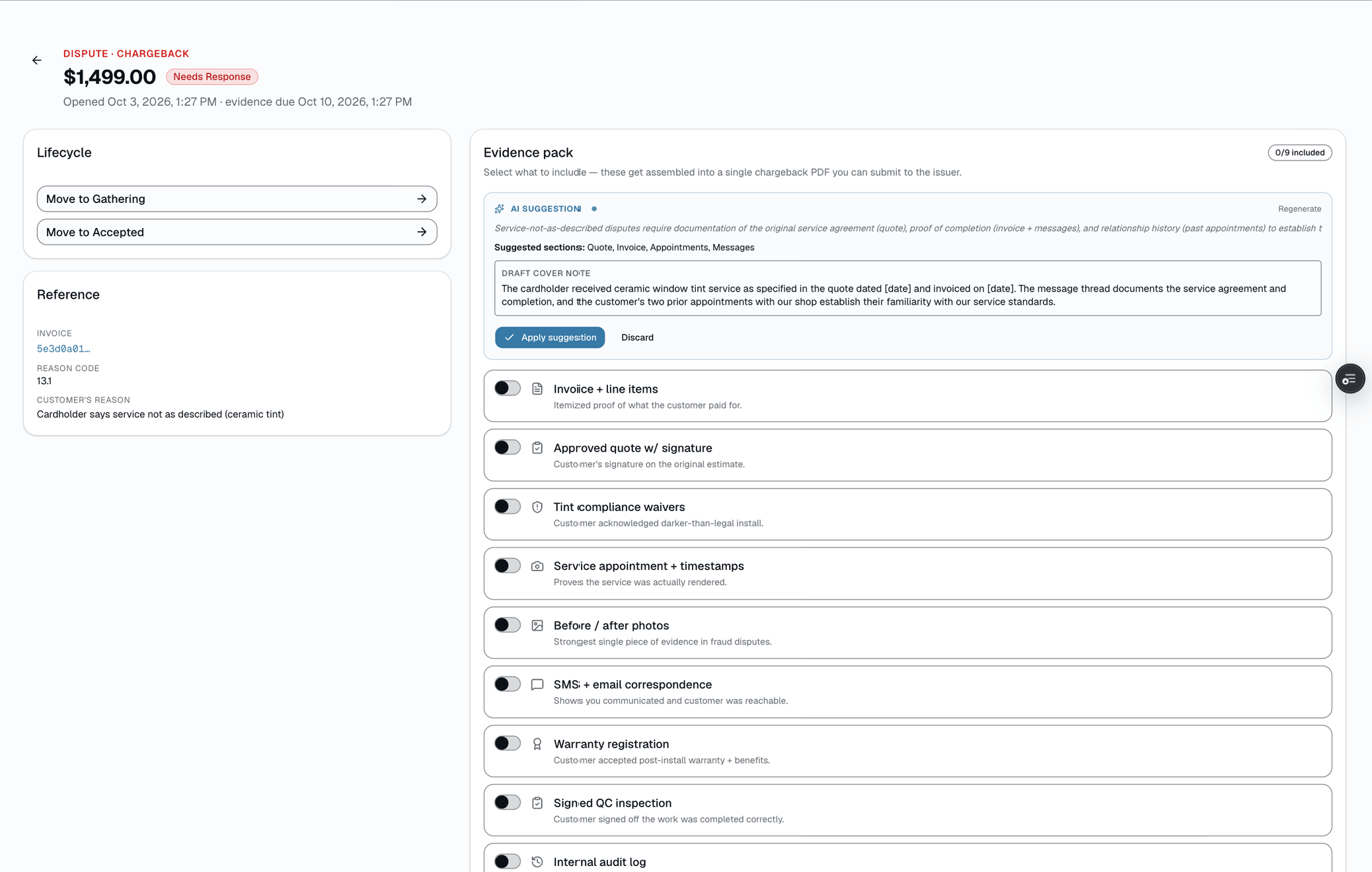
Suggested evidence pack
Online Booking
A booking page that actually fills your slow days.
Your booking page is your salesperson at 11 PM. It lives at your own link (salesthumb.com/book/midnight-tint), works from any phone, and is branded to your colors, your logo, your services. Customers walk a 4-step flow — pick a service, choose a time, enter their info, review and confirm — see your real availability pulled from the same calendar you run the shop on, and pay a deposit if you require one. Every booking creates a customer record, an appointment on your calendar, and a confirmation. You sleep, the funnel works.
- Branded mobile page — your logo, accent color, welcome message
- Service picker with name, category, description, duration, and price
- "Describe what you need" helper matches plain-English requests to the right service
- Calendar + time-of-day grouped slot list (morning / afternoon / evening) pulled from real availability
- Optional preferred-installer picker, showing pinned award badges
- Vehicle year/make/model/color — optional text fields, no scan required
What this looks like in a shop
Illustrative scenario: Thursday at 11pm a customer finds your shop on Instagram. They tap your bio link, pick ceramic tint, see your real availability, and book a Saturday slot. If your policy requires it, they pay a deposit right there. You wake up to a confirmed booking on your calendar and a new customer record — no DM back-and-forth.
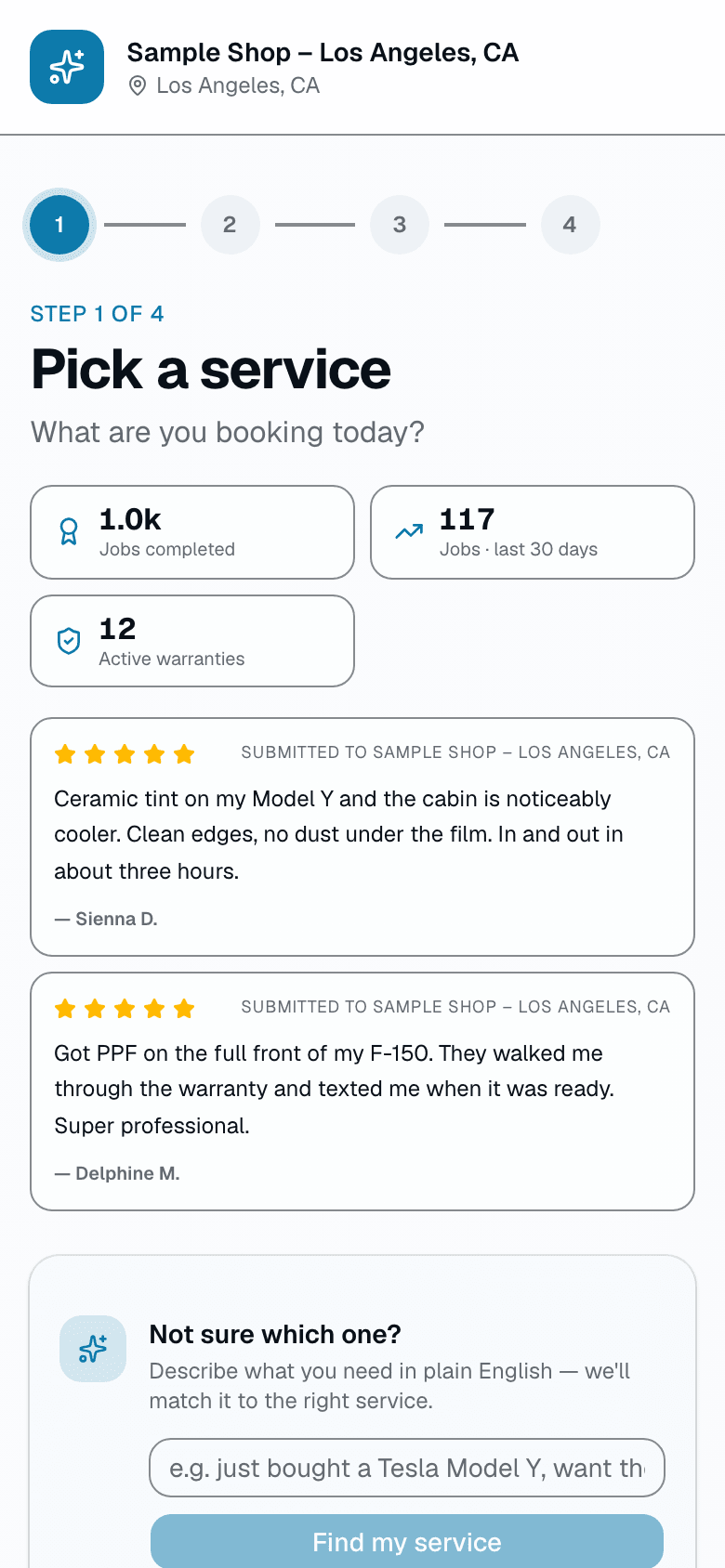
Booking landing
AI cancellation recovery
A slot opens, AI lines up who to text, you tap send
A cancellation an hour out used to mean an empty bay and a scramble through old texts. Open the freed appointment and SalesThumb pulls two pools — everyone on your waitlist who's still waiting, and anyone who messaged in the last 14 days asking about availability — scores them for service match and how long they've waited, then has AI re-rank and write a casual SMS draft for the top 3. Each draft names the service and the new time. You read the reason, tweak the wording if you want, and tap to send. The AI suggests; you decide who actually gets the text.
- Fires from a canceled or no-show appointment (Growth and Pro plans)
- Pulls two pools: active waitlist entries (status 'waiting') + inbound texts from the last 14 days
- Deterministic scoring first — same-service match, date-window fit, flexible-dates flag, and waiting time
- AI re-ranks across both pools and surfaces the top 3 candidates (hard-capped at 3)
- Each pick comes with a one-clause 'why' and a ready-to-edit SMS draft naming the slot + service
- Drafts only — every message routes through a 'Send this text' button you press; nothing auto-sends
What this looks like in a shop
Illustrative scenario: a customer cancels their 2pm ceramic coating at Sample Shop LLC the morning of. Mike opens the freed appointment and the slot-fill panel already lists three names — a customer who's been on the ceramic waitlist nine days, someone who texted 'any openings this week?' on Tuesday, and a flexible-date regular. Each comes with a draft like 'Hey Dana — a spot just opened for Ceramic Coating today at 2pm. Want it? Reply YES to grab it.' Mike sends the first two as-is, edits the third, and gets back to the floor. Actual fill results vary by your waitlist and customer base.
This slot just opened up
Ceramic Coating · Today 2:00 PM · Bay 2 · Sample Shop LLC
Top 3 candidates
Waitlist + last 14 days of inbox- 1Waitlist
Dana K.
On waitlist for Ceramic Coating · waiting 9 days
- 2Inbox
Marcus T.
Texted “any openings this week?” 3 days ago
- 3Waitlist
Priya N.
Flexible dates · same-service match
Scored before the AI sees them · hard-capped at 3.
Slot just opened
Inline AI writing help
The blank box, already filled in. You edit. You approve.
Writing isn't the job — installing film is. But the job comes with words: a caption under the after-shot, a customer-facing line for a service you never described, a reply to the 5-star review sitting unanswered for a week. AI write tools draft those for you, right where you already are. A caption button under each job photo, a 'draft description' button on an empty catalog item, a suggested reply on each review. Nothing is invented and nothing auto-sends — the AI proposes, you tweak the wording, and you're the one who hits save or reply.
- Photo caption suggestions — one tap under any job photo in the lightbox (AI vision captions on Pro; other plans get a plain template caption)
- Captions are grounded in the actual photo (Claude vision) + the category (before / after / damage)
- One-click draft for an empty service description, written in your shop's tone
- On-brand review-reply draft — tone adapts to the star rating, no fabricated details (Growth and Pro)
- Every output is a draft you approve — nothing is saved or posted until you apply or save it
- You edit, then apply — captions save via your normal save, replies are recorded when you click reply
What this looks like in a shop
Illustrative scenario: an installer at a mid-size ceramic-coating shop wraps a job and snaps eight after-shots in the app. Instead of leaving them blank, he taps 'suggest caption' on each, glances at the line, fixes one to name the actual coating, and saves — the customer's gallery now reads like the shop cared. That evening the owner clears three unanswered reviews: she opens each, reads the suggested reply, softens one sentence on the 2-star, and clicks reply herself. The next morning she adds a 'paint correction' item to her catalog, clicks 'AI · Write description' on the service, applies the draft, then trims it to two sentences. None of it auto-posted; she approved every word, but the staring-at-a-blank-box part was gone.
Photo · After
Sample Shop LLC After
AfterSuggest caption
Caption · editable draft
Vision-grounded — the model sees the photo.
Category-aware tone · your save commits it.
Caption suggestion in the lightbox
Sales playbook engine
Every paid invoice fires a 12-month sales sequence. Hands-off.
Your busiest day is the day you don't follow up. The Sales Playbook does it for you: when an invoice flips PAID, a six-step nudge sequence enqueues against the customer — t+24h review, t+7d warranty registration, t+30d cross-sell, t+90d maintenance check, t+180d win-back with a discount, t+365d anniversary — each delivered by SMS (the only channel — there's no email variant) at the scheduled time, except the review step, which is logged on the timeline while the review ask itself goes out through your separate review-request automation. Five of the six steps use editable template copy with merge fields ({{firstName}}, {{shopName}}, etc.); only the cross-sell step's pitch line is written per-customer by AI, using the customer's real purchase history. Replies are AI-classified and acted on. Operator opt-outs honored. Per-shop kill switch, per-customer opt-out, full timeline view per invoice.
- Six-step sequence per paid invoice (t+24h → t+365d)
- SMS only — no email channel for playbook nudges
- AI-written pitch line for the cross-sell step, using real purchase history
- AI reply intent classifier — auto-marks DONE / SKIPPED / opts customer out (confidence-gated, 0.7 floor)
- Per-shop master kill switch + per-customer opt-out (NUDGES OFF keyword)
- Per-shop template editor: edit the copy, change the delay, disable a step
What this looks like in a shop
Illustrative scenario: a month after a shop starts using the playbook, the first +30d cross-sell texts go out and three customers reply 'yes pls send PPF quote' to the +30d cross-sell — the owner sees them flagged FOLLOW UP MANUALLY in the next-morning replies digest and sends quotes the same day. The shop had been doing zero post-paid follow-up before this; the only ongoing operator time it costs is reading the digest.
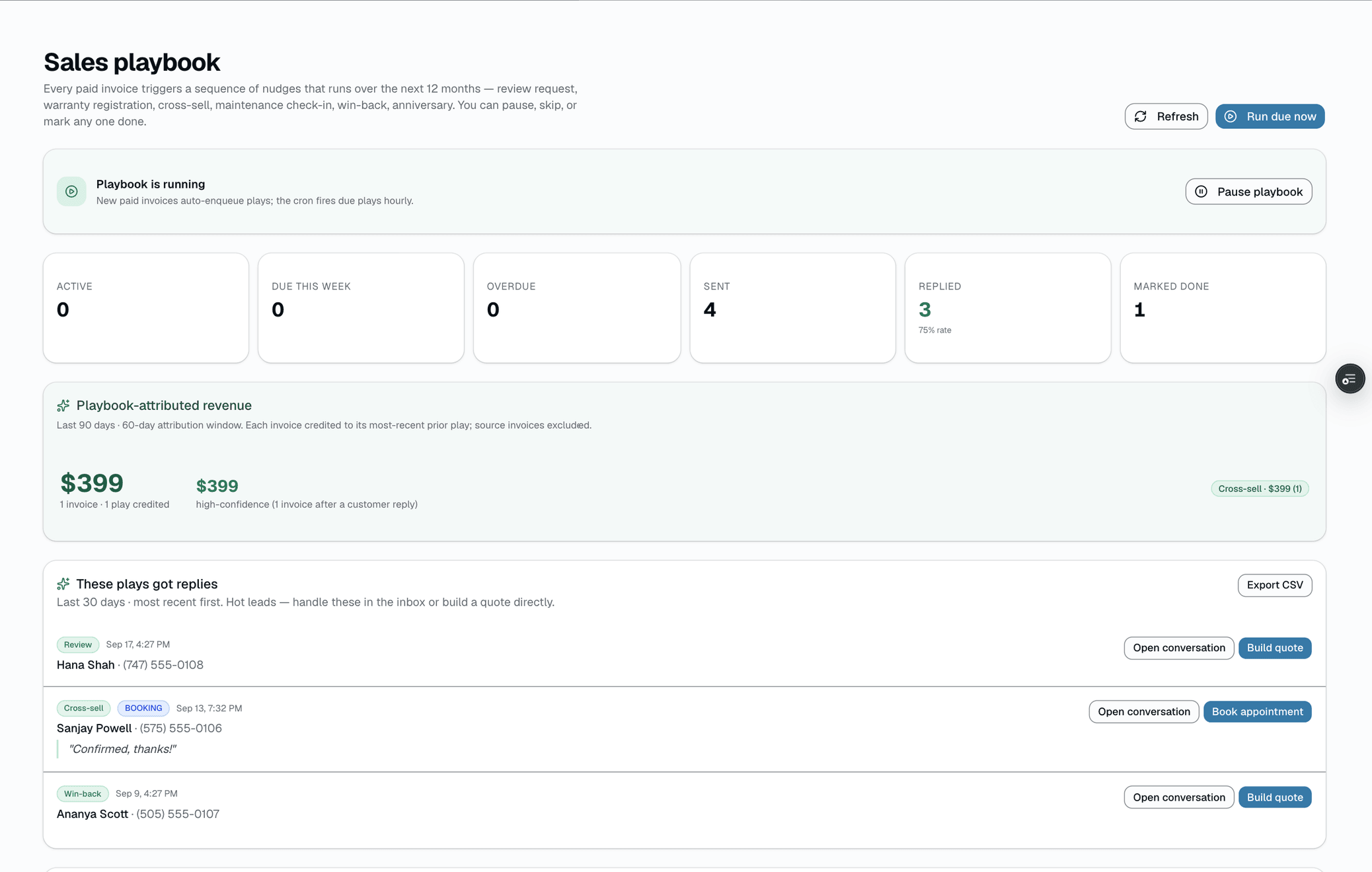
Playbook timeline · invoice #2841
More in ai built in
Supporting tools that round out the pillar.
AI Ops Assistant
A ranked feed of what needs attention across your shop — low stock, churn-risk customers, today's unconfirmed appointments, no-show and revenue trends. For plain-English questions about your numbers, use Business Analyst.
Other pillars
The full feature taxonomy.
Run the shop day to day
Run your shop
18 features
What your customers see
Customer experience
16 features
One app for techs, sales and customers
Mobile app
8 features
Fill the calendar
Growth
8 features
Run more than one shop
Multi-location & franchise
12 features
Selling new franchise units
Franchise Sales
6 features