A reference playbook for your team. A real FDD version history and audit log for compliance.
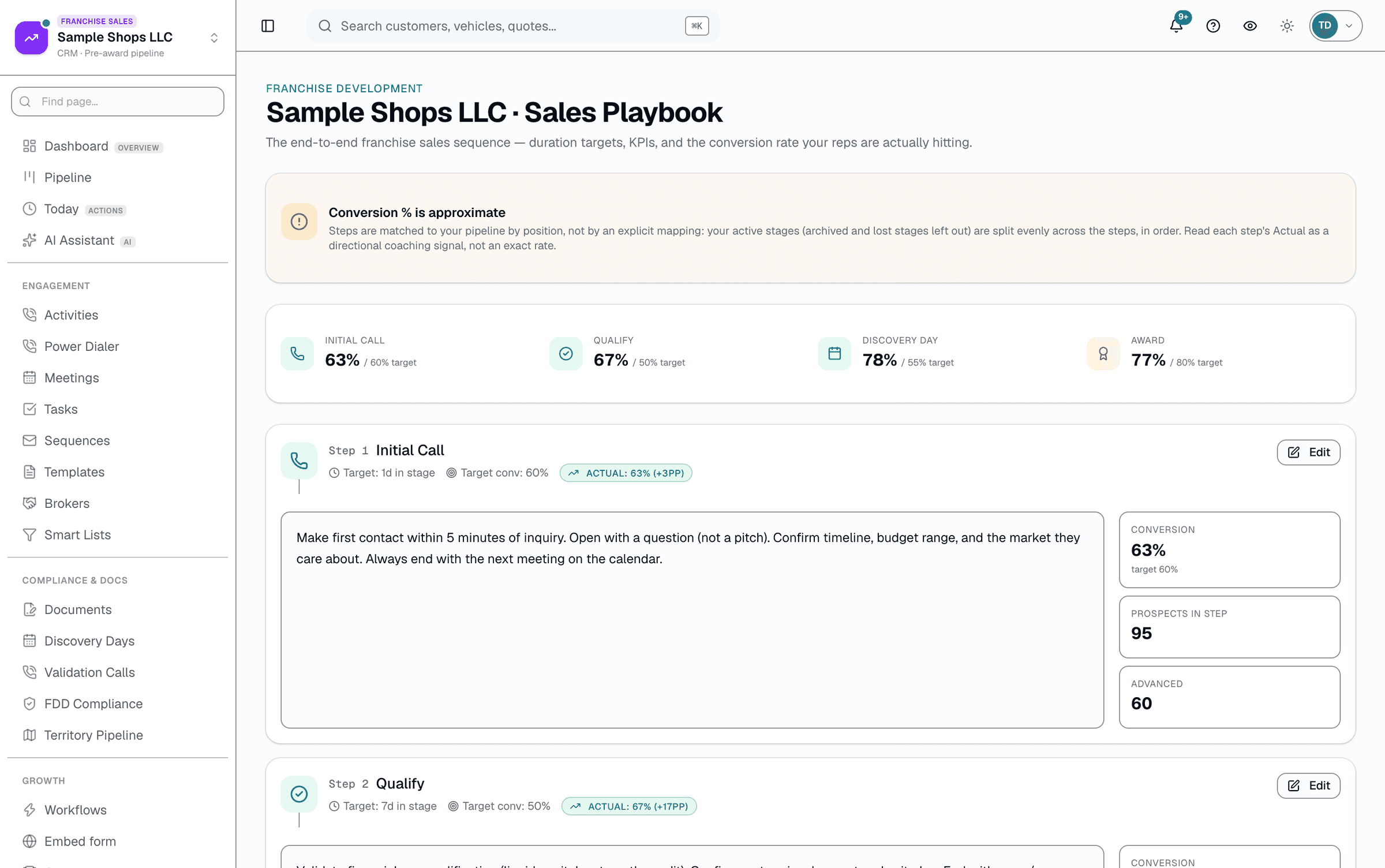
Franchise sales runs on two things: a process the team can follow, and a clean document trail the FDD requires. SalesThumb's playbook gives every rep a reference for each stage of the sale — target days, target conversion, and an approximate conversion rate computed from your live pipeline (steps are matched to your stages by position, so read it as directional) — while the FDD library keeps every edition of your disclosure document versioned (draft, publish, retire) and the compliance page keeps a live audit log built from real activity, including automatic detection of a franchise agreement signed before the FDD's 14-day FTC review window elapsed.
The quick version
Playbook & documents: Your sales playbook and a version history of franchise documents.
- 4-step sales playbook (Call → Qualify → Discovery Day → Award) with target days + target conversion
- Approximate conversion rate per step from your live pipeline (stages matched to steps by position)
- FDD document + version library — draft, publish, retire
A closer look
01
A playbook with real numbers, not a blocking gate
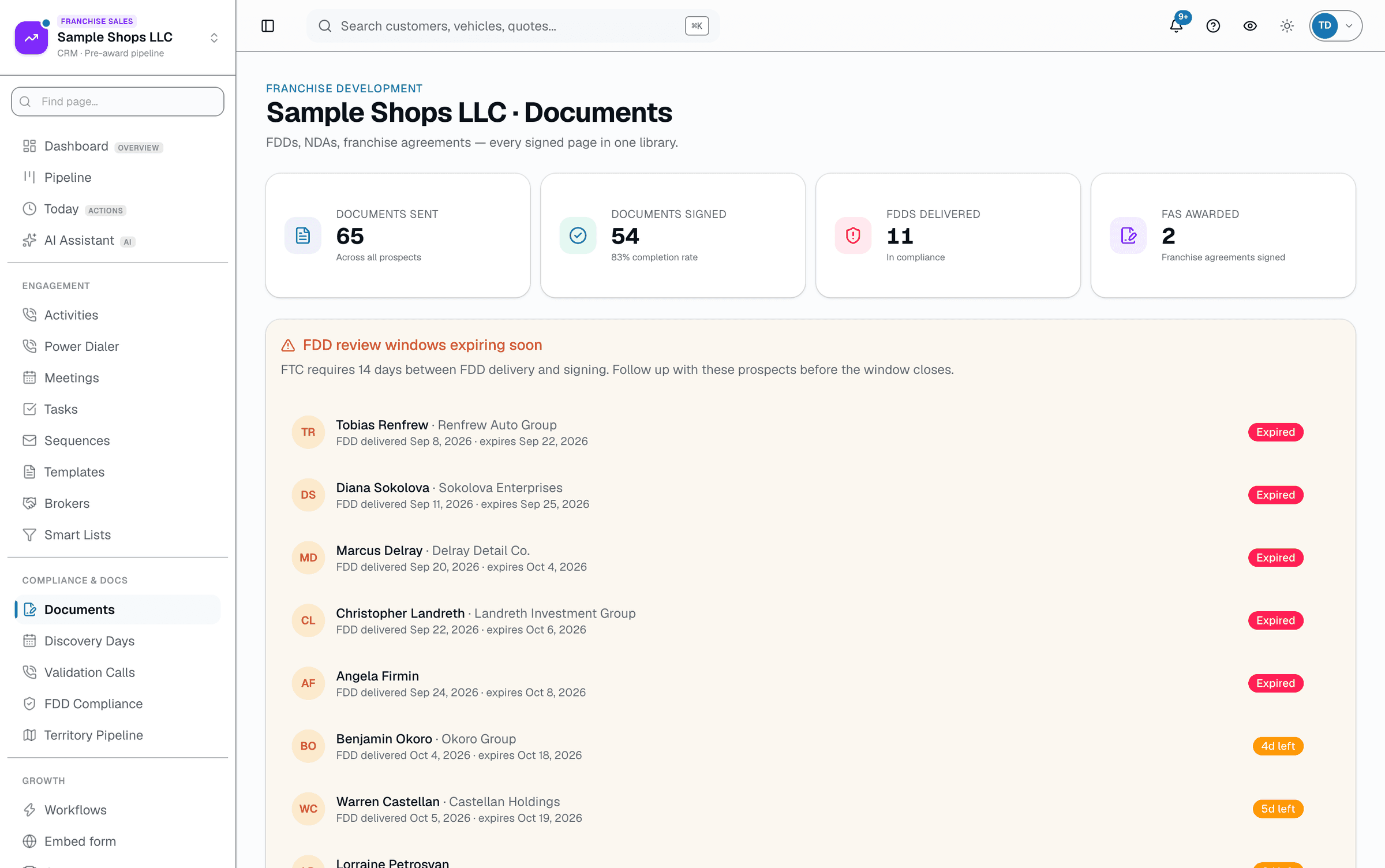
The playbook ships with 4 editable steps — Call, Qualify, Discovery Day, Award — each carrying a title, guidance text, a target number of days, and a target conversion percentage you set. Next to each, SalesThumb shows an approximate conversion rate computed live from your prospects — your active stages are split evenly across the 4 steps by position, so treat it as a directional signal, not an exact per-step rate. It's a coaching reference, not an enforcement layer — the only stage transition SalesThumb actually blocks is moving a prospect into the Onboarding pipeline stage before the FDD's 14-day review window has elapsed.
- 4 steps: Call → Qualify → Discovery Day → Award
- Each step: target days, target conversion %, and an approximate actual conversion %
- The one hard block: no moving to "won" until the 14-day FDD window clears
02
FDD version history, and a real compliance audit log
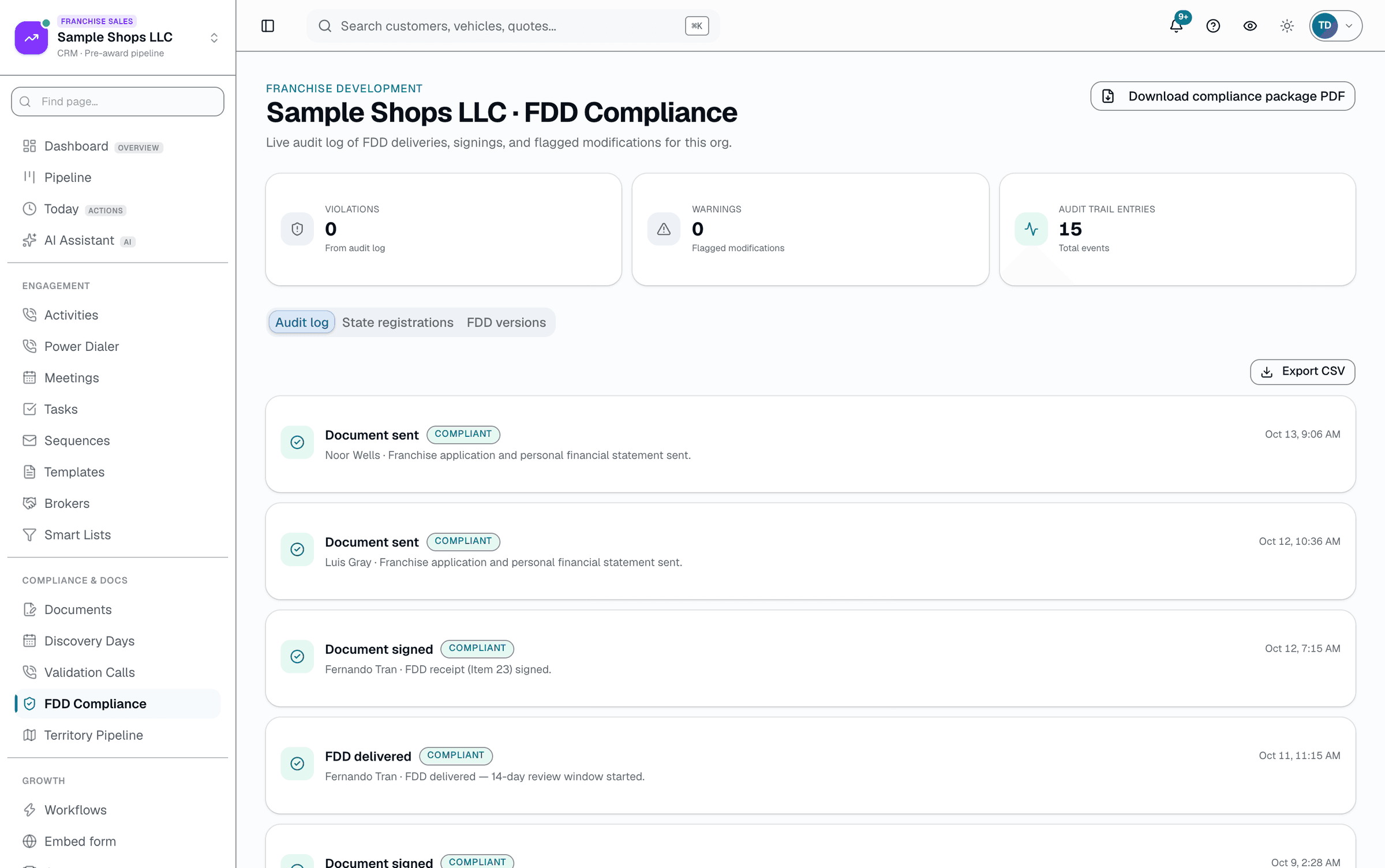
Draft a new FDD edition, publish it, and the prior active version retires automatically — a document never has zero or two active versions at once. Separately, the compliance page reads your org's real activity log and flags anything relevant: a franchise agreement signed before the 14-day review window is an automatic violation; a note about a material FDD modification after delivery is a warning. A States tab tracks per-state franchise registration status with the filing, expiration, and renewal-due dates you enter — SalesThumb never decides which states require registration.
Everything it does
The complete list. The plan tag above shows which plans include it.
- 4-step sales playbook (Call → Qualify → Discovery Day → Award) with target days + target conversion
- Approximate conversion rate per step from your live pipeline (stages matched to steps by position)
- FDD document + version library — draft, publish, retire
- E-sign for FDD acknowledgement + franchise agreement (real-or-stub DocuSign)
- 14-day FTC review window enforced before a prospect can be marked won
- Live compliance audit log with automatic early-signature violation detection
A tour of the screens
Every meaningful view, the path through it, and the moments that matter — so you know exactly what you're buying.
Document library + FDD review windows
Every FDD, NDA and franchise agreement in one library, with each prospect's 14-day FDD review window tracked so you know when they can sign..
Compliance audit log
Live, org-wide log of FDD deliveries, signings, and flagged modifications, with automatic early-signature violation detection..
Who it's for
Built specifically for…
- Franchise development teams of 1-20 reps
- Franchise legal + compliance officers
- Master-franchisees managing multi-state programs
What it replaces
The old way…
- Process docs that nobody reads
- Email + Dropbox FDD sending
- A compliance spreadsheet nobody keeps current
Setting it up
- 1
Use the playbook as a coaching reference
Edit the 4 steps' guidance and targets. Watch the approximate conversion rate per step move as your pipeline data changes.
- 2
Version your FDD
Draft a new edition, publish it when it's ready — the prior version retires automatically.
- 3
Watch the compliance log
Every FDD delivery, signature, and flagged material modification lands in a live, org-wide audit log — including automatic detection of an early signature.
What this looks like in a shop
Illustrative scenario: A franchise development team had a franchise agreement countersigned nine days after the FDD went out — five days short of the FTC's 14-day window. In a spreadsheet-based process, nobody would've caught it until legal review. In SalesThumb, the compliance audit log flagged it automatically the moment the signature activity was logged.
Good to know
- Which plan includes playbook & documents?
- It's part of the CRM/Franchise Sales add-on, which you can add to any plan. See the Pricing page for everything in each plan.
- Does SalesThumb block a rep from moving a prospect forward without completing tasks?
- Only one thing is actually blocked at the API: moving a prospect into the award/won stage before the FDD's 14-day FTC review window has elapsed since delivery. There's no general required-tasks gate on other stage transitions today.
- Does the FDD vault know which version to send to a prospect in a given state?
- No — "states covered" is a label you set on the document for your own reference, not an automated per-state matching or registration-status tracker. Delivering an FDD to a prospect (from their pipeline record) doesn't consult it.
- What about state-by-state FTC registration status?
- The compliance page's States tab lets you record each state's registration status plus filing, expiration, and renewal-due dates, and lists registrations expiring soon. It doesn't know which states require registration — get that from your franchise counsel. Once you track any state, sending an FDD or franchise agreement to a prospect whose state isn't registered as active is blocked unless an admin records an override reason.
Works with your stack
DocuSign
E-sign FDD acknowledgements + franchise agreements (or a demo stub when not connected)
Pairs well with
Franchise Pipeline
New Lead → Contacted → Discovery Call → FDD Review → Validation → Onboarding. Custom, renamable stages; a weighted forecast; a real territory-conflict flag. Part of the +CRM/Franchise Sales add-on.
Validation Calls
Track existing franchisees who take validation calls, book a call with one from the roster at an agreed time, and rate the outcome — a rating of 4-5 auto-advances the prospect's pipeline stage. Part of the +CRM/Franchise Sales add-on.
Discovery Days
A rolling 60-day calendar of every scheduled prospect visit, a 5-item prep checklist backed by real data (not a note field), and an AI briefing that pulls the prospect's real history — replaces the spreadsheet most franchisors still run this on. Part of the +CRM/Franchise Sales add-on.
FDD Compliance
Server-enforced brand-color locks, network-wide minimum pricing, and a structured visit-checklist runner that turns every failed item into a tracked corrective action — not a spreadsheet note.