A pipeline built for selling franchise units
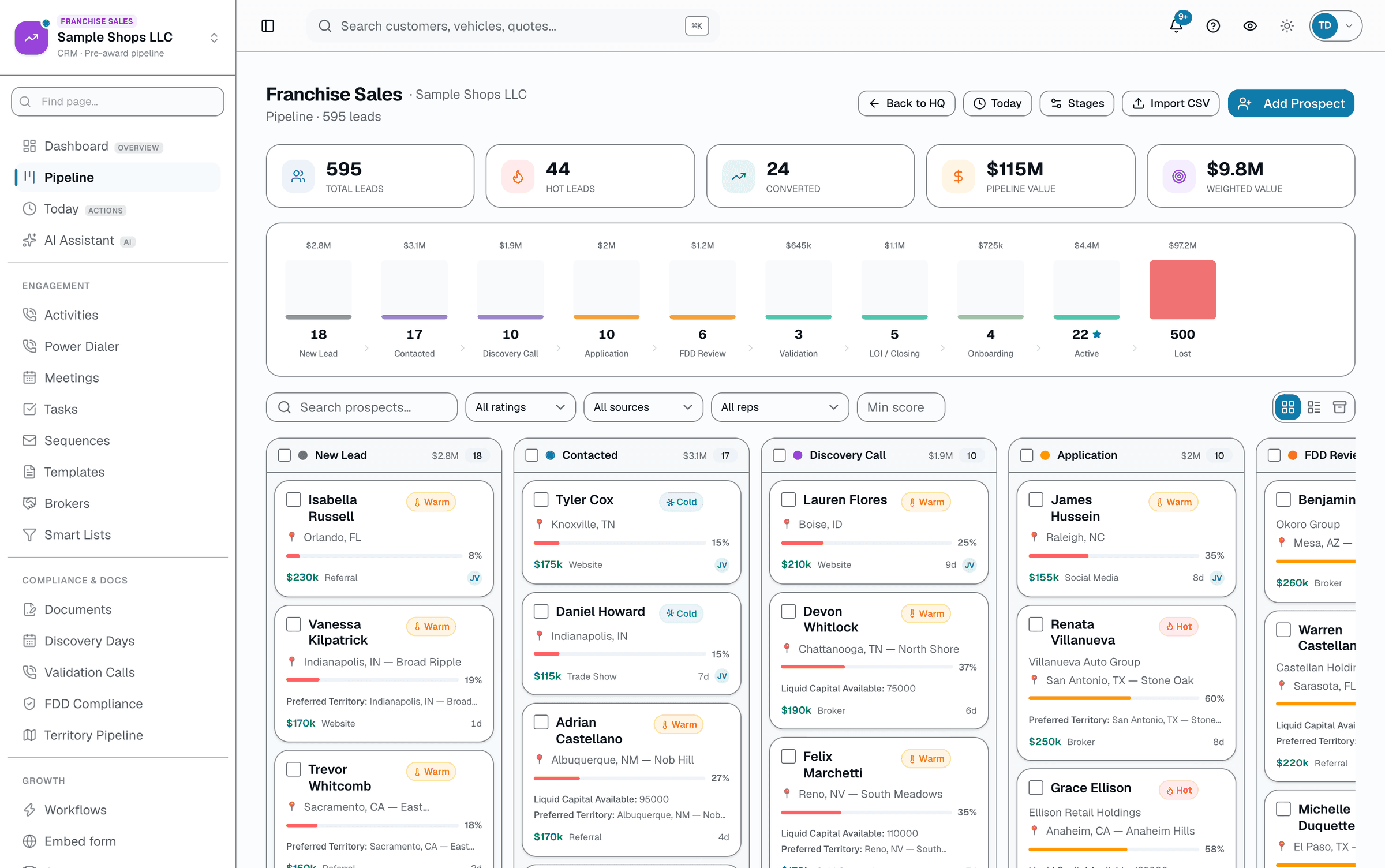
Franchise development sells over 6-18 months, not 6 weeks. SalesThumb's franchise pipeline reflects that: stages model the actual franchise-sales motion (not a generic SaaS Kanban), each prospect carries a target territory and an investment budget (add net worth or liquid capital as custom fields if you track them), and the forecast weights each open deal by a rep-set probability.
The quick version
Sales pipeline: A pipeline built for selling franchise units.
- Pipeline stages tuned for franchise development
- Kanban + list views
- Weighted forecast (investment budget × rep-set probability)
A closer look
01
Stages tuned for franchise sales, not SaaS
Default stages mirror the franchise-sales motion: New Lead → Contacted → Discovery Call → Application → FDD Review → Validation → LOI / Closing → Onboarding → Active (the last two marked won). Rename, reorder, or add stages to match how your team actually sells. The one hard-coded rule: a prospect can't move into a "won" stage until the FDD's 14-day FTC review window has elapsed since delivery — that's enforced at the API, not just the UI.
- Rename or reorder any stage
- FDD 14-day cooling-off window blocks the Onboarding stage until it clears
- Every stage move is logged to the prospect's activity timeline
02
Named territories + conflict flagging
Set up named territories and reserve, award, or retire them from HQ's territory tool, which needs the +HQ add-on on top of CRM/Franchise Sales. On +HQ alone a territory is a ZIP list; with the +Territory Mapping add-on, HQ also gets a live map where territories are picked or drawn by ZIP, county, Census block group, radius or shape. A rep-facing rollup shows awarded/reserved/open status by state. Every reserve and award is checked automatically against the territories already claimed, whatever kind of area each one is. An overlap stops the action until an admin chooses to go ahead anyway, and when two prospects want the same ground it's flagged as an open conflict for HQ to resolve by hand.
03
Collect the franchise fee right in the pipeline
The one-time fee due at signing is set and collected in this pipeline, not run through a side invoicing tool. An Org Owner or Org Admin sets the amount on the prospect record, then generates a payment link — copied for the rep to send themselves; nothing is auto-emailed to the prospect. The prospect pays from the same portal they already use for their FDD and franchise agreement. The charge settles directly to the franchisor's own merchant account (no SalesThumb markup on it), and a webhook flips the prospect to Paid the moment it clears — which is what actually unlocks their documents. The fee can also be waived with a required reason. Once a fee is Paid or Waived, the amount is locked and can't be changed.
- Set, edit, or waive the fee — limited to Org Owners and Org Admins
- Payment link opens in the prospect's existing portal, not a separate checkout page
- Settles to the franchisor's own merchant account, not SalesThumb's
- Paying (or waiving) the fee is what unlocks the FDD/agreement documents on the portal
- PAID or WAIVED is terminal — the amount can't be edited or un-waived after the fact
Everything it does
The complete list. The plan tag above shows which plans include it.
- Pipeline stages tuned for franchise development
- Kanban + list views
- Weighted forecast (investment budget × rep-set probability)
- Target territory + investment budget on every prospect
- Named territories with automatic overlap checks on reserve and award (territory setup needs the +HQ add-on; the live territory map needs +Territory Mapping)
- Custom fields per org
- Reorderable, renamable stages
- One-time franchise fee collection — paid online through the prospect's own portal, no separate invoice
A tour of the screens
Every meaningful view, the path through it, and the moments that matter — so you know exactly what you're buying.
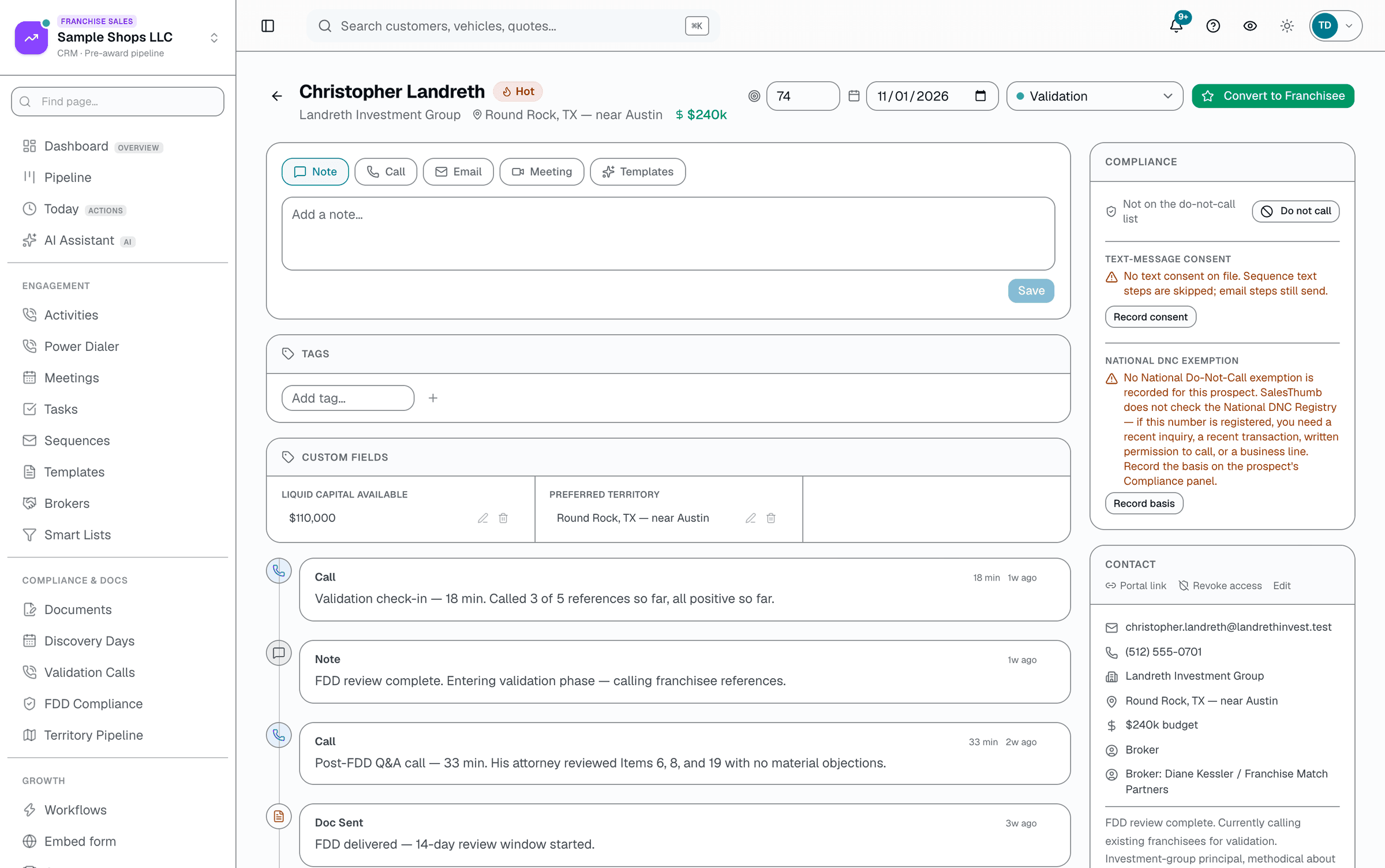
Prospect detail
Full activity timeline, open tasks, notes, and FDD-delivery status.
One screen, one prospect.
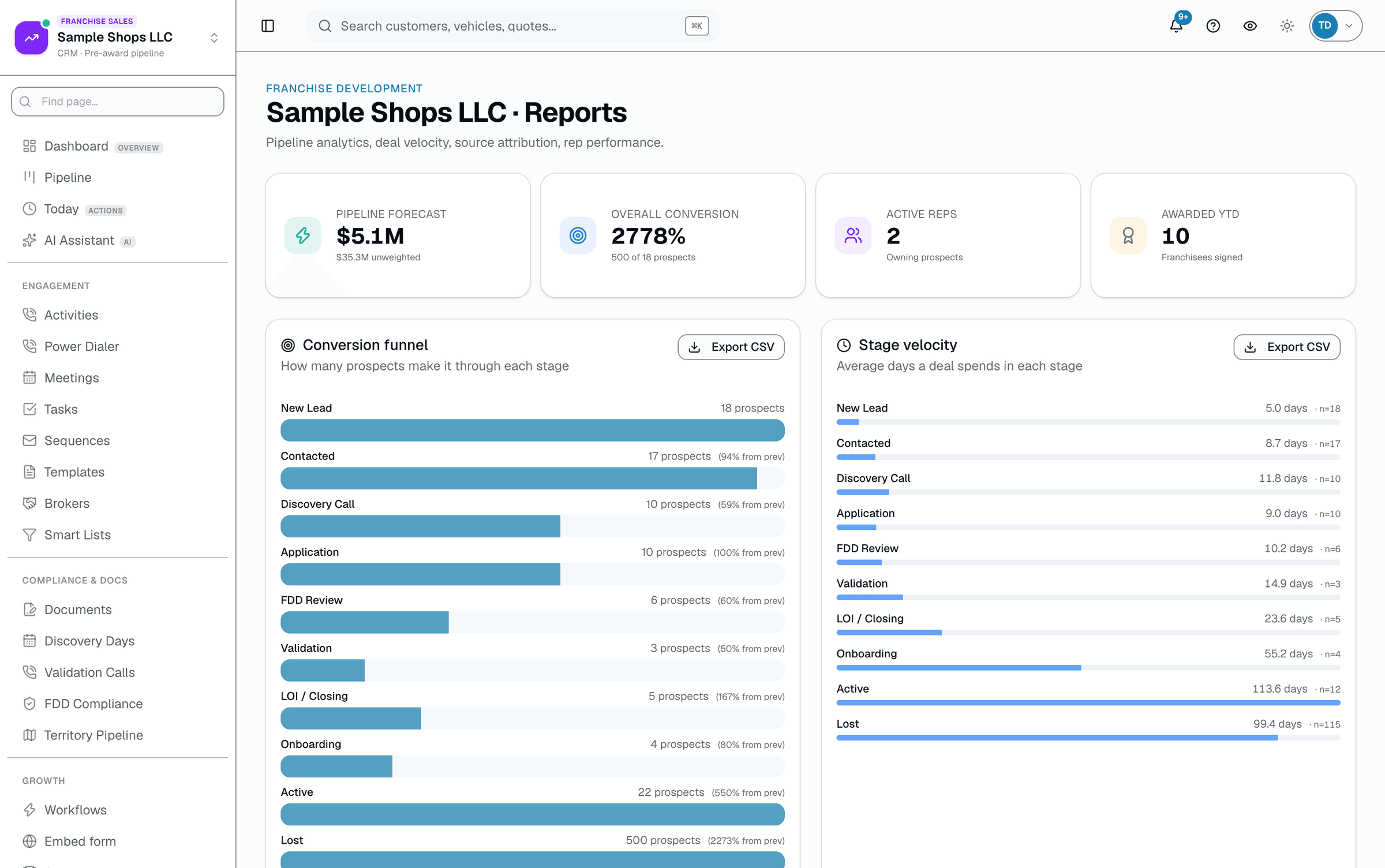
Forecast report
Pipeline forecast and overall conversion up top, then a stage-by-stage funnel and how many days deals sit in each stage..
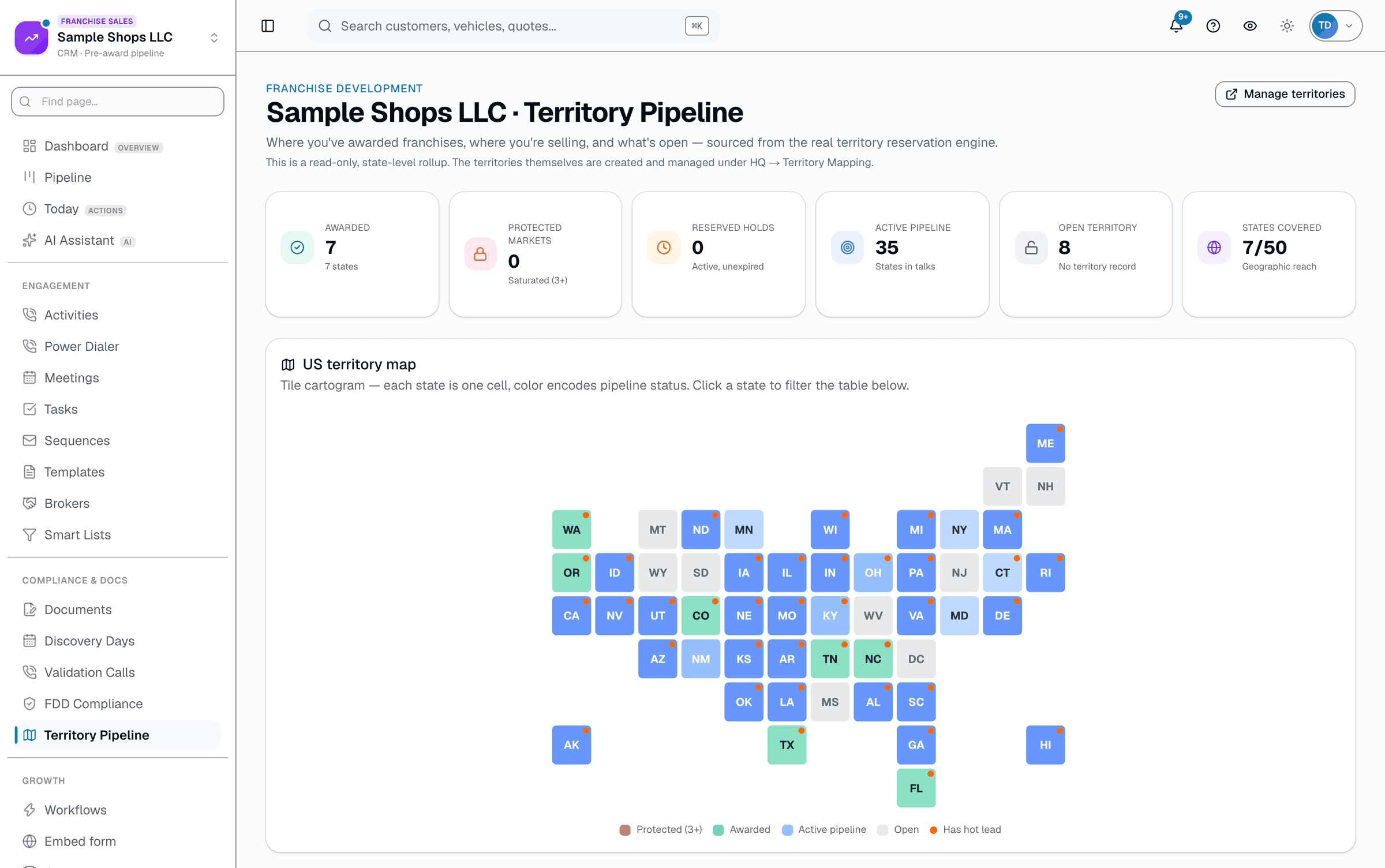
Territory rollup
Per-state rollup — awarded, reserved, open — sourced from named territory records.
Conflicts are resolved from HQ's separate territory tool.
Who it's for
Built specifically for…
- Franchise development teams
- Franchise sales reps
- Master-franchisees recruiting sub-franchisees
What it replaces
The old way…
- Salesforce contorted into a franchise pipeline
- FranConnect (custom-quoted enterprise pricing)
- HubSpot with custom-object hacks
Setting it up
- 1
Set up stages
Start with the defaults; rename, reorder, or add stages to match your motion.
- 2
Prospects flow through
Inbound from the embed form (see Lead Capture). Outbound from sequences (see Sequences). Each prospect gets a timeline, tasks, notes, and a target territory.
- 3
Forecast + report
A weighted forecast total (investment budget × rep-set probability). Per-rep conversion and lead-source breakdowns in Reports.
What this looks like in a shop
Illustrative scenario: A franchise development team was running franchise sales in a generic CRM with hacked custom objects and a gut-feel forecast. Moving to SalesThumb's franchise pipeline gave every prospect a real target territory, a rep-set close probability, and a weighted forecast total instead of a spreadsheet guess — and the territory-conflict flag caught two reps chasing the same exclusive market before either wasted a discovery day on it.
Good to know
- Which plan includes sales pipeline?
- It's part of the CRM/Franchise Sales add-on, which you can add to any plan. See the Pricing page for everything in each plan.
- How is this different from a regular CRM pipeline?
- Generic CRMs model widget sales (short cycle, small ticket). Franchise pipelines need multi-month cycles, five- and six-figure tickets, territorial exclusivity, validator calls, and FDD compliance. SalesThumb's stage defaults and prospect fields are built around that motion instead of a generic deal object.
- Can multiple reps share the same pipeline?
- Yes — every prospect has one assigned rep, and activities are timestamped and attributed. Reports break down pipeline value and conversion by rep.
- What's the territory-conflict rule?
- Territories are named records an HQ admin sets up and reserves or awards to a prospect. Every reserve and award is checked automatically against territories that are already claimed, including overlaps between different kinds of areas (a county against a ZIP list, a radius against Census block groups). An overlap stops the action until an admin chooses to go ahead anyway, and two prospects wanting the same ground are flagged as an open conflict for HQ to resolve by hand. Nobody is disqualified automatically.
- How is the franchise fee actually collected?
- Online, from the same portal your prospect already uses for their FDD and agreement — not a separate invoice. You set the amount and generate a payment link (copied for you to send; SalesThumb doesn't email it automatically), the prospect pays, and the charge settles straight to your own merchant account. Paying it is what unlocks their documents; you can also waive it with a required reason.
Works with your stack
Calendly
Link only: a meeting type can carry a Calendly or Cal.com URL as its join link. Calendly bookings do not sync into SalesThumb
DocuSign
FDD acknowledgement + franchise agreement e-sign (a demo stub until DocuSign is configured on the platform)
Pairs well with
Lead Capture & Embed
A branded, hosted intake form or embeddable iframe. Submissions land in your pipeline auto-rated by declared budget — no manual entry. Part of the +CRM/Franchise Sales add-on.
Sequences & Dialer
Multi-touch email/SMS/task cadences with day-based spacing. A Twilio power dialer. AI turns the rep's own call notes into structured, disposition-tagged summaries. Part of the +CRM/Franchise Sales add-on.
Validation Calls
Track existing franchisees who take validation calls, book a call with one from the roster at an agreed time, and rate the outcome — a rating of 4-5 auto-advances the prospect's pipeline stage. Part of the +CRM/Franchise Sales add-on.
Playbook & FDD Vault
A 4-step sales playbook with target timelines and live conversion rates. A versioned FDD document library. A real compliance audit log built from actual pipeline activity. Part of the +CRM/Franchise Sales add-on.
Territory Mapping
Your franchise territories on a live map: draw or pick areas, see Census population and demographics, print location reports. $199/mo per HQ org, on top of +HQ.