A real prep checklist for the most valuable day in your sales cycle.
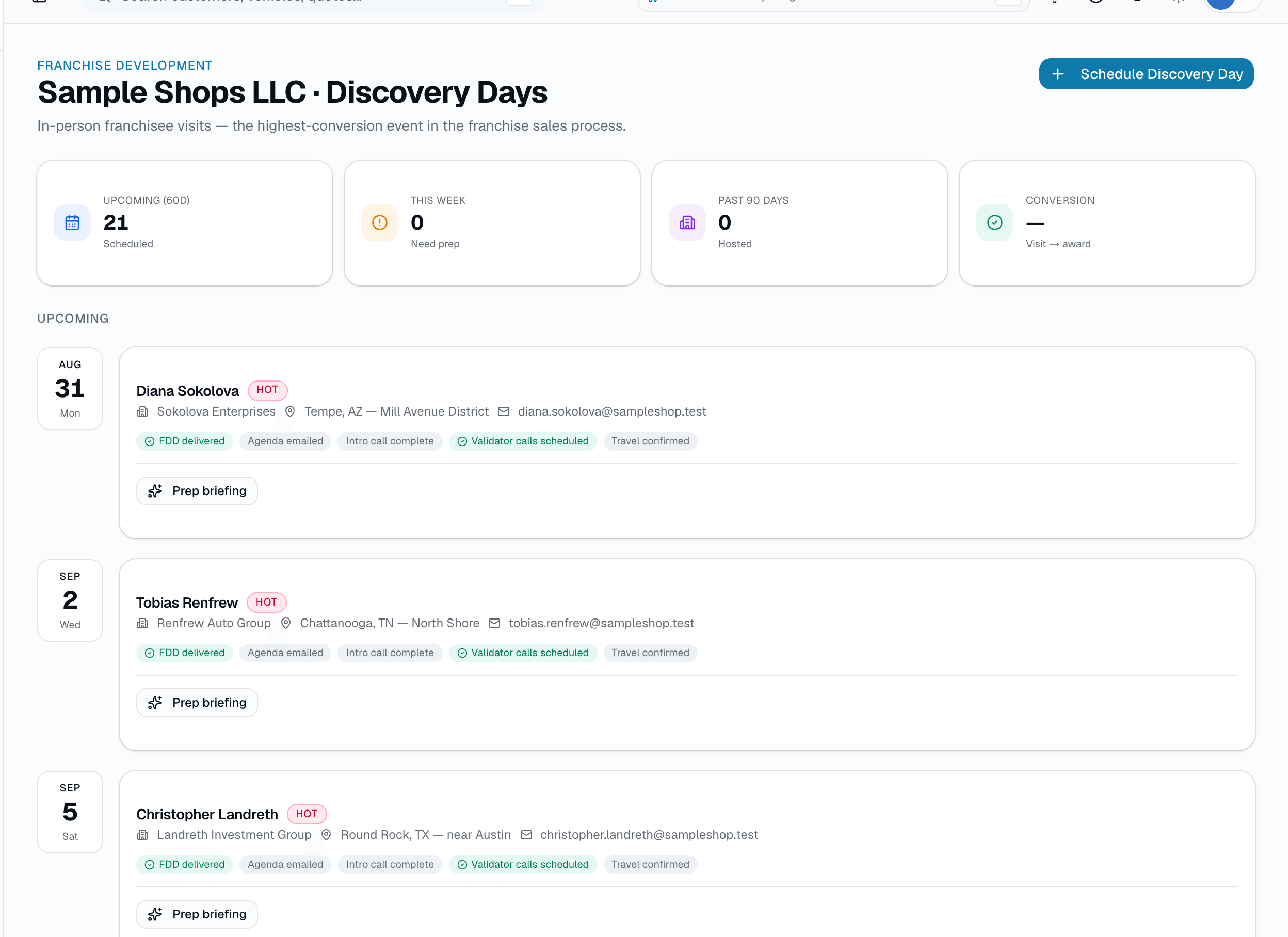
Discovery day is where most franchise awards are won or lost, and most franchisors still track it on a spreadsheet. SalesThumb's Discovery Days page lists every Discovery Day you've scheduled in the next 60 days, grouped by date, each with its attending prospects, with a live prep checklist per prospect: FDD delivered, agenda emailed, intro call complete, validator calls scheduled, and travel confirmed.
The quick version
Discovery days: A prep checklist for each discovery-day visit.
- Rolling 60-day calendar of upcoming visits, grouped by date
- 5-item prep checklist per prospect: FDD delivered, agenda emailed, intro call complete, validator calls scheduled, travel confirmed
- 3 of 5 checklist items are one-click toggles; the other 2 reflect real state from the FDD-send flow and validator-call system
Three of those five are one-click toggles tied to real fields on the prospect record; the other two reflect real state from elsewhere in the app (the FDD-send flow and the validator-call system) so nobody can fake a checkmark. A 'Prep briefing' button generates a short AI narrative grounded only in that prospect's real intake + validation-call data.
A closer look
01
The checklist can't be faked
Every checkbox is backed by a real column or a real row somewhere else in the app — not a free-text note. 'FDD delivered' and 'Validator calls scheduled' are read-only here because they're governed by the actual FDD-send and validator-call workflows; 'Agenda emailed,' 'Intro call complete,' and 'Travel confirmed' are one-click toggles that write directly to the prospect record.
- FDD delivered — reflects the real FDD-send timestamp (read-only here)
- Validator calls scheduled — true if any SCHEDULED/COMPLETED validation call exists for the prospect (read-only here)
- Agenda emailed, intro call complete, travel confirmed — click to mark/un-mark
02
A prep briefing grounded in real data
The 'Prep briefing' button calls a real AI endpoint that assembles a short narrative from the prospect's actual intake fields and validation-call history — not a fabricated summary. Without an ANTHROPIC_API_KEY configured it clearly labels itself 'Stub mode' rather than pretending to be AI-written.
Everything it does
The complete list. The plan tag above shows which plans include it.
- Rolling 60-day calendar of upcoming visits, grouped by date
- 5-item prep checklist per prospect: FDD delivered, agenda emailed, intro call complete, validator calls scheduled, travel confirmed
- 3 of 5 checklist items are one-click toggles; the other 2 reflect real state from the FDD-send flow and validator-call system
- Stats strip: upcoming (60d), this week, past 90 days, visit-to-award conversion %
- Past-90-days list with an Awarded / In follow-up badge per visit
- AI 'Prep briefing' grounded only in the prospect's real intake + validation-call data (stub mode without an AI key)
Who it's for
Built specifically for…
- Franchise development teams running franchisee visits at HQ
- Franchisors who currently track discovery-day prep on a spreadsheet
- Anyone who wants a single screen for 'who's visiting soon, and what's still outstanding'
What it replaces
The old way…
- Spreadsheet attendee lists
- A prep checklist that lives in someone's notes app
- Chasing three different systems to confirm FDD sent / validator scheduled / travel booked
Setting it up
- 1
1. Schedule the Discovery Day
Click Schedule Discovery Day, pick the date, location, and host, and add the attending prospects — that's what puts them on this calendar.
- 2
2. Work the prep checklist
Toggle agenda-emailed, intro-call-complete, and travel-confirmed as you complete them. FDD-delivered and validator-calls-scheduled update automatically from the real workflows that own them.
- 3
3. Pull the AI prep briefing
Before the visit, generate a short narrative grounded in the prospect's real intake + validation-call data. Regenerate anytime; it only re-runs the AI call when you explicitly ask.
What this looks like in a shop
Illustrative scenario: A franchise development coordinator opens Discovery Days on Monday morning and sees six visits scheduled over the next two weeks. Three prospects are missing their agenda email and one hasn't had validator calls scheduled yet — she fixes both from the calendar without opening each prospect's full record, then pulls up the AI prep briefing before her 2pm call to refresh herself on where that prospect's validation calls landed.
Good to know
- Which plan includes discovery days?
- It's part of the CRM/Franchise Sales add-on, which you can add to any plan. See the Pricing page for everything in each plan.
- How do prospects get onto the Discovery Days calendar?
- You schedule the Discovery Day itself and attach the prospects attending. A prospect's forecast close date no longer puts them on this calendar.
- Can I mark 'FDD delivered' or 'validator calls scheduled' by hand if I did it outside the app?
- No — those two stay read-only on this page on purpose, so the checklist can't drift from what actually happened. FDD delivery is set by the real FDD-send flow; validator scheduling is set by booking a real validation call.
- What happens to a visit after the day passes?
- It drops into the 'Past 90 days' list with a badge showing whether anyone who attended was awarded or it's still in follow-up, so you can see recent conversion at a glance.
Pairs well with
Franchise Pipeline
New Lead → Contacted → Discovery Call → FDD Review → Validation → Onboarding. Custom, renamable stages; a weighted forecast; a real territory-conflict flag. Part of the +CRM/Franchise Sales add-on.
Validation Calls
Track existing franchisees who take validation calls, book a call with one from the roster at an agreed time, and rate the outcome — a rating of 4-5 auto-advances the prospect's pipeline stage. Part of the +CRM/Franchise Sales add-on.
Playbook & FDD Vault
A 4-step sales playbook with target timelines and live conversion rates. A versioned FDD document library. A real compliance audit log built from actual pipeline activity. Part of the +CRM/Franchise Sales add-on.
Scheduling
Every installer, every bay, every appointment in one view. Drag to reschedule. Color-coded by status. Double-book detection with explicit confirm-to-override.