Loading
AI inbox assistant
Three voice-matched replies, ready to edit and send.
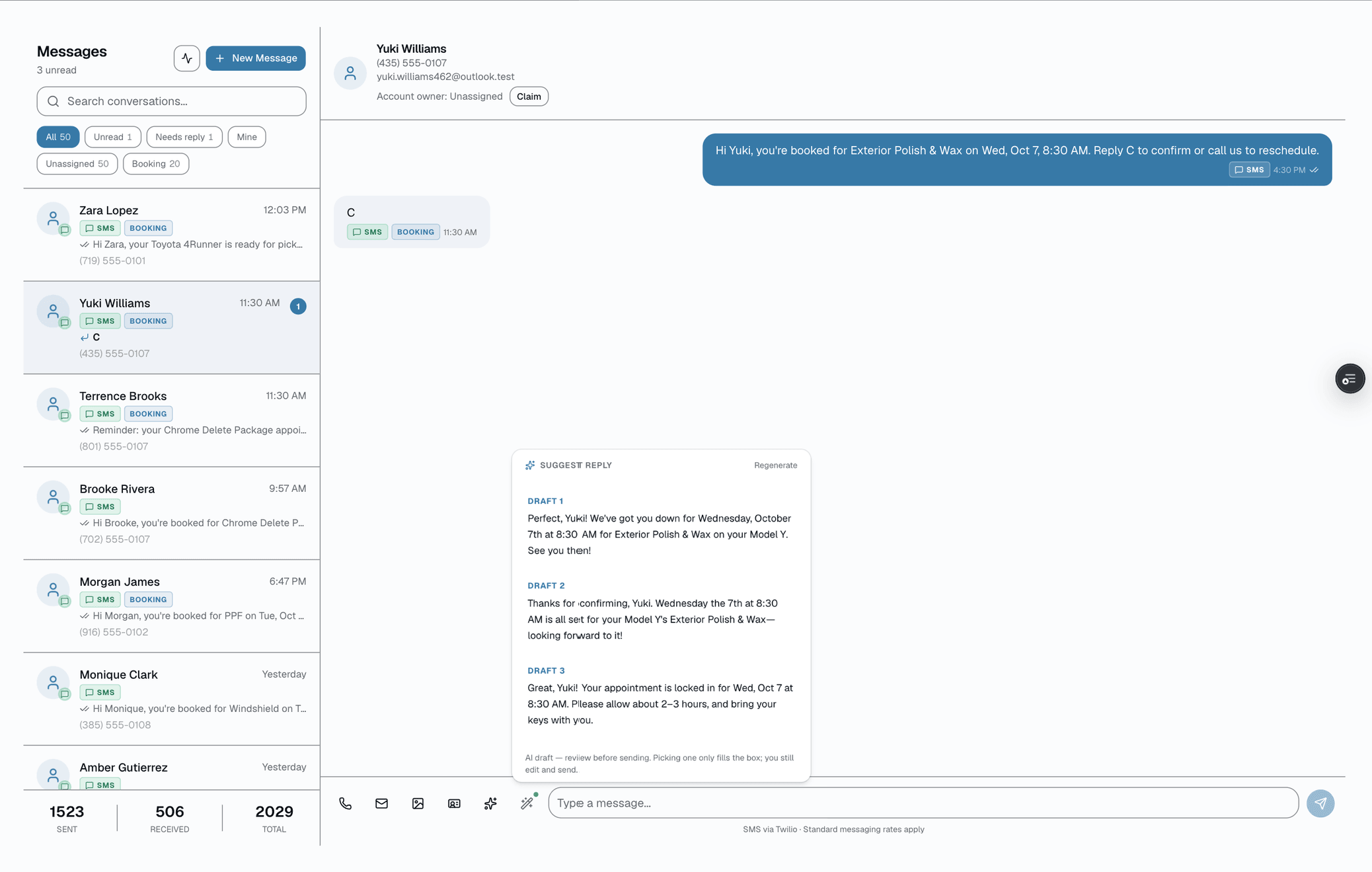
Replying to the same tint, PPF, and coating questions all day is the quiet tax on a busy shop. AI reply drafts read the existing thread — the customer's first name, the vehicle on file, the last few messages — and hand you up to three distinct, SMS-length reply options written in your shop's voice.
No credit card
Cancel anytime
app.salesthumb.com/app/inbox
The quick version
Reply drafts: Three reply options for each text. You edit and send.
- Up to three distinct reply drafts per thread, one tap from the composer (Growth and Pro plans)
- Grounded in the real conversation — last several messages, customer first name, vehicle on file
- Written in a warm, SMS-length shop voice (1-2 sentences, no robotic boilerplate)
Plans: Growth+ See pricingTry it in the Test Drive
It's strictly advisory: drafts drop into the same Inbox composer you already use, so you edit, swap, or rewrite before anything sends. Nothing goes out until you tap send. The assistant never invents a price, a date, an appointment time, or a promise — if a detail is missing, it asks the customer for it instead of guessing.
A closer look
01
Drafts, never sends — the human is always the sender
AI reply drafts is a read-only suggestion surface, not an autopilot. When you tap Suggest reply, the assistant reads the thread and returns up to three options; that's where it stops. It cannot send a message, book an appointment, change a quote, or touch a customer record — it only proposes text. The options drop straight into the Inbox composer you already use, so the path to sending is identical to typing it yourself: review, edit, send. If two of the three drafts miss the mark, you take the third and reshape it. The send button is always yours.
- Returns text only — no send, no booking, no record changes
- Drafts populate the existing composer; you edit before sending
- Built as a read query with no side effects, by design
- Pick one of the options, rewrite freely, or ignore them entirely
app.salesthumb.com/app/inbox
02
Grounded in your thread — so it doesn't make things up
Each draft is built from real context the shop already has: the customer's first name, their most recent vehicle on file, and the last several messages in that exact conversation. The assistant is instructed to use only those facts — it's blocked from fabricating a quote, a price, a date, or a guarantee, and is told to ask the customer for anything missing rather than guess. Every row it reads is scoped to your shop and that one customer, so a draft can never be built from another shop's or another customer's messages. On long conversations, a thread-summary card gives you the gist at a glance before you reply.
- Pulls the customer's first name + most recent vehicle for light grounding
- Reads the recent thread, oldest to newest, for accurate context
- Strictly scoped to your shop and the one customer — no cross-thread leakage
- Instructed to ask for missing details instead of inventing them
app.salesthumb.com/app/inbox
Everything it does
The complete list. The plan tag above shows which plans include it.
- Up to three distinct reply drafts per thread, one tap from the composer (Growth and Pro plans)
- Grounded in the real conversation — last several messages, customer first name, vehicle on file
- Written in a warm, SMS-length shop voice (1-2 sentences, no robotic boilerplate)
- Advisory only — drafts land in the existing Inbox composer for you to edit and send
- Never invents a price, date, time, promo, or guarantee — asks for missing details instead
- Reads only your shop's data; every message pulled is scoped to your shop and that one customer
- Deterministic stub drafts when the AI key is off, so the button always returns something usable
- AI thread-summary card surfaces the gist on long, scrolled-back conversations
A tour of the screens
Every meaningful view, the path through it, and the moments that matter — so you know exactly what you're buying.
Options drop into the composer
Drafts land in the same Inbox composer you already use — advisory only, fully editable, never sent until you tap send..
app.salesthumb.com/app/inbox
Thread-summary card
On long, scrolled-back conversations an AI summary card surfaces the gist before you reply, so you're not re-reading twenty messages..
app.salesthumb.com/app/inbox
DR
Dana R.
22 messages · last reply 9:18 AM
AI summary · 22 messages
NormalDana is comparing ceramic coating options for a 2022 Tesla Model 3 and asked about durability versus a standard coating, but hasn't picked a package yet.
↳ Suggested next: Ask front-two vs. full-vehicle and which shade
Hey — how durable is ceramic on a Tesla?
Worth it over regular?
Trying to get it done before a trip…
Reply to Dana…
Who it's for
Built specifically for…
- Front-desk and service writers answering the same tint/PPF/coating questions all day
- Owner-operators replying to customers between installs who want a fast, on-brand starting point
- Shops where reply tone drifts depending on who happens to grab the phone
What it replaces
The old way…
- Staring at a blank composer trying to phrase the same answer for the hundredth time
- Copy-pasted canned replies that read stiff and ignore what the customer actually asked
- Inconsistent voice across whoever is working the inbox that shift
Setting it up
- 1
1. Open a thread, tap Suggest reply
From any customer conversation in the Inbox, tap the Suggest reply button on the composer. The assistant pulls the customer's first name, most recent vehicle on file, and the last several messages — all scoped to your shop.
- 2
2. Get up to three options
Claude returns two to three distinct, SMS-length drafts in your shop's voice, each grounded only in the conversation. No prices, dates, or promises are invented — missing details turn into a question back to the customer.
- 3
3. Pick, edit, send
Tap an option to drop it into the composer, edit it however you like, and send through the same path you always use. If the AI key is off, you still get deterministic stub drafts so the button never comes back empty.
What this looks like in a shop
Illustrative scenario: A service writer at Sample Shop LLC opens a thread where a customer asked about ceramic coating for a 2022 Tesla Model 3. Instead of typing from scratch, she taps Suggest reply and gets three options — one that answers the durability question and offers to book, one that asks the two follow-up details needed to quote accurately, and one shorter confirmation-style reply. She picks the second, adds a sentence about their current availability, and sends. The draft saved her the blank-page moment; the words that went out were still hers.
Good to know
- Which plan includes reply drafts?
- Growth and Pro include it. See the Pricing page for everything in each plan.
- Does the AI send messages on its own?
- No. It only drafts. The options appear in the Inbox composer you already use, and nothing leaves your shop until you review, edit if needed, and tap send. The assistant cannot send, book, or change any record on its own.
- Will it make up prices or appointment times?
- No. The drafts are grounded only in the actual conversation, the customer's vehicle on file, and the business facts and knowledge-base answers you've entered in Settings → AI Assistant, and the assistant is explicitly instructed never to invent a price, date, time, promo, or guarantee. If a detail is missing, the draft asks the customer for it instead of guessing.
- What if I don't like any of the drafts?
- Ignore them. They're suggestions, not a queue. You can rewrite one of the options, combine them, or type your own reply from scratch — the composer works exactly as it does without the assistant.
- Does it work without an AI key configured?
- Yes. When no AI key is set, the feature returns deterministic stub drafts built from the customer's name and your shop name, so the Suggest reply button always returns something usable. Turn the key on later to upgrade to fully AI-written, thread-aware drafts.
Works with your stack
An
Anthropic Claude
Drafts the reply options from the thread (fast model on the composer hot path)
Tw
Twilio
Carries the message you choose to send through the existing Inbox send path
Pairs well with
Two-way SMS
Every customer conversation in one inbox. Auto-reminders run 24/7, but when they reply, a human sees it. MMS, templates, merge fields.
Learn more
My Day brief
AI reads today's schedule, urgent inbox threads, AR aged 30+ days, and a count of film products with a reorder threshold set — writes a one-paragraph summary you can scan in 10 seconds. Click 'Brief me' whenever you want the latest read. It does not read reviews or playbook activity today.
Learn more
Customer CRM
Search by name, plate, or VIN in milliseconds. Every appointment, quote, invoice, warranty, and photo attached to the right record — forever.
Learn more