AI customer brief
One click on any customer drafts a 2-sentence brief before you call.
Before you call a customer back, you want the 10-second version: are they a repeat, what did they buy, when were they last in, is there an obvious gap in what they've tried? The AI customer brief drafts exactly that.
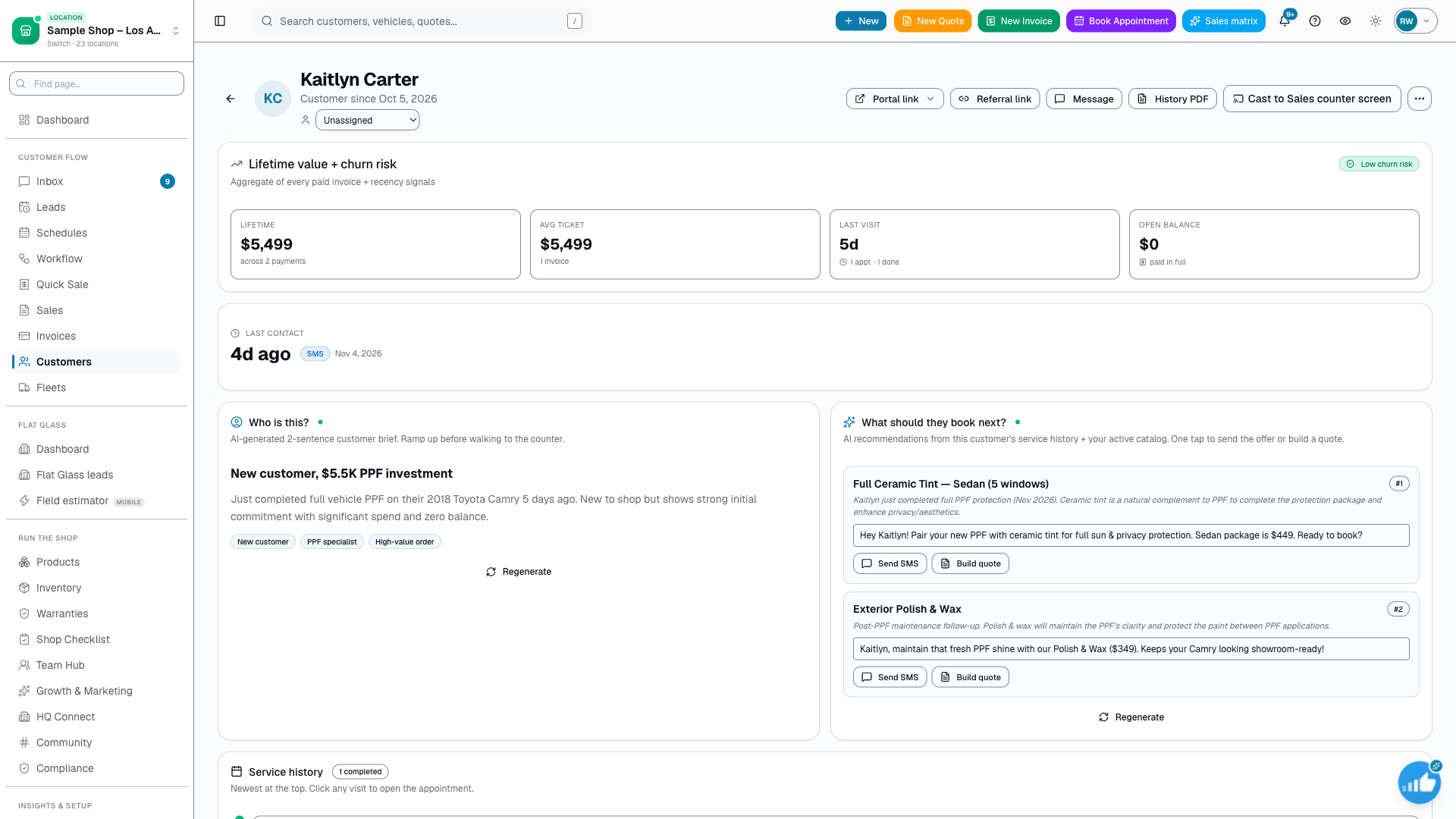
The quick version
Customer brief: A two-sentence summary of a customer before you call.
- One-click draft on any customer profile — headline, 1-2 sentence body, 1-4 tags (Growth and Pro plans)
- Built only from real records: vehicle on file, appointment history, spend, open balance, last-visit recency
- Surfaces what they buy and when they last came in, with the category history to spot an obvious gap
One click on any customer pulls their vehicle on file, appointment history (services + categories + dates), lifetime spend, open balance, and days since their last visit — then an AI writes a short headline, a 1-2 sentence relationship summary, and a few quick tags. It's read-only context generated from real records: it never invents a fact that isn't in the data, and it leaves the customer's name off because the page already shows it. The brief is a draft to inform your next move, not a message that gets sent — you read it, then you decide.
In detail
A closer look
Every line traces back to a row in your database
The brief is not a chatbot guessing about your customer. A deterministic query runs first and assembles the real picture — the vehicle on file, up to the last ten appointments with their service names, categories, dates and statuses, lifetime invoiced total across the customer's invoices, any open balance, and how many days since the last visit. That structured bundle is the only thing the AI sees, and the prompt is explicit: never invent a fact that isn't in the data. So "3 ceramic visits, last in March, open balance of $240" is something you can click straight through to verify — not a hallucination.
- DB query runs first; the AI only rewrites the real numbers into plain English
- Reads vehicle, appointment history (service + category + date + status), spend, open balance, last-visit days
- Headline capped to one short factual line; body to 1-2 sentences
- Tags drawn from the same history (repeat, VIP, open balance, at-risk)
You read every draft before it goes out
This feature is deliberately advisory. The brief is context for the human about to make the call: it tells the rep what to lead with and what to offer, then gets out of the way. Nothing in the brief is sent to the customer, nothing is changed on the record, and no follow-up fires off the back of it. If you want to act on what you just read — text them, send a quote, queue a nudge — that's a separate, human-initiated step in messaging or the sales playbook. The brief just makes sure you walk into the conversation already knowing the customer.
- Read-only: generates context, never writes to the customer record
- No message is sent and no automation is triggered by viewing a brief
- Acting on it (text, quote, nudge) is always a separate human step
- Pairs naturally with the next-service suggestion on the same profile
Everything it does
The complete list. The plan tag above shows which plans include it.
- One-click draft on any customer profile — headline, 1-2 sentence body, 1-4 tags (Growth and Pro plans)
- Built only from real records: vehicle on file, appointment history, spend, open balance, last-visit recency
- Surfaces what they buy and when they last came in, with the category history to spot an obvious gap
- Read-only by design — the brief informs your next call; it is never auto-sent to the customer
- Never invents facts not present in the data; omits the name the page already displays
- Auto-tags like "VIP", "Repeat customer", "Open balance", "At-risk" derived from the same history
- Deterministic stub brief when ANTHROPIC_API_KEY is unset — the panel still works, just without the AI phrasing
- Runs on the fast model and counts against your per-shop AI spend tracking like every other AI feature
A tour of the screens
The main screens, and what each one is for.
Built from real history
Vehicle, past appointments by service and date, lifetime spend, open balance, and last-visit recency feed the brief.
Every line traces back to a record.
Stub fallback when AI is off
With no AI key configured, a deterministic stub fills the same headline, body, and tags from the same numbers — the panel keeps working without the AI phrasing..
Who it's for
Built for
- Reps returning a stack of callbacks who want the 10-second version of each customer first
- Front-counter staff who pick up a profile cold and need context before they greet someone
- Owners and managers reviewing a customer list who want repeat-vs-new and at-risk surfaced at a glance
What it replaces
What you can retire
- Manually scrolling a customer's appointment history to reconstruct what they've bought
- Sticky notes and mental shorthand about "who this customer is" that live only in one rep's head
- Walking into a callback blind and asking the customer to re-explain their own history
How it works
Setting it up
Step 1
1. Open a customer, click the brief
On any customer profile you tap the brief. A deterministic query pulls that customer's vehicle, appointment history, spend, open balance, and last-visit recency from your real data — no external lookup, just their record.
Step 2
2. AI drafts headline, body, and tags
The structured history goes to the fast AI model with a strict instruction: summarize in a short headline plus 1-2 sentences, add a few quick tags, and never invent anything not in the data. With no AI key configured, a deterministic stub fills the same fields from the same numbers.
Step 3
3. You read it and decide
The brief renders as read-only context on the profile. Nothing is sent and nothing on the record changes. If you want to act — text the customer, build a quote, or queue a playbook nudge — that's your next, separate, human-initiated step.
What this looks like in a shop
Illustrative scenario: a rep at a busy ceramic-and-tint shop has eight callbacks to clear before lunch. On each customer profile she clicks the brief. One reads "Repeat customer, 4 tint visits over 14 months" with a one-line body noting the last visit was nine months ago and that the history shows tint only, no ceramic — tagged "Repeat customer" and "At-risk". She now knows to lead with a ceramic check-up offer instead of opening cold. The brief didn't send anything or change the record; it just meant she started the call already knowing the customer. The numbers above are an example, not a reported result.
Questions
Good to know
- Which plan includes customer brief?
- Growth and Pro include it. See the Pricing page for everything in each plan.
- Does the brief message the customer or change anything?
- No. It is read-only context for the rep — it drafts a summary and stops there. It never sends a message, never edits the customer record, and never triggers a follow-up. Acting on what you read is always a separate step you take by hand.
- Where do the facts come from — can the AI make them up?
- The facts come from a database query that runs before the AI is involved: the customer's vehicle, appointment history, lifetime spend, open balance, and days since last visit. The AI only rewrites those real numbers into a short brief, and it's instructed never to invent anything that isn't in the data.
- What happens if AI isn't turned on for my shop?
- The panel still works. When no AI key is configured it falls back to a deterministic stub that fills the same headline, body, and tags from the same underlying numbers — you lose the natural phrasing, not the context. Turn the key on later to upgrade to the AI-written version.
- How much time does it actually save?
- We don't claim a measured number. The intent is to replace the typical manual step of scrolling a customer's full history to reconstruct what they bought and when, with a one-click draft you can skim in seconds before a call. Your real savings will depend on your history depth and how you work.
Works with your stack
Anthropic Claude
Rewrites the real history bundle into a short brief (fast model)
Pairs well with
Customer CRM
Search by name, plate, or VIN in milliseconds. Every appointment, quote, invoice, warranty, and photo attached to the right record — forever.
My Day brief
AI reads today's schedule, urgent inbox threads, AR aged 30+ days, and a count of film products with a reorder threshold set — writes a one-paragraph summary you can scan in 10 seconds. Click 'Brief me' whenever you want the latest read. It does not read reviews or playbook activity today.
Sales playbook
On Growth and Pro: up to six scheduled nudges per paid invoice over a year — review, warranty (film services only), cross-sell, maintenance, win-back, anniversary — with reply intent AI-classified and acted on automatically. Only the cross-sell step's pitch line is AI-written per customer; the other five are editable template copy.
Two-way SMS
However a customer reaches you — a text, an email, a Facebook or Instagram message, or WhatsApp — it lands in the same inbox, on the same customer, and you answer from there.
Talk to a person
Not ready to start? Talk to a person.
Tell us about your shop and we'll get back to you, usually within one business day. No pitch, and we only call if you leave a number.
- A real person on our team reads it and replies
- Ask about pricing, switching or a walkthrough
- Leave a phone number if you'd rather talk