Loading
AI chargeback defense
A chargeback hits. AI surveys your evidence and drafts the response.
Chargebacks land at the worst possible time, and assembling an evidence pack by hand eats time most shops don't have. Dispute Defender does the survey for you: when a dispute opens, AI reads the reason code and inventories what artifacts the shop already has on file — invoices, signed quotes, job photos, the message thread, warranties, past appointments — then recommends exactly which sections to include and drafts a factual 2-3 sentence cover note arguing your case.
No credit card
Cancel anytime
/app/disputes
The quick version
Dispute help: When a customer disputes a card charge, it gathers your evidence and drafts a reply.
- AI surveys on-file evidence (invoices, quotes, photos, messages, warranties, appointments) when you ask it to — Pro plan
- Recommends which sections to include in the evidence pack, keyed to the chargeback reason code
- Drafts a short, factual cover note in past tense — no apologies, no speculation
Plans: Pro See pricingTry it in the Test Drive
It is a recommendation, not an autopilot: the suggestion lands behind an 'Apply' button you review first, and you submit the response yourself. Empty sections are filtered out automatically so the pack never claims evidence you don't have.
A closer look
01
It only recommends evidence you actually have
Before the AI sees anything, a deterministic query counts what's on file for this customer: how many invoices, quotes, job photos, message-thread entries, warranties, and past appointments exist. That inventory is what the AI reasons over — and on the way back out, any 'include' flag for a section with a zero count is force-disabled in code. So the recommendation can never tell you to attach photos you never took or a warranty that was never registered. The pack reflects reality, not a hopeful template.
- Real DB counts run first; the AI reasons over the inventory, not guesses
- Reason code shapes the pick: fraud claim → identity / signature / on-premises proof; quality complaint → photos + warranty; not-received → completion proof + customer presence
- Post-processing strips any section whose evidence count is zero
- Output shape matches the evidence manifest exactly, so 'Apply' is a clean one-tap write
/app/disputes
02
Advisory by design — you review, you submit
Dispute Defender drafts; a human decides. The suggestion (which sections, plus the cover note) lands in a review panel with a rationale line explaining why that configuration matches the reason code. You can edit the cover note, toggle sections on or off, then click Apply — which only updates your draft manifest. Submitting the response to your processor stays a deliberate, separate action you take. SalesThumb doesn't send anything to the processor or card network — you file the response yourself and mark the dispute Submitted here.
- Suggestion shown with a one-line rationale before anything is written
- Cover note is fully editable — the draft is a starting point, not a final answer
- 'Apply' updates the draft evidence manifest only; it does not submit
- Cover notes capped and sanitized; you own the final wording and the send
/app/disputes
Everything it does
The complete list. The plan tag above shows which plans include it.
- AI surveys on-file evidence (invoices, quotes, photos, messages, warranties, appointments) when you ask it to — Pro plan
- Recommends which sections to include in the evidence pack, keyed to the chargeback reason code
- Drafts a short, factual cover note in past tense — no apologies, no speculation
- One-tap 'Apply suggestion' writes the recommendation into your evidence manifest; you stay in control of submit
- Sections with zero on-file items (quotes, invoices, photos, messages, warranties, appointments) are force-disabled
- Deterministic fallback when ANTHROPIC_API_KEY is unset, so the recommendation still works without AI
- Every applied suggestion (evidence-manifest change) is logged to the dispute timeline (who, what, when)
- Dispute queue with win-rate, open/submitted counts, and evidence-due-date sorting
A tour of the screens
Every meaningful view, the path through it, and the moments that matter — so you know exactly what you're buying.
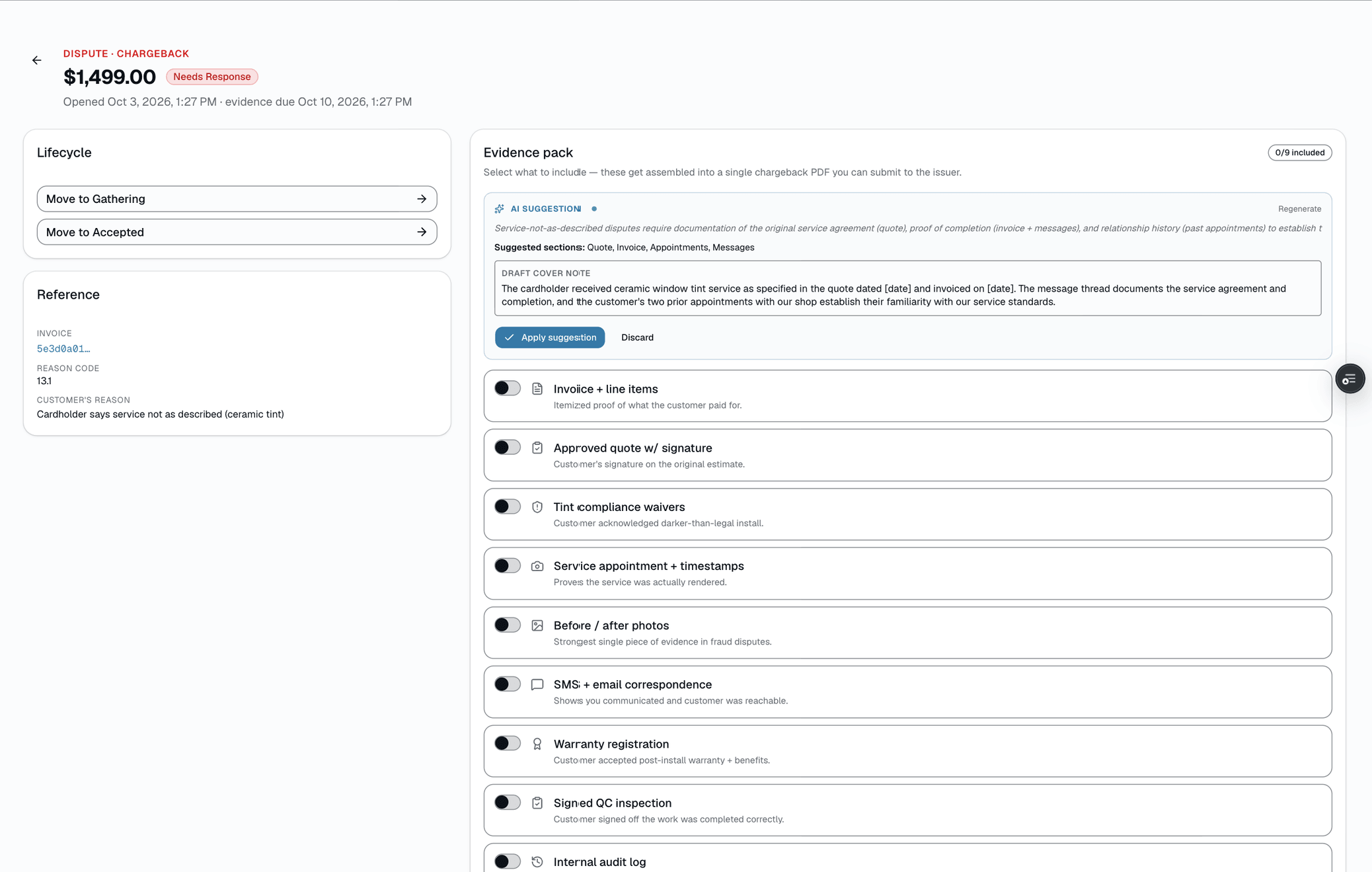
Drafted cover note — review before apply
A factual 2-3 sentence cover note in your shop's voice, with a one-line rationale.
Edit it, then click Apply to write it into your draft manifest. You still submit the response yourself.
/app/disputes
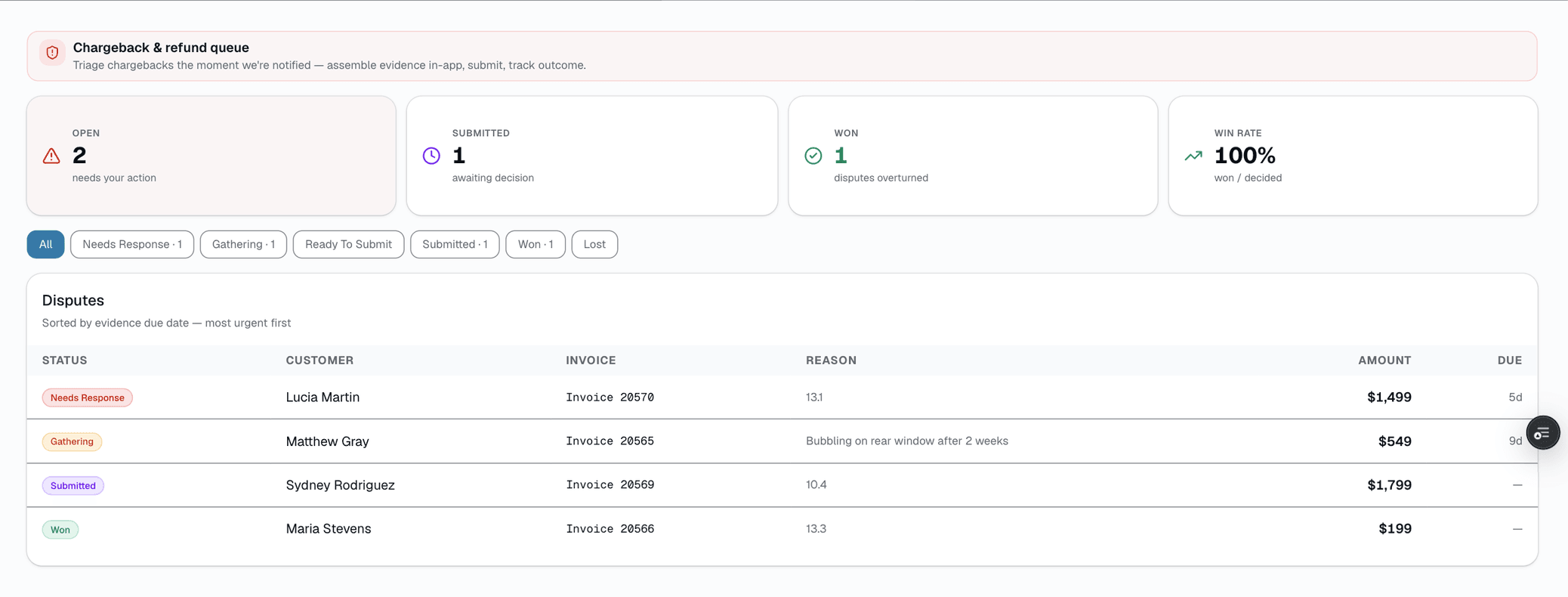
Dispute queue
Every chargeback and refund request in one list, sorted by evidence-due date, with open / submitted counts and a running win-rate..
/app/disputes
Who it's for
Built specifically for…
- Shops taking card payments who occasionally get a chargeback and have no process for responding
- Owners who currently eat disputes because assembling evidence takes too long
- Multi-location operators who want a consistent, defensible response packet across every shop
What it replaces
The old way…
- Manually digging through your CRM, photo galleries, and texts to find proof for a dispute
- Blank-page paralysis writing a cover letter to the card network
- Eating the chargeback because nobody had time to fight it
Setting it up
- 1
1. A dispute opens
A processor chargeback fires the webhook and creates the dispute row, or staff log a refund request manually. It lands in the queue sorted by evidence-due date so the most urgent one is on top.
- 2
2. AI surveys and recommends
Click Suggest evidence pack. A query counts the real evidence on file, the AI reads that inventory plus the reason code, and returns which sections to include, a short cover note in your shop's voice, and a one-line rationale. Sections with no evidence are stripped automatically.
- 3
3. You review, apply, and submit
Edit the cover note or toggle sections, then Apply to write the suggestion into your draft manifest. Submitting the response to the processor is your call — the AI never sends on its own.
What this looks like in a shop
Illustrative scenario: A shop gets a $1,240 chargeback flagged 'fraudulent' on a ceramic-coating job. The owner opens the dispute and clicks Suggest evidence pack. AI sees the signed quote, the invoice, 14 job photos, a two-week message thread, and the appointment that put the customer on premises — and recommends including all of them, while skipping the warranty section (not relevant to a fraud claim) and drafting a cover note noting the customer was on-site, signed the work order, and was in direct two-way contact during scheduling. The owner reads it, tightens one sentence, clicks Apply, and submits the response.
Good to know
- Which plan includes dispute help?
- The Pro plan includes it. See the Pricing page for everything in each plan.
- Does the AI submit the chargeback response for me?
- No. It only recommends which evidence to pack and drafts a cover note. The suggestion lands behind an 'Apply' button that updates your draft, and submitting the response to your payment processor is always a deliberate action you take. The AI is advisory end to end.
- Can it claim evidence I don't actually have?
- No. The recommendation is built from real counts of what's on file, and any section whose evidence count is zero is force-disabled in code before the suggestion reaches you. The pack reflects what the shop genuinely has — photos, signed quotes, message threads, warranties, appointments — and nothing it doesn't.
- What if I don't have the AI key configured?
- It degrades to a deterministic recommendation that keys off the reason code and your on-file evidence using fixed rules, plus a templated cover note. You lose the natural-language polish but still get a sensible section pick and a starting draft. Turn the key on later to upgrade to AI-written notes.
- Will the cover note sound like a robot apologizing?
- It's written to be factual and in past tense — never apologetic, never speculative — and it's fully editable before you apply it. Treat it as a strong first draft you can tighten to your shop's voice, not a final answer.
Works with your stack
Pa
Payment processor
Chargeback webhook opens the dispute row automatically
An
Anthropic Claude
Surveys evidence + drafts the section picks and cover note (fast model)
Pairs well with
Payments
Accept cards online with a one-click pay link in SMS or email. Partial payments, deposits, refunds — all handled. All-in card rate as low as 2.79% + $0.20 per tap on Pro, tier-dependent — visible any time in Reports → Fees.
Learn more
Invoices
Convert any approved quote to a branded invoice in one click. Partial pays, deposits, and final balance all tracked against the same line items.
Learn more
Job Photos
Every appointment gets a photo gallery. Techs capture on mobile (Growth and Pro; the app is view-only on Starter). Customers see a polished post-install gallery. You protect yourself from 'it was like that when you got it' claims.
Learn more
Two-way SMS
Every customer conversation in one inbox. Auto-reminders run 24/7, but when they reply, a human sees it. MMS, templates, merge fields.
Learn more