Every paid invoice fires a 12-month sales sequence. Hands-off.
Your busiest day is the day you don't follow up. The Sales Playbook does it for you: when an invoice flips PAID, a six-step nudge sequence enqueues against the customer — t+24h review, t+7d warranty registration, t+30d cross-sell, t+90d maintenance check, t+180d win-back with a discount, t+365d anniversary — each delivered by SMS (the only channel — there's no email variant) at the scheduled time, except the review step, which is logged on the timeline while the review ask itself goes out through your separate review-request automation.
The quick version
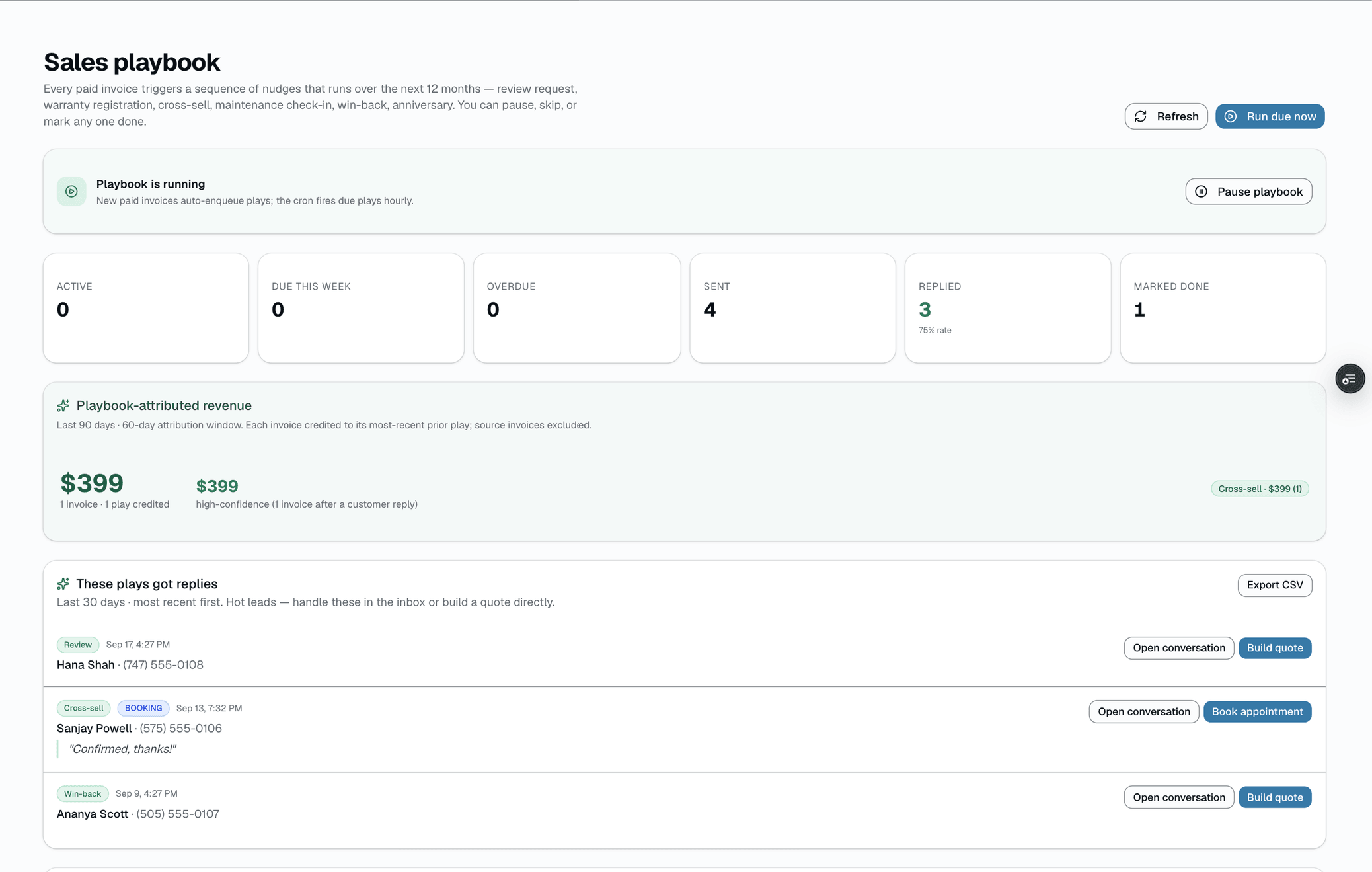
Sales playbook: Every paid invoice starts a year of scheduled follow-up texts.
- Six-step sequence per paid invoice (t+24h → t+365d)
- SMS only — no email channel for playbook nudges
- AI-written pitch line for the cross-sell step, using real purchase history
); only the cross-sell step's pitch line is written per-customer by AI, using the customer's real purchase history. Replies are AI-classified and acted on. Operator opt-outs honored. Per-shop kill switch, per-customer opt-out, full timeline view per invoice.
A closer look
01
Six steps that compound into your reorder rate
Each step lands at the moment a real shop owner would have called the customer if they had time. The +24h ask runs while the work is still fresh. The +30d cross-sell pitches the natural next service (PPF after tint, ceramic after PPF, maintenance wash after ceramic). The +6mo win-back fires before the customer drifts to a competitor. The +1yr anniversary keeps the relationship warm.
- +24h REVIEW_REQUEST — a timeline record; the review ask itself is sent by your review-request automation
- +7d WARRANTY_REGISTRATION — only fires for film services (TINT, PPF, VINYL_WRAP, FLAT_GLASS_*)
- +30d CROSS_SELL — a built-in map picks the next service (e.g. PPF after tint); AI rewrites the pitch line from the customer's history
- +90d MAINTENANCE_REMINDER — the gentle 'how's it holding up?' tap
- +180d WIN_BACK — 15% off if they book within 14 days (on by default; disable it in the template editor)
- +365d ANNIVERSARY — celebrates the install date + offers a check-up
Everything it does
The complete list. The plan tag above shows which plans include it.
- Six-step sequence per paid invoice (t+24h → t+365d)
- SMS only — no email channel for playbook nudges
- AI-written pitch line for the cross-sell step, using real purchase history
- AI reply intent classifier — auto-marks DONE / SKIPPED / opts customer out (confidence-gated, 0.7 floor)
- Per-shop master kill switch + per-customer opt-out (NUDGES OFF keyword)
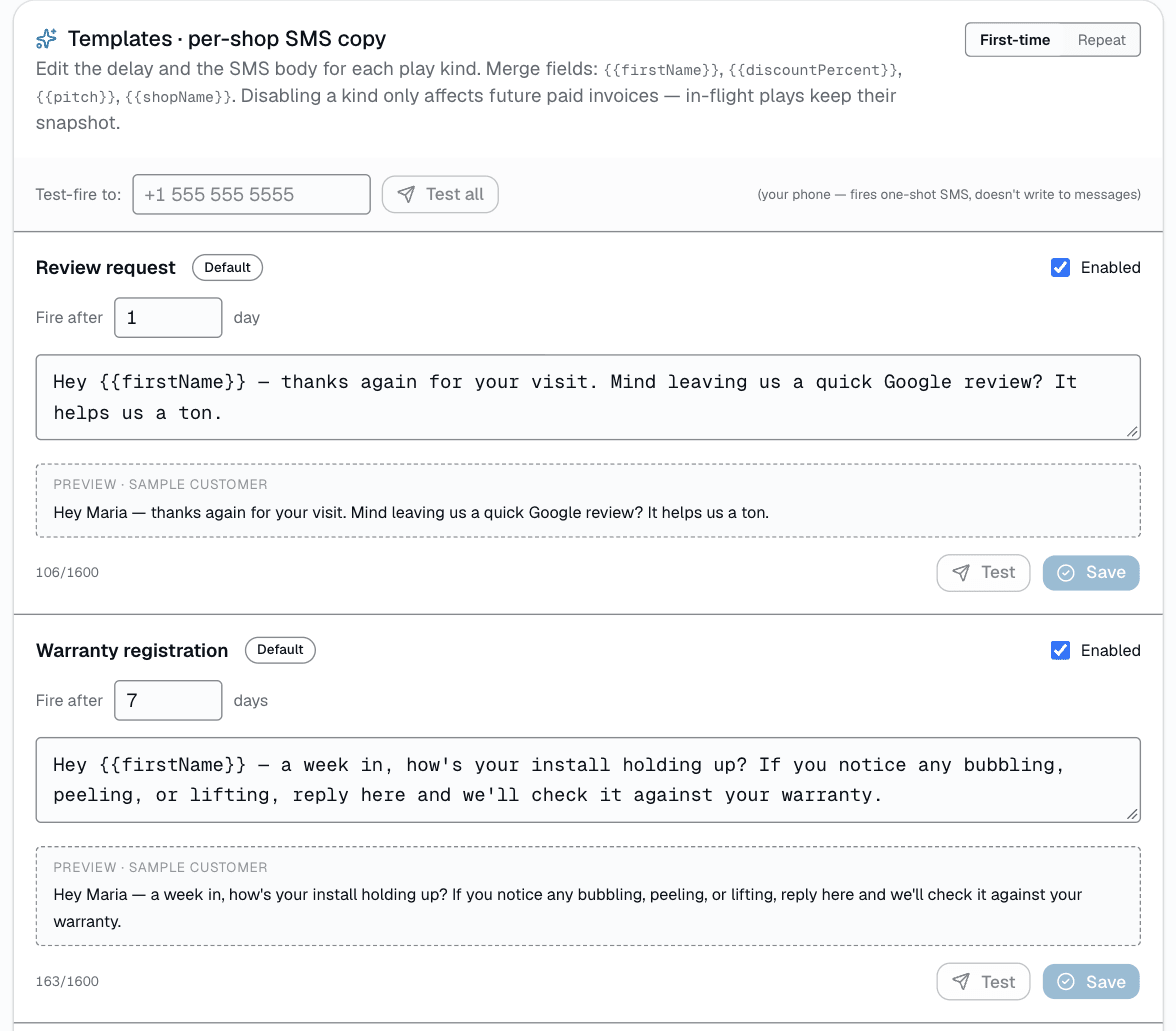
- Per-shop template editor: edit the copy, change the delay, disable a step
- Replies-digest email + failure-alert email + HQ-rollup digest
- Manual trigger for testing (runDue mutation)
- Live timeline of every play per invoice + per-customer rollup
A tour of the screens
Every meaningful view, the path through it, and the moments that matter — so you know exactly what you're buying.
Per-shop template editor
Edit each kind's SMS copy + delay + enabled state.
HQ tier can set an org default that shops without their own edit inherit — a shop's own customization always wins.
Who it's for
Built specifically for…
- Shops doing 30+ paid jobs per month who can't manually follow up on every one
- Multi-location franchises that want consistent customer-touch quality across shops
- Owners who currently do zero post-paid follow-up and want a floor under it
What it replaces
The old way…
- Spreadsheet of 'people I should call back'
- Hopium-driven 'just delivered great work, surely they'll come back'
- Bolt-on CRMs billed separately from your shop software (playbook texts draw from your plan's included SMS segments)
Setting it up
- 1
1. Invoice flips PAID
When staff record a payment by hand (cash, check, or a card run outside SalesThumb) or close a Sales Matrix sale, enqueuePlaybookForInvoice fires. Card payments processed through SalesThumb (online pay links and card-present terminals) don't queue the playbook yet.
- 2
2. Up to six rows insert into sales_plays
Each gets a scheduledFor offset (t+24h, t+7d, t+30d, t+90d, t+180d, t+365d), a kind, and a body template resolved with merge fields — SMS only, there's no per-customer channel choice. Idempotent — re-firing on the same invoice is a no-op.
- 3
3. Hourly cron fires due plays
salesPlaybookTick scans PENDING plays whose scheduledFor has passed, sends the SMS (honoring smsOptOutAt + playbookOptOutAt + the per-shop kill switch), flips to SENT or FAILED, and stamps engagedAt the moment the customer replies.
What this looks like in a shop
Illustrative scenario: a month after a shop starts using the playbook, the first +30d cross-sell texts go out and three customers reply 'yes pls send PPF quote' to the +30d cross-sell — the owner sees them flagged FOLLOW UP MANUALLY in the next-morning replies digest and sends quotes the same day. The shop had been doing zero post-paid follow-up before this; the only ongoing operator time it costs is reading the digest.
Good to know
- Which plan includes sales playbook?
- Growth and Pro include it. See the Pricing page for everything in each plan.
- What if my customer doesn't want these messages?
- They reply NUDGES OFF — sets playbookOptOutAt on the customer record. They keep getting transactional SMS (appointment reminders, ready-for-pickup, payment receipts). The hard STOP keyword still kills ALL outbound SMS and is honored carrier-side.
- Can I edit the copy?
- Yes — a per-shop template editor at /app/settings/playbook lets you rewrite each step, change the delay, or disable specific kinds entirely. An HQ-tier org can set an org-wide default for shops that haven't customized their own copy yet — a shop's own edit always overrides the org default, it's never force-replaced.
- Is the copy AI-written?
- Only the cross-sell step's pitch line — it reads the customer's real purchase history and vehicle, then writes one sentence pitching the natural next service. The other five steps (review, warranty, maintenance, win-back, anniversary) are fixed, editable template copy with merge fields, not per-customer AI text. Once a play is enqueued, its copy is snapshotted — editing a template later doesn't rewrite plays already in flight.
Works with your stack
Twilio
Sends the SMS at scheduled time + receives replies
Sends the daily reply digest + failure-alert emails (playbook nudges themselves are SMS-only)
Anthropic Claude
Writes the cross-sell pitch line + classifies inbound reply intent
Inngest
Hourly tick fires due plays; daily crons run the digests
Pairs well with
Two-way SMS
However a customer reaches you — a text, an email, a Facebook or Instagram message, or WhatsApp — it lands in the same inbox, on the same customer, and you answer from there.
Automations
On Growth and up, pick a preset drip sequence — win back lapsed customers, follow up cold leads, or ask for a review after a completed job. It goes live the moment you choose a pace, so edit the messages right away or pause it until you have.
Reports
SalesThumb's 83 reports live in a 14-category sidebar in the app; grouped here by the decision they answer, they sort into 6 clusters. The six: cash & revenue, job & service profitability, team & schedule performance, marketing & lead performance, customer retention & risk, and customer obligations — the reports inside each cluster export individually to CSV. Basic and Starter include the core reports; Gross Profit per Job, the installer and service-time reports, the close-rate funnel, Referral Attribution, ZIP Code Density, Channel CAC / ROI, Loyalty Program, and the inventory reports need Growth.
Customer CRM
Search by name, plate, or VIN in milliseconds. Every appointment, quote, invoice, warranty, and photo attached to the right record — forever.