AI receptionist for shops
An AI receptionist that answers your shop's chats, texts and missed calls
A customer who asks about tint at 9pm, or calls while everyone is in the bay, shouldn't have to wait. The AI receptionist answers them from your own services, hours and approved answers.
The quick version
AI receptionist: Answers chats, texts, social messages and missed calls, and hands off to your team.
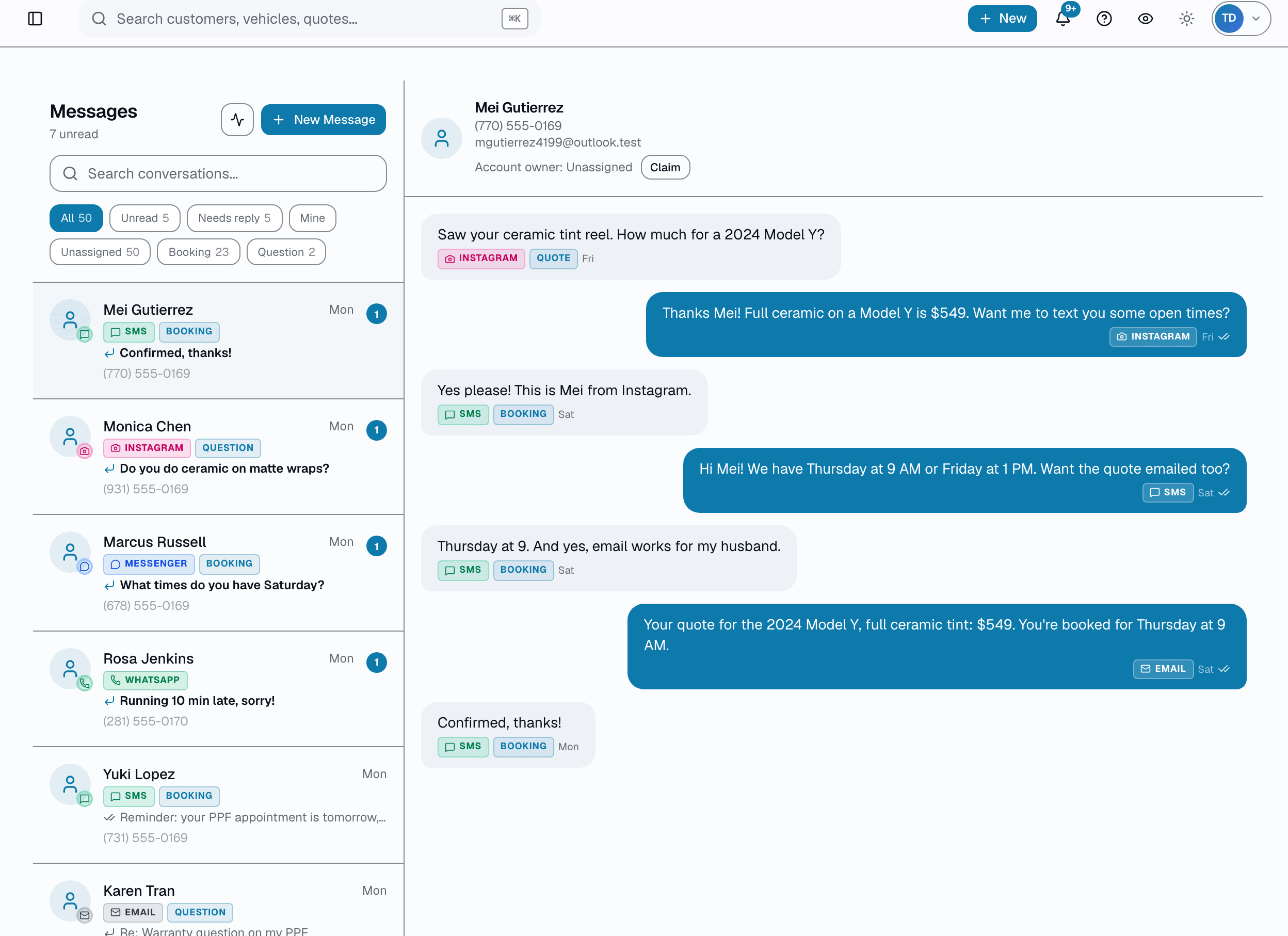
- Answers website chat, texts, email, Messenger, Instagram and WhatsApp, each with its own switch
- Picks up calls your team misses, through forwarding from the phone number you already have
- Works with Zoom Phone, RingCentral, Dialpad, or a cell or landline
It says it's automated, it hands off when someone asks for a person, and your team can take over any conversation in the Inbox. Calls nobody picks up are forwarded to a SalesThumb number, so you keep your phone number and phone system. Each caller is saved as a lead with a transcript and a short summary.
Watch: How to set up the AI receptionist for website chat and calls in SalesThumb (1:09)
In detail
A closer look
It answers from your shop's own information
The receptionist only answers from what you give it. Turn on your SalesThumb data and it uses your current services and business hours, always up to date. Add an "About your shop" section and approved answers for common questions, such as warranty, how long a job takes, or legal tint. A checklist shows what it has to work with.
- Choose whether it gives "starting at" prices on website chat
- Choose whether it offers open times from your booking calendar
- Try it yourself before you turn it on
Missed calls get answered, and you keep your number
Forward calls nobody picks up to your receptionist number, so your team still gets the first chance to answer. Before it listens, the AI tells the caller it's the shop's automated AI assistant, that the call is transcribed and processed by AI service providers, and that they can hang up if they'd rather not continue. It answers questions and gives "starting at" prices and open times.
- The call shows on your Calls page with a transcript and a short summary
- The caller is saved as a lead and stays in Needs a reply until someone follows up
- Used all your minutes? Callers hear a short message, and the call is still saved as a missed call and a lead
Your team stays in control
Click Take over in the Inbox at any time. Sending a customer a message from SalesThumb also pauses the AI for 15 minutes, and each reply from your team starts the 15 minutes over. A bar above the message box shows whether the AI is answering, paused or off. You can list words that always go straight to your team, such as manager, refund, complaint or insurance.
- Take over for 15 minutes, or leave the AI off until someone turns it back on
- Optional: let the AI step back in if a customer is left waiting
- Customers who opted out of texts or email don't get AI messages
Everything it does
The complete list. The plan tag above shows which plans include it.
- Answers website chat, texts, email, Messenger, Instagram and WhatsApp, each with its own switch
- Picks up calls your team misses, through forwarding from the phone number you already have
- Works with Zoom Phone, RingCentral, Dialpad, or a cell or landline
- Gives "starting at" prices and open times from your booking calendar
- Answers only from what you give it: your services, hours, shop details and approved answers
- Answers always, or only when you're closed
- Hands off when a customer asks for a person, is upset, or asks something it can't answer
- Saves each caller as a lead, with a transcript and a short summary on your Calls page
Who it's for
Built for
- Tint, PPF, ceramic coating, detailing and wrap shops whose team is in the bay when customers reach out
- Shops that get questions at night and on weekends, through their website or social pages
- Owners who want every missed caller saved as a lead with a summary, not a voicemail to chase
What it replaces
What you can retire
- Voicemail for calls nobody could pick up
- Website chat nobody watches after hours
- Answering the same price and hours questions by hand
How it works
Setting it up
Step 1
1. Tell it where to answer
Open Settings, then AI receptionist. Switch on the places it should answer, and choose always or only when you're closed.
Step 2
2. Give it what it needs to know
Use your SalesThumb services and hours automatically, then add approved answers to common questions. Set what it says when it hands off.
Step 3
3. Forward your missed calls
Get your receptionist number, then forward calls that aren't answered to it from your phone system. Call your shop from another phone to test it.
What this looks like in a shop
Illustrative scenario: a customer calls Sample Shop LLC about ceramic tint while both installers are in the bay and nobody can pick up. The call forwards to the AI receptionist, which says it's an automated AI assistant, gives a "starting at" price and shares open times. The call lands on the Calls page with a transcript and a summary, and the caller is saved as a lead in Needs a reply so the team can call back.
Questions
Good to know
- Does it tell callers it's AI?
- Yes. Before it listens, it says it's the shop's automated AI assistant, that the call is transcribed and processed by AI service providers, and that callers who'd rather not can hang up. Text, email and social replies start with "Automated reply from" and your shop's name. On website chat, replies show a small AI label.
- Do I have to change my phone number?
- No. You keep your phone number and phone system. Calls nobody picks up are forwarded to a SalesThumb number, and the AI answers them. Use forwarding for unanswered calls, not all calls, so your team still gets the first chance to pick up.
- Which plans include the AI receptionist?
- Website chat, texts, email and social message answers are on the Growth plan and up. Phone answering is included in Pro with 300 minutes a month. On Basic, Starter and Growth it's an add-on with 300, 750 or 2,000 minutes a month. Our team confirms the price with you when you request it.
- Can it make things up?
- It only answers from what you give it: your services, business hours, shop details and approved answers. If a customer asks something it can't answer, it hands the conversation to your team.
- How do I stop it answering a customer?
- Click Take over in the Inbox. You can take over for 15 minutes or leave the AI off until someone turns it back on. Sending the customer a message from SalesThumb also pauses it for 15 minutes.
- How is it different from missed-call text-back?
- Missed-call text-back sends the caller a text after a missed call. The AI receptionist picks up the call, answers questions, and saves the caller as a lead with a transcript and a summary.
Works with your stack
Zoom Phone, RingCentral, Dialpad
Forward unanswered calls to your receptionist number
Messenger, Instagram, WhatsApp
Answers messages once those apps are connected
Pairs well with
Two-way SMS
However a customer reaches you — a text, an email, a Facebook or Instagram message, or WhatsApp — it lands in the same inbox, on the same customer, and you answer from there.
AI reply drafts
The customer who'd wait an hour for a reply — and start looking at a competitor, or leave a so-so review over it — gets an answer in the time it takes you to tap Send. Tap Suggest reply and two or three on-brand draft options appear in seconds. The AI drafts — you always pick, edit, and send.
Online Booking
Your own branded booking URL — salesthumb.com/book/your-shop. Customers pick a service, a time, and pay a deposit if you require one. It runs 24/7.
Talk to a person
Not ready to start? Talk to a person.
Tell us about your shop and we'll get back to you, usually within one business day. No pitch, and we only call if you leave a number.
- A real person on our team reads it and replies
- Ask about pricing, switching or a walkthrough
- Leave a phone number if you'd rather talk