Point the camera at the VIN. Skip typing 17 characters by hand.
Typing a 17-character VIN correctly while a customer is standing at the counter is a small but constant tax on every intake. SalesThumb's VIN scanner reads it with the phone's camera instead.
The quick version
VIN scanner: Point the camera at the VIN instead of typing it.
- Reads the VIN barcode (Code 39, Code 128, Data Matrix, QR, or PDF417) right on the phone
- Reads the printed VIN when there's no readable barcode (Growth plan and up, uses your AI allowance)
- Checks every read against the VIN's check digit; a mismatch waits for you to confirm or edit
It reads the barcode printed next to the VIN on the label right on the phone, and if it can't find one after a moment it reads the printed VIN characters instead. Every read is checked against the VIN's built-in check digit, then looked up in NHTSA's free VIN database for year, make, model, trim, and body style. Body style is the quiet payoff: it sets the vehicle's tint-law class (car vs. SUV/truck) so nobody has to pick it.
A closer look
01
Barcode first, printed VIN as backup
Most VIN labels carry a barcode next to the printed VIN, and the scanner reads it on the phone on every camera frame, so a clean label locks in about as fast as you can aim. Older or worn labels, and windshield plates without a barcode, are where the backup comes in: after a moment without a barcode, the app reads the printed characters from what's inside the frame. Either way the VIN's check digit has to add up before it moves on, so one misread character doesn't turn into the wrong car.
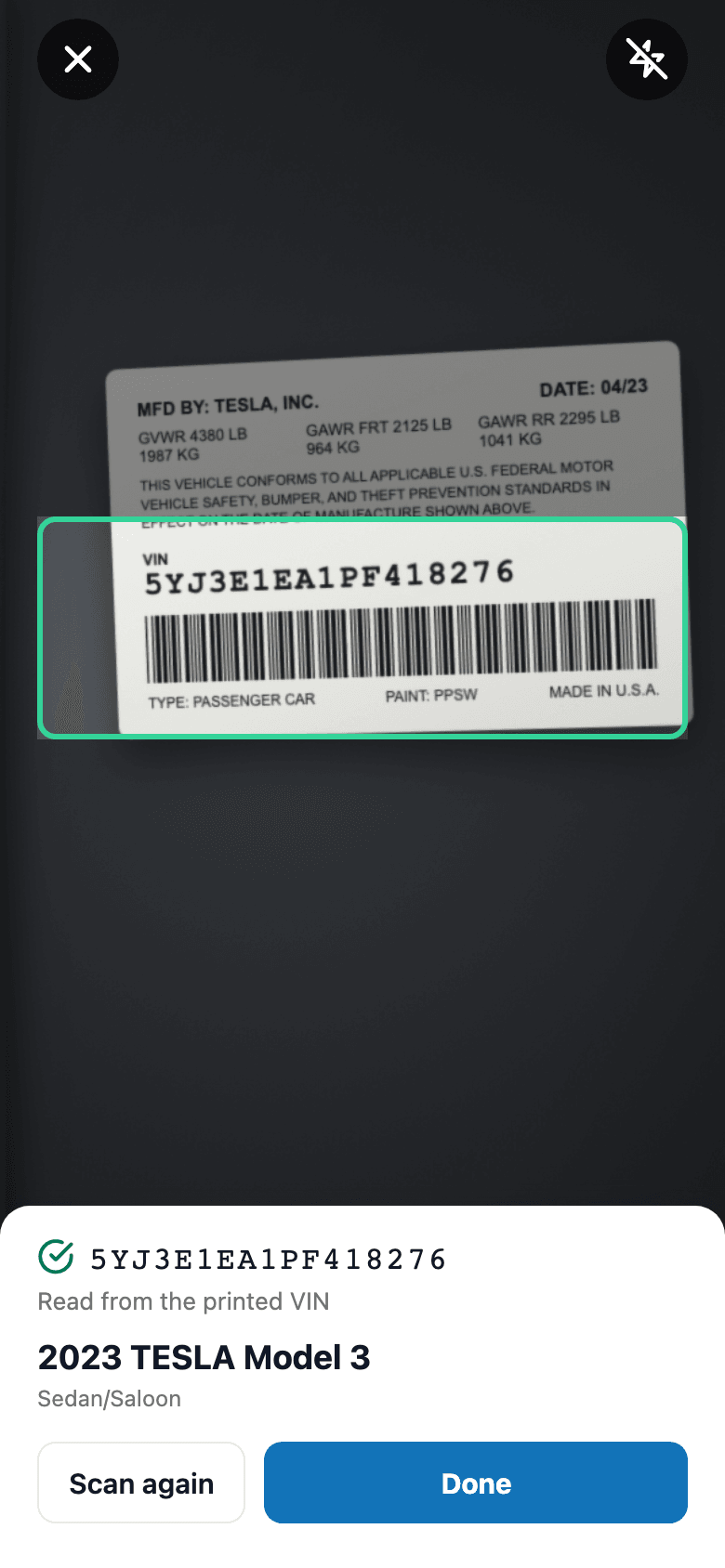
- A dimmed frame shows exactly where to aim, and turns green on a good read
- Imported cars whose door-jamb barcode adds an extra leading letter still read correctly
- Works on any iPhone or Android with a camera — no separate scanner hardware
Everything it does
The complete list. The plan tag above shows which plans include it.
- Reads the VIN barcode (Code 39, Code 128, Data Matrix, QR, or PDF417) right on the phone
- Reads the printed VIN when there's no readable barcode (Growth plan and up, uses your AI allowance)
- Checks every read against the VIN's check digit; a mismatch waits for you to confirm or edit
- Looks up year, make, model, trim, and body style in NHTSA's free VIN database
- Body style sets car vs. SUV/truck for tint-law defaults
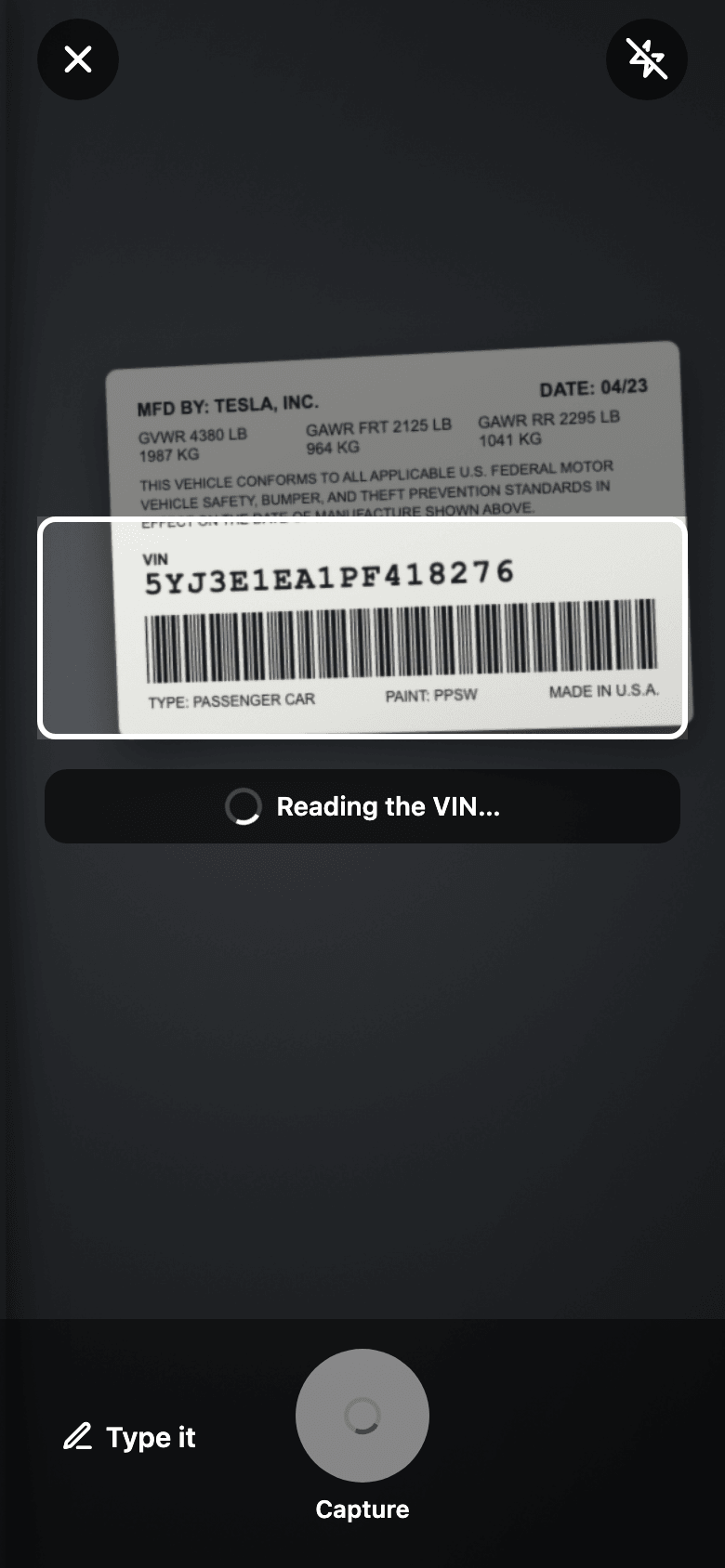
- Flashlight button, a Capture button to read right now, and Type it to enter the VIN by hand
Who it's for
Built specifically for…
- Front-desk and intake staff who key in a vehicle for every single job
- Shops that quote off vehicle class (sedan vs. SUV/truck) and want that set automatically
- Techs who'd rather scan a sticker than transcribe 17 characters under pressure
What it replaces
The old way…
- Typing the VIN by hand from a windshield sticker or door jamb
- A second lookup on a separate NHTSA or Carfax site to confirm year/make/model
- Manually picking sedan vs. SUV/truck for tint-law compliance defaults
Setting it up
- 1
1. Open the scanner from a customer's page
A full-screen camera opens with a frame to line the VIN up in, a flashlight button, and Type it for entering the VIN by hand.
- 2
2. It reads and checks the VIN
The barcode is read on the phone; if there isn't a readable one, the printed VIN is read instead. The VIN's check digit has to match before it's used.
- 3
3. NHTSA fills in the vehicle
NHTSA's free VIN database returns year, make, model, trim, and body style, and the app takes you back to the customer with the vehicle ready to add.
What this looks like in a shop
Illustrative scenario: A customer pulls up for a same-day ceramic coat. Instead of asking for the VIN and typing it off their registration, the tech opens the scanner from the customer's page and aims at the door-jamb label. The frame turns green, the VIN checks out, and NHTSA comes back with 2023 Tesla Model 3, Sedan. The app goes straight back to the customer's page with the vehicle ready to add — no typos, and the tint-law class is already set to car.
Good to know
- Which plan includes vin scanner?
- Growth and Pro include it. See the Pricing page for everything in each plan.
- Does it read the printed VIN or just the barcode?
- Both. It reads the barcode on the phone first. If it can't find one after a moment, it reads the printed VIN characters inside the frame. Reading the printed VIN is on the Growth plan and up and counts toward your shop's AI allowance; the barcode read never does.
- What if NHTSA doesn't recognize the VIN?
- The scanner says it couldn't look up the vehicle details, and you can still use the VIN — add the year, make, and model by hand on the customer's vehicle.
- Does this cost anything per scan?
- Barcode scans and NHTSA lookups are free — NHTSA's VIN database has no per-lookup charge. Reading a printed VIN uses your plan's AI allowance.
Works with your stack
NHTSA vPIC
Free, no-API-key vehicle decode by VIN
Pairs well with
Mobile Apps
The installer app shows today's schedule, captures photos, clocks in/out, and updates job status. The customer app shows their active job's progress, appointments, quotes, invoices, and warranty status. Both are native iOS + Android apps, live now on the App Store and Google Play as the SalesThumb app; a fully white-labeled app under your own brand is further out on the roadmap.
Customer login
One app, two ways to sign in. Customers type name + phone, get a 6-digit SMS code, land in their own portal. Staff use email + password. Role decides which tabs they see.
Quotes
Build a quote from real line items — services, film, parts, fees — send it, and the customer approves with a drawn signature and a card deposit on their phone. No account needed on either side.