Shop software built for multi-bay garages.
Bay-aware scheduling with per-installer lanes, a double-booking guard, lobby TVs that show the queue, and a live job tracker customers can watch from their phone.
Multi-vertical catalog, bay-level scheduling, and cross-vertical upsell prompts — built for shops running tint, PPF, ceramic coating, and detail under one roof.
Why multi-bay shops choose SalesThumb
Built for how you actually work — not a generic CRM with your logo on it.
Every workflow is specific to multi-bay. None of the auto-repair bloat.
Bay-aware scheduling with installer lanes
Every bay is a lane on the calendar. Every installer is a sub-lane. Drag a job into the right bay × installer × time slot — double-bookings blocked unless staff choose to override.
Double-booking guard
Each appointment holds its bay and installer for its full length, so a 3-day PPF job keeps the bay for all 3 days. A double-booking is blocked unless staff choose to override it.
Lobby TVs that show the queue
Customer in the waiting room sees today's queue: who's being worked on now and who's up next. Less 'how much longer?' at the counter.
Live job tracker (customer-facing)
Customer follows their vehicle's progress from their phone — checked in, in progress, ready. Reduces calls and texts dramatically.
Per-bay + per-installer reporting
Utilization per bay and per installer, revenue per installer, throughput per service. See which bay sits idle and which installer's your closer.
Multi-vertical under one roof
Tint in bay 1, PPF in bays 2-3, ceramic in bay 4, detail in 5-6. Each vertical's modules light up; one customer record across all of it.
A typical multi-bay job, end-to-end
From inquiry to rebook — automated where it should be.
- 1
Customer books a service
Online booking checks installer availability for the requested service. Only open slots are shown; staff assign the bay afterward.
- 2
Deposit + bay assignment
Customer pays deposit; the job lands in the installer's lane and staff assign the bay. The appointment blocks the lane for its full length, so book coatings long enough to cover cure time.
- 3
Day-of bay flow
Vehicle checked in; lobby TV shows it in the queue. Bay tech pulls it into their bay; the queue updates in real time; customer's live tracker updates too.
- 4
Per-bay progress
Each job moves through checked in, in progress, and ready. Status changes trigger customer texts and lobby-TV updates.
- 5
Pickup + payment
Customer notified by SMS when ready. They pay with a card via the portal pay link. A review request goes out automatically about a day after the job's marked complete.
- 6
Reporting + capacity tuning
Reports: utilization per bay and installer, revenue per installer, throughput per service. Tune your bay assignments for next week based on what actually moved.
The features that matter for multi-bay
Picked from the platform for multi-bay workflows.
SalesThumb ships 51+ features. These are the ones multi-bay operators lean on every day.
Scheduling
Every installer, every bay, every appointment in one view. Drag to reschedule. Color-coded by status. Double-book detection with explicit confirm-to-override.
Learn more
Live job tracker
Generate a public /track/<token> URL for any appointment and text it over — the customer follows along like a pizza-delivery tracker, no login required.
Learn more
Lobby TVs
Any browser-equipped TV becomes a sales tool. Lobby reels rotate your service menu and customer photos. Sales-counter screens cast live products from the rep's tablet for a counter-side close.
Learn more
Reports
SalesThumb's 83 reports live in a 14-category sidebar in the app; grouped here by the decision they answer, they sort into 6 clusters. The six: cash & revenue, job & service profitability, team & schedule performance, marketing & lead performance, customer retention & risk, and customer obligations — the reports inside each cluster export individually to CSV. Basic and Starter include the core reports; Gross Profit per Job, the installer and service-time reports, the close-rate funnel, Referral Attribution, ZIP Code Density, Channel CAC / ROI, Loyalty Program, and the inventory reports need Growth.
Learn more
Two-way SMS
However a customer reaches you — a text, an email, a Facebook or Instagram message, or WhatsApp — it lands in the same inbox, on the same customer, and you answer from there.
Learn more
Automations
On Growth and up, pick a preset drip sequence — win back lapsed customers, follow up cold leads, or ask for a review after a completed job. It goes live the moment you choose a pace, so edit the messages right away or pause it until you have.
Learn more
Online Booking
Your own branded booking URL — salesthumb.com/book/your-shop. Customers pick a service, a time, and pay a deposit if you require one. It runs 24/7.
Learn more
Payments
Accept cards online with a one-click pay link in SMS or email. Partial payments, deposits, refunds — all handled. Flat-rate card pricing on every plan, or interchange-plus on Growth and Pro — your rate is visible any time in Reports → Fees.
Learn more
A multi-bay shop puts the lobby TV on a screen in the waiting room. As staff move each job from checked in to in progress to ready, the queue on the TV and the customer's live tracker update, so a waiting customer can see where their car is without asking at the counter.
Illustrative example — not a customer quote. It describes no real shop, and no results are claimed; the workflow shown uses real product features.
See it in the app
Real screens from SalesThumb, taken in our Test Drive sample shop.
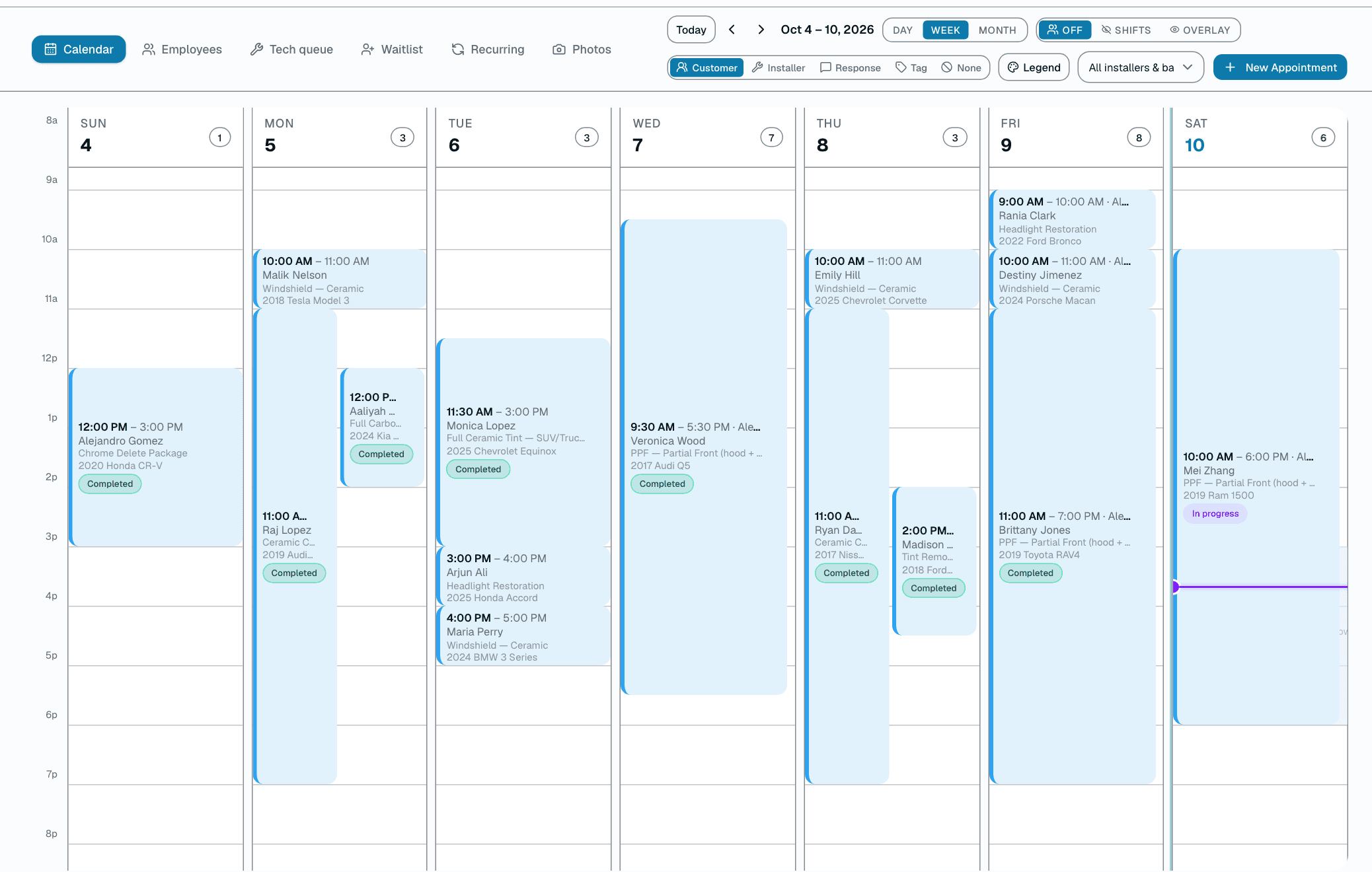
Calendar
See the day, week or month. Give each job an installer and a bay, and drag it to reschedule.
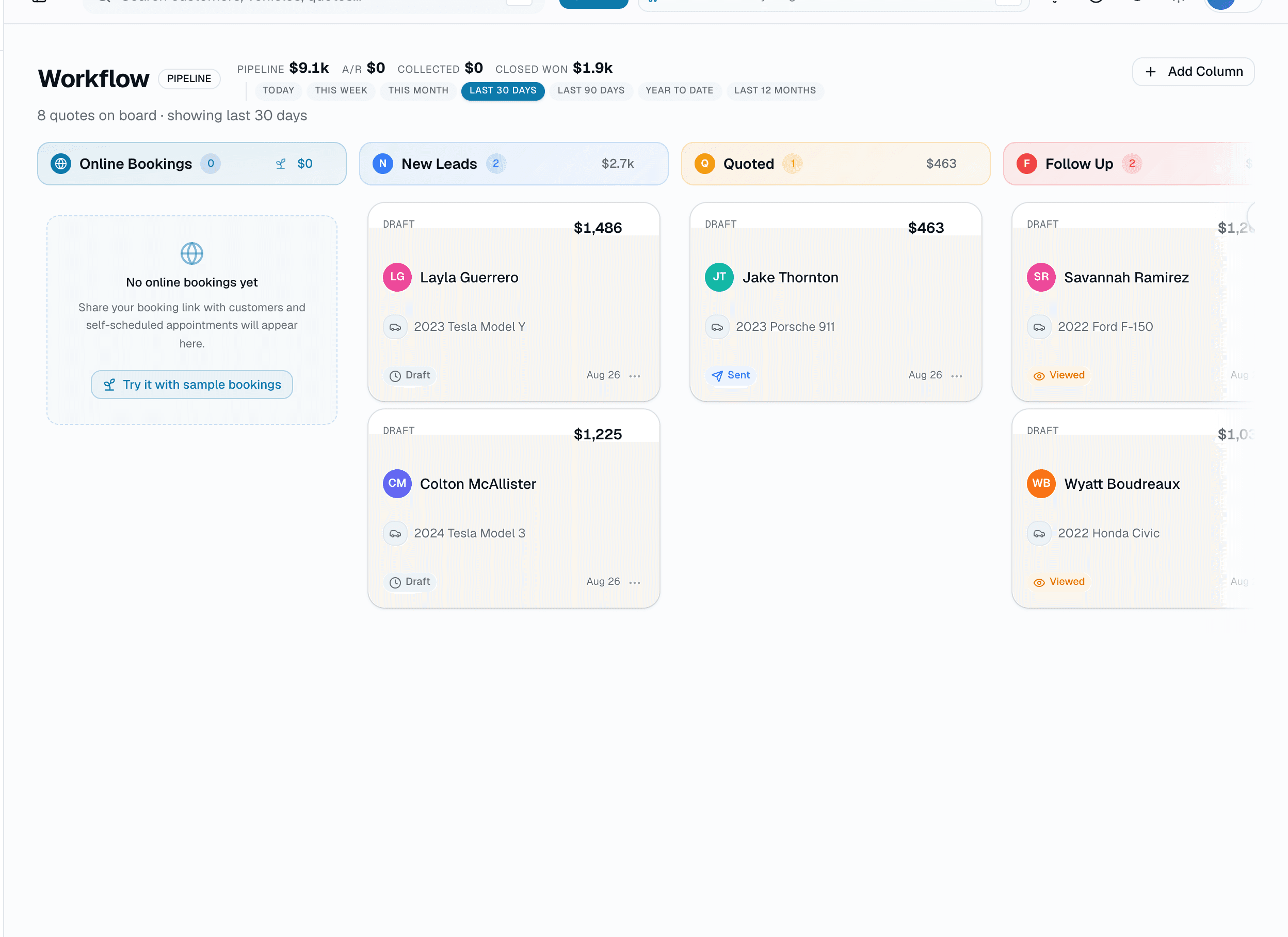
Workflow board
Every quote on one board, from new lead to completed. Drag a card to move it along.
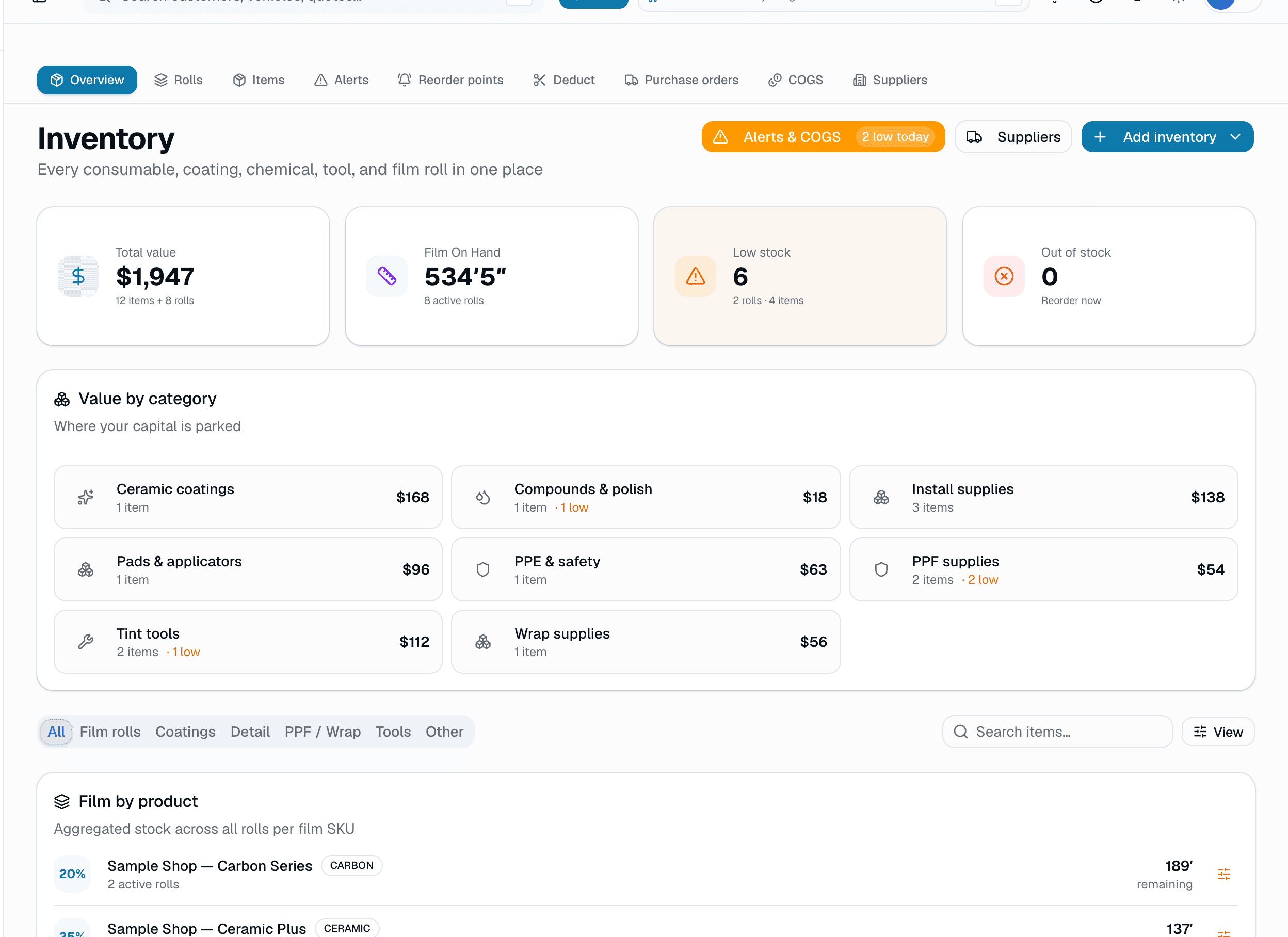
Film inventory
Track each roll by the inches left, with batch and lot numbers. Take film off after a job in one screen.
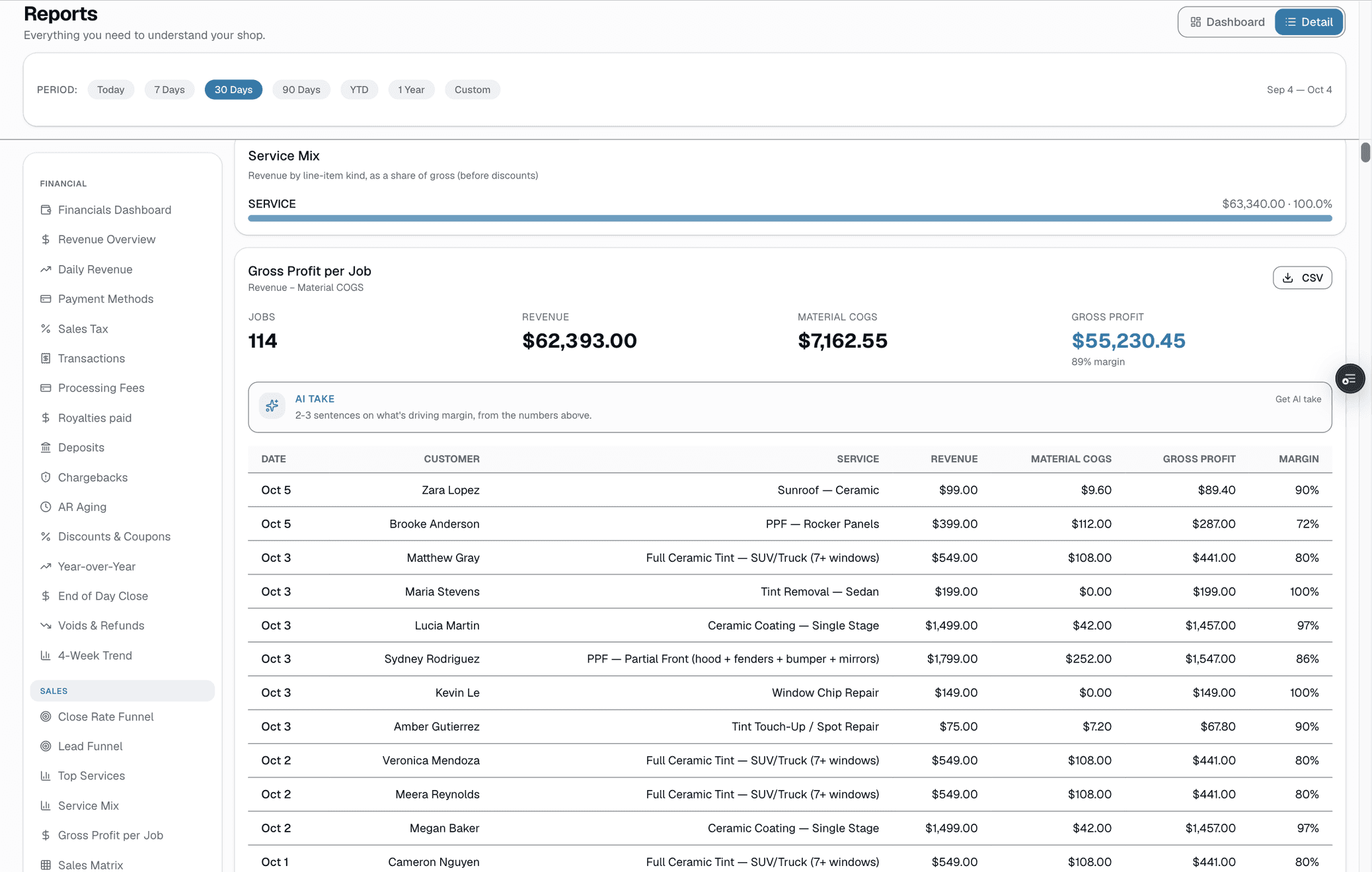
Reports
83 reports, including gross profit per job and installer leaderboards.
Some features are on higher plans. See what's in each plan.
FAQ
Multi-bay shop questions, answered.
Does the calendar handle multiple bays and installers?
+
Yes. Every bay is a lane; every installer is a sub-lane within their bay (or across bays if you cross-train). Drag jobs across bays and installers; double-bookings are blocked unless staff choose to override.
Can I prevent overbooking with per-bay capacity?
+
Not with per-bay capacity rules. Each appointment holds its bay and installer for its full length, a double-booking is blocked unless staff choose to override it, and online booking only shows times when an installer is free.
How do lobby TVs work?
+
Mount a Roku, Fire TV, or any browser-capable display in your lobby and point it at your shop's lobby URL. It shows today's queue: who's being worked on now and who's up next, by first name and start time. See /features/lobby-tvs.
Can customers see their car's progress from their phone?
+
Yes. Live job tracker — customer gets a magic-link SMS that opens a status page in their browser. Updates as the job moves from checked in → in progress → ready. See /features/live-job-tracker.
Can I report on bay utilization and revenue?
+
Yes. Per-bay and per-installer utilization %, per-installer revenue and throughput, per-service avg duration. See which bay and which installer are your profit centers — and where you have capacity slack.
Can I run tint + PPF + ceramic + detail in the same shop?
+
Yes, on Growth or Pro. Each vertical's modules light up when enabled — film catalog for tint, coverage-area pricing for PPF, tier pricing for ceramic, packages for detail. One customer record, one calendar, one inbox across all of it. See /features/hq for multi-vertical.
How does it compare to ShopMonkey for multi-bay shops?
+
ShopMonkey is auto-repair software with bays oriented around oil changes and brake jobs. SalesThumb is built for film and finish work with bay-aware scheduling, lobby TVs, live job tracker, and multi-vertical support. See /compare/shopmonkey.
Free trial?
+
Yes: 30 days free on Basic, Starter, Growth or Pro, no credit card required. Pick a plan on the pricing page and the trial starts when you create your shop. When it ends, your shop moves to the Free plan and your data stays. Migration support and bay-layout setup included.
Side-by-side
SalesThumb vs. ShopMonkey for multi-bay shops
Feature-by-feature comparison with pricing, what each platform's actually built for, and a migration checklist.
See comparison
Pricing
Simple plans for multi-bay shops
Basic, Starter, Growth, and Pro tiers, plus HQ and CRM/Franchise Sales add-ons. No long-term contract; cancel anytime.
See pricing
ShopMonkey is a trademark of its owner. Use here is for comparison and identification purposes only and does not imply endorsement, partnership, or affiliation.