Shop software built for mobile detailers and installers.
Service-area booking with a same-area ZIP hint, mobile photo capture built for spotty signal, a no-app card pay link, and a customer portal that doesn't require an app download.
Address-based scheduling, curb-side card payment, and a same-area ZIP hint at booking — built for mobile operators.
Why mobile operators shops choose SalesThumb
Built for how you actually work — not a generic CRM with your logo on it.
Every workflow is specific to mobile operators. None of the auto-repair bloat.
Service-area booking
Customers enter their address at booking; the page compares the first three digits of their ZIP with your shop's and shows a looks-local hint. It isn't a mileage check. You still sequence the day's stops yourself — dispatch stays manual.
Built for spotty signal
Quote, photo-log, invoice, and capture signatures in the field. Most actions need a connection to save. Writes deliberately do not auto-retry — a re-sent write can commit twice — so a failure gives you a clear message instead of silently duplicating or losing it.
Card payment at the curb
Text the customer a pay link — they settle with a card from their own phone (no card reader needed). They pay before you leave.
Customer portal without an app
No download required. Customers get a magic-link SMS — quote, signature, payment, photo gallery, reviews — all in their phone's browser. Zero friction.
Photo log per stop
Before/after photos per address. Customer gets a branded gallery; you have time-stamped evidence for any later dispute.
A typical mobile operators job, end-to-end
From inquiry to rebook — automated where it should be.
- 1
Customer books online
Picks a service + address + window. Booking shows a looks-local hint from the ZIP code; the open windows come from your normal booking hours, not the address.
- 2
Deposit + schedule slot
Customer pays deposit. Stop is added to that day's schedule at the time slot they picked. You sequence and re-order stops yourself — no automatic route optimization.
- 3
Day-of route brief
Driver opens 'My Day' on the mobile app: the stop list you sequenced, customer notes, photos, service checklist per stop. Tap any address for turn-by-turn directions in your phone's maps app.
- 4
Service performed + photo log
Per-stop photo log (before/after). Needs a data connection to save. A shot that fails to upload stays staged on the job for a one-tap retry — nothing re-sends itself.
- 5
Customer pays before you leave
Final invoice texted as a pay link. Customer settles with a card on their own phone. You drive to the next stop.
- 6
Review + rebook
A review request goes out automatically about a day after the job's marked complete. The same text carries a one-tap rebook link, and regulars can go on a recurring appointment schedule.
The features that matter for mobile operators
Picked from the platform for mobile operators workflows.
SalesThumb ships 51+ features. These are the ones mobile operators operators lean on every day.
Mobile Apps
The installer app shows today's schedule, captures photos, clocks in/out, and updates job status. The customer app shows their active job's progress, appointments, quotes, invoices, and warranty status. Both are native iOS + Android apps, live now on the App Store and Google Play as the SalesThumb app; a fully white-labeled app under your own brand is further out on the roadmap.
Learn more
Scheduling
Every installer, every bay, every appointment in one view. Drag to reschedule. Color-coded by status. Double-book detection with explicit confirm-to-override.
Learn more
Payments
Accept cards online with a one-click pay link in SMS or email. Partial payments, deposits, refunds — all handled. Flat-rate card pricing on every plan, or interchange-plus on Growth and Pro — your rate is visible any time in Reports → Fees.
Learn more
Job Photos
Every appointment gets a photo gallery. Techs capture on mobile (Growth and Pro; the app is view-only on Starter). Customers see a polished post-install gallery. On Pro, AI looks at the damage photos on a vehicle inspection and drafts the damage note for you. You protect yourself from 'it was like that when you got it' claims.
Learn more
Online Booking
Your own branded booking URL — salesthumb.com/book/your-shop. Customers pick a service, a time, and pay a deposit if you require one. It runs 24/7.
Learn more
Two-way SMS
However a customer reaches you — a text, an email, a Facebook or Instagram message, or WhatsApp — it lands in the same inbox, on the same customer, and you answer from there.
Learn more
Automations
On Growth and up, pick a preset drip sequence — win back lapsed customers, follow up cold leads, or ask for a review after a completed job. It goes live the moment you choose a pace, so edit the messages right away or pause it until you have.
Learn more
Customer portal
From any customer's page, hit 'Portal link' → Copy, text, or email a 30-day link. Lands at /portal/<token>. No password, no app install required.
Learn more
A mobile detailer's customer books a time window online and pays the deposit the operator requires. On the day, the operator opens the stop list they sequenced, with addresses and job notes. After the job, the customer pays from a texted pay link, and a review request goes out about a day after the job is marked complete.
Illustrative example — not a customer quote. It describes no real shop, and no results are claimed; the workflow shown uses real product features.
See it in the app
Real screens from SalesThumb, taken in our Test Drive sample shop.
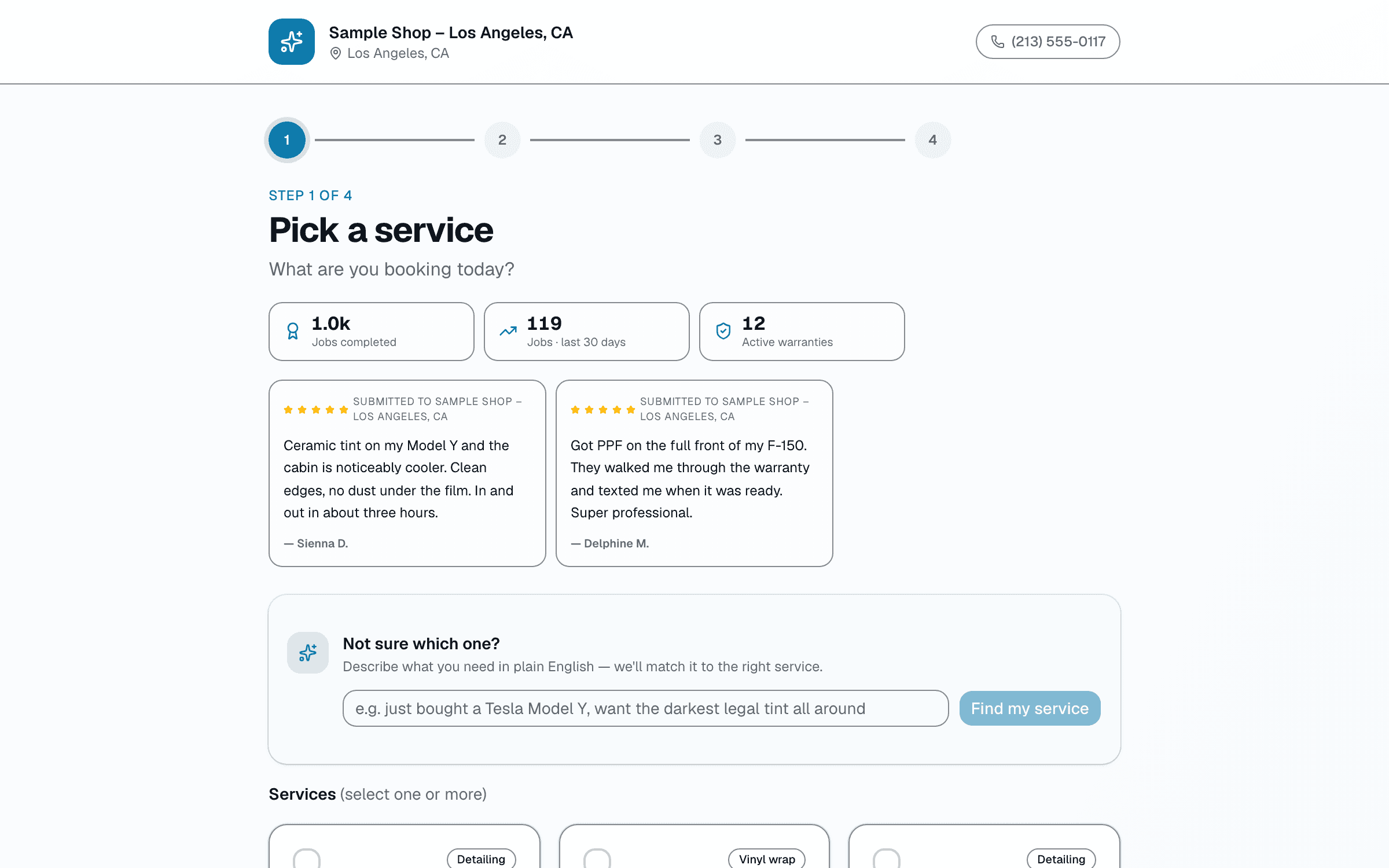
Online booking
Your own booking page. Customers pick a service and a time, add their details and confirm.
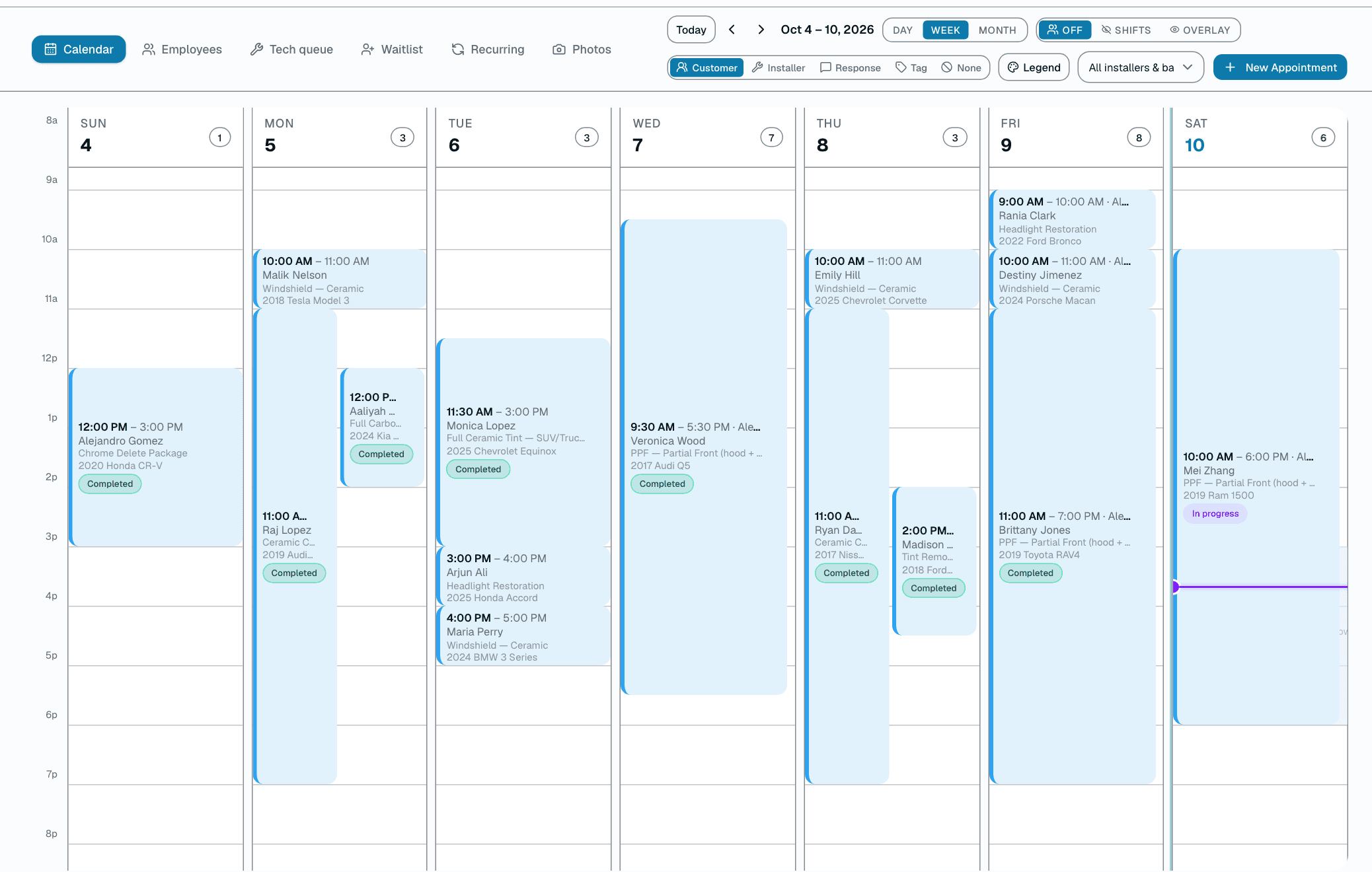
Calendar
See the day, week or month. Give each job an installer and a bay, and drag it to reschedule.
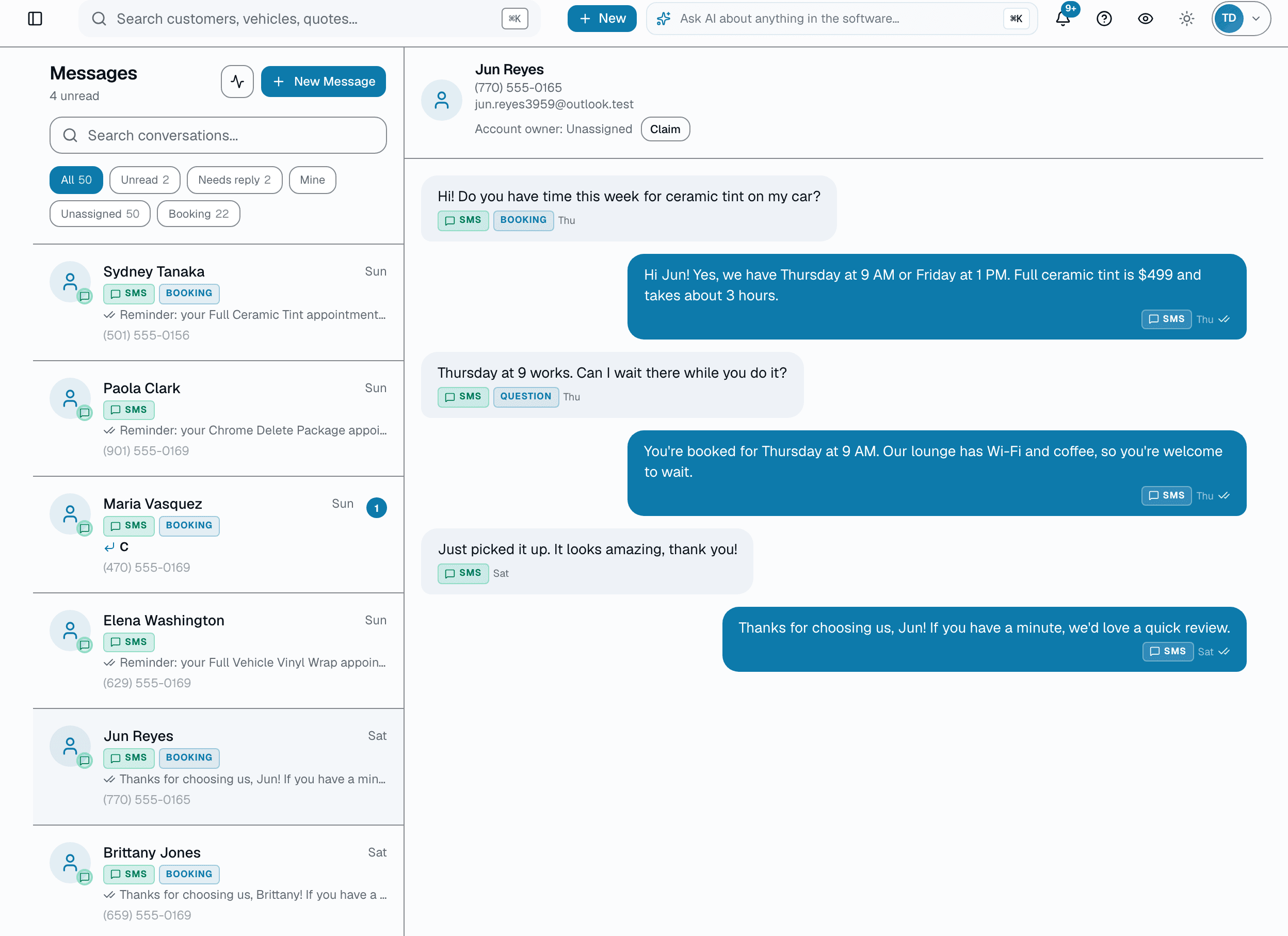
Two-way texting
One shared inbox for every customer text, with photos in and out.
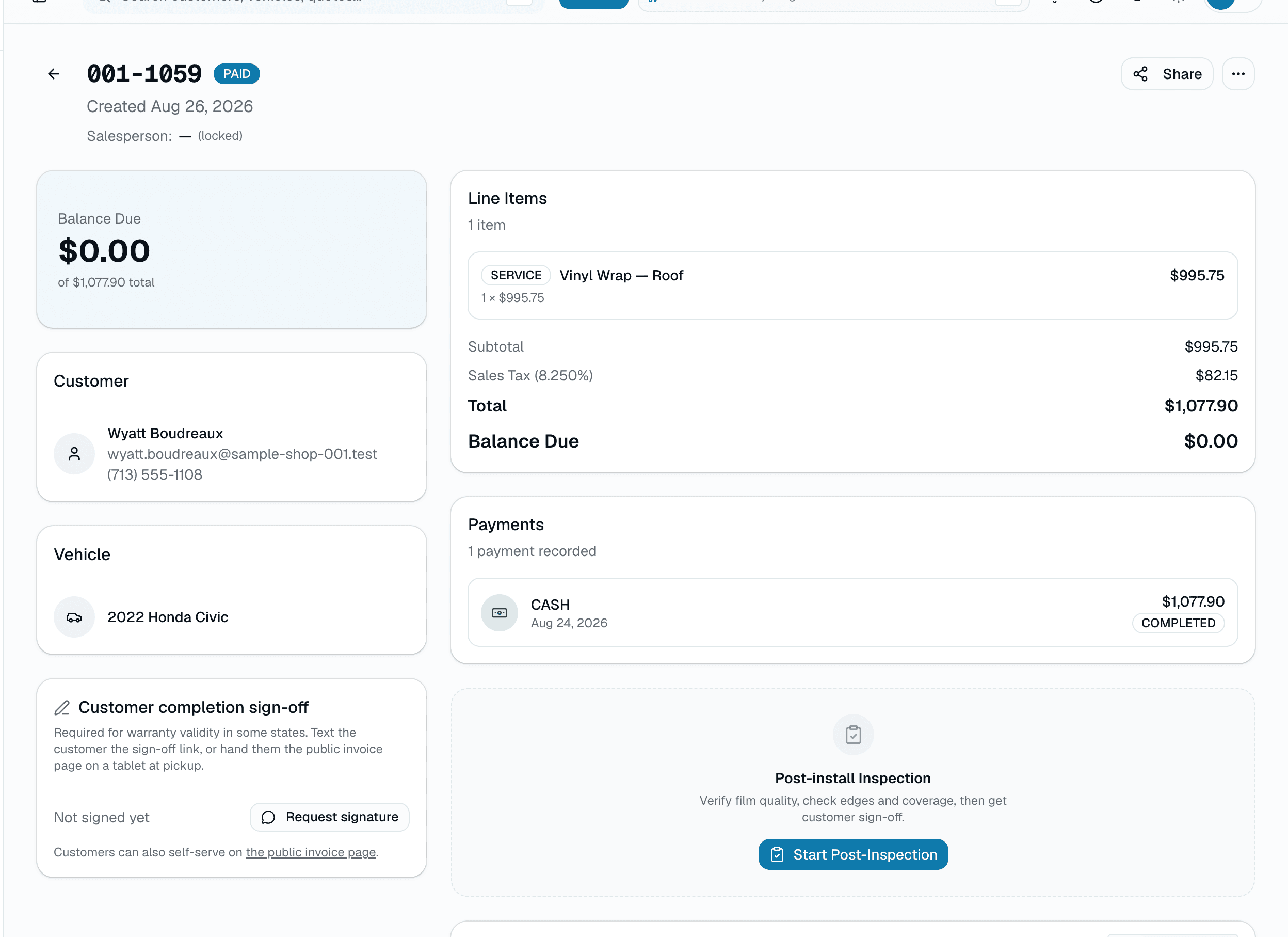
Invoices
Turn a quote into an invoice in one click. Tax on each line, with deposits and the balance tracked.
Some features are on higher plans. See what's in each plan.
FAQ
Mobile operators shop questions, answered.
Does it work offline?
+
Not fully — quoting, photo-log, invoicing, and signatures all need a data connection to save today. If a save fails it is NOT retried automatically — re-firing a write the server may already have committed would double-post it — so you get a clear "couldn't save, check your connection" message rather than a silent duplicate, and you can retry it once you are back in signal. Full offline queueing (write now, sync later) is a roadmap item, not shipped yet.
Can I take payment at the curb?
+
Yes. You text the customer a pay link and they pay with a card on their own phone — no extra card reader to buy or carry. Cash payments can be recorded manually too.
Does it optimize my route?
+
Not automatically — there's no drive-time calculation or auto-sequencing. Booking only shows a same-area ZIP hint, not a mileage check; you sequence the day's stops yourself. Techs open 'My Day' to see their scheduled jobs with per-stop notes.
Do customers need to download an app?
+
No. Customers get a magic-link SMS that opens their portal in any phone browser — quote, signature, payment, photo gallery, review, rebook. Zero friction; works on iPhone and Android equally.
Can it handle recurring maintenance routes?
+
Yes. Weekly / bi-weekly / monthly maintenance customers get their next visit auto-booked on schedule with a due-date reminder; you still collect payment yourself — no auto-charge, and no automatic route grouping (each stop is sequenced by you).
Does it geocode customer addresses correctly?
+
Tap-to-navigate opens the customer's address in your phone's maps app — one tap from the route brief straight to turn-by-turn directions.
Will it work if I run both mobile and a fixed location?
+
Yes. Switch between bay-based and address-based scheduling per appointment. Same customer record, same calendar, same inbox. Common setup for shops adding a mobile service to a brick-and-mortar.
Free trial?
+
Yes: 30 days free on Basic, Starter, Growth or Pro, no credit card required. Pick a plan on the pricing page and the trial starts when you create your shop. When it ends, your shop moves to the Free plan and your data stays.
Side-by-side
SalesThumb vs. ShopMonkey for mobile operators shops
Feature-by-feature comparison with pricing, what each platform's actually built for, and a migration checklist.
See comparison
Pricing
Simple plans for mobile operators shops
Basic, Starter, Growth, and Pro tiers, plus HQ and CRM/Franchise Sales add-ons. No long-term contract; cancel anytime.
See pricing
ShopMonkey is a trademark of its owner. Use here is for comparison and identification purposes only and does not imply endorsement, partnership, or affiliation.