The shop software built for ceramic coating studios.
Tiered coating pricing (1yr · 5yr · 9yr · lifetime), a custom-named job-stage checklist for tracking prep through cure, and annual maintenance reminders that bring customers back.
Tier-based warranty pricing, digital prep checklists, and automated recoating reminders — built for the ceramic coating workflow.
Why ceramic coating shops choose SalesThumb
Built for how you actually work — not a generic CRM with your logo on it.
Every workflow is specific to ceramic coating. None of the auto-repair bloat.
Tiered coating pricing
1-year, 5-year, 9-year, and lifetime tiers configured per brand. Add prep level (1-step, 2-step, 3-step correction) as a separate line item. Customers see the upgrade path clearly.
Custom job-stage checklist
Name the stages your process needs — wash, decon, clay, correction, panel wipe, coating, whatever your shop calls them — and mark each complete as the job moves through your bay. One checklist per appointment, in order, so nothing gets skipped.
Ready-for-pickup texting
When the vehicle's actually ready, a staff member marks it and the customer gets a pickup-notification text. No guessing what stage a job is at from the front counter.
Warranty certificate PDFs
Register the completed install in a couple clicks and get a certificate with vehicle year/make/model, install date, warranty period (or LIFETIME), a unique certificate number, and a QR code customers or future buyers can scan to verify it's still active.
Maintenance-due reminders
Turn on a maintenance cadence per tier or film — 365 days by default — and the system texts the customer once when their inspection or recoat comes due. No repeat nudges on the same cycle. Off by default; opt in once your cadences are set.
Paint depth + condition logging
Document paint condition per stage with photos and notes — justify two-step correction to the customer.
A typical ceramic coating job, end-to-end
From inquiry to rebook — automated where it should be.
- 1
Customer requests a coating quote
Year/make/model, current paint photos, desired tier (1yr through lifetime). Staff choose the prep level from the photos, and the quote builder can suggest a tier upgrade.
- 2
Tier + prep priced
Coating tier × prep level builds the quote. Add interior coating, wheel-face coating, glass coating as line items. Customer signs and pays deposit online.
- 3
Multi-day job, one appointment
Book the appointment for however long the job actually takes — wash, decon, correction, panel wipe, coating, cure. Add a named stage for each part of your process and mark them complete as the vehicle moves through your bay.
- 4
Job-stage checklist
Every stage you named shows up in order with a percent-complete. Nothing marked done until someone on the job marks it complete.
- 5
Ready + pickup
When the coating's cured and the vehicle's ready, a staff member marks it ready and the customer gets a pickup-notification text. Staff can also email the customer a link to their warranty certificate with one click from the warranty record. Final payment captured on the customer's pay link (card).
- 6
Maintenance-due nudge
If you've turned on maintenance reminders, the system texts the customer once when their inspection or recoat comes due (365-day default, configurable per tier or film). Mark the cycle resolved when they rebook — warranty stays active and the next cycle's nudge re-arms automatically.
The features that matter for ceramic coating
Picked from the platform for ceramic coating workflows.
SalesThumb ships 51+ features. These are the ones ceramic coating operators lean on every day.
Quotes
Build a quote from real line items — services, film, parts, fees — send it, and the customer approves with a drawn signature and a card deposit on their phone. No account needed on either side.
Learn more
Scheduling
Every installer, every bay, every appointment in one view. Drag to reschedule. Color-coded by status. Double-book detection with explicit confirm-to-override.
Learn more
Warranty
Register a warranty when a job's done and SalesThumb emails the customer a link to the PDF certificate and its public verification page, usually within about an hour. Warranty registration and certificates are on Growth and Pro. Customers can file a claim from that same link.
Learn more
Job Photos
Every appointment gets a photo gallery. Techs capture on mobile (Growth and Pro; the app is view-only on Starter). Customers see a polished post-install gallery. On Pro, AI looks at the damage photos on a vehicle inspection and drafts the damage note for you. You protect yourself from 'it was like that when you got it' claims.
Learn more
Automations
On Growth and up, pick a preset drip sequence — win back lapsed customers, follow up cold leads, or ask for a review after a completed job. It goes live the moment you choose a pace, so edit the messages right away or pause it until you have.
Learn more
Two-way SMS
However a customer reaches you — a text, an email, a Facebook or Instagram message, or WhatsApp — it lands in the same inbox, on the same customer, and you answer from there.
Learn more
Payments
Accept cards online with a one-click pay link in SMS or email. Partial payments, deposits, refunds — all handled. Flat-rate card pricing on every plan, or interchange-plus on Growth and Pro — your rate is visible any time in Reports → Fees.
Learn more
Customer CRM
Search by name, plate, or VIN in milliseconds. Every appointment, quote, invoice, warranty, and photo attached to the right record — forever.
Learn more
A coating customer's car is finishing a multi-day job. When staff mark it ready, the customer gets a pickup text, and the coating and its warranty are recorded on the vehicle. If the shop has turned on maintenance reminders, the customer gets one text when the inspection or recoat comes due.
Illustrative example — not a customer quote. It describes no real shop, and no results are claimed; the workflow shown uses real product features.
See it in the app
Real screens from SalesThumb, taken in our Test Drive sample shop.
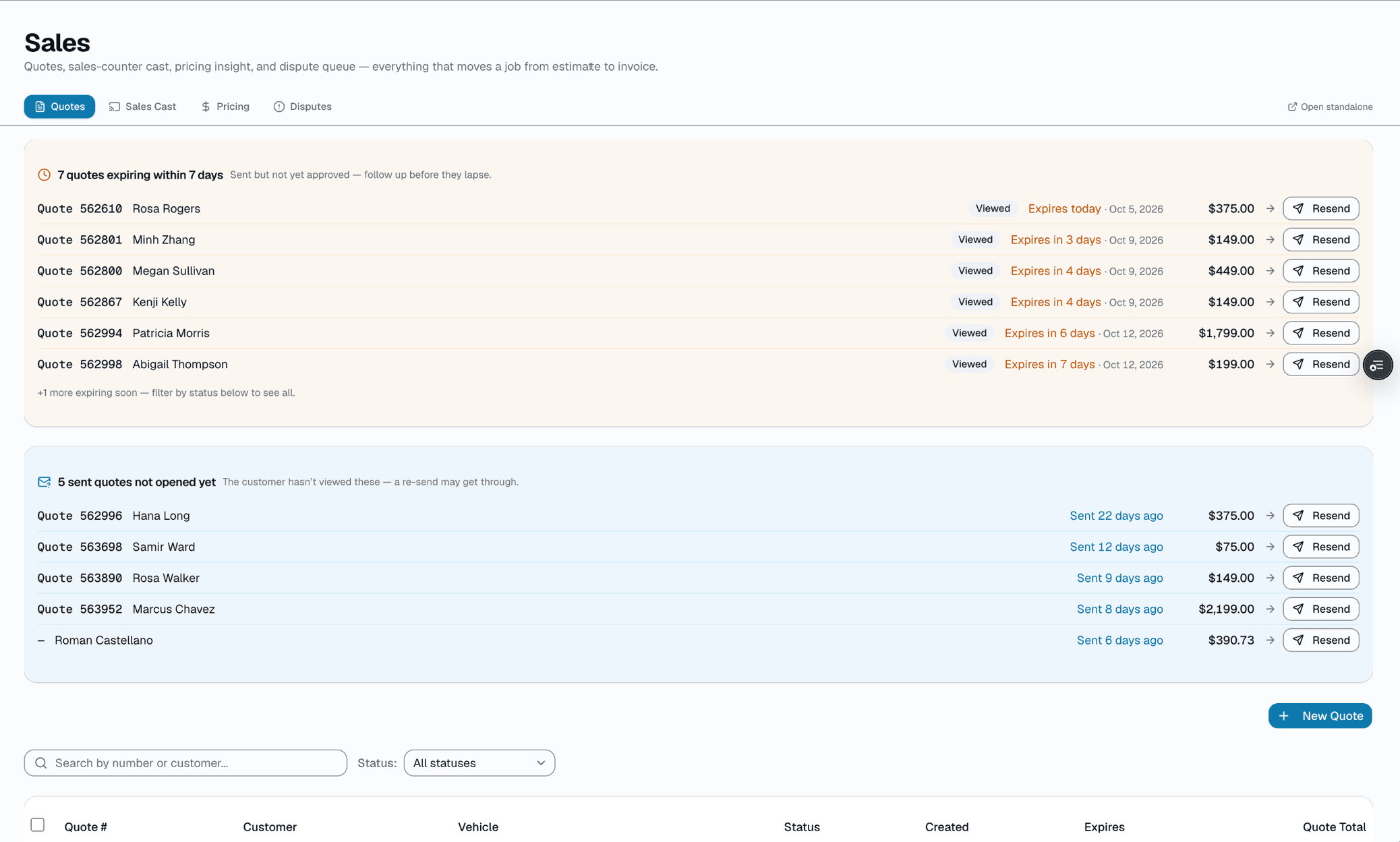
Quotes
Build a quote from services, film and parts, with good, better and best film options. The customer signs and pays a deposit online.
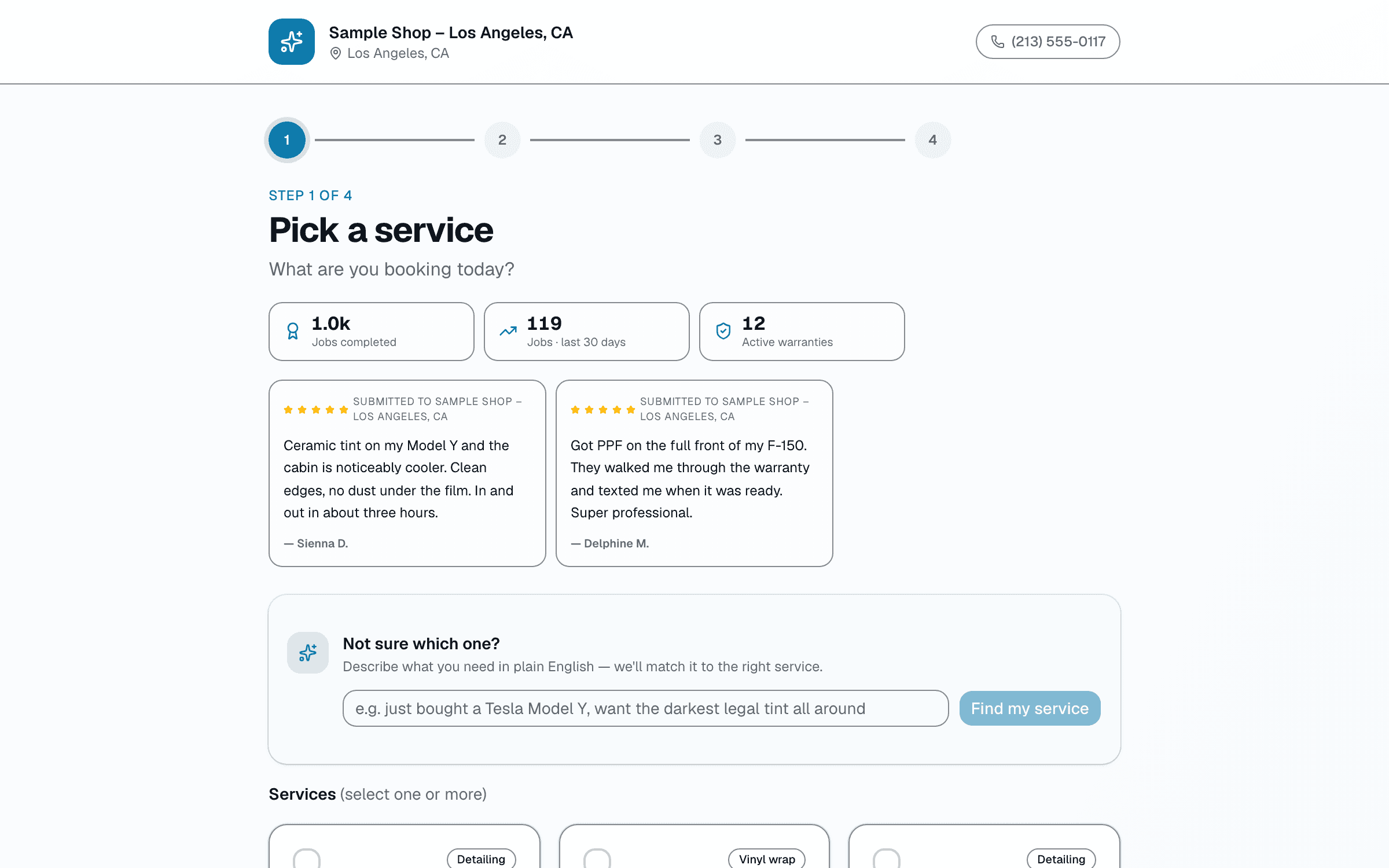
Online booking
Your own booking page. Customers pick a service and a time, add their details and confirm.
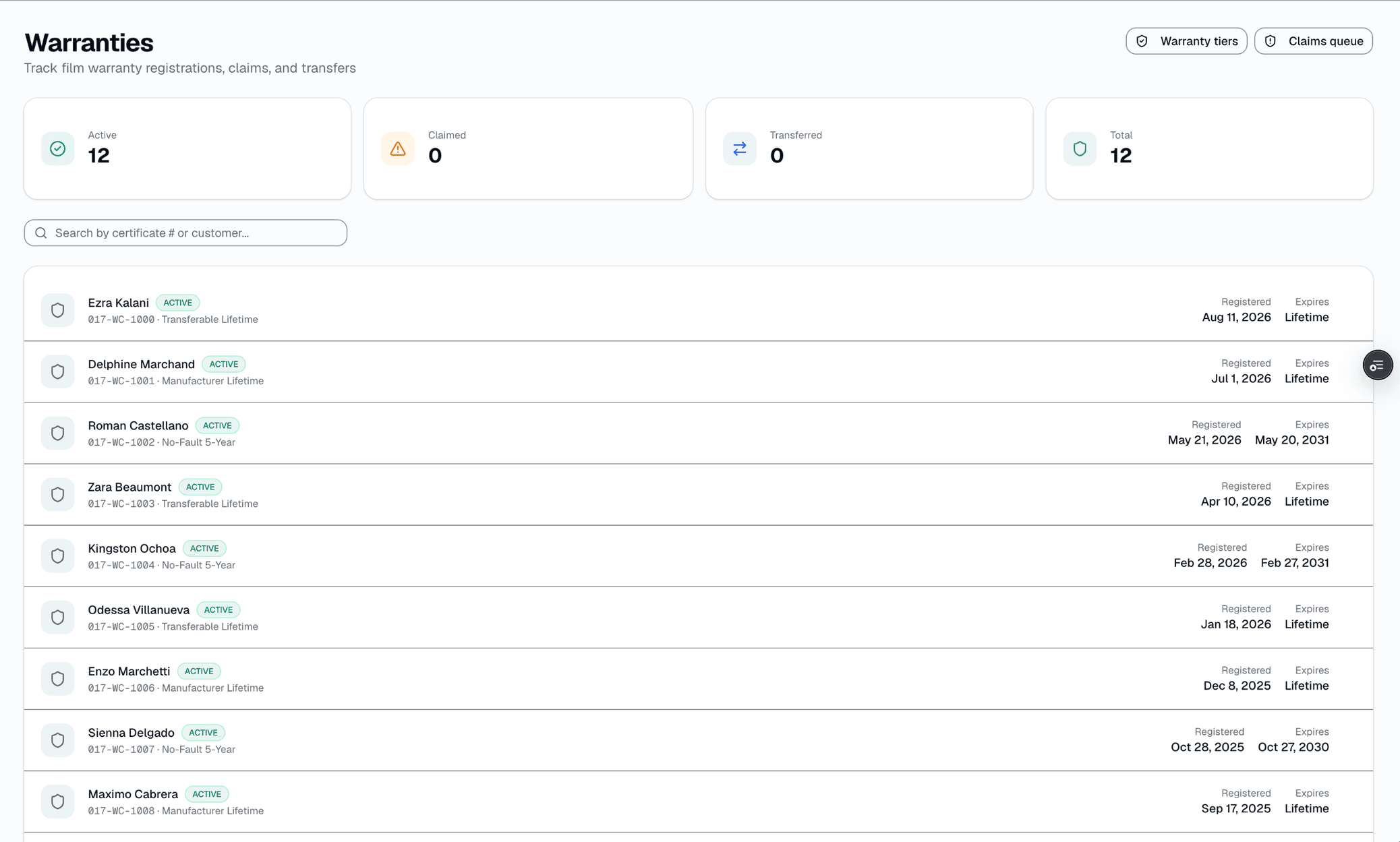
Warranties
PDF warranty certificates with a QR code the customer can scan to check them, plus tracked claims.
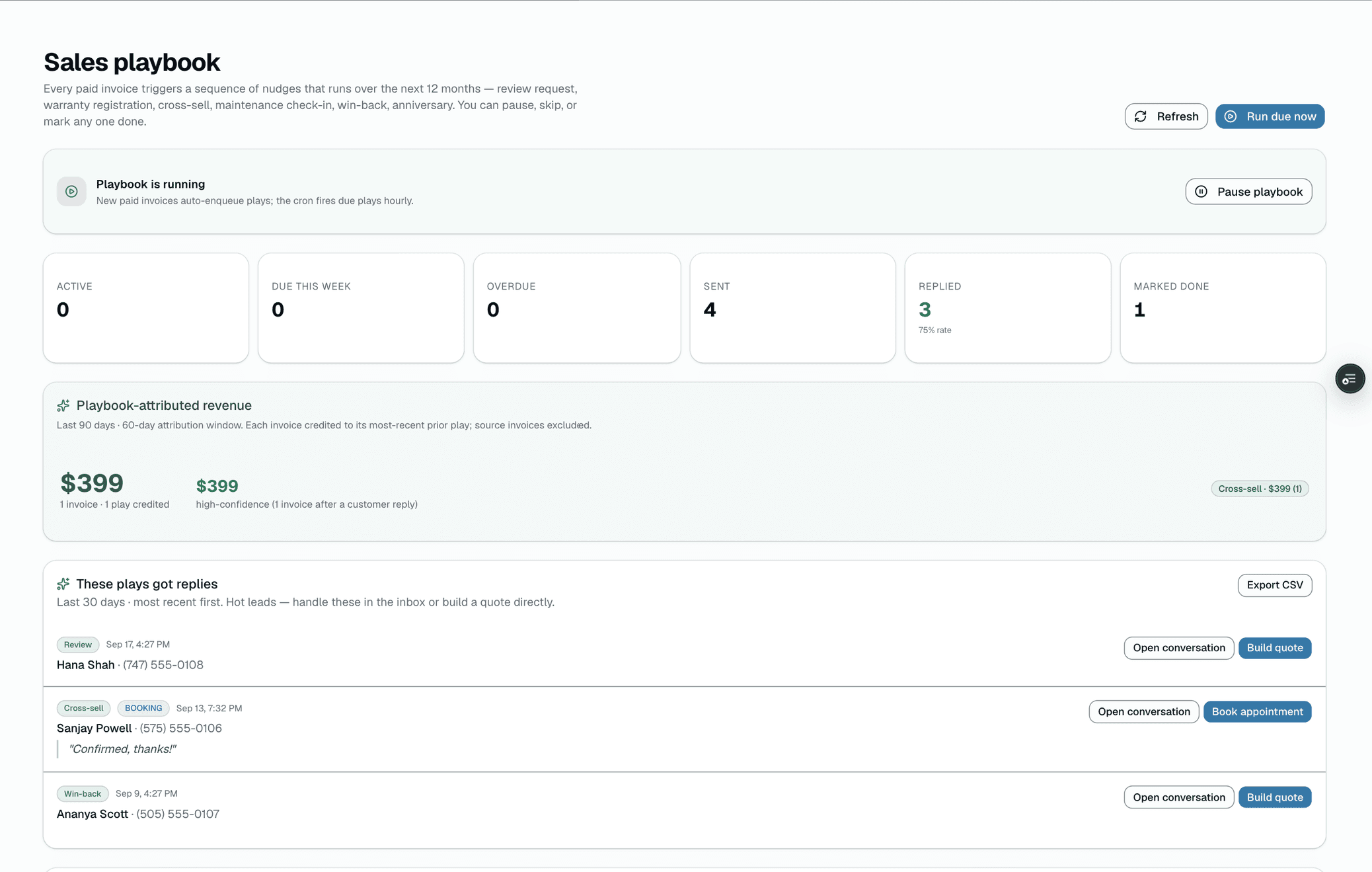
Follow-up texts
Every paid invoice starts a year of scheduled follow-up texts to that customer.
Some features are on higher plans. See what's in each plan.
FAQ
Ceramic coating shop questions, answered.
Does it support tiered coating pricing?
+
Yes. Configure 1-year, 5-year, 9-year, and lifetime tiers per brand (Gtechniq, Ceramic Pro, Modesta, Feynlab, IGL). Prep level is a separate line (1-step, 2-step, 3-step correction). Customers see the upgrade path and the price delta clearly.
How does the prep checklist work?
+
It's a shop-wide QC gate, not a per-stage checklist. In Settings you choose which artifacts have to exist before an estimate or invoice can go out — pre-install photos, post-install photos, a signed inspection, a registered warranty, a completed appointment. Try to send without one and the system blocks it and tells the installer exactly what's missing. One configuration covers every job at your shop.
Can I block out cure time on the calendar?
+
There's no dedicated cure-window lock, but you can schedule the appointment for however long the full job needs — including cure — so the vehicle's held on your calendar the whole time. Use the job-stage checklist to track where it's at (wash, correction, coating, cure) within that appointment.
Does it generate warranty certificates with cure-window terms?
+
Every registered install gets an auto-generated PDF certificate: vehicle year/make/model, install date, and the warranty period (an expiration date or LIFETIME), plus a unique certificate number and a QR code the customer — or a future buyer — can scan to verify the warranty is still active. Customers see the warranty listed in their portal.
Will it remind customers about maintenance?
+
It can — turn on maintenance reminders in Settings (off by default) and set a cadence per tier or film (365 days by default). The system texts the customer once when their inspection or recoat comes due, then re-arms for the next cycle once you mark it resolved.
Can I document paint condition before coating?
+
Yes. Paint condition is documented per stage with photos and notes — justify two-step correction to the customer, and back it up if anyone questions the call later.
How does it compare to ShopMonkey for ceramic shops?
+
ShopMonkey is auto-repair software with no coating-specific workflows. SalesThumb gives you tiered coating pricing, a job-stage checklist for tracking prep through cure, warranty certificate PDFs, and maintenance-due reminders. See /compare/shopmonkey.
Free trial?
+
Yes: 30 days free on Basic, Starter, Growth or Pro, no credit card required. Pick a plan on the pricing page and the trial starts when you create your shop. When it ends, your shop moves to the Free plan and your data stays. We migrate your customers, vehicle history, and quote templates.
Side-by-side
SalesThumb vs. ShopMonkey for ceramic coating shops
Feature-by-feature comparison with pricing, what each platform's actually built for, and a migration checklist.
See comparison
Vertical deep dive
See the ceramic coating product in action
Industry page with product mockups, multi-day job flow, and a closer look at the ceramic coating workflow.
Open industry page
ShopMonkey, Tint Wiz, Urable, AutoLeap, Tekmetric, 3M, XPEL, Gtechniq, Ceramic Pro, Modesta, Feynlab, and IGL are trademarks of their respective owners. Use here is for comparison and identification purposes only and does not imply endorsement, partnership, or affiliation.