New hire's first day: the app shows them where everything is.
Most software either dumps a new hire into an empty dashboard or hands them a PDF nobody reads past page one. SalesThumb's Training Wizard is built into the product itself: a role-matched set of short tours a technician, front-desk hire, manager, or HQ operator can start the moment they log in.
The quick version
Training wizard: Guided walkthroughs that show a new hire where everything is.
- Role-matched tours for 9 roles today — shop owner, manager, technician, front desk, service writer, HQ operator, franchise sales, org viewer, and super admin each see only the tours built for them
- Live spotlight, not a slideshow — "tour" steps highlight the actual UI element on the actual page, navigating there automatically if needed
- "Try it" steps require the real action — an "I did it" button advances the tour only after the person performs the step themselves; nothing is auto-detected
Some steps just explain a screen; others spotlight a real button and don't advance until the person has actually clicked it. Progress is saved automatically, so a tour interrupted at step 3 picks back up at step 3 — not step 1 — whenever they return.
A closer look
01
Three kinds of steps, not one slideshow format
A tour isn't a flat stack of description cards. "Intro" steps are centered cards for context that doesn't map to one screen. "Tour" steps spotlight a real element on a real page — the tour navigates there for you, dims everything else, and draws a highlight ring around exactly what it's talking about. "Try it" steps go one step further: the highlighted action has to actually be performed, and the tour waits for an explicit "I did it" before moving on, rather than guessing whether the person followed along.
- Tour steps auto-navigate to the right page, then spotlight the specific element
- Try-it steps advance on explicit confirmation, never an auto-detected click
- Intro steps stay a plain centered card for anything that isn't tied to one screen
02
Shows up when it's relevant, not just once
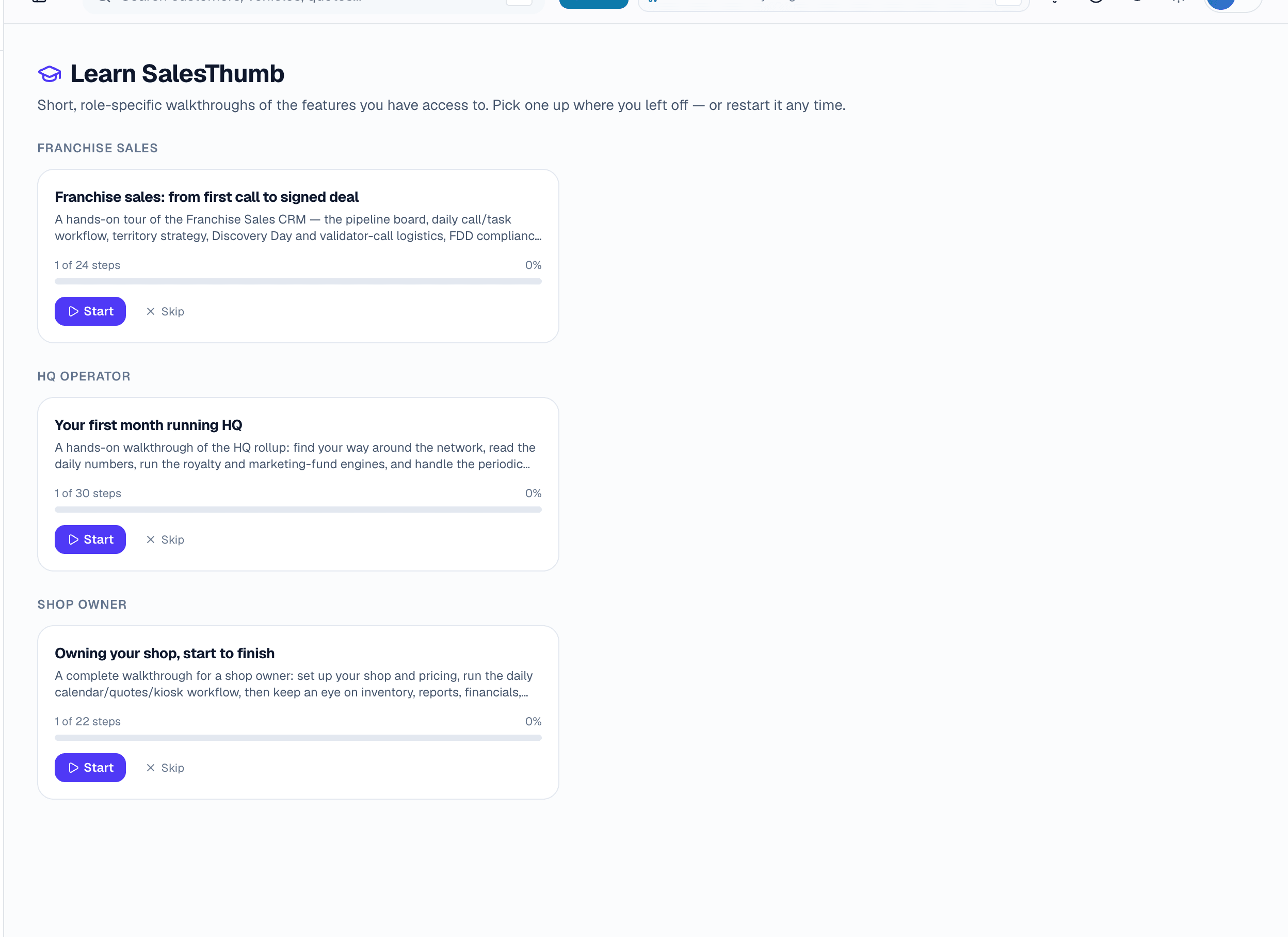
A soft banner offers a not-yet-started tour on the pages it applies to — easy to dismiss for the session, never a forced modal. Dismissing it doesn't delete the tour: it comes back another session if the tour still hasn't been started, skipped, or completed. The /learn hub is the permanent home either way: every tour for your role, grouped by role, with a progress bar and Continue / Reset / Skip on each one. Finishing a tour doesn't archive it — it stays in the hub to replay any time a refresher is needed, which matters more for the tours nobody uses daily (an HQ operator's royalty-period close, a franchise-sales rep's discovery-day checklist).
- Banner is a dismissible nudge, never a forced modal — dismissing it doesn't stop the tour from being available at /learn
- /learn hub lists every tour for your role with Continue / Reset / Skip
- Completed tours stay available to replay — nothing disappears after finishing once
Everything it does
The complete list. The plan tag above shows which plans include it.
- Role-matched tours for 9 roles today — shop owner, manager, technician, front desk, service writer, HQ operator, franchise sales, org viewer, and super admin each see only the tours built for them
- Live spotlight, not a slideshow — "tour" steps highlight the actual UI element on the actual page, navigating there automatically if needed
- "Try it" steps require the real action — an "I did it" button advances the tour only after the person performs the step themselves; nothing is auto-detected
- Resumable — progress (current step, started/completed/skipped) is saved per person, so leaving mid-tour and coming back continues exactly where they left off
- Two entry points: a soft, dismissible banner that offers any not-yet-started tour on the pages it's relevant to, and a permanent /learn hub to start, reset, or skip any tour for your role at any time
- Steps can be gated to a specific permission — a step covering how to issue a refund only appears to someone who can actually issue refunds
A tour of the screens
Every meaningful view, the path through it, and the moments that matter — so you know exactly what you're buying.
Who's started, who hasn't
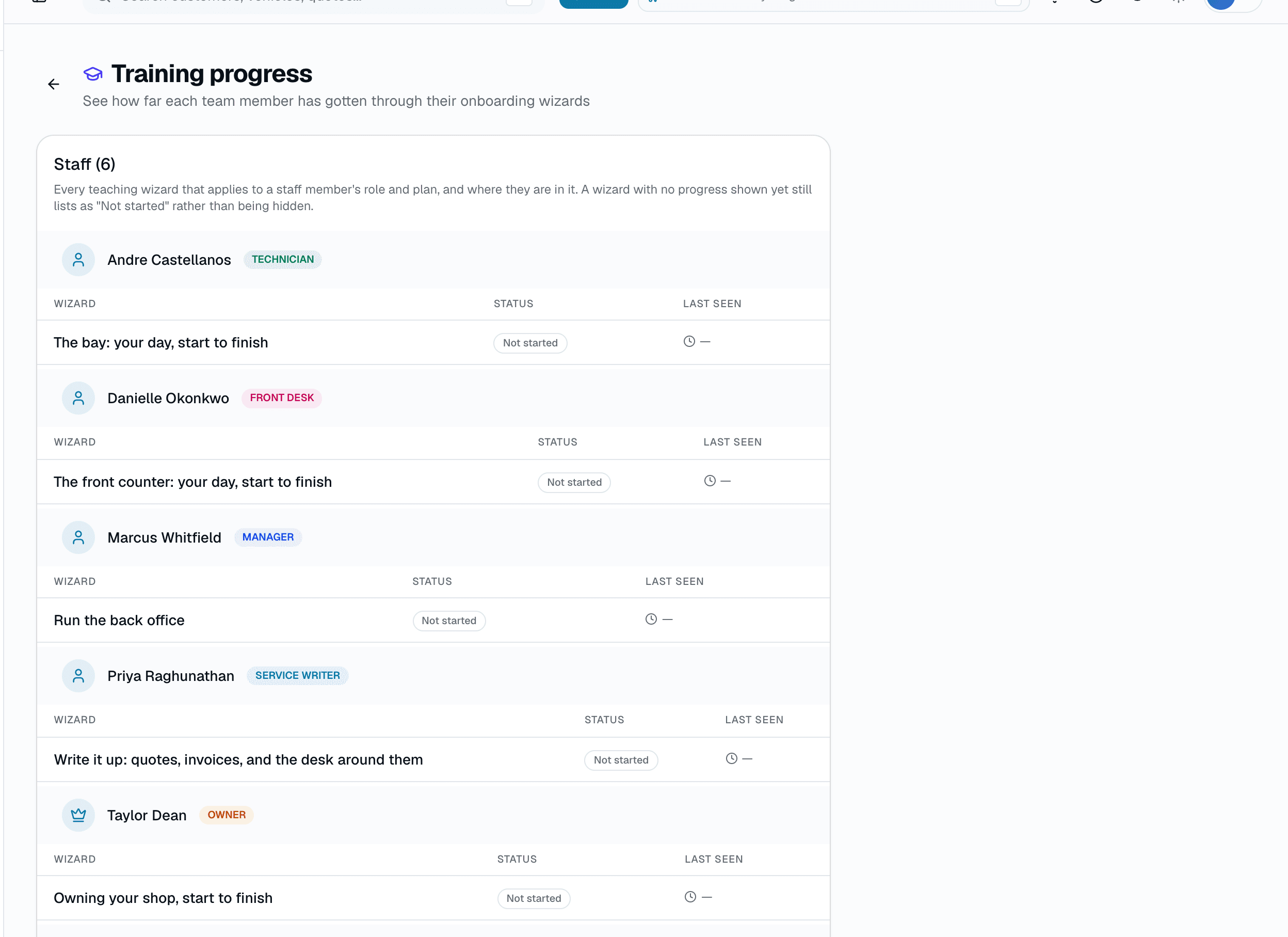
Training progress per team member — which wizards apply to them, and where they are in each one.
A wizard nobody has opened still lists as "Not started" rather than being hidden.
Who it's for
Built specifically for…
- Multi-location shops onboarding a new technician or front-desk hire every few weeks
- Owners who don't want to personally walk every new hire through the software
- HQ operators bringing a new franchise location's team up to speed on royalty, reporting, and the tools specific to their role
What it replaces
The old way…
- A printed or PDF training manual nobody reopens after day one
- A one-time training session that's half-forgotten by the following week
- Pulling a manager off the floor to personally walk a new hire through the calendar, quotes, and inventory
Setting it up
- 1
1. The right tours surface automatically
Tours are matched to the person's role — a technician and a front-desk hire see different tours, and someone with more than one role (e.g. an HQ operator who's also a shop owner) sees every tour that applies.
- 2
2. Each step shows, not just tells
"Tour" steps navigate to and spotlight the real screen; "try it" steps wait for the person to actually perform the action before advancing.
- 3
3. Pick up where you left off
Progress saves automatically. Anyone can resume, reset, or skip any tour for their role from /learn at any time — finishing once doesn't remove it from the hub.
What this looks like in a shop
Illustrative scenario: a shop hires a new technician who logs in for the first time and sees a small banner offering the Technician tour. She starts it — a few intro cards on what her role can see, then a "tour" step spotlights the calendar and walks her through today's jobs, then a "try it" step has her actually open a real job and mark a status change before the tour advances. She gets pulled away mid-tour for an install; when she comes back that evening, /learn shows the tour exactly where she left it. She finishes it over her first two shifts instead of one overwhelming session.
Good to know
- Which plan includes training wizard?
- Every plan includes it, Basic through Pro. See the Pricing page for everything in each plan.
- Does it just describe features, or does it actually show me?
- Both, depending on the step. Some steps are plain explanatory cards, but "tour" and "try it" steps spotlight the real element on the real page — the tour navigates there and highlights exactly what it's talking about, rather than describing it in the abstract.
- What happens if I get interrupted in the middle of a tour?
- Progress saves automatically as you move through each step. Closing the tour or leaving the app doesn't lose your place — it resumes at the same step next time.
- Can I skip it, or does every new hire have to sit through it?
- It can be skipped at any point from within the tour or from /learn, and the banner can be dismissed for the session. Skipping doesn't delete the tour — it stays available in /learn to start whenever someone's ready.
- Does every role see the same training?
- No — tours are built per role (shop owner, manager, technician, front desk, service writer, HQ operator, franchise sales, org viewer, super admin), and an individual step inside a tour can be limited further to only show to someone who actually holds the permission it covers.
- Is this the same as the setup flow when I first create my shop?
- No — shop setup (configuring your services, hours, and booking policy) is a separate one-time flow. The Training Wizard is ongoing, per-person, role-based training on how to use the software day to day.
Pairs well with
Mobile Apps
The installer app shows today's schedule, captures photos, clocks in/out, and updates job status. The customer app shows their active job's progress, appointments, quotes, invoices, and warranty status. Both are native iOS + Android apps, live now on the App Store and Google Play as the SalesThumb app; a fully white-labeled app under your own brand is further out on the roadmap.
Multi-Location HQ
From a single shop to a franchisor with hundreds of locations, every shop rolls up into one HQ view with consolidated KPIs, centralized catalogs, and push-to-shop pricing and templates.
Staff login
Your team signs in with the same email and password they use on the web. Sign in once and stay signed in.