Loading
In-Store Selling
Turn a walk-in into a closed sale, right at the counter.
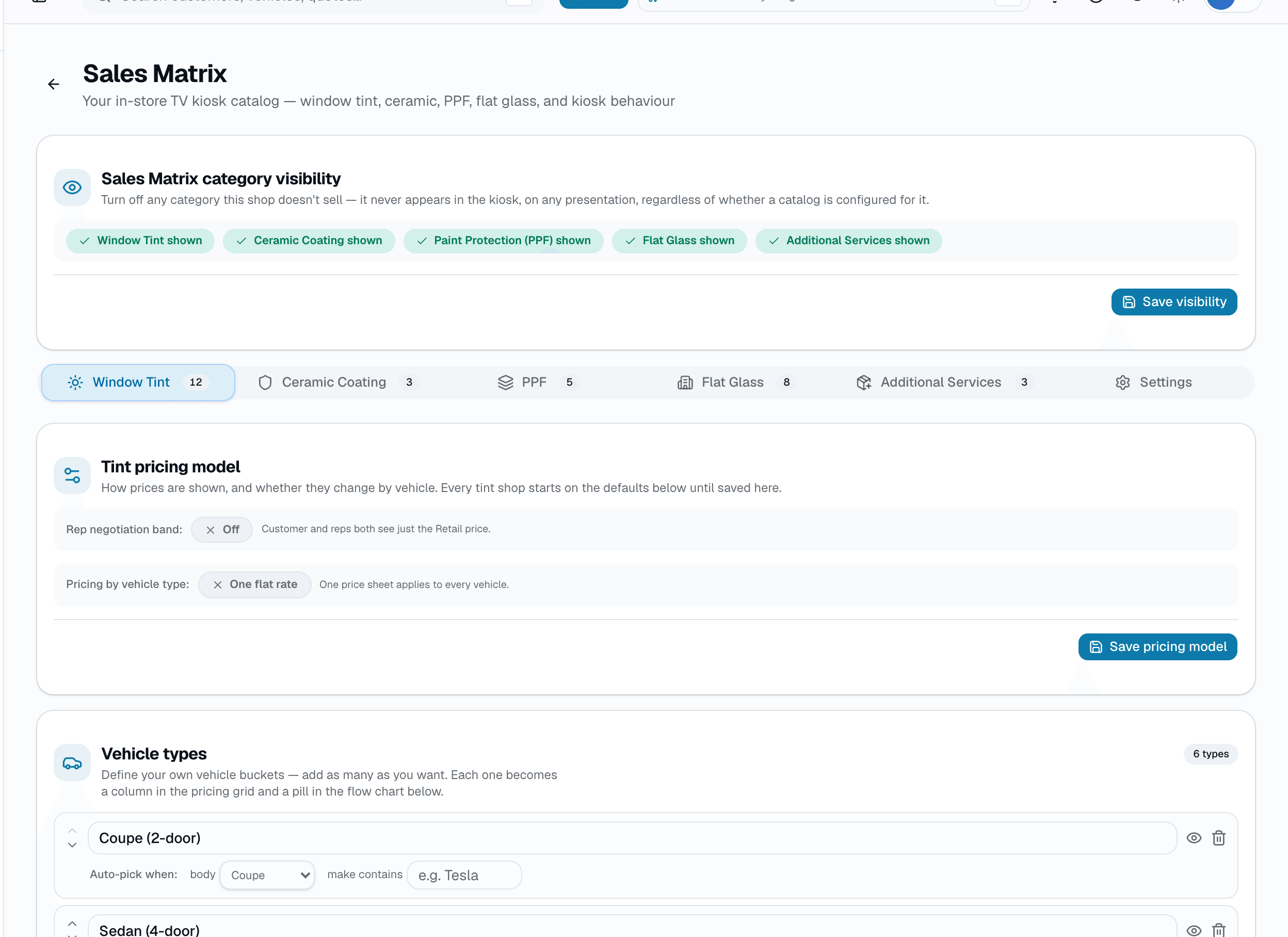
Sales Matrix is the customer-facing screen your team runs at the counter or the round table: a step-by-step walkthrough of the categories a customer's interested in — window tint, ceramic coating, PPF, flat glass — each framed as Good/Better/Best (or the category's own equivalent), followed by a shop-defined Additional Services upsell step. The tier cards show Best first, on purpose — that's deliberate anchor pricing, not alphabetical order.
No credit card
Cancel anytime
app.salesthumb.com/app/settings/sales-matrix
The quick version
Sales Matrix: Turn a walk-in into a sale, right at the counter.
- Runs full-screen on a TV or tablet — the customer sees the presentation, not your app's sidebar
- Walks Window Tint, Ceramic Coating, PPF, and Flat Glass one at a time; a category the shop hasn't configured (or has turned off) skips automatically
- Optional AI window-film visualizer step, off by default
Plans: Growth+ See pricingTry it in the Test Drive
Every tap logs to a real event trail, and tapping Save as quote or Create invoice at the end creates a real Quote or Invoice and books a real appointment on your calendar — the same records the rest of the app uses, not a separate sales-only database.
A closer look
01
A TV, a tablet, and a real close — not a slideshow
The Present flow fills the whole screen — sized for a 65-75in TV at 6-8 feet or a tablet at the counter, with tap targets built for a finger, not a mouse. It's built to close, not just to pitch: Save as quote creates a real draft Quote, and Create invoice converts that session straight into a real Invoice — both paths also auto-book a real appointment on your calendar. The kiosk itself doesn't take payment; Create invoice hands off to your invoice page, which does. For a Flat Glass cart specifically, the customer can pick a real open slot on your calendar before they leave.
- Full-screen, sized for a TV at conversation distance or a tablet at the counter
- Save as quote → real draft Quote. Create invoice → real Invoice, converted on the spot
- Both paths auto-book a real appointment — this isn't a separate sales-only record
- The kiosk itself never collects payment — that happens on the invoice page it hands off to
app.salesthumb.com
A TV, a tablet, and a real close
Screenshot coming soon
02
Good/Better/Best — the same anchoring frame, every category
Window Tint is literally Good/Better/Best, mixable per window on the same vehicle. Ceramic Coating uses the same three tiers plus a 4th slot a shop can name anything it wants. PPF doesn't force the same frame — coverage there is named levels (High-Wear, Partial Front End, Full Front End, Full Vehicle) because that's how PPF is actually sold, plus custom per-panel pricing for anything outside those buckets. Flat Glass skips tiers entirely for a rough room/area-count estimate. Every brand name, spec sheet, price, and sales script line behind all of it is entered per shop in Settings → Sales Matrix — this isn't one fixed national price list.
- Window Tint: Good/Better/Best, mixed per window
- Ceramic Coating: Good/Better/Best + one shop-named custom tier
- PPF: named coverage levels, not Good/Better/Best — plus custom panel pricing
- Flat Glass: a rough estimate, no tier picker
- All of it — brand names, specs, pricing, scripts — configured per shop, not fixed
app.salesthumb.com
Good/Better/Best
Screenshot coming soon
03
Additional Services — a shop-defined upsell, with an AI assist
After the core categories, a shop-configured Additional Services step lists whatever upsell items a shop has added — a ceramic maintenance kit, PPF edge sealant, anything sold as an add-on — each with a simple quantity stepper. A rep can also tap 'Suggest add-ons' for AI-generated suggestions; that's rep-triggered only, it never fires on its own, and every suggestion is checked server-side against the shop's own real, active catalog before it's ever shown — the AI can't suggest something the shop doesn't actually sell.
- Upsell categories and priced items are entered per shop from Settings → Sales Matrix
- Simple quantity stepper per item — no sub-tiers on this step
- 'Suggest add-ons' is a rep-tapped AI panel, never automatic
- Suggestions are grounded to, and checked against, the shop's real active catalog before display
app.salesthumb.com
Additional Services
Screenshot coming soon
04
HQ sees which locations are running sessions — and which aren't
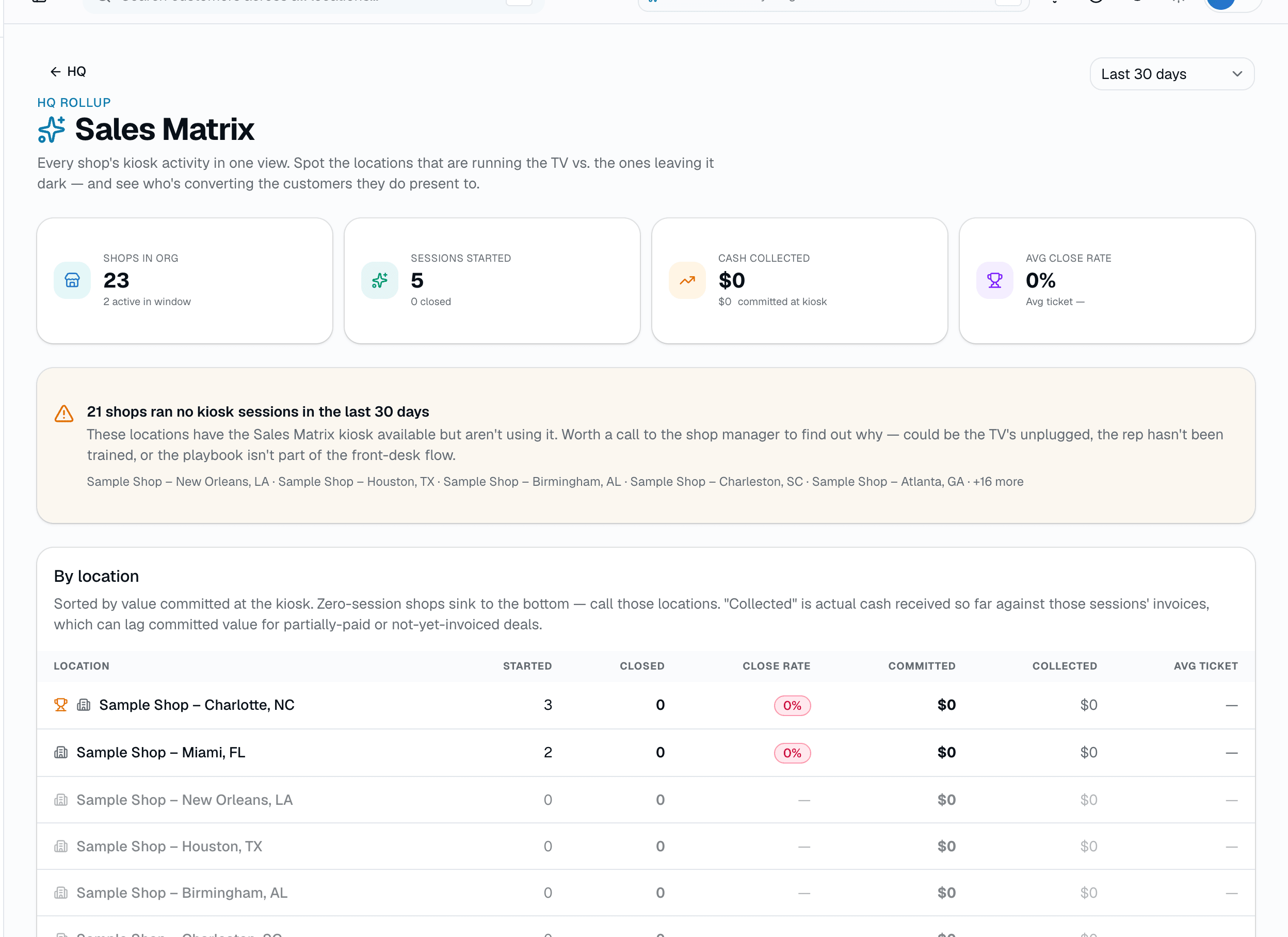
The HQ rollup is real, DB-backed aggregation across every shop in an org — not a mock. It shows org-wide totals plus a per-location table (sessions started, completed, close rate, revenue, avg ticket), and it explicitly injects a zero row for any shop that ran no sessions in the window, so a dark TV at one location doesn't just quietly disappear from the list. It does not currently break tier mix (Good/Better/Best split) out at the HQ level — that level of detail lives on the shop-level Salesperson Scorecard instead, via each rep's Best-tier pick rate. HQ rollup requires the HQ add-on.
- Org-wide totals + a per-shop table: sessions, close rate, revenue, avg ticket
- Shops with zero sessions in the window are called out, not omitted
- No tier-mix breakdown at the HQ level today — that detail lives on the per-rep Scorecard
- Requires the HQ add-on ($599/mo flat, first 5 shops included)
app.salesthumb.com
HQ sees which locations are running sessions
Screenshot coming soon
05
Two reports built for exactly this flow
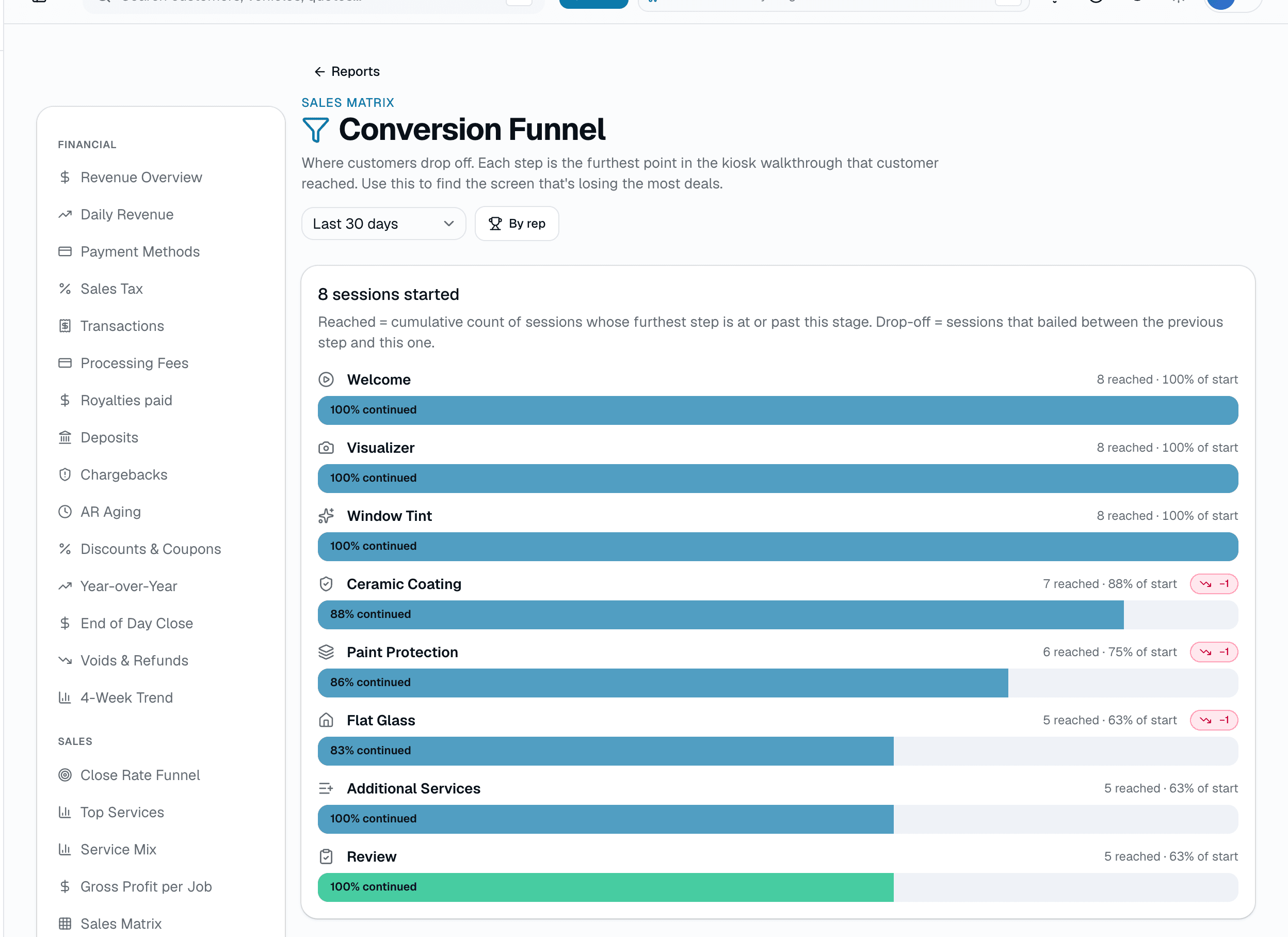
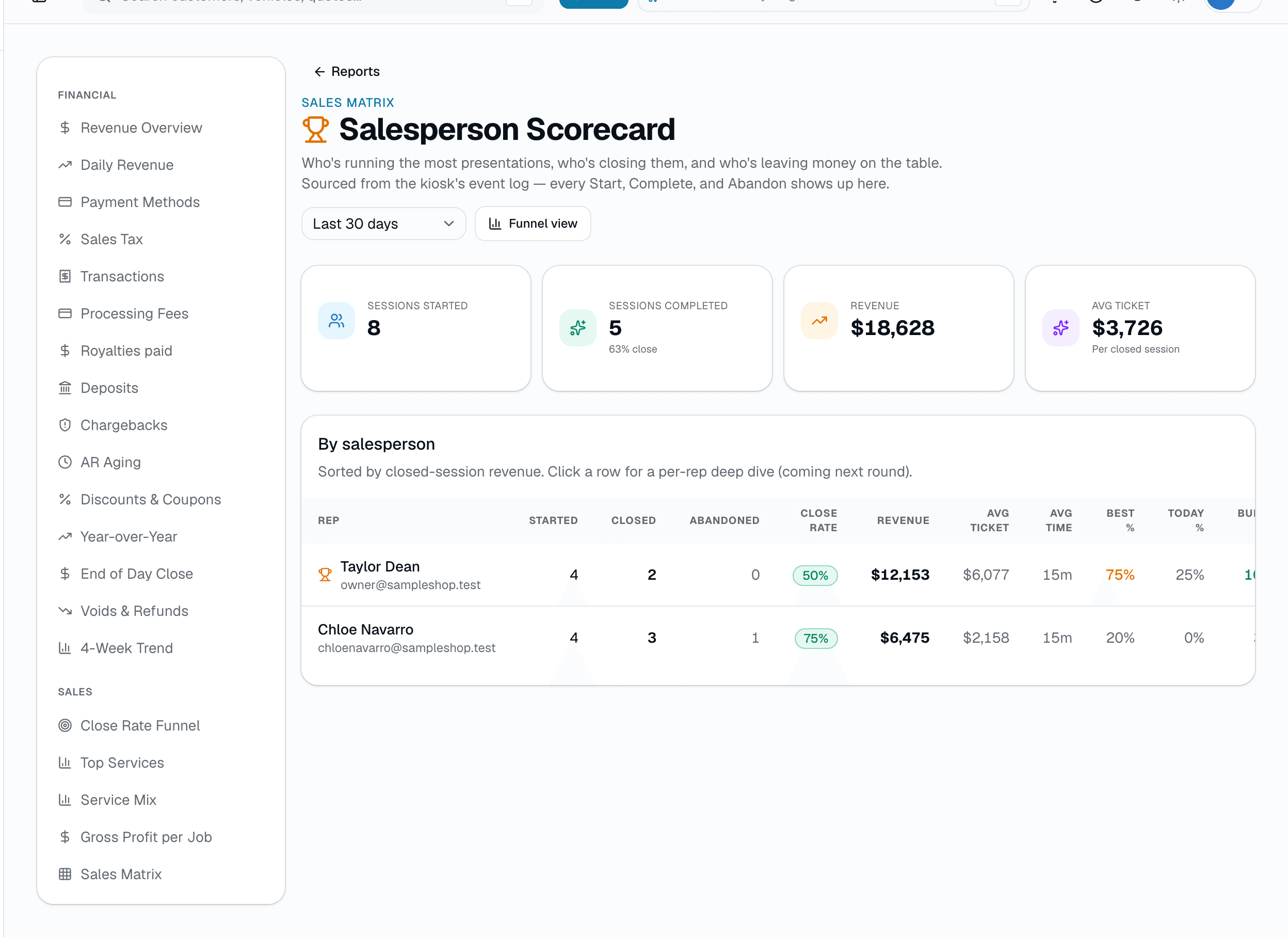
The Conversion Funnel shows cumulative sessions reached at every step (Welcome → Visualizer → Window Tint → Ceramic Coating → PPF → Flat Glass → Additional Services → Review), the percentage of starts that reach each one, and a callout for the single biggest drop-off — plus a 'shelfware' flag for any category reps walk into but skip more than half the time. The Salesperson Scorecard rolls the same underlying sessions up per rep: sessions, close rate, revenue, avg ticket, avg session length, how often a rep's closed line items land on the Best tier, and how often they use today-only urgency pricing. A separate, older pivot-grid analytics view (Sales Analytics) still exists for cross-tabbing service category by customer segment — its own code comments call it a foundation still evolving, distinct from these two purpose-built reports.
- Conversion Funnel: per-step reach %, drop-off between steps, biggest-drop-off callout, shelfware flag
- Salesperson Scorecard: sessions, close rate, revenue, avg ticket, avg session length, Best-tier pick rate, today-only-pricing use rate
- A separate, older pivot-grid report (Sales Analytics) also exists — still evolving, not the same tool as these two
app.salesthumb.com
Two reports built for exactly this flow
Screenshot coming soon
Everything it does
The complete list. The plan tag above shows which plans include it.
The in-person Present flow
- Runs full-screen on a TV or tablet — the customer sees the presentation, not your app's sidebar
- Walks Window Tint, Ceramic Coating, PPF, and Flat Glass one at a time; a category the shop hasn't configured (or has turned off) skips automatically
- Optional AI window-film visualizer step, off by default
- Live running total, with a 'bundle savings' line once 2+ categories are added
- Ends with Save as quote (creates a draft Quote) or Create invoice (converts straight to a real Invoice) — either way, an appointment auto-books on your calendar
Good/Better/Best, tuned per category
- Window Tint: Good / Better / Best per window, mixed across the same vehicle
- Best is shown first — the tier-card order is deliberate anchor pricing
- Ceramic Coating: Good / Better / Best, plus an optional 4th tier you name yourself
- PPF: named coverage levels (High-Wear, Partial Front End, Full Front End, Full Vehicle) rather than Good/Better/Best, plus custom per-panel add-ons
- Flat Glass: a rough residential/commercial estimate by room or area count
- Every price, tier, and sales script line is configured per shop from Settings → Sales Matrix — none of it is hardcoded
Visibility, shop floor to HQ
- Every session logs an event trail — step reached, item added or removed, category skipped, completed or abandoned
- Conversion Funnel report: how far customers get before dropping off, step by step, plus a callout for whichever category reps skip most
- Salesperson Scorecard: sessions, close rate, revenue, avg ticket, avg session length, and how often a rep's closed deals land on the Best tier
- HQ rollup (HQ add-on): sessions, close rate, revenue, and avg ticket per shop, with locations running zero sessions called out explicitly
A tour of the screens
Every meaningful view, the path through it, and the moments that matter — so you know exactly what you're buying.
The Present flow
Full-screen on a TV or tablet at the counter — the customer sees the presentation, not your app's sidebar..
app.salesthumb.com/app/sales-matrix/present
The Present flow
Screenshot coming soon
Good/Better/Best, Best shown first
Tier cards anchor on Best, deliberately — mix tiers per window on the same vehicle for Window Tint..
app.salesthumb.com/app/sales-matrix/present
Good/Better/Best, Best shown first
Screenshot coming soon
Additional Services + AI suggestions
Shop-defined upsell items with a quantity stepper, plus a rep-tapped AI panel that only ever suggests what the shop actually sells..
app.salesthumb.com/app/sales-matrix/present
Additional Services + AI suggestions
Screenshot coming soon
HQ rollup
Sessions, close rate, revenue, and avg ticket per shop — locations running zero sessions are called out, not just missing from the list..
app.salesthumb.com/app/hq/acme-tint/sales-matrix
Conversion Funnel
Where customers drop off, step by step — each stage is the furthest screen that session reached, so the biggest fall-off is the screen losing you deals..
app.salesthumb.com/app/reports/sales-matrix-funnel
Salesperson Scorecard
The same sessions, grouped by rep: how many they started, how many closed, what they averaged per closed ticket..
app.salesthumb.com/app/reports/sales-matrix-scorecard
Who it's for
Built specifically for…
- Shops that sell in person, at a counter or a round table, not just over the phone
- Multi-installer shops where sales technique — and close rate — varies rep to rep
- Franchisors who want to see which locations are actually running the presentation, not just guessing
What it replaces
The old way…
- A laminated price sheet the customer reads upside-down across the counter
- Quoting three price points from memory and hoping you remembered the upsells
- A slide deck or PDF price list nobody keeps updated after the first month
Setting it up
- 1
1. Configure your tiers once
From Settings → Sales Matrix, enter your real brand names, specs, pricing, and sales-script lines for each category you sell, plus whatever Additional Services items you want to offer as an upsell.
- 2
2. Present at the counter
Open the Present flow full-screen on a TV or tablet and walk the categories relevant to that customer. Anything the shop hasn't configured, or has turned off, skips automatically.
- 3
3. Close, and it's already real
Tap Save as quote or Create invoice. Either way, a real record is created and an appointment auto-books — no re-entry into a separate system afterward.
What this looks like in a shop
Illustrative scenario: A customer at Sample Shop LLC sits down at the round table for a ceramic coating quote. The rep taps through the TV — Ceramic Coating first, with the shop's real pricing and the Best tier card shown first. On Additional Services, the rep taps 'Suggest add-ons' and adds a ceramic maintenance kit pulled straight from the shop's own catalog. The customer decides to add window tint too, and the running total picks up a bundle-savings line. The customer agrees; the rep taps Create invoice, and by the time they stand up, the appointment is already on the calendar and the invoice is ready to pay.
Good to know
- Which plan includes sales matrix?
- Growth and Pro include it. See the Pricing page for everything in each plan.
- Do I need a dedicated TV, or can I use a tablet?
- Either. The Present flow is sized to fill a 65-75in TV at conversation distance, or it runs directly on a tablet at the counter — there's no separate hardware to buy.
- Does the customer sign anything on the kiosk?
- Yes, when you tap Create invoice: the customer signs on screen to approve the quote before it converts to an invoice. Save as quote doesn't ask for a signature, and neither does the direct-to-invoice path used when a shop turns off quote creation.
- What happens to categories we don't sell?
- They skip automatically. Turn off Ceramic Coating, PPF, or Flat Glass from Settings → Sales Matrix and the Present flow never shows that step for any customer.
- Does the AI 'Suggest add-ons' panel ever add something on its own?
- No. It only runs when a rep taps it, and it's only ever allowed to suggest items that already exist in your own active Additional Services catalog — anything outside that list is dropped before it's ever shown.
- Is Sales Matrix a separate paid add-on?
- The Present flow itself is part of the base product, not a separate line item. The HQ rollup that shows session and revenue numbers across every location requires the HQ add-on ($599/mo flat, first 5 shops included).
Works with your stack
An
Anthropic Claude
Powers the optional 'Suggest add-ons' panel — rep-triggered, checked against the shop's real catalog before showing
Vi
Vizme (window-film visualizer)
Optional AI before/after visualizer step, off by default
Pairs well with
Quotes
Build a quote from real line items — services, film, parts, fees — send it, and the customer approves with a drawn signature and a card deposit on their phone. No account needed on either side.
Learn more
Invoices
Convert any approved quote to a branded invoice in one click. Partial pays, deposits, and final balance all tracked against the same line items.
Learn more
Scheduling
Every installer, every bay, every appointment in one view. Drag to reschedule. Color-coded by status. Double-book detection with explicit confirm-to-override.
Learn more
Reports
SalesThumb's 83 reports live in a 14-category sidebar in the app; grouped here by the decision they answer, they sort into 6 clusters. The six: cash & revenue, job & service profitability, team & schedule performance, marketing & lead performance, customer retention & risk, and customer obligations — the reports inside each cluster export individually to CSV. Basic and Starter include the core reports; Gross Profit per Job, the installer and service-time reports, the close-rate funnel, Referral Attribution, ZIP Code Density, Channel CAC / ROI, Loyalty Program, and the inventory reports need Growth.
Learn more
Multi-Location HQ
Whether you're a solo operator or a franchisor with hundreds of locations, every shop rolls up into one HQ view with consolidated KPIs, centralized catalogs, and push-to-shop pricing and templates.
Learn more